CPUID Monitor

bigmck

Very Senior Member
Guru
Gold Member
VIP
Local time
2:56 AM
Messages
4,745
Location
Houston, Texas
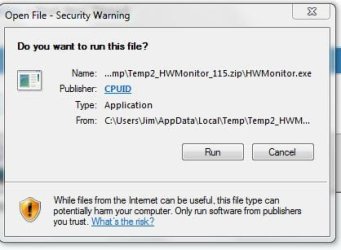
Any of you that use this, when it is opened I get this prompt. How can I get rid of it?
 

Attachments

  • CPUID.JPG
    CPUID.JPG
    25.3 KB · Views: 4

My Computer My Computer

At a glance

Windows 7 Home Premium 32-Bit - Build 7600 SP1Intel Core i3-2120 3.30GhzKingston 4 GB DDR3 1333 mhzAMD Radeon HD6670
Computer type
PC/Desktop
Computer Manufacturer/Model Number
Custom Build
OS
Windows 7 Home Premium 32-Bit - Build 7600 SP1
CPU
Intel Core i3-2120 3.30Ghz
Motherboard
Asus P8Z68-V LX Intel Z68 Socket H2 ATX
Memory
Kingston 4 GB DDR3 1333 mhz
Graphics Card(s)
AMD Radeon HD6670
Sound Card
Sound Blaster Audigy SE 24-Bit
Monitor(s) Displays
Asus VE228
Screen Resolution
1440 X 900
Hard Drives
OCZ Vertex 3 120 GB Sata 3 SSD ==
Kingston SH103/S3 120 G Hyper X 120 GB SSD ==
Western Digital 500 GB Caviar Green 7200 RPM ==
PSU
Corsair CX600M == 600 Watt
Case
NZXT Apollo - Silver with Clear Side Panel
Cooling
Three 120 mm Fans
Keyboard
Microsoft Natural 4000
Mouse
Microsoft Custom Optical 3000
Internet Speed
AT&T Fiber Optic Wireless Network
Antivirus
Microsoft Security Essentials
Browser
Chrome
Other Info
120 mm Blue LED Fan -- Three Blue LED Lazer Light Sticks
Right click the file > Properties
At the bottom of the window there's something Like 'Security: blablabla' and next to it is a button to take away that blockade or whatever the button is called in English (I'm on a Dutch version of windows)
Anyway, that should solve it.
 

My Computer My Computer

At a glance

Windows 7 Ultimate 64-BitCore i7-990X Extreme Edition24 GB DDR3-1066 Hex-KitXFX HD5970 Black Edition Limited 4096MB
Computer type
PC/Desktop
Computer Manufacturer/Model Number
Custom build
OS
Windows 7 Ultimate 64-Bit
CPU
Core i7-990X Extreme Edition
Motherboard
ASUS P6T6 WS Revolution
Memory
24 GB DDR3-1066 Hex-Kit
Graphics Card(s)
XFX HD5970 Black Edition Limited 4096MB
Sound Card
Sound Blaster X-FI Titanium HD SB1270
Monitor(s) Displays
[will update soon]
Screen Resolution
[will update soon]
Hard Drives
OCZ SSD 60GB
Seagate 1TB
Samsung 1TB
Western Digital 1TB
LaCie 500GB
PSU
SilverStone Strider ST 1500W
Case
Antec Dark Fleet DF-85
Cooling
Deepcool IceWing 5 Pro + 2x 140mm fans + 5x 120mm fans
Keyboard
Microsoft Wired Keyboard 200
Mouse
Logitech Revolution MX
Internet Speed
2MB/s
Antivirus
Bit Defender 2013
Browser
Chrome
It looks to me like it's just asking if you want to run the program, although I don't get that screen myself. Have you clicked "run"?
 

My Computer My Computer

At a glance

Windows 7 Home Premium SP1, 64-bitIntel Skylake i5-6600K, not overclocked8 GB HyperX DDR4-2666 (2 x 4 GB)none; graphics are integrated on CPU
Computer type
PC/Desktop
Computer Manufacturer/Model Number
Ignatz Special; 4 speed manual gearbox; factory air conditioning; one of one
OS
Windows 7 Home Premium SP1, 64-bit
CPU
Intel Skylake i5-6600K, not overclocked
Motherboard
AsRock Z170M Extreme 4, micro ATX
Memory
8 GB HyperX DDR4-2666 (2 x 4 GB)
Graphics Card(s)
none; graphics are integrated on CPU
Sound Card
onboard: Realtek ALC1150; external: USB Behringer UF0-202
Monitor(s) Displays
Dell S2340M 23 inch IPS
Screen Resolution
1600 x 900
Hard Drives
System: Crucial MX100 series SSD, 128 GB;
Data: Samsung Spinpoint 103SJ, 1 TB;
Backup: WD Caviar Green WD30EZRX-00D8PB0, 3 TB
PSU
Rosewill SilentNight 500 watt fanless, semi-modular
Case
Antec Solo II
Cooling
Noctua NH-U12S; Noctua F12 intake, Noctua S12A exhaust
Keyboard
Microsoft 200 6JH-00001 USB
Mouse
Dell or Microsoft optical wired; USB
Antivirus
Microsoft Security Essentials and Malwarebytes Premium
Browser
Pale Moon
Other Info
All fans PWM; speeds at idle: CPU circa 500 rpm; intake circa 600 rpm; exhaust circa 600 rpm; CPU temps 27 idle and 47 C load in a warm room (27 C/81 F) when running Intel Extreme Tuning Utility stress test.
It does that with exe files gotten from the internet, it serves to protect you of course but sometimes it can really get in the way, lol.
 

My Computer My Computer

At a glance

Windows 7 Ultimate 64-BitCore i7-990X Extreme Edition24 GB DDR3-1066 Hex-KitXFX HD5970 Black Edition Limited 4096MB
Computer type
PC/Desktop
Computer Manufacturer/Model Number
Custom build
OS
Windows 7 Ultimate 64-Bit
CPU
Core i7-990X Extreme Edition
Motherboard
ASUS P6T6 WS Revolution
Memory
24 GB DDR3-1066 Hex-Kit
Graphics Card(s)
XFX HD5970 Black Edition Limited 4096MB
Sound Card
Sound Blaster X-FI Titanium HD SB1270
Monitor(s) Displays
[will update soon]
Screen Resolution
[will update soon]
Hard Drives
OCZ SSD 60GB
Seagate 1TB
Samsung 1TB
Western Digital 1TB
LaCie 500GB
PSU
SilverStone Strider ST 1500W
Case
Antec Dark Fleet DF-85
Cooling
Deepcool IceWing 5 Pro + 2x 140mm fans + 5x 120mm fans
Keyboard
Microsoft Wired Keyboard 200
Mouse
Logitech Revolution MX
Internet Speed
2MB/s
Antivirus
Bit Defender 2013
Browser
Chrome
It just means it's an unsigned program, it's there for your security as Morph said.

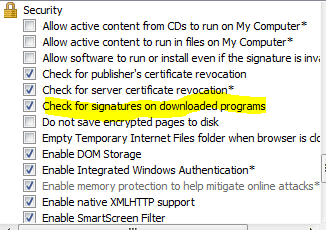
I think that disabling signature checking from the Advanced tab in Internet Options on IE will make it go away. Don't really recommend that though. (That looks like the IE run box to me... unless your not using IE, in which case ignore what I just said)
 

Attachments

  • IE.PNG
    IE.PNG
    6.7 KB · Views: 1

My Computer My Computer

At a glance

Windows 10 Pro x64Intel Core i5 7400 @ 3.00GHz8GB 2133Mhz DDR4 (OEM supplied)Gygabyte Windforce GTX 1050Ti (Factory Overcl...
Computer type
PC/Desktop
Computer Manufacturer/Model Number
Medion Erazer (note to self: insert model number) - with custom additions
OS
Windows 10 Pro x64
CPU
Intel Core i5 7400 @ 3.00GHz
Motherboard
OEM supllied with PC
Memory
8GB 2133Mhz DDR4 (OEM supplied)
Graphics Card(s)
Gygabyte Windforce GTX 1050Ti (Factory Overclocked)
Sound Card
Realtek
Monitor(s) Displays
Acer Al1980 + HKC
Screen Resolution
1360*768(HKC) / 1280*1024(Acer)
Hard Drives
1TB Toshiba
1TB WD Caviar Green
120GB Samsung Evo 840
PSU
OEM supplied (no power rating on case)
Case
OEM Supplied
Cooling
Stock
Keyboard
Logitech Wireless
Mouse
Logitect Wireless
Internet Speed
40Mb/s Down 10Mb/s Up
Antivirus
Defender
Browser
Firefox
Nah it's just the windows run box. It's a fairly good security option but once you're sure the file is safe (like for example, you've run it before and everything was fine) it's best to just go to properties and take away the blockade for the specific file. I wouldn't recommend changing windows' settings to stop the blockade from happening completely either, just in case.
 

My Computer My Computer

At a glance

Windows 7 Ultimate 64-BitCore i7-990X Extreme Edition24 GB DDR3-1066 Hex-KitXFX HD5970 Black Edition Limited 4096MB
Computer type
PC/Desktop
Computer Manufacturer/Model Number
Custom build
OS
Windows 7 Ultimate 64-Bit
CPU
Core i7-990X Extreme Edition
Motherboard
ASUS P6T6 WS Revolution
Memory
24 GB DDR3-1066 Hex-Kit
Graphics Card(s)
XFX HD5970 Black Edition Limited 4096MB
Sound Card
Sound Blaster X-FI Titanium HD SB1270
Monitor(s) Displays
[will update soon]
Screen Resolution
[will update soon]
Hard Drives
OCZ SSD 60GB
Seagate 1TB
Samsung 1TB
Western Digital 1TB
LaCie 500GB
PSU
SilverStone Strider ST 1500W
Case
Antec Dark Fleet DF-85
Cooling
Deepcool IceWing 5 Pro + 2x 140mm fans + 5x 120mm fans
Keyboard
Microsoft Wired Keyboard 200
Mouse
Logitech Revolution MX
Internet Speed
2MB/s
Antivirus
Bit Defender 2013
Browser
Chrome
Back
Top