

- Local time
- 4:01 AM
- Messages
- 35,002
Information
This instructions are for associating crash dump files with windbg, debugging tool for windows; so that double clicking on the crash dump files will directly open it with windbg only.
Note
It is suggested that you install windbg in the default location. Installing it in any other location is not really needed.
When you have WINDBG installed, if you associate the crash dumps with that program, a simple double click on a crash dump will open it with windbg directly. Here's how:
1. Open a command prompt.
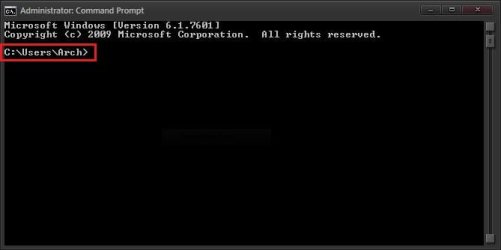
2. Get back to root. Simple DOS command.... cd/
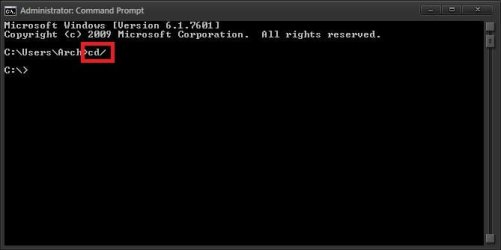
Note that after hitting enter, you are on C prompt.
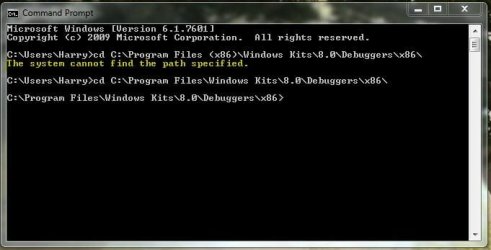
3. Now go the the installation directory .... CD (change directory).
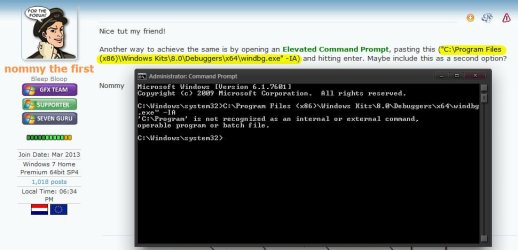
The usual installation location is "C:\Program Files (x86)\Windows Kits\8.0\Debuggers\x64\windbg.exe" ... so we have changed the directory to C:\Program Files (x86)\Windows Kits\8.0\Debuggers\x64

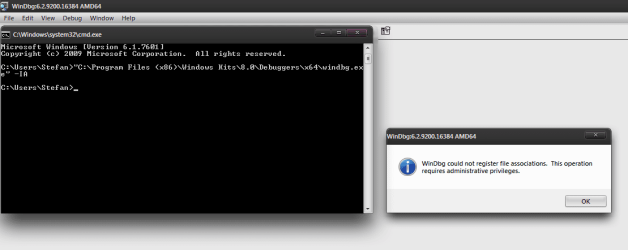
4. Now, the required command is .... windbg.exe -IA
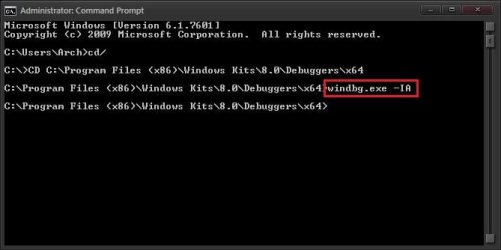
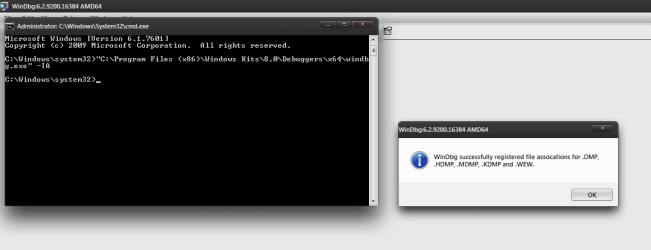
Put the command and hit enter .... windbg will open automatically, saying this ...

Done. Now every double click on a single crash dump will open it in windbg directly.
If you are not certain about your installation directory that is needed as per step 3 ..... determine it ...2. Get back to root. Simple DOS command.... cd/
Note that after hitting enter, you are on C prompt.
3. Now go the the installation directory .... CD (change directory).
The usual installation location is "C:\Program Files (x86)\Windows Kits\8.0\Debuggers\x64\windbg.exe" ... so we have changed the directory to C:\Program Files (x86)\Windows Kits\8.0\Debuggers\x64
4. Now, the required command is .... windbg.exe -IA
Put the command and hit enter .... windbg will open automatically, saying this ...
Done. Now every double click on a single crash dump will open it in windbg directly.
1. Go to Start > All Programs> Windows Kits> Debugging tool for windows> Windbg, and right click on it. Choose "Properties from the context menu.
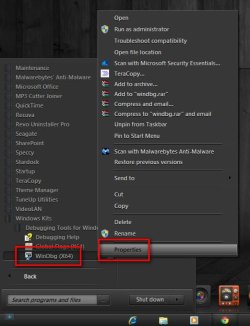
2. Look at the "target" of Windbg properties dialog. It is where the program is installed.

2. Look at the "target" of Windbg properties dialog. It is where the program is installed.
Last edited:
My Computer
At a glance
Microsoft Windows 10 Pro Insider Preview 64-bitIntel(R) Core(TM) i3-4130 CPU @ 3.40GHzCorsair Vengence 4GB x2 (8.00GB Dual-Channel ...2047MB GeForce GTS 450 (ZOTAC International)
- Computer type
- PC/Desktop
- Computer Manufacturer/Model Number
- Self Assembled
- OS
- Microsoft Windows 10 Pro Insider Preview 64-bit
- CPU
- Intel(R) Core(TM) i3-4130 CPU @ 3.40GHz
- Motherboard
- Gigabyte Technology Co., Ltd. B85M-D3H
- Memory
- Corsair Vengence 4GB x2 (8.00GB Dual-Channel DDR3 @ 798MHz)
- Graphics Card(s)
- 2047MB GeForce GTS 450 (ZOTAC International)
- Sound Card
- Onboard (Realtek High Definition Audio)
- Monitor(s) Displays
- LG Flatron E2040T
- Screen Resolution
- 1600x900
- Hard Drives
- Western Digital 1 TB
Seagate 500 GB
- PSU
- Corsair VS550
- Case
- Cooler Master K380
- Cooling
- Cooler Master Seidon 120V Plus
- Keyboard
- Logitech MK260r
- Mouse
- Logitech MK260r
- Internet Speed
- PMPL Broadband
- Antivirus
- Windows Defender + MBAM
- Browser
- Firefox
- Other Info
- Dell Studio 15" Laptop





 ..
..


