
Crashing 7 Windows Explorer

Rob 0

New member
Local time
8:30 AM
Messages
17
Crashing 7 Windows Explorer

Much to my shock, I pulled the rip cord on my newly minted install of Ultimate 7. First ever user! Task manger > processes > explorer.exe > end process > end process TO FIND that running a new instance of explorer did not bring back the Taskbar -- as was the case with XP. Running two didn't either... explorer.exe came right back to life in processes as well as on screen but the all important Taskbar remained unobtainable until after reboot. This cannot be. I prefer registry fixes over hunting the Microsoft committee, for sport, that dictated this painfully useless edict upon us lowly users to force us into an endless chase of upgrading away from horrible options we thought surely they would have fixed in the next version.

CRASH EXPLORER AND RECOVER WITHOUT REBOOT... how?
 

My Computer My Computer

Computer type
PC/Desktop
OS
7 Ultimate
CPU
Intel Core i7-4790 Haswell 3.6GHz LGA 1150 84W Desktop Proce
Motherboard
MSI Z97-G41 Desktop Motherboard - Intel Z97 Express Chipset
Memory
Crucial Ballistix Tactical 4GB DDR3 SDRAM Memory Module
Graphics Card(s)
GeForce GTX 560 SE
Hard Drives
Western Digital WD Blue WD10EZEX 1TB 7200 RPM 64MB Cache SATA 6.0Gbs 3.5" Internal Hard Drive
...
 

My Computer My Computer

Computer type
PC/Desktop
OS
7 Ultimate
CPU
Intel Core i7-4790 Haswell 3.6GHz LGA 1150 84W Desktop Proce
Motherboard
MSI Z97-G41 Desktop Motherboard - Intel Z97 Express Chipset
Memory
Crucial Ballistix Tactical 4GB DDR3 SDRAM Memory Module
Graphics Card(s)
GeForce GTX 560 SE
Hard Drives
Western Digital WD Blue WD10EZEX 1TB 7200 RPM 64MB Cache SATA 6.0Gbs 3.5" Internal Hard Drive
I don't have the answer unfortunately. Killing explorer.exe then choosing File> New Task (Run) has always worked for me.

If you like you could try this test to see if it will work in a different way:

Download the Small Tools package from here:

Sordum's Small tools | Sordum.org

Extract the files to a handy folder then from the list of extracted files copy the one name rexplorer.exe to your desktop, save anything that you're currently working on, then run ReExplorer to see if Explorer is terminated and then restarted.

If it doesn't work - it would confirm that there are problems that require further investigation.
 

My Computer My Computer

Computer type
Laptop
Computer Manufacturer/Model Number
ASUS
OS
Microsoft Windows 7 Home Premium 64-bit 7601 Multiprocessor Free Service Pack 1
CPU
AMD C-60 APU with Radeon(tm) HD Graphics
Motherboard
ASUSTeK COMPUTER INC. X501U
Memory
4.00 GB
Graphics Card(s)
AMD Radeon HD 6290 Graphics
Sound Card
(1) AMD High Definition Audio Device (2) Realtek High Defi
Screen Resolution
1366 x 768 x 32 bits (4294967296 colors) @ 60 Hz
Hard Drives
Hitachi HTS545050A7E380 SATA Disk Device
Antivirus
Comodo CIS & FW, SecureAplus App Whitelisting, Threatfire
Browser
Cyberfox 64bit, Opera 64bit, Airfox
Other Info
Spy-The-Spy, HitmanPro.Alert, Norton Connect Safe, MJRegWatcher, BitDefender TrafficLight, Voodoo Shield, Zemana AntiMalware
This happened to me too.

Try this. Start a new task from the task manager.
Enter "userinit.exe" w/o quotes.
This should bring back the explorer taskbar.
 

My Computer My Computer

Computer type
Laptop
Computer Manufacturer/Model Number
Compaq
OS
Windows 7 Ultimate x86
Hit your Start Button and type == Taskbar == in the space and hit enter. This will bring up a window that allows you to do different things with the Taskbar, one of which is Auto-Hide which might be checked.
 

My Computer My Computer

Computer type
PC/Desktop
Computer Manufacturer/Model Number
Custom Build
OS
Windows 7 Home Premium 32-Bit - Build 7600 SP1
CPU
Intel Core i3-2120 3.30Ghz
Motherboard
Asus P8Z68-V LX Intel Z68 Socket H2 ATX
Memory
Kingston 4 GB DDR3 1333 mhz
Graphics Card(s)
AMD Radeon HD6670
Sound Card
Sound Blaster Audigy SE 24-Bit
Monitor(s) Displays
Asus VE228
Screen Resolution
1440 X 900
Hard Drives
OCZ Vertex 3 120 GB Sata 3 SSD ==
Kingston SH103/S3 120 G Hyper X 120 GB SSD ==
Western Digital 500 GB Caviar Green 7200 RPM ==
PSU
Corsair CX600M == 600 Watt
Case
NZXT Apollo - Silver with Clear Side Panel
Cooling
Three 120 mm Fans
Keyboard
Microsoft Natural 4000
Mouse
Microsoft Custom Optical 3000
Internet Speed
AT&T Fiber Optic Wireless Network
Antivirus
Microsoft Security Essentials
Browser
Chrome
Other Info
120 mm Blue LED Fan -- Three Blue LED Lazer Light Sticks
I don't have the answer unfortunately. Killing explorer.exe then choosing File> New Task (Run) has always worked for me.

From crashed explorer, as described in the first post, with no visible Taskbar as a result of the crash only and not another effect:

Ultimate 7 > Task Manager > New Task > Run > Explorer: starts a new explorer window
win XP pro > Task Manager > New Task > Run > Explorer: starts a new explorer AND a new Taskbar

Open your Task Manager and crash your explorer in either one to see this absolute effect on both. [Cntrl+Alt+Del then look to the right side for the "evil" Start button to reboot.]

Lock the Taskbar is checked
Auto-hide the Taskbar is unchecked

The first solution is: Task Manager > New Task > Run > userinit

This function restarts the Taskbar in both XP pro and Ultimate 7. But is not as simple as opening a new instance of explorer as was the case win XP. How to make this new solution as simple as the old.

CRASH EXPLORER AND RECOVER WITHOUT REBOOT (recovering both taskbar and explorer in one desktop shortcut function)... how?
 

My Computer My Computer

Computer type
PC/Desktop
OS
7 Ultimate
CPU
Intel Core i7-4790 Haswell 3.6GHz LGA 1150 84W Desktop Proce
Motherboard
MSI Z97-G41 Desktop Motherboard - Intel Z97 Express Chipset
Memory
Crucial Ballistix Tactical 4GB DDR3 SDRAM Memory Module
Graphics Card(s)
GeForce GTX 560 SE
Hard Drives
Western Digital WD Blue WD10EZEX 1TB 7200 RPM 64MB Cache SATA 6.0Gbs 3.5" Internal Hard Drive
Kill Explorer

Hmmm... I don't see that happening on my machine.

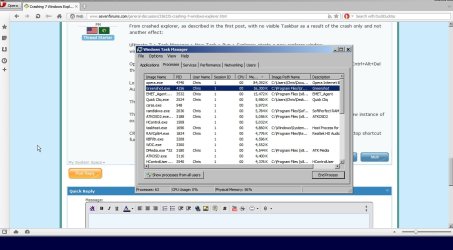
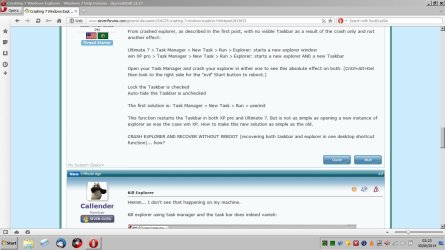
Kill explorer using task manager and the task bar does indeed vanish:

Kill Explorer.jpg

Start a new instance of explorer and I get this:

2Restart Explorer.jpg

The taskbar appears but missing a couple of system tray icons although the programs are still running.

If I use ReExplorer I get the same results. I'm using Windows 7 Home Premium so the comparison doesn't say much. Perhaps someone with Ultimate will confirm.
 

My Computer My Computer

Computer type
Laptop
Computer Manufacturer/Model Number
ASUS
OS
Microsoft Windows 7 Home Premium 64-bit 7601 Multiprocessor Free Service Pack 1
CPU
AMD C-60 APU with Radeon(tm) HD Graphics
Motherboard
ASUSTeK COMPUTER INC. X501U
Memory
4.00 GB
Graphics Card(s)
AMD Radeon HD 6290 Graphics
Sound Card
(1) AMD High Definition Audio Device (2) Realtek High Defi
Screen Resolution
1366 x 768 x 32 bits (4294967296 colors) @ 60 Hz
Hard Drives
Hitachi HTS545050A7E380 SATA Disk Device
Antivirus
Comodo CIS & FW, SecureAplus App Whitelisting, Threatfire
Browser
Cyberfox 64bit, Opera 64bit, Airfox
Other Info
Spy-The-Spy, HitmanPro.Alert, Norton Connect Safe, MJRegWatcher, BitDefender TrafficLight, Voodoo Shield, Zemana AntiMalware
This happened to me too just recently. I had to use userinit for a while in order to restore the explorer. Unfortunately, I never really did find out what caused it. It just fixed itself.

Have you tried this?

Open Startmenu -> search for 'folder options' -> open 'folder options'
On the view tab: advanced settings
Untick the 'Launch folder windows in a seperate process'. and apply.

Then test by killing all explorer processes and running a new one.
 

My Computer My Computer

Computer type
Laptop
Computer Manufacturer/Model Number
Compaq
OS
Windows 7 Ultimate x86

My Computer My Computer

Computer type
PC/Desktop
Computer Manufacturer/Model Number
n/a
OS
W7 Ultimate SP1, LM19.2 MATE, W10 Home 1703, W10 Pro 1703 VM, #All 64 bit
CPU
AMD Phenom II x6 1100T, 3.3 GHz
Motherboard
ASUS M4A88T-M/USB3 (AM3)
Memory
12GB DDR3 1333 G-Skill (4GB x 2), G-Skill (2GB x 2)
Graphics Card(s)
NVIDIA GeForce GTX 660
Sound Card
Realtek?
Monitor(s) Displays
Samsung S23B350
Screen Resolution
1920x1080
Hard Drives
WD Green 2TB (SATA), WD Green 3TB (SATA), WD Blue 4TB (SATA), WD Blue 6TB (SATA)
PSU
Cooler Master
Case
Antec GX300 Tower
Cooling
3x Antec TRICOOL 120mm Fans
Mouse
Wired Optical
Internet Speed
DSL
Antivirus
Avast
Browser
Pale Moon (64 bit)
Other Info
2018-12-27 Upgraded HDDs
2015-12-10 Upgraded case, graphics card, storage
2015-08-15 Upgraded motherboard & RAM
2015-07-15 Upgraded LM17.1 to LM17.2
Open Startmenu -> search for 'folder options' -> open 'folder options'
On the view tab: advanced settings
Untick the 'Launch folder windows in a separate process'. and apply.

Mine already has this unticked.

Perhaps a .bat would perform both functions at once. I can do it with scripts, but a more commonly usable solution would help others find XP in 7. The eXPerience doesn't still dominate 25% of desktop marketshare a dozen years after its inception because it's XPerfect. It dominates because its better than almost anything else.

If i don't find XP-classic-to-the-letter in Threshold I will start taking hostages.

Code:
Ctrl+Alt+Kill
 

My Computer My Computer

Computer type
PC/Desktop
OS
7 Ultimate
CPU
Intel Core i7-4790 Haswell 3.6GHz LGA 1150 84W Desktop Proce
Motherboard
MSI Z97-G41 Desktop Motherboard - Intel Z97 Express Chipset
Memory
Crucial Ballistix Tactical 4GB DDR3 SDRAM Memory Module
Graphics Card(s)
GeForce GTX 560 SE
Hard Drives
Western Digital WD Blue WD10EZEX 1TB 7200 RPM 64MB Cache SATA 6.0Gbs 3.5" Internal Hard Drive
Back
Top