Crazy RAM Usage

ian1

New member
Excessive RAM Usage?

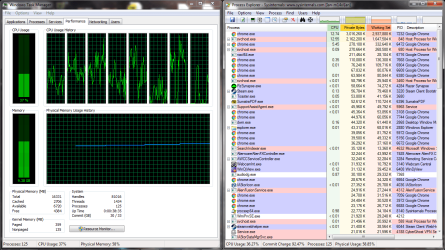
I just upgrade from 8 to 16gb of ram. Previously my computer would idle at around 4 or 5gb ram usage sometimes. Now it's using 8-10gb, with just 12 chrome tabs open, and a couple pdf files. I'd previously tried switching from Firefox to Chrome, but it didn't really help. I think this is a recent problem - for years I'd have 60-100 tabs in Firefox open, now I'm stuck with 12 in Chrome even though I have twice the ram.

Perhaps I have a memory leak? I'm not sure how to diagnose this in a quantitative way.
 

Attachments
  • ram usage 12-22-16.png
    ram usage 12-22-16.png
    267.9 KB · Views: 9
Last edited:

My Computer

Computer type
Laptop
Computer Manufacturer/Model Number
alienware m14x r1
OS
win 7 x64
CPU
i7-2630qm
Memory
16gb 1600mhz
Graphics Card(s)
555m
I don't like Chrome because it has memory resident program and it uses a lot of memory.
That's why I use Firefox64.
 

My Computers

System One System Two

  • Computer type
    PC/Desktop
    Computer Manufacturer/Model Number
    custom build
    OS
    Windows 7 HP 64
    CPU
    i5 6600K - 800MHz to 4200MHz
    Motherboard
    GA-Z170-HD3P
    Memory
    4+4G GSkill DDR4 3000
    Graphics Card(s)
    IG - Intel 530
    Monitor(s) Displays
    Samsung 226BW
    Screen Resolution
    1680x1050
    Hard Drives
    (1) -1 SM951 – 128GB M.2 AHCI PCIe SSD drive for Windows 7 and Lubuntu
    (2) -1 WD SATA 3 - 1T for Data
    (3) -1 WD SATA 3 - 1T for backup
    PSU
    Thermaltake 450W TR2 gold
    Keyboard
    Old and good Chicony mechanical keyboard
    Mouse
    Logitech mX performance - 9 buttons (had to disable some)
    Internet Speed
    500Mb/s
    Browser
    Firefox 64
    Other Info
    TinyWall firewall
  • Computer type
    Laptop
    System Manufacturer/Model Number
    Asus Q550LF
    OS
    Windows 7 Pro
    CPU
    i7-4500U 800MHz to 3.0GHz
    Motherboard
    Asus Q550LF
    Memory
    (4+4)G DDR3 1600
    Graphics Card(s)
    IG intel 4400 + NVIDIA GeForce GT 745M
    Sound Card
    Realtek
    Monitor(s) Displays
    LG Display LP156WF4-SPH1
    Screen Resolution
    1920 x 1080
    Hard Drives
    BX500 120G SSD for Windows and programs +
    1T HDD for data
    Internet Speed
    500 Mb/s
    Browser
    Firefox
    Other Info
    TinyWall firewall
I tried switching from FF64 to chrome because I was having a memory issue, but it didn't help. Maybe a shared plugin?
 

My Computer

Computer type
Laptop
Computer Manufacturer/Model Number
alienware m14x r1
OS
win 7 x64
CPU
i7-2630qm
Memory
16gb 1600mhz
Graphics Card(s)
555m
Have you tried stopping and disabling windows update within services? It always racks up my ram.
 

My Computer

Computer type
PC/Desktop
Computer Manufacturer/Model Number
Custom Build
OS
Ohio
CPU
AMD 8350 BE
Motherboard
MSI 970
Memory
32 gigs
Graphics Card(s)
GTX 1080
Hard Drives
Seagate 1tb SSHHDD
Try Firefox 32 bit.

Jack
 

My Computer

Computer type
PC/Desktop
Computer Manufacturer/Model Number
Home made Desktop
OS
Windows 10 Pro. 64/ version 1709 Windows 7 Pro/64
CPU
Intel i7-6800K @ 4.3
Motherboard
ASUS X-99 Deluxe II
Memory
Corsair Platinum 16 gig @2400
Graphics Card(s)
EVGA GTX 1070 OC
Monitor(s) Displays
Asus 27" LED LCD/VE278Q
Screen Resolution
1920-1080 or 1280-720 HDMI
Hard Drives
INTEL SSD 730-240 Gb Sata 3.0/
PSU
EVGA Platium 1200W
Case
Phanteks Luxe Tempered Glass 8 fans/ one radiator
Cooling
XSPC/ Water Cooled CPU
Keyboard
Das 4 Professional
Mouse
Logitech M705/MX Anywhere 2-S
Internet Speed
100 mbits
Antivirus
Microsoft Security Essentials/ Malwarebytes Premium 3.0/ SAS
Browser
I.E. 11 default/Firefox/ ISP Time Warner Cable/Spectrum
Other Info
LG BluRay Burner/
Sound system-KLipsch-THX/
Icy Dock ssd Hot Swap bays.
Have you tried stopping and disabling windows update within services? It always racks up my ram.

Curious... My method of not updating to windows 10 was to just ignore the windows update icon forever. I might have changed an option to keep it from autoupdating, too. I thought it wasn't possible to get rid of this service?
 

My Computer

Computer type
Laptop
Computer Manufacturer/Model Number
alienware m14x r1
OS
win 7 x64
CPU
i7-2630qm
Memory
16gb 1600mhz
Graphics Card(s)
555m
Ignoring WU icon doesn't mean WU doesn't install updates if it is set to automatically install.
 

My Computers

System One System Two

  • Computer type
    PC/Desktop
    Computer Manufacturer/Model Number
    custom build
    OS
    Windows 7 HP 64
    CPU
    i5 6600K - 800MHz to 4200MHz
    Motherboard
    GA-Z170-HD3P
    Memory
    4+4G GSkill DDR4 3000
    Graphics Card(s)
    IG - Intel 530
    Monitor(s) Displays
    Samsung 226BW
    Screen Resolution
    1680x1050
    Hard Drives
    (1) -1 SM951 – 128GB M.2 AHCI PCIe SSD drive for Windows 7 and Lubuntu
    (2) -1 WD SATA 3 - 1T for Data
    (3) -1 WD SATA 3 - 1T for backup
    PSU
    Thermaltake 450W TR2 gold
    Keyboard
    Old and good Chicony mechanical keyboard
    Mouse
    Logitech mX performance - 9 buttons (had to disable some)
    Internet Speed
    500Mb/s
    Browser
    Firefox 64
    Other Info
    TinyWall firewall
  • Computer type
    Laptop
    System Manufacturer/Model Number
    Asus Q550LF
    OS
    Windows 7 Pro
    CPU
    i7-4500U 800MHz to 3.0GHz
    Motherboard
    Asus Q550LF
    Memory
    (4+4)G DDR3 1600
    Graphics Card(s)
    IG intel 4400 + NVIDIA GeForce GT 745M
    Sound Card
    Realtek
    Monitor(s) Displays
    LG Display LP156WF4-SPH1
    Screen Resolution
    1920 x 1080
    Hard Drives
    BX500 120G SSD for Windows and programs +
    1T HDD for data
    Internet Speed
    500 Mb/s
    Browser
    Firefox
    Other Info
    TinyWall firewall
It works everytime... not sure why but svchost.exe just piles on the ram whenever the windows update service is active.
 

My Computer

Computer type
PC/Desktop
Computer Manufacturer/Model Number
Custom Build
OS
Ohio
CPU
AMD 8350 BE
Motherboard
MSI 970
Memory
32 gigs
Graphics Card(s)
GTX 1080
Hard Drives
Seagate 1tb SSHHDD
Don't understand why having many tabs open.

Any specific reason.

Tabs open and sometime it may use resource as tabs remain open are active.

This is where the chart will go up and down a bit, then go up, non-stop, and putting squeeze the system.

Instead just put in the bookmark and then if required, click on new tab and click on the bookmark.

Everything are open will eat some resource.
 

My Computer

Computer type
Laptop
Computer Manufacturer/Model Number
Toshiba L630 and L735
OS
Windows 7 x64
Hard Drives
240 GB SSD
One thing to remember...

Windows will use a portion of whatever available RAM you have in the system. For me it usually works out to to be about half when I have 4 GB in the machine, 3.5 GB when I have 8 GB in the machine, and the machine idles with around 4 - 4.5 GB when I have 16 GB in the machine.

It's not unusual for the PC to use a lot of memory at idle when you have a lot of memory in the PC. However, you shouldn't be using as much as you are with just a few tabs open and a couple of PDF files.

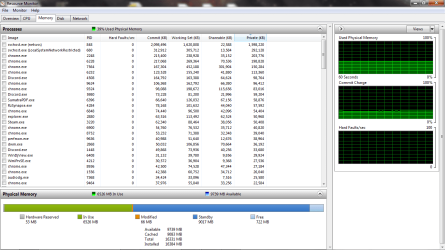
Can you take a screen shot of the Memory tab on Resource Monitor and post it please? Looking at your posted screenshot, Chrome is using a heck of a lot of memory, but I'd like to see how much is hardware reserved.
 

My Computer

Computer type
PC/Desktop
Computer Manufacturer/Model Number
Mellon Labs (custom build)
OS
Win 7 Pro x64/Win 10 Pro x64 dual boot
CPU
AMD FX 8350 Vishera @ 4200
Motherboard
ASUS M5A97 R2.0
Memory
16 GB Mushkin Blackline DDR3-2400 @ 1866 (9-10-10-10-31)
Graphics Card(s)
XFX Radeon R9 280 Double D Black Edition
Sound Card
Realtek HD Audio on MB. Sounds great.
Monitor(s) Displays
Acer 24", Acer 22"
Screen Resolution
3840 x 1080
Hard Drives
1 x Mushkin Chronos 120 GB SSD (Win 10)
1 x Samsung 850 EVO 250 GB SSD (Win 7)
1 x WD 1TB SATA Blue
1 x WD 1TB SATA Green
PSU
Corsair TX-750
Case
CoolerMaster HAF 912+
Cooling
Coolermaster Seidon 240M Liquid AIO. 6 case fans
Keyboard
Logitech G710+
Mouse
Logitech G500s
Internet Speed
Much better since I got fiber, but still way overpriced.
Antivirus
MSE, Malware Bytes for scanning
Browser
Firefox
Other Info
Corsair VOID USB headphones.

A Mellon Labs X-1 - LCD Smartie driven system status display.

Brought to you by the letter E
Can you take a screen shot of the Memory tab on Resource Monitor and post it please? Looking at your posted screenshot, Chrome is using a heck of a lot of memory, but I'd like to see how much is hardware reserved.

Here's the resource monitor
 

Attachments

  • resource monitor 12-28-16.png
    resource monitor 12-28-16.png
    115.3 KB · Views: 5

My Computer

Computer type
Laptop
Computer Manufacturer/Model Number
alienware m14x r1
OS
win 7 x64
CPU
i7-2630qm
Memory
16gb 1600mhz
Graphics Card(s)
555m
Back
Top