Create a permanant drive letter for USB Stick Drive

RBCC

New member
Member
VIP
Local time
2:10 PM
Messages
119
Can Someone please tell me how I create a permanent drive letter for a USB Stick Drive? Say Z: ?? So When I boot to it it will always go to that drive letter? Thank you Very much John
 

My Computer My Computer

At a glance

Windows 7 UltimateTurion 64 Bit2 GIG
Computer Manufacturer/Model Number
Gateway
OS
Windows 7 Ultimate
CPU
Turion 64 Bit
Memory
2 GIG
yes, but it will only work on the computer that you are setting this up on.

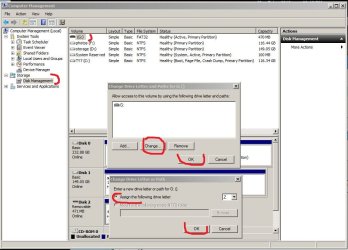
Go to Control Panel > Administrative Tools > Computer Management > Disk Management

Select the USB drive in the graphical layout. right click and go to Change Drive letter

Assign it a drive letter and click OK. Now when you plug it into the computer, it will show up with that drive letter. or it should....

This won't carry over to other computers.

Shortcut: type in "Disk Management" in the start menu search bar and select "Create and format hard disk partitions"
 
Last edited:

My Computer My Computer

At a glance

Win7 Home Premium 64xIntel Core 2 Duo P7450 / 2.13 GHz (2.29 with ...4 GB PC-6400 Hyundai (2X2) at 800MhzNVIDIA GeForce GTX 260M 1GB DDR3 VRAM
Computer type
Laptop
Computer Manufacturer/Model Number
ASUS G60-RBBX05
OS
Win7 Home Premium 64x
CPU
Intel Core 2 Duo P7450 / 2.13 GHz (2.29 with Extreme Turbo)
Memory
4 GB PC-6400 Hyundai (2X2) at 800Mhz
Graphics Card(s)
NVIDIA GeForce GTX 260M 1GB DDR3 VRAM
Monitor(s) Displays
16" LED Backlit
Screen Resolution
1366 x 768 on laptop 1600x1050 max res on 22" external mon
Hard Drives
OCZ Agility 3 60GB SSD / 320 GB - Serial ATA-150 - 7200 rpm
PSU
6-cell Lithium ion { lasts 1.5 hours }
Case
ASUS G60 Laptop
Keyboard
Chicklet type back-lit (white light) keyboard
Mouse
Logitech G9 Laser Mouse 3200dpi and 1000 reports per minute
Internet Speed
Comcast 8.60mb/s up - 3.11mb/s down
Antivirus
MSE
Browser
Firefox
Other Info
General mid-budget gaming Comp. Low batterylife - High FrameRates - currently overheating problems :(

2nd Rig: Case: Rosewill BLACKHAWK Gaming ATX Mid Tower Computer Case

Mobo: GIGABYTE GA-990FXA-UD3
CPU: AMD FX-6200 Zambezi 3.8GHz (4.1GHz Turbo)
Heatsink: COOLER MASTER V8 CPU Cooler
RAM: Patriot Viper 3 8GB (2 x 4GB) 240-Pin DDR3 SDRAM 1866 (PC3 15000)
GPU: SAPPHIRE Radeon HD 6850 1GB 2
Can Someone please tell me how I create a permanent drive letter for a USB Stick Drive? Say Z: ?? So When I boot to it it will always go to that drive letter? Thank you Very much John

plug in USB drive--go to Computer Management>Disk Management--right click the disk - select 'Change drive letter and paths' -the drive should be highlighted--select 'change' - assign drive letter - click OK and OK....done!
 

Attachments

  • Capture.JPG
    Capture.JPG
    85.9 KB · Views: 4

My Computer My Computer

At a glance

win7 ultimate 32bitcore2 Extreme QX6850-OCd to 3.15 GHz4 GBNVidia 8600 GT
Computer Manufacturer/Model Number
SALEON model 2.2b
OS
win7 ultimate 32bit
CPU
core2 Extreme QX6850-OCd to 3.15 GHz
Motherboard
ASUS P5G41-M LE
Memory
4 GB
Graphics Card(s)
NVidia 8600 GT
Monitor(s) Displays
23" acer
Hard Drives
one SATA 250GB partitioned equally in half
one SATA 160GB-internal storage
PSU
500W Thermaltake
Case
mini tower
Type diskmgmt.msc in run box Select the USB drive in the graphical layout. right click and go to Change Drive letter

Assign the drive letter and click OK. Now when you plug it into the computer, it will show up with that drive letter.......
 

My Computer My Computer

At a glance

Windows 7 32 bit
OS
Windows 7 32 bit
If you want the USB stick to retain the drive letter on other PC's 1st of all select a seldom used drive letter...say from the middle of the alphabet down...
Then after assigning it in Disk Management also give the stik a Volume Label...it can be any name you want.
This will make it retain the drive letter on any PC...the only time it will change is if it's used on a PC that already uses that drive letter.
 

My Computer My Computer

At a glance

Vista Ultimate X64/ Windows 7 Dual-bootQ66004G OCZ PC2 8500 PlatinumEVGA 8800GTS Vid Card
Computer Manufacturer/Model Number
Self-Built
OS
Vista Ultimate X64/ Windows 7 Dual-boot
CPU
Q6600
Motherboard
ASUS P5K
Memory
4G OCZ PC2 8500 Platinum
Graphics Card(s)
EVGA 8800GTS Vid Card
Hard Drives
500G Seagate SATA
200G Seagate SATA
100G WD Caviar SATA
80G WD Caviar IDE
PSU
OCZ Elite 800W PSU
Case
RaidMax Smilodon Case
Back
Top