Solved Create icon to url on taskbar

robertg

New member
I've been trying to create shortcuts on my taskbar to a couple of specific urls. This was extremely easy in XP. I won't tell you what I think of Windows 7 for this simple task.

What I've been able to do: I can create a new shortcut to a specific url on the desktop. I can pin that to the start menu. When I remove the shortcut on the desktop, the shortcut on the start menu no longer works. Obviously the shortcut on the start menu is to the shortcut on the desktop, not the url.
If I try to pin the shortcut to the taskbar, it will only allow me to pin it to an existing shortcut like Internet Explorer or Firefox.

What I want to do: Have a simple shortcut on the taskbar that opens my default browser to a specific url. This would be a stand-alone shortcut, not a link on the "links" menu or pinned to the IE or Firefox shortcuts. I also don't want to clutter my desktop with shortcuts that will never be used.

Any help on this is much appreciated. Thanks.
 

My Computer

OS
Windows 7 Professional 64bit

My Computer

Computer type
PC/Desktop
Computer Manufacturer/Model Number
Self built custom
OS
64-bit Windows 11 Pro for Workstations
CPU
Intel i7-8700K OC'd to 5 GHz
Motherboard
ASUS ROG Maximus XI Formula Z390
Memory
64 GB (4x16GB) G.SKILL TridentZ RGB DDR4 3600 MHz
Graphics Card(s)
ASUS ROG-STRIX-GTX1080TI-O11G-GAMING
Sound Card
Integrated
Monitor(s) Displays
2 x Samsung Odyssey G7 27"
Screen Resolution
2560x1440
Hard Drives
1TB Samsung 990 PRO M.2,
4TB Samsung 990 PRO PRO M.2,
TerraMaster F8 SSD Plus NAS
PSU
Seasonic Prime Titanium 850W
Case
Thermaltake Core P3
Cooling
Corsair Hydro H115i
Keyboard
Logitech wireless K800
Mouse
Logitech MX Master 4
Internet Speed
2 Gb/s Download and 100 Mb/s Upload
Antivirus
Malwarebyte Anti-Malware Premium
Browser
Google Chrome
Other Info
Logitech Z625 speaker system,
Logitech BRIO 4K Pro webcam,
HP Color LaserJet Pro MFP M477fdn,
APC SMART-UPS RT 1000 XL - SURT1000XLI,
Galaxy S23 Plus phone
Thanks for the link, Brink. I already figured that much out, though. Step 5 is deceiving:

"5. Move the shortcut to where you like for easy use."

As best I can determine, you can move it anywhere on the desktop. The problem comes when you want to pin it to the taskbar. There's where I ran into difficulties.

It may not be possible to do this in W7. Not only does W7 look different, it doesn't act the same way XP does. I think Microsoft has eliminated some useful functions in W7. This is all part of the learning process. I appreciate the reply.
 

My Computer

OS
Windows 7 Professional 64bit
Thanks for the link, Brink. I already figured that much out, though. Step 5 is deceiving:

"5. Move the shortcut to where you like for easy use."

As best I can determine, you can move it anywhere on the desktop. The problem comes when you want to pin it to the taskbar. There's where I ran into difficulties.

It may not be possible to do this in W7. Not only does W7 look different, it doesn't act the same way XP does. I think Microsoft has eliminated some useful functions in W7. This is all part of the learning process. I appreciate the reply.

Step #5 means to put the shortcut somewhere like My Documents then right click it & chose pin it to the taskbar then it will work.
Jerry
 

My Computer

Computer type
Laptop
Computer Manufacturer/Model Number
Sager NP9170
OS
Win 7 Pro x64 / Win 10 Pro
CPU
Intel(R) Core(TM) i7-3630QM CPU @ 2.40GHz
Motherboard
CLEVO P170EM
Memory
12 GB
Graphics Card(s)
(1) Intel(R) HD Graphics 4000 (2) NVIDIA GeForce GTX 675M
Sound Card
(1) Realtek High Definition Audio (2) Intel(R) Display Aud
Monitor(s) Displays
17.3
Screen Resolution
1920x1080
Hard Drives
(1) Samsung 860 EVO 500GB(OS) (1) Samsung 860 EVO 500GB(Data)
Keyboard
Backlite
Antivirus
MSE, Malwarebytes Pro
Browser
Firefox
Other Info
DESKTOP: Custom-built.
OS: Win 10 Pro x64.
CASE: Rosewill R5.
CPU: Intel I5 4670K CPU @ 3.40GHz.
CPU COOLER: Cool Master Hyper 212 EVO.
MOTHERBOARD: Asus Z87-A.
MEMORY: Kingston HyperX 2x4 GB.
GPU: Nvidia Geforce 650 TI.
PSU: Corsair TX750.
DRIVES: (1) Samsung 840 120 GB SSD (2) Western Digital blue 500 GB 7200 RPM.
Thanks, Bongo. That hadn't occurred to me. At your suggestion, I tried it but with the shortcut in my Documents, there doesn't seem to be an option to pin it to the Taskbar. It was a very good suggestion, though. I'll see if there is somewhere else I can put it to get the job done. If I'm successful, I'll post it here. Your reply is appreciated.
 

My Computer

OS
Windows 7 Professional 64bit
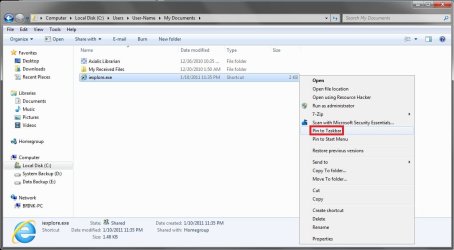
Robert,

Strange. When you right click on the shortcut created using the method in the tutorial, you should have a "Pin to taskbar" option when you right click on it like below.

Shortcut.jpg
 

My Computer

Computer type
PC/Desktop
Computer Manufacturer/Model Number
Self built custom
OS
64-bit Windows 11 Pro for Workstations
CPU
Intel i7-8700K OC'd to 5 GHz
Motherboard
ASUS ROG Maximus XI Formula Z390
Memory
64 GB (4x16GB) G.SKILL TridentZ RGB DDR4 3600 MHz
Graphics Card(s)
ASUS ROG-STRIX-GTX1080TI-O11G-GAMING
Sound Card
Integrated
Monitor(s) Displays
2 x Samsung Odyssey G7 27"
Screen Resolution
2560x1440
Hard Drives
1TB Samsung 990 PRO M.2,
4TB Samsung 990 PRO PRO M.2,
TerraMaster F8 SSD Plus NAS
PSU
Seasonic Prime Titanium 850W
Case
Thermaltake Core P3
Cooling
Corsair Hydro H115i
Keyboard
Logitech wireless K800
Mouse
Logitech MX Master 4
Internet Speed
2 Gb/s Download and 100 Mb/s Upload
Antivirus
Malwarebyte Anti-Malware Premium
Browser
Google Chrome
Other Info
Logitech Z625 speaker system,
Logitech BRIO 4K Pro webcam,
HP Color LaserJet Pro MFP M477fdn,
APC SMART-UPS RT 1000 XL - SURT1000XLI,
Galaxy S23 Plus phone
Hi Brink,

I see your shortcut is an .exe file. That's handled differently than a url. The OS must read the target and treat it accordingly. This must be why the url shortcut can only be pinned to IE or Firefox. I think they got too smart with W7 in some respects. My nephew also took a look and did a google search on this. He found that the code for the taskbar has been written differently and a url shortcut can't be pinned to the taskbar itself.

Now that I know it isn't currently possible, I'll just make do with the "Links" toolbar for my purpose until someone writes a plug-in or MS does a patch that changes this. Hey, you're not one of those application wizards, are you? LOL.

Thanks for all the help. It really is great to have this forum to ask around on. :cool:
 

My Computer

OS
Windows 7 Professional 64bit
Last edited:

My Computer

Computer type
PC/Desktop
Computer Manufacturer/Model Number
Self built custom
OS
64-bit Windows 11 Pro for Workstations
CPU
Intel i7-8700K OC'd to 5 GHz
Motherboard
ASUS ROG Maximus XI Formula Z390
Memory
64 GB (4x16GB) G.SKILL TridentZ RGB DDR4 3600 MHz
Graphics Card(s)
ASUS ROG-STRIX-GTX1080TI-O11G-GAMING
Sound Card
Integrated
Monitor(s) Displays
2 x Samsung Odyssey G7 27"
Screen Resolution
2560x1440
Hard Drives
1TB Samsung 990 PRO M.2,
4TB Samsung 990 PRO PRO M.2,
TerraMaster F8 SSD Plus NAS
PSU
Seasonic Prime Titanium 850W
Case
Thermaltake Core P3
Cooling
Corsair Hydro H115i
Keyboard
Logitech wireless K800
Mouse
Logitech MX Master 4
Internet Speed
2 Gb/s Download and 100 Mb/s Upload
Antivirus
Malwarebyte Anti-Malware Premium
Browser
Google Chrome
Other Info
Logitech Z625 speaker system,
Logitech BRIO 4K Pro webcam,
HP Color LaserJet Pro MFP M477fdn,
APC SMART-UPS RT 1000 XL - SURT1000XLI,
Galaxy S23 Plus phone
OK, Brink! That's the answer. Not only can you make a shortcut, but you can choose the browser to open in. Your tutorial is very clear (as they all are). This opens up other possibilities with making shortcuts, as well. I really appreciate your time on this. Take the rest of the day off. :D
 

My Computer

OS
Windows 7 Professional 64bit
You're most welcome Robert. I'm happy to hear that will work for you. :)
 

My Computer

Computer type
PC/Desktop
Computer Manufacturer/Model Number
Self built custom
OS
64-bit Windows 11 Pro for Workstations
CPU
Intel i7-8700K OC'd to 5 GHz
Motherboard
ASUS ROG Maximus XI Formula Z390
Memory
64 GB (4x16GB) G.SKILL TridentZ RGB DDR4 3600 MHz
Graphics Card(s)
ASUS ROG-STRIX-GTX1080TI-O11G-GAMING
Sound Card
Integrated
Monitor(s) Displays
2 x Samsung Odyssey G7 27"
Screen Resolution
2560x1440
Hard Drives
1TB Samsung 990 PRO M.2,
4TB Samsung 990 PRO PRO M.2,
TerraMaster F8 SSD Plus NAS
PSU
Seasonic Prime Titanium 850W
Case
Thermaltake Core P3
Cooling
Corsair Hydro H115i
Keyboard
Logitech wireless K800
Mouse
Logitech MX Master 4
Internet Speed
2 Gb/s Download and 100 Mb/s Upload
Antivirus
Malwarebyte Anti-Malware Premium
Browser
Google Chrome
Other Info
Logitech Z625 speaker system,
Logitech BRIO 4K Pro webcam,
HP Color LaserJet Pro MFP M477fdn,
APC SMART-UPS RT 1000 XL - SURT1000XLI,
Galaxy S23 Plus phone
the easiest way to add a URL to taskbar (Windows7)

I just left-drag the Internet Explorer URL's icon (just to the left of the address) in one smooth move directly to the taskbar. That Pins it to the Taskbar. You can also left-drag to the Desktop if that is your desired destination. I was able to do the latter all the way back to Windows 95 and now Windows 7 allows that action to Pin to the Taskbar.
 

My Computer

Computer type
PC/Desktop
Computer Manufacturer/Model Number
Home built Asus MB Ryzen 9 16GB DDR4 2TB SSD Blu-ray DVD 300+Mbps
OS
Windows 10 20H2
CPU
AMD Ryzen 9 3900X 12 core
Motherboard
Asus
Memory
16GB DDR4
Graphics Card(s)
Radeon RX-580
Sound Card
Realtek HD and Intel HD Audio HDMI
Monitor(s) Displays
Hanns-G
Screen Resolution
1920 x 1080
Hard Drives
CT2000BX500SSD1
PSU
modular
Keyboard
generic jettisoned a 50 buck rainbow LED keyboard
Mouse
generic
Internet Speed
325Mbps down and 30Mbps up (Comcast-very dependable)
Browser
prefer Edge Chromium
▲ thats using IE , you cant drag a favicon to the taskbar from firefox ,and probably any other browser except for IE
 

My Computer

Computer Manufacturer/Model Number
Hewlett packard/p6512uk
OS
Microsoft Windows 7 Home Premium 64-bit 7600
CPU
IIx4 amd athelon 635 processor
Motherboard
FOXCONN 2AA9
Memory
2x2gb
Graphics Card(s)
ati radeon HD 5450
Sound Card
(1) Realtek High Definition Audio (2) AMD High Definition
Monitor(s) Displays
samsung lcd tv 32"
Screen Resolution
1360x 768
Hard Drives
(1) WDC WD10 01FAES-60Z2A0 SATA Disk Device (2) Maxtor OneTouch USB Device (3) ST310003 33AS USB Device (4) WD My Book 1111 USB Device
PSU
?
Cooling
air!
Keyboard
wireless hp
Mouse
wireless Hp,optical
Internet Speed
1.10mb/s
Antivirus
MSE
Browser
Firefox
Back
Top