Solved Create new user/migrate old user's data, to change logon icon order

frable82

New member
Local time
1:03 AM
Messages
19
(reposted from Customization)

Having just learned from an OLD post here that renaming a user account apparently doesn't change the order in which the corresponding logon icons appear at startup -- due to the order being apparently determined by when each folder was originally created, which was when this computer was first opened back in 2011 -- I want to be able, after creating a new user account, to migrate data from the account whose name I changed. I'd been previously suggested to try User Profile Wizard from Forensit.com... would this be a good idea, or can you suggest something different?

HP/Compaq CQ2014, AMD E-300, Radeon HD graphics, Win7 Home Premium 64-bit custom SP1, 3MB RAM, 500GB disk

Bob
 

My Computer My Computer

Computer type
PC/Desktop
Computer Manufacturer/Model Number
Hewlett-Packard CQ2014 1.02
OS
Windows 7 Home Premium x64
CPU
1.30 gigahertz AMD E-300 APU with Radeon HD Graphics
Motherboard
PEGATRON CORPORATION 2AD3 1.02
Memory
2664 Megabytes Usable Installed Memory
Graphics Card(s)
AMD Radeon HD 6310 Graphics
Sound Card
Realtek High Definition Audio
Monitor(s) Displays
Hitachi CM823F
Screen Resolution
1152 x 864
Hard Drives
WDC WD5000AAKS-60WWPA0 [Hard drive] (500.11 GB) -- drive 0, s/n WD-WMAYU2933783, rev 16.01H16
Keyboard
101-key (standard with system)
Mouse
Logitech M100
Internet Speed
25Mbps Cable
Antivirus
MS Security Essentials
Browser
Firefox v69.0
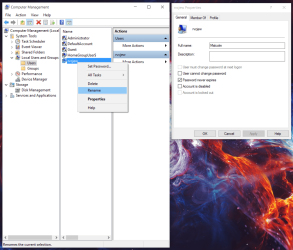
Open computer management then click system tools, user and groups, users and right click the user you want in front and hit rename and put an a in front of the name then click off it to save it then right click the user again and pick properties and make the full name the one you want displayed on the login screen. Mine shows Malcolm.
 

Attachments

  • users.png
    users.png
    216.4 KB · Views: 3

My Computer My Computer

Computer type
PC/Desktop
Computer Manufacturer/Model Number
Custom
OS
10 Pro x64
CPU
Ryzen 9 3900X
Motherboard
Asrock x370 Tachi
Memory
64GB(4x16GB) DDR4
Graphics Card(s)
EVGA 1080ti FTW3
Sound Card
ASUS Xonar Essence STX (V4 Bursons), ODAC rev B, NFB-11, O2
Monitor(s) Displays
3xASUS PB278Q/R, Optoma HD142X
Screen Resolution
3x1440p, 1080p
Hard Drives
512GB 850 EVO(OS, Programs)
4TB (Movies)
3TB (Downloads)
3TB (Programs)
1TB HDD (Games)
2x6TB R1 (videos)
PSU
AX760
Case
Fractal Define R5
Cooling
NH-D15S
Keyboard
Massdrop Ctrl with Box Navy's
Mouse
G903, Alioth XXL Mat
Internet Speed
280/40
Antivirus
MBAM, ESET
Browser
Canary 64 Bit
Other Info
I also own a Thinkpad P50 Xeon 4K, X220T, X1C5
Local Users and Groups is *not an option* in Win7 Home Premium, only in Win7 Pro. :-)

Bob
 

My Computer My Computer

Computer type
PC/Desktop
Computer Manufacturer/Model Number
Hewlett-Packard CQ2014 1.02
OS
Windows 7 Home Premium x64
CPU
1.30 gigahertz AMD E-300 APU with Radeon HD Graphics
Motherboard
PEGATRON CORPORATION 2AD3 1.02
Memory
2664 Megabytes Usable Installed Memory
Graphics Card(s)
AMD Radeon HD 6310 Graphics
Sound Card
Realtek High Definition Audio
Monitor(s) Displays
Hitachi CM823F
Screen Resolution
1152 x 864
Hard Drives
WDC WD5000AAKS-60WWPA0 [Hard drive] (500.11 GB) -- drive 0, s/n WD-WMAYU2933783, rev 16.01H16
Keyboard
101-key (standard with system)
Mouse
Logitech M100
Internet Speed
25Mbps Cable
Antivirus
MS Security Essentials
Browser
Firefox v69.0
Local Users and Groups is *not an option* in Win7 Home Premium, only in Win7 Pro. :-)

Bob

Ah sorry, I thought it was a separate snap in to the gpedit and netplwiz. There are ways to get the snap in that version but its messy and not advisable. Do Below Instead.

I would make a restore point before trying this.

1. Make a new admin account to do this from
2. go into that account and run this from an elevated command prompt.

wmic useraccount where name='currentname' rename newname

3. Then run:
net user nameyoujustmade /fullname:"nameyouwantologinwith"
4. Logg off and back into old user that is renamed. Check to make sure permissions are good for user folders. Delete new admin account made for this process.

Rename local user account
https://technet.microsoft.com/en-us/library/cc771865(WS.10).aspx
 

My Computer My Computer

Computer type
PC/Desktop
Computer Manufacturer/Model Number
Custom
OS
10 Pro x64
CPU
Ryzen 9 3900X
Motherboard
Asrock x370 Tachi
Memory
64GB(4x16GB) DDR4
Graphics Card(s)
EVGA 1080ti FTW3
Sound Card
ASUS Xonar Essence STX (V4 Bursons), ODAC rev B, NFB-11, O2
Monitor(s) Displays
3xASUS PB278Q/R, Optoma HD142X
Screen Resolution
3x1440p, 1080p
Hard Drives
512GB 850 EVO(OS, Programs)
4TB (Movies)
3TB (Downloads)
3TB (Programs)
1TB HDD (Games)
2x6TB R1 (videos)
PSU
AX760
Case
Fractal Define R5
Cooling
NH-D15S
Keyboard
Massdrop Ctrl with Box Navy's
Mouse
G903, Alioth XXL Mat
Internet Speed
280/40
Antivirus
MBAM, ESET
Browser
Canary 64 Bit
Other Info
I also own a Thinkpad P50 Xeon 4K, X220T, X1C5
I don't like messy, as you might imagine.

I'm almost inclined to use a 'touch' utility (and I have more than one here) to change the creation time of the users folder, which would definitely accomplish my goal without a lot of other more-risky things happening. I would do this as an admin and make a restore point beforehand, of course.
 

My Computer My Computer

Computer type
PC/Desktop
Computer Manufacturer/Model Number
Hewlett-Packard CQ2014 1.02
OS
Windows 7 Home Premium x64
CPU
1.30 gigahertz AMD E-300 APU with Radeon HD Graphics
Motherboard
PEGATRON CORPORATION 2AD3 1.02
Memory
2664 Megabytes Usable Installed Memory
Graphics Card(s)
AMD Radeon HD 6310 Graphics
Sound Card
Realtek High Definition Audio
Monitor(s) Displays
Hitachi CM823F
Screen Resolution
1152 x 864
Hard Drives
WDC WD5000AAKS-60WWPA0 [Hard drive] (500.11 GB) -- drive 0, s/n WD-WMAYU2933783, rev 16.01H16
Keyboard
101-key (standard with system)
Mouse
Logitech M100
Internet Speed
25Mbps Cable
Antivirus
MS Security Essentials
Browser
Firefox v69.0

My Computer My Computer

Computer type
PC/Desktop
Computer Manufacturer/Model Number
Home made Desktop
OS
Windows 10 Pro. 64/ version 1709 Windows 7 Pro/64
CPU
Intel i7-6800K @ 4.3
Motherboard
ASUS X-99 Deluxe II
Memory
Corsair Platinum 16 gig @2400
Graphics Card(s)
EVGA GTX 1070 OC
Monitor(s) Displays
Asus 27" LED LCD/VE278Q
Screen Resolution
1920-1080 or 1280-720 HDMI
Hard Drives
INTEL SSD 730-240 Gb Sata 3.0/
PSU
EVGA Platium 1200W
Case
Phanteks Luxe Tempered Glass 8 fans/ one radiator
Cooling
XSPC/ Water Cooled CPU
Keyboard
Das 4 Professional
Mouse
Logitech M705/MX Anywhere 2-S
Internet Speed
100 mbits
Antivirus
Microsoft Security Essentials/ Malwarebytes Premium 3.0/ SAS
Browser
I.E. 11 default/Firefox/ ISP Time Warner Cable/Spectrum
Other Info
LG BluRay Burner/
Sound system-KLipsch-THX/
Icy Dock ssd Hot Swap bays.

My Computer My Computer

Computer type
PC/Desktop
Computer Manufacturer/Model Number
Custom
OS
10 Pro x64
CPU
Ryzen 9 3900X
Motherboard
Asrock x370 Tachi
Memory
64GB(4x16GB) DDR4
Graphics Card(s)
EVGA 1080ti FTW3
Sound Card
ASUS Xonar Essence STX (V4 Bursons), ODAC rev B, NFB-11, O2
Monitor(s) Displays
3xASUS PB278Q/R, Optoma HD142X
Screen Resolution
3x1440p, 1080p
Hard Drives
512GB 850 EVO(OS, Programs)
4TB (Movies)
3TB (Downloads)
3TB (Programs)
1TB HDD (Games)
2x6TB R1 (videos)
PSU
AX760
Case
Fractal Define R5
Cooling
NH-D15S
Keyboard
Massdrop Ctrl with Box Navy's
Mouse
G903, Alioth XXL Mat
Internet Speed
280/40
Antivirus
MBAM, ESET
Browser
Canary 64 Bit
Other Info
I also own a Thinkpad P50 Xeon 4K, X220T, X1C5
Problem solved, elsewhere...

Opened netplwiz.exe,
removed all unused user accounts,
changed user name of account that would have been migrated to match folder name.

Thanks to everyone who helped.
 

My Computer My Computer

Computer type
PC/Desktop
Computer Manufacturer/Model Number
Hewlett-Packard CQ2014 1.02
OS
Windows 7 Home Premium x64
CPU
1.30 gigahertz AMD E-300 APU with Radeon HD Graphics
Motherboard
PEGATRON CORPORATION 2AD3 1.02
Memory
2664 Megabytes Usable Installed Memory
Graphics Card(s)
AMD Radeon HD 6310 Graphics
Sound Card
Realtek High Definition Audio
Monitor(s) Displays
Hitachi CM823F
Screen Resolution
1152 x 864
Hard Drives
WDC WD5000AAKS-60WWPA0 [Hard drive] (500.11 GB) -- drive 0, s/n WD-WMAYU2933783, rev 16.01H16
Keyboard
101-key (standard with system)
Mouse
Logitech M100
Internet Speed
25Mbps Cable
Antivirus
MS Security Essentials
Browser
Firefox v69.0
Back
Top