- Local time
- 9:16 AM
- Messages
- 139
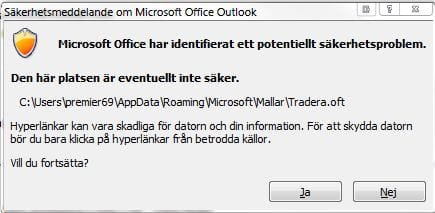
Hello, i have used the customize toolbar, added a button and assigned a hyperlink to an .oft file on my computer so that i can in one click create a new mail using my home made template but outlook pops up a message security dialog box every time that i have to click ok before it proceeds, i can't find any setting to turn this off in security center.
Can i go about creating this shortcut to create new mail in a different way?
Also, can i create a similar button for reply to an e-mail using this home made template?
Can i go about creating this shortcut to create new mail in a different way?
Also, can i create a similar button for reply to an e-mail using this home made template?
My Computer
At a glance
Windows 7 RTM x64Core 2 Quad 2.6GHz4GB RamAsus nvidia 260
- Computer Manufacturer/Model Number
- White Box
- OS
- Windows 7 RTM x64
- CPU
- Core 2 Quad 2.6GHz
- Motherboard
- Gigabyte Ga-x48-ds5
- Memory
- 4GB Ram
- Graphics Card(s)
- Asus nvidia 260
- Sound Card
- Built in, Using Optical Out with Logitech Z-5500 5.1
- Monitor(s) Displays
- Acer T230H & Samsung LCD TV FULL HD "LE46B530"
- Screen Resolution
- 1920x1080 + 1920x1080
- Hard Drives
- 8 of them, about 6.5TB
- PSU
- 750 watt
- Case
- Antec P180
- Cooling
- Default Intel stock
- Keyboard
- Logitech Dinovo edge
- Mouse
- wireless laser mouse
- Internet Speed
- 15mbit Cable
- Other Info
- Primary monitor is multitouch (yay)