Solved Create txt file of folder contents

xxxdannyxxx

Do You Believe
Guru
Gold Member
VIP
Local time
4:37 AM
Messages
2,615
Location
England
Hi Guys long time no see, hope you are all well

I want to create an index of movies on a NAS drive.
I have a folder G:\Shared Videos on a NAS which has 23 sub folders inside (Film Genres) and a total of 1100 .Mp4 movies spread across these folders. I need a .bat file I can run from inside G:\Shared Videos that will list the 1100 movies, name only (not the Genre Folders or location) in alphabetical order to a text file I can then import to excel to create an Index. Is this possible. I've tried a few I have found searching but there not quite doing what I want.

Danny
 

My Computer My Computer

At a glance

Windows 7 Home Premium x64 SP1intel(R)core(TM)2 duo CPU T6600 @ 2.20GHz3 gb ddr3ati radeon hd4570/512mb
Computer Manufacturer/Model Number
acer aspire 5935g
OS
Windows 7 Home Premium x64 SP1
CPU
intel(R)core(TM)2 duo CPU T6600 @ 2.20GHz
Motherboard
intel gm45/gm47 revision 07
Memory
3 gb ddr3
Graphics Card(s)
ati radeon hd4570/512mb
Monitor(s) Displays
lop156wh2-tle1 15.3 flat
Screen Resolution
1366x768
Hard Drives
OCZ-Agility3 60gig ssd
320gig external hdd
500gig external hdd
Mouse
Optical
Internet Speed
30Mbps Down/30Mbps Up

My Computer My Computer

At a glance

Windows Seven Ultimate x64 SP1Intel Core i7 x980 @ 3.33GHz12.0 GBNvidia GeForce GTX 260
Computer type
PC/Desktop
Computer Manufacturer/Model Number
HP
OS
Windows Seven Ultimate x64 SP1
CPU
Intel Core i7 x980 @ 3.33GHz
Memory
12.0 GB
Graphics Card(s)
Nvidia GeForce GTX 260

Yes tried it Thanks. that copies the whole path I only want the file names

I have got as far as this but this is only copying the 23 folder names in the public folder to a .txt file which means I would have to run the .bat in all 23 folders and then organise them alphabetically. I need it to omit the folders and list the .Mp4s in the folders only

Code:
dir /a /b /-p /o:gen >C:\WINDOWS\Temp\file_list.txt
start notepad C:\WINDOWS\Temp\file_list.txt
 

My Computer My Computer

At a glance

Windows 7 Home Premium x64 SP1intel(R)core(TM)2 duo CPU T6600 @ 2.20GHz3 gb ddr3ati radeon hd4570/512mb
Computer Manufacturer/Model Number
acer aspire 5935g
OS
Windows 7 Home Premium x64 SP1
CPU
intel(R)core(TM)2 duo CPU T6600 @ 2.20GHz
Motherboard
intel gm45/gm47 revision 07
Memory
3 gb ddr3
Graphics Card(s)
ati radeon hd4570/512mb
Monitor(s) Displays
lop156wh2-tle1 15.3 flat
Screen Resolution
1366x768
Hard Drives
OCZ-Agility3 60gig ssd
320gig external hdd
500gig external hdd
Mouse
Optical
Internet Speed
30Mbps Down/30Mbps Up
Try this ahk script. Instead of using notepad I suggest free EditPad Lite 7. It has sorting and duplicate line elimination.

To use the script, compile to exe and copy the exe to the root folder. Open command prompt tp root folder and type GetMovieNames.exe. I suggest erasing your text file first as this appends to it.

Code:
SendMode Input
SetWorkingDir %A_ScriptDir%


Loop,%A_WorkingDir%,2,1
    Run %comspec% /c  "dir /a /b /-p /o:gen >>C:\WINDOWS\Temp\file_list.txt"
You can download AutoHotkey_L here
AutoHotkey Downloads

There are forums. You can post the script and ask for help embellishing it. For example deleting the results file on start and filtering out the folder names etc..

Edit: It's worth messing around with ahk since you can make your own hotkey tray utilities to do just about anything when you press a key combination.

Edit2: ahk and the forums are free. An online email like hotmail or outlook is fine for free registration to the forums.
 

My Computer My Computer

At a glance

Windows 7 32 bitAMD 5200+ dual core2 GBNVidia GeForce 6150SE 128 MB
Computer Manufacturer/Model Number
HP Media Center
OS
Windows 7 32 bit
CPU
AMD 5200+ dual core
Memory
2 GB
Graphics Card(s)
NVidia GeForce 6150SE 128 MB
Monitor(s) Displays
CRT
Screen Resolution
1280x1024
Hard Drives
500 GB Sata internal :

SIIG USB 3.0 docking stations w/WD Caviar Black 6 Gb/s drives
Keyboard
PS/2
Mouse
PS/2 Wheel Mouse
Other Info
SIIG USB 3.0 PCIexpress card.
Try this ahk script. Instead of using notepad I suggest free EditPad Lite 7. It has sorting and duplicate line elimination.

To use the script, compile to exe and copy the exe to the root folder. Open command prompt tp root folder and type GetMovieNames.exe. I suggest erasing your text file first as this appends to it.

Code:
SendMode Input
SetWorkingDir %A_ScriptDir%


Loop,%A_WorkingDir%,2,1
    Run %comspec% /c  "dir /a /b /-p /o:gen >>C:\WINDOWS\Temp\file_list.txt"
You can download AutoHotkey_L here
AutoHotkey Downloads

There are forums. You can post the script and ask for help embellishing it. For example deleting the results file on start and filtering out the folder names etc..

Edit: It's worth messing around with ahk since you can make your own hotkey tray utilities to do just about anything when you press a key combination.

Edit2: ahk and the forums are free. An online email like hotmail or outlook is fine for free registration to the forums.

Thanks Miles will give it a go, one question why the >> oppose to my single
 

My Computer My Computer

At a glance

Windows 7 Home Premium x64 SP1intel(R)core(TM)2 duo CPU T6600 @ 2.20GHz3 gb ddr3ati radeon hd4570/512mb
Computer Manufacturer/Model Number
acer aspire 5935g
OS
Windows 7 Home Premium x64 SP1
CPU
intel(R)core(TM)2 duo CPU T6600 @ 2.20GHz
Motherboard
intel gm45/gm47 revision 07
Memory
3 gb ddr3
Graphics Card(s)
ati radeon hd4570/512mb
Monitor(s) Displays
lop156wh2-tle1 15.3 flat
Screen Resolution
1366x768
Hard Drives
OCZ-Agility3 60gig ssd
320gig external hdd
500gig external hdd
Mouse
Optical
Internet Speed
30Mbps Down/30Mbps Up
Movie file names to .csv?

Hi,

I must confess that I cannot write a script for you but I have another solution that works for me.

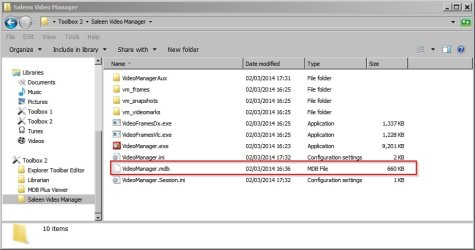
I have installed Saleen Video Manager as a portable app and it stores videos that are added to the library in an Access Database (.mdb format).

VideoManag 4.jpg

It's possible to open this database using any software that can open and view .mdb files.

It's then possible to choose columns and sort by path or alphabetically and export to .csv.

You'd only need to sort by path if you added more than one directory to the library.

VideoManag 3.jpg

Here's a screenshot of part of an exported list of files in .mdb and .csv formats/ views.

VideoManag.jpg
 

Attachments

  • VideoManag 2.jpg
    VideoManag 2.jpg
    60.7 KB · Views: 23
Last edited:

My Computer My Computer

At a glance

Microsoft Windows 7 Home Premium 64-bit 7601 ...AMD C-60 APU with Radeon(tm) HD Graphics4.00 GBAMD Radeon HD 6290 Graphics
Computer type
Laptop
Computer Manufacturer/Model Number
ASUS
OS
Microsoft Windows 7 Home Premium 64-bit 7601 Multiprocessor Free Service Pack 1
CPU
AMD C-60 APU with Radeon(tm) HD Graphics
Motherboard
ASUSTeK COMPUTER INC. X501U
Memory
4.00 GB
Graphics Card(s)
AMD Radeon HD 6290 Graphics
Sound Card
(1) AMD High Definition Audio Device (2) Realtek High Defi
Screen Resolution
1366 x 768 x 32 bits (4294967296 colors) @ 60 Hz
Hard Drives
Hitachi HTS545050A7E380 SATA Disk Device
Antivirus
Comodo CIS & FW, SecureAplus App Whitelisting, Threatfire
Browser
Cyberfox 64bit, Opera 64bit, Airfox
Other Info
Spy-The-Spy, HitmanPro.Alert, Norton Connect Safe, MJRegWatcher, BitDefender TrafficLight, Voodoo Shield, Zemana AntiMalware
Got it in the end was missing the s switch. Anyone needs it copy to notepad and save as .bat and run from the directory you want the list of files for

Code:
dir /a:-d /b /s /o:n >C:\WINDOWS\Temp\file_list.txt
start notepad C:\WINDOWS\Temp\file_list.txt

Cheers Guys

Danny
 

My Computer My Computer

At a glance

Windows 7 Home Premium x64 SP1intel(R)core(TM)2 duo CPU T6600 @ 2.20GHz3 gb ddr3ati radeon hd4570/512mb
Computer Manufacturer/Model Number
acer aspire 5935g
OS
Windows 7 Home Premium x64 SP1
CPU
intel(R)core(TM)2 duo CPU T6600 @ 2.20GHz
Motherboard
intel gm45/gm47 revision 07
Memory
3 gb ddr3
Graphics Card(s)
ati radeon hd4570/512mb
Monitor(s) Displays
lop156wh2-tle1 15.3 flat
Screen Resolution
1366x768
Hard Drives
OCZ-Agility3 60gig ssd
320gig external hdd
500gig external hdd
Mouse
Optical
Internet Speed
30Mbps Down/30Mbps Up
The >> is append to file. The > will overwrite the file.

Also if they are all the same file type such as .mp4 use dir *.mp4 /s instead of just dir /s
 

My Computer My Computer

At a glance

Windows 7 32 bitAMD 5200+ dual core2 GBNVidia GeForce 6150SE 128 MB
Computer Manufacturer/Model Number
HP Media Center
OS
Windows 7 32 bit
CPU
AMD 5200+ dual core
Memory
2 GB
Graphics Card(s)
NVidia GeForce 6150SE 128 MB
Monitor(s) Displays
CRT
Screen Resolution
1280x1024
Hard Drives
500 GB Sata internal :

SIIG USB 3.0 docking stations w/WD Caviar Black 6 Gb/s drives
Keyboard
PS/2
Mouse
PS/2 Wheel Mouse
Other Info
SIIG USB 3.0 PCIexpress card.
Thanks Miles any way to get the list without the file path just the Mp4 name
 

My Computer My Computer

At a glance

Windows 7 Home Premium x64 SP1intel(R)core(TM)2 duo CPU T6600 @ 2.20GHz3 gb ddr3ati radeon hd4570/512mb
Computer Manufacturer/Model Number
acer aspire 5935g
OS
Windows 7 Home Premium x64 SP1
CPU
intel(R)core(TM)2 duo CPU T6600 @ 2.20GHz
Motherboard
intel gm45/gm47 revision 07
Memory
3 gb ddr3
Graphics Card(s)
ati radeon hd4570/512mb
Monitor(s) Displays
lop156wh2-tle1 15.3 flat
Screen Resolution
1366x768
Hard Drives
OCZ-Agility3 60gig ssd
320gig external hdd
500gig external hdd
Mouse
Optical
Internet Speed
30Mbps Down/30Mbps Up
See if this works

Code:
SendMode Input
SetWorkingDir %A_ScriptDir%
ResultFile := "C:\WINDOWS\Temp\file_list.txt"

Loop,*.mp4,,1
    FileAppend,%A_LoopFlename%`n,%ResultFile%
Edit: I added the "`n" to the "%A_LoopFlename%" in the script so it should write one name per line to the text file.

Edit2: I haven't tested it. Should be simple enough but you never know. If it doesn't work as expected post and I'll try to fix it up. :)
 
Last edited:

My Computer My Computer

At a glance

Windows 7 32 bitAMD 5200+ dual core2 GBNVidia GeForce 6150SE 128 MB
Computer Manufacturer/Model Number
HP Media Center
OS
Windows 7 32 bit
CPU
AMD 5200+ dual core
Memory
2 GB
Graphics Card(s)
NVidia GeForce 6150SE 128 MB
Monitor(s) Displays
CRT
Screen Resolution
1280x1024
Hard Drives
500 GB Sata internal :

SIIG USB 3.0 docking stations w/WD Caviar Black 6 Gb/s drives
Keyboard
PS/2
Mouse
PS/2 Wheel Mouse
Other Info
SIIG USB 3.0 PCIexpress card.
Code:
C:\FOLDER> tree /A /F > tree.txt
Tree is built in the command line. With some simple search and replace can remove the bits you dont want.
 

My Computer My Computer

At a glance

Windows 10 Pro (x64)Intel Core i7-3930K (3.2GHz - 4.5GHz)4x Samsung 4GB PC3-12800 DDR3 (16GB 1600MHz)Nvidia Geforce GTX 690
Computer type
PC/Desktop
Computer Manufacturer/Model Number
Alienware Aurora ALX R4
OS
Windows 10 Pro (x64)
CPU
Intel Core i7-3930K (3.2GHz - 4.5GHz)
Motherboard
Alienware Aurora-R4 x79
Memory
4x Samsung 4GB PC3-12800 DDR3 (16GB 1600MHz)
Graphics Card(s)
Nvidia Geforce GTX 690
Sound Card
SteelSeries Siberia Elite
Monitor(s) Displays
Dell UltraSharp U3011
Screen Resolution
2560x1600
Hard Drives
Samsung 850 Pro 256 GB, Seagate 1TB Desktop Hybrid HDD, 2x Western Digital 4TB Green HDD
PSU
875W Some Dell PSU <.<
Case
Alienware Aurora ALX
Cooling
Custom Liquid Cooling (EK CPU & GPU blocks) dual EK 480RAD
Keyboard
Logitech G710+ Mechanical
Mouse
Logitech G700s
Internet Speed
Verizon Fios (50 mbps average)
Other Info
Server: Intel NUC D54250WYK: i5-4250U, 16GB, 256 GB mSATA, Windows Server 2012 R2
Code:
C:\FOLDER> tree /A /F > tree.txt
Tree is built in the command line. With some simple search and replace can remove the bits you dont want.

Another approach. But one thing good about a working script is you can enhance it. For example if only .avi and .mp4 are of interest the search may use *.* then filter with
SplitPath,A_LoopFileLongPath,,Ext
If Ext in avi,mp4
yadda yadda

Of course this is a knock-off. A polished script would allow for input types, result filename etc..
 

My Computer My Computer

At a glance

Windows 7 32 bitAMD 5200+ dual core2 GBNVidia GeForce 6150SE 128 MB
Computer Manufacturer/Model Number
HP Media Center
OS
Windows 7 32 bit
CPU
AMD 5200+ dual core
Memory
2 GB
Graphics Card(s)
NVidia GeForce 6150SE 128 MB
Monitor(s) Displays
CRT
Screen Resolution
1280x1024
Hard Drives
500 GB Sata internal :

SIIG USB 3.0 docking stations w/WD Caviar Black 6 Gb/s drives
Keyboard
PS/2
Mouse
PS/2 Wheel Mouse
Other Info
SIIG USB 3.0 PCIexpress card.
Back
Top