Creating a multi-boot USB stick, possible?

HHawk

New member
Member
Local time
9:39 AM
Messages
34
Okay I am looking to achieve the following; I bought a USB stick and I want Windows 7 Repair Disc 32-bit & 64-bit versions on it.

Is this possible?

Also it would be great if I could also add Ultimate Boot CD along with Hires Bootcd as well on the same USB stick. I don't know if that would be possible as well?

The most important thing for me at the moment is, is getting both versions (32-/64-bit) of Windows 7 Repair on one USB stick.

Please advice. TY.
 

My Computer

OS
Windows 7 & Windows XP x64

My Computer

Computer Manufacturer/Model Number
* BFK Customs *
OS
W 7 64-bit Ultimate
CPU
Intel Q9550 Yorkfield
Motherboard
ASUS P5Q Pro
Memory
8GB Dominator 8500C5D
Graphics Card(s)
ATI : XFX 5870
Sound Card
Realtek HD Audio 7-1
Monitor(s) Displays
1x 47" LCD HDMI & 3x 26" LCD HDMI
Screen Resolution
1920x1080P & 1920x1200
Hard Drives
1x 80GB Intel X25-M G2 SSD : 1x 500GB & 1x 640GB WD Caviar Black(s)
PSU
Corsair 620HX
Case
Cooler Master RC-690
Cooling
Tuniq Tower 120, 2x 140mm and 3x 120mm case fans
Keyboard
Microsoft 500
Mouse
Razer Diamondback 3G
Internet Speed
14 Mb/s
Other Info
1x Koutech 3Gb/s SATA HDD Hot Swap Rack
Wow great... Searched for about an hour on Google, but couldn't find anything. Most probably I was searching the wrong way. Hehe.

Will report back... Thanks man, highly appreciated.
 

My Computer

OS
Windows 7 & Windows XP x64
My pleasure, glad I could help; do remember to post back so I'll know if it works the way you want.
 

My Computer

Computer Manufacturer/Model Number
* BFK Customs *
OS
W 7 64-bit Ultimate
CPU
Intel Q9550 Yorkfield
Motherboard
ASUS P5Q Pro
Memory
8GB Dominator 8500C5D
Graphics Card(s)
ATI : XFX 5870
Sound Card
Realtek HD Audio 7-1
Monitor(s) Displays
1x 47" LCD HDMI & 3x 26" LCD HDMI
Screen Resolution
1920x1080P & 1920x1200
Hard Drives
1x 80GB Intel X25-M G2 SSD : 1x 500GB & 1x 640GB WD Caviar Black(s)
PSU
Corsair 620HX
Case
Cooler Master RC-690
Cooling
Tuniq Tower 120, 2x 140mm and 3x 120mm case fans
Keyboard
Microsoft 500
Mouse
Razer Diamondback 3G
Internet Speed
14 Mb/s
Other Info
1x Koutech 3Gb/s SATA HDD Hot Swap Rack
Okay seems I have some problems.

I managed to get Windows 7 Repaird Disc x64 & x86 on the USB Stick, along with UBCD and Hiren's Bootcd. However when I select W7 Repair x64 or x86 it keeps displaying "Loading Windows Files". It just stays like that. Something is not working properly. :S

I also checked this thread: http://www.sevenforums.com/tutorials/92177-boot-windows-7-system-repair-disc-usb-using-grub4dos.html

But it simply doesn't work for some reason...?

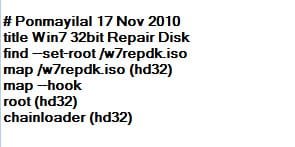
I have this in my list:

title Windows 7 x86 Repair Disc
find --set-root /w7_repair_x86.iso
map /w7_repair_x86.iso (hd32)
map --hook
root (hd32)
chainloader (hd32)

title Windows 7 x64 Repair Disc
find --set-root /w7_repair_x64.iso
map /w7_repair_x64.iso (hd32)
map --hook
root (hd32)
chainloader (hd32)

On a sidenote;

UBCD works and Hiren's Bootcd also works from the USB stick, however Mini Windows XP (from within Hiren's Bootcd) doesn't work. Same problem as described above?
 
Last edited:

My Computer

OS
Windows 7 & Windows XP x64
Anyone here who can help me to get this working?
 

My Computer

OS
Windows 7 & Windows XP x64

My Computer

Computer Manufacturer/Model Number
* BFK Customs *
OS
W 7 64-bit Ultimate
CPU
Intel Q9550 Yorkfield
Motherboard
ASUS P5Q Pro
Memory
8GB Dominator 8500C5D
Graphics Card(s)
ATI : XFX 5870
Sound Card
Realtek HD Audio 7-1
Monitor(s) Displays
1x 47" LCD HDMI & 3x 26" LCD HDMI
Screen Resolution
1920x1080P & 1920x1200
Hard Drives
1x 80GB Intel X25-M G2 SSD : 1x 500GB & 1x 640GB WD Caviar Black(s)
PSU
Corsair 620HX
Case
Cooler Master RC-690
Cooling
Tuniq Tower 120, 2x 140mm and 3x 120mm case fans
Keyboard
Microsoft 500
Mouse
Razer Diamondback 3G
Internet Speed
14 Mb/s
Other Info
1x Koutech 3Gb/s SATA HDD Hot Swap Rack
Anyone here who can help me to get this working?

Did your Windows 7 Repair disk - burnt on a CD directly - run properly?

Assuming that it does, the only other thing that I can think of is that the ISOs created by you are either corrupt or not proper.

I recommend that you use the simple, elegant and straight-forward ISO Recorder v 3.1 from here to make ISOs of your repair disks.(or for that matter any other disk/s)

I would also recommend that you use MultiBootISOs-2.1.3.9.exe from here to make your multi-boot pen drive. You may also refer to my this post.

Good luck.
 
Last edited:

My Computer

Computer Manufacturer/Model Number
self-assembled
OS
Windows 7 Ultimate 32bit
CPU
AMD Phenom II X3 720 Processor
Motherboard
Gigabyte GA-MA78GM-S2H Revision 1.0
Memory
Transcend DDR2 (PC2 6400) 4 X 1GB
Graphics Card(s)
Integrated + ATI Radeon 4550
Sound Card
Integrated Realtek ALC 889A
Monitor(s) Displays
DELL 1704 FPT
Screen Resolution
1280 x 1024
Hard Drives
Western Digital Caviar SE16 250 GB x2 in RAID 0
PSU
Coolermaster 400 W
Case
Zebronics Cube
Cooling
stock
Keyboard
Microsoft - wired
Mouse
Microsoft - wired
Internet Speed
ADSL 256-512Kbps
Same ISO boots correctly from DVD. I tried the old and new version of MultiBootISO's, both give me the same result.

I am using the repair / recovery disc's found here: Download Windows 7 System Recovery Discs — The NeoSmart Files

They work properly when I am using them from a CD, but of course I don't want that; I just want one USB stick which has all the program's I will ever need...
 

My Computer

OS
Windows 7 & Windows XP x64
^ I downloaded the 143MB ISO file (torrent download), put it into my Multiboot pendrive, edited the menu to show it and tried.( I used MultibootISOs v2.1.3.5 which was the latest then.) It is working perfectly. No problems whatsoever.

trial 16-31-05.jpg

Suggest that you redownload the file and try again.
 

My Computer

Computer Manufacturer/Model Number
self-assembled
OS
Windows 7 Ultimate 32bit
CPU
AMD Phenom II X3 720 Processor
Motherboard
Gigabyte GA-MA78GM-S2H Revision 1.0
Memory
Transcend DDR2 (PC2 6400) 4 X 1GB
Graphics Card(s)
Integrated + ATI Radeon 4550
Sound Card
Integrated Realtek ALC 889A
Monitor(s) Displays
DELL 1704 FPT
Screen Resolution
1280 x 1024
Hard Drives
Western Digital Caviar SE16 250 GB x2 in RAID 0
PSU
Coolermaster 400 W
Case
Zebronics Cube
Cooling
stock
Keyboard
Microsoft - wired
Mouse
Microsoft - wired
Internet Speed
ADSL 256-512Kbps
Back
Top