Creating a welcoming batch file...

kooldudematt

New member
Local time
7:19 PM
Messages
4
I need help creating batch file that will do the following...
I want it to echo "Welcome (insert name here)."
I want it to say "How are you today, good or bad?" [G, B]
If G, I want it to display, "That's great to know, sir! Would you like me to open your homepage? [Y, N]
If Y, I want it to execute cd C:\Program Files\Internet Explorer\iexplore.exe
If N, I want it to EXIT
If B, I want it to display "I'm terribly sorry to hear that. Would you like me to open Internet for You?"
If Y, execute cd C:\Program Files\Internet Explorer\iexplore.exe
If N, I want it to pause

Any help would be great, because everytime I put in the commands, they don't work (I'm sure I'm not putting them in correctly). I do not understand much of the way Microsoft CMD help explains it, so please put it in examples and plain English! Thanks!
 

My Computer

Computer Manufacturer/Model Number
eMachines/EL1850
OS
Windows 7 Home Premium 64-bit (6.1, Build 7600)
Motherboard
Intel(R) Celeron(R) 450 @ 2.20GHz, ~2.2GHz
Memory
2.00 GB
Monitor(s) Displays
Dell ST2010f
Try this;

Visual Command Line - Create Bat Files

This gives you a visual interface where you can just click on the commands you want to use, and add any text etc. This then automatically generates the batch file you want;


Regards....Mike Connor
 

My Computer

OS
Several, including Windows 7 x64 Ultimate
This must be in .bat? Not in .exe file?
 

My Computer

Computer type
PC/Desktop
Computer Manufacturer/Model Number
Custom Build
OS
Windows 10 Pro x64
CPU
Intel Core i5 4440 @Stock
Motherboard
Gigabyte Z97 D3H
Memory
4 x 4GB HyperX Fury DDR3
Graphics Card(s)
Gigabyte GTX 1050Ti O4G
Sound Card
Integrated
Monitor(s) Displays
Dell P2417H
Screen Resolution
1920 x 1080
Hard Drives
Samsung EVO 850 120GB / Toshiba DT01ACA050 1TB 7200prm 32MB
PSU
Riotoro Onyx 750W
Case
NZXT H500 Black-Red
Cooling
Stock CPU + NZXT 120mm + 2x120mm red fans
Keyboard
Modecom Volcano Lanparty
Mouse
Asus ROG Gladius / DeepCool E-Pad Plus
Internet Speed
DOCSIS 50/3 Mbit
Browser
Google Chrome
Other Info
Asus K55VJ(i5 3210M, GT635M / 2GB, 8GB DDR3, 500GB HDD)
Last edited:

My Computer

Computer type
PC/Desktop
Computer Manufacturer/Model Number
Gateway DX4831-01e (Mid-Tower Desktop)
OS
Originally Win 7 Hm Prem x64 Ver 6.1.7600 Build 7601-SP1 | Upgraded to Windows 10 December 14, 2019
CPU
Intel i3 530 2.93GHz, 2933MHz 2 Cores 4 Logical Processors
Motherboard
Gateway H57M01 133 megahertz
Memory
6GB of 1,333MHz DDR3 SDRAM
Graphics Card(s)
32MB Intel Graphics Media Accelerator HD IGChip
Sound Card
Realtek High Definition Audio
Monitor(s) Displays
Gateway HX2000 20inch TFT active matrix TN
Screen Resolution
1600 x 900 x 59 hertz
Hard Drives
WDC WD10EADS-00M2B0 [HDD] (1000.20 GB) -- drive 0,
HL-DT-ST DVDRAM GH41N [CD-ROM dr]
Four card readers, and Four USB 2.0
PSU
300watts.
Case
Mid-Tower Desktop
Cooling
Stock from Gateway
Keyboard
Natural Ergonomic Keyboard 4000, see Other Info
Mouse
Orig. Gateway wore out now using Insignia USB wired optical
Internet Speed
Vz FIOS 10ms png 57.64Mbps down 65.53Mbps up Speedtest.org
Antivirus
Zamana Anti-logger with Anti-malware, MSE, Windows Firewall,
Browser
IE11.0.9600.19399-Upd ver11.0.135, Firefox 68.0.1 x64
Other Info
System Specs by Belarc.

BIOS: American Megatrends Inc. P01-A0 11/17/2009

Replaced the MS 'Natural' Standard PS/2 Enhanced 101-102 Keyboard with a new Natural Ergonomic Keyboard 4000 on August 1st 2014.

Canon Pixma MG3222 Printer.

Updated to IE11 on 12102015 | Fios Quantum Router g1100

Additional AV: SpywareBlaster, manual Mbam, SAS
I do not currently know understand the way the computer describes the commands. I need it in plain English, and I am saving the file as a .bat
 

My Computer

Computer Manufacturer/Model Number
eMachines/EL1850
OS
Windows 7 Home Premium 64-bit (6.1, Build 7600)
Motherboard
Intel(R) Celeron(R) 450 @ 2.20GHz, ~2.2GHz
Memory
2.00 GB
Monitor(s) Displays
Dell ST2010f
I do not currently know understand the way the computer describes the commands. I need it in plain English,
That would be like doing your homework. Could you post what you have so far without all the "I want this. I want that"?
Then we can learn together.

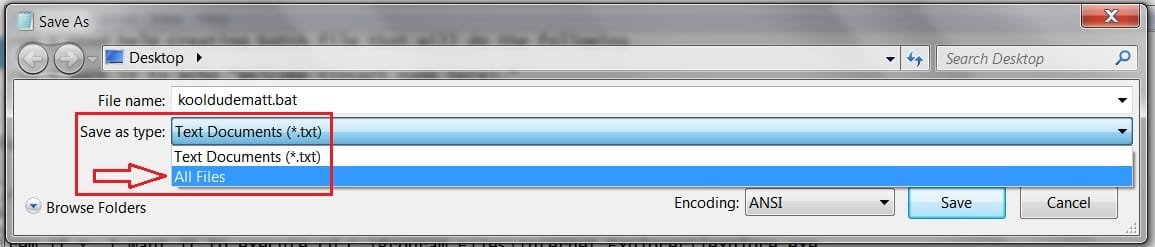
and I am saving the file as a .bat
Yes it would be correct to save the file with the .bat extension, as in kooldudematt.bat . That would be the Files name

But,

Where you "Save as type" are you saving the .bat as "All Files (*.*)" ?
 

Attachments

  • KDM.jpg
    KDM.jpg
    35 KB · Views: 14

My Computer

Computer type
PC/Desktop
Computer Manufacturer/Model Number
Gateway DX4831-01e (Mid-Tower Desktop)
OS
Originally Win 7 Hm Prem x64 Ver 6.1.7600 Build 7601-SP1 | Upgraded to Windows 10 December 14, 2019
CPU
Intel i3 530 2.93GHz, 2933MHz 2 Cores 4 Logical Processors
Motherboard
Gateway H57M01 133 megahertz
Memory
6GB of 1,333MHz DDR3 SDRAM
Graphics Card(s)
32MB Intel Graphics Media Accelerator HD IGChip
Sound Card
Realtek High Definition Audio
Monitor(s) Displays
Gateway HX2000 20inch TFT active matrix TN
Screen Resolution
1600 x 900 x 59 hertz
Hard Drives
WDC WD10EADS-00M2B0 [HDD] (1000.20 GB) -- drive 0,
HL-DT-ST DVDRAM GH41N [CD-ROM dr]
Four card readers, and Four USB 2.0
PSU
300watts.
Case
Mid-Tower Desktop
Cooling
Stock from Gateway
Keyboard
Natural Ergonomic Keyboard 4000, see Other Info
Mouse
Orig. Gateway wore out now using Insignia USB wired optical
Internet Speed
Vz FIOS 10ms png 57.64Mbps down 65.53Mbps up Speedtest.org
Antivirus
Zamana Anti-logger with Anti-malware, MSE, Windows Firewall,
Browser
IE11.0.9600.19399-Upd ver11.0.135, Firefox 68.0.1 x64
Other Info
System Specs by Belarc.

BIOS: American Megatrends Inc. P01-A0 11/17/2009

Replaced the MS 'Natural' Standard PS/2 Enhanced 101-102 Keyboard with a new Natural Ergonomic Keyboard 4000 on August 1st 2014.

Canon Pixma MG3222 Printer.

Updated to IE11 on 12102015 | Fios Quantum Router g1100

Additional AV: SpywareBlaster, manual Mbam, SAS
Interesting app. I don't think it's going to help here tho.

Batch file is not going to be very pretty - you might be beter doing a simple little app. - AutoIt or similar.
 

My Computers

System One System Two

  • Computer type
    PC/Desktop
    OS
    7 X64
    CPU
    i5 8400
    Motherboard
    gigabyte b365m ds3h
    Memory
    2x8gb 3200mhz
    Hard Drives
    various
    PSU
    pure power 11 400w cm
    Case
    Coolermaster
    Cooling
    cryorig m9i
  • Computer type
    PC/Desktop
    OS
    7x64
    CPU
    g5400
    Motherboard
    ga b365m ds3h
    Memory
    8gb ddr4 2400
    PSU
    xfx pro 450w
Interesting app. I don't think it's going to help here tho.

Batch file is not going to be very pretty - you might be beter doing a simple little app. - AutoIt or similar.

"Simple little apps" are rarely all that simple! Autoit is a prime example! :)

I don't think a beginner cares much about the niceties of various coding examples, they are happy if it does the job.

That application works very well, and they can see what they are doing.

Regards....Mike Connor
 

My Computer

OS
Several, including Windows 7 x64 Ultimate
Yes , I am sure it does work well.

Never seen it before - so thanks for the heads up.

Not clear to me how it explains to the op what to do.

As a completely separate second point - even if he does get it going - a command window won't look great.
 

My Computers

System One System Two

  • Computer type
    PC/Desktop
    OS
    7 X64
    CPU
    i5 8400
    Motherboard
    gigabyte b365m ds3h
    Memory
    2x8gb 3200mhz
    Hard Drives
    various
    PSU
    pure power 11 400w cm
    Case
    Coolermaster
    Cooling
    cryorig m9i
  • Computer type
    PC/Desktop
    OS
    7x64
    CPU
    g5400
    Motherboard
    ga b365m ds3h
    Memory
    8gb ddr4 2400
    PSU
    xfx pro 450w
The program allows you to choose commands, explaining what they do. When you are finished the program writes the batch file for you.

There is no command window involved when you start the .bat file.

It is a good way to learn how to use various commands.


Regards....Mike Connor
 

My Computer

OS
Several, including Windows 7 x64 Ultimate
Resources on batchfiles and scripting for Win 7

There is a great site giving a wealth of information on writing batch files for
administrative tasks and other in Rob Vanderwoude's site:

I wrote a series of batch files that I use regularly, ie. refresh the registry without rebooting. This was always a big pain after modifying the registry...

Rob van der Woude's Scripting Pages
(general scripting tutorials)

and

http://www.robvanderwoude.com/batchfiles.php
(batch files tutorials and commands)

:D Ken Niebling
 

My Computer

Computer Manufacturer/Model Number
Scinformatica Home Build
OS
Windows 7 Ultimate x64
CPU
Intel Core 2 Duo E8400 Wolfdale 3.0GHz LGA 775 65W Dual Core
Motherboard
ASUS P5N-EM HDMI LGA 775 NVIDIA GeForce 7100/nForce630i HDMI
Memory
G.SKILL 4GB (2 x 2GB) 240-Pin DDR2 SDRAM DDR2 800 (PC2 6400)
Graphics Card(s)
Gigabyte NVidia GeForce 8400 GS 512MB 64 bit DDR3 PCIe
Sound Card
Diamond Extreme 7.1 24bit
Monitor(s) Displays
LG 1080p HDTV
Screen Resolution
I use 1024 x 768 or 1920 x 1080
Hard Drives
WD Caviar Black Series 640GB 7200rpm SATA 3GB/s
Hitachi 500GB 7200rpm 3GB/s
PSU
Thermaltake Purepower W0100RU 500W ATX 12V
Case
HEC Blitz Black Steel Edition ATX Mid Tower
Cooling
ARCTIC COOLING Freezer 7 Pro
Keyboard
Verbatim Wireless Keyboard Mouse Combo
Mouse
Gigabyte 2.4G Wireless Notebook Mouse
Internet Speed
Too Slow
Other Info
ASUS DVD +/-RW Optical Disk
1x e-SATA; 6 USB 2.0; 2 x PCI; 1 x PCIe 16; 1 PCIe 4
Seagate 500GB External USB Free Agent Go Drive
Back
Top