Creating Partitions

Birdulike

New member
Member
Local time
4:24 AM
Messages
62
:D Hi to all,

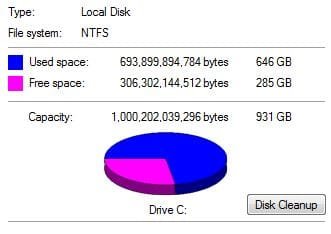
I have a C drive with about 700Gb on it and no partition!
I want to create a partition without losing any data.
The prog I’ve got to do this is EASEUS partition master 9 but it looks complicated to use.
Now the thing is, how do know how much space to allocate.
The whole point of this operation is to use Acronis true image to back up my OS and all my current progs I don’t want to include all the other data because most of it is backed up onto other drives anyway but I still want to keep remaining the data.
So my plan is to
1. Create partition on C allowing enough space for more progs.
2. Make image/back up of OS and all current progs
Am I going about this the right way?:huh:
Any and all help would be appreciated.:D


Attachments

  • My C Drive.JPG
    My C Drive.JPG
    17.5 KB · Views: 2

My Computer

OS
VISTA HP UPGRADED TO WIN7 HP
CPU
AND PHENOM II X4 965 BLACK EDITION 3.4 GHZSOCKET AM3CACHE
Motherboard
ASUS® CROSSHAIR II FORMULA: SATA II, 3 x PCI-Ex, 2 x PCI
Memory
8GB CORSAIR XMS2 DUAL-DDR2 800MHz - LIFETIME WARRANTY!
Graphics Card(s)
1GB NVIDIA GEFORCE 9600GT PCI EXPRESS
Screen Resolution
SONY TN 1024X768
Hard Drives
X2 1TB SERIAL ATA 3-Gb/s HARD DRIVE WITH 16MB CACHE (7,200rpm)
PSU
700W Quiet Quad Rail PSU + 120mm Case Fan
Other Info
Power Supply & Case Cooling
22x DUAL LAYER DVD WRITER ±R/±RW/RAM


700W Quiet Quad Rail PSU + 120mm Case Fan

My Computer

Computer Manufacturer/Model Number
Custom Build
OS
Windows 7 Ultimate x64/Windows 8 Consumer Preview x64/Ubuntu 11.04
CPU
Intel Pentium Dual Core E6700 3.2GHz
Motherboard
ASUS P5G41T-M LX
Memory
Strontium 8192MB DDR3 1333Mhz
Graphics Card(s)
msi GeForce N560GTX-M2D1GD5 1GB
Sound Card
Realtek HD Audio
Monitor(s) Displays
CHIMEI CMV 221D 22"
Screen Resolution
1680x1050
Hard Drives
Seagate Barracuda LP Green 3.5'' 2TB Internal HDD 5900RPM + WD Elements Desktop 1TB External HDD 7200RPM
PSU
SHAW Viper-1500w Gaming PSU
Case
Black eMaxx ATX Mini Tower Case
Keyboard
Microsoft Wireless Keyboard 1000
Mouse
Microsoft Wireless Optical Mouse 2000
Internet Speed
100GB @ 4.76Mbps
The best way to backup is use to two separate Hard Disk Drives, one for OS, & one for Backup.
 

My Computer

OS
ME/XP/Vista/Win7

Attachments

  • Disk Management.JPG
    Disk Management.JPG
    55.8 KB · Views: 14

My Computer

OS
VISTA HP UPGRADED TO WIN7 HP
CPU
AND PHENOM II X4 965 BLACK EDITION 3.4 GHZSOCKET AM3CACHE
Motherboard
ASUS® CROSSHAIR II FORMULA: SATA II, 3 x PCI-Ex, 2 x PCI
Memory
8GB CORSAIR XMS2 DUAL-DDR2 800MHz - LIFETIME WARRANTY!
Graphics Card(s)
1GB NVIDIA GEFORCE 9600GT PCI EXPRESS
Screen Resolution
SONY TN 1024X768
Hard Drives
X2 1TB SERIAL ATA 3-Gb/s HARD DRIVE WITH 16MB CACHE (7,200rpm)
PSU
700W Quiet Quad Rail PSU + 120mm Case Fan
Other Info
Power Supply & Case Cooling
22x DUAL LAYER DVD WRITER ±R/±RW/RAM


700W Quiet Quad Rail PSU + 120mm Case Fan
The best way to backup is use to two separate Hard Disk Drives, one for OS, & one for Backup.

Thanks but my disk is 1 Tb
 

My Computer

OS
VISTA HP UPGRADED TO WIN7 HP
CPU
AND PHENOM II X4 965 BLACK EDITION 3.4 GHZSOCKET AM3CACHE
Motherboard
ASUS® CROSSHAIR II FORMULA: SATA II, 3 x PCI-Ex, 2 x PCI
Memory
8GB CORSAIR XMS2 DUAL-DDR2 800MHz - LIFETIME WARRANTY!
Graphics Card(s)
1GB NVIDIA GEFORCE 9600GT PCI EXPRESS
Screen Resolution
SONY TN 1024X768
Hard Drives
X2 1TB SERIAL ATA 3-Gb/s HARD DRIVE WITH 16MB CACHE (7,200rpm)
PSU
700W Quiet Quad Rail PSU + 120mm Case Fan
Other Info
Power Supply & Case Cooling
22x DUAL LAYER DVD WRITER ±R/±RW/RAM


700W Quiet Quad Rail PSU + 120mm Case Fan
My Computer

Computer Manufacturer/Model Number
Custom Build
OS
Windows 7 Ultimate x64/Windows 8 Consumer Preview x64/Ubuntu 11.04
CPU
Intel Pentium Dual Core E6700 3.2GHz
Motherboard
ASUS P5G41T-M LX
Memory
Strontium 8192MB DDR3 1333Mhz
Graphics Card(s)
msi GeForce N560GTX-M2D1GD5 1GB
Sound Card
Realtek HD Audio
Monitor(s) Displays
CHIMEI CMV 221D 22"
Screen Resolution
1680x1050
Hard Drives
Seagate Barracuda LP Green 3.5'' 2TB Internal HDD 5900RPM + WD Elements Desktop 1TB External HDD 7200RPM
PSU
SHAW Viper-1500w Gaming PSU
Case
Black eMaxx ATX Mini Tower Case
Keyboard
Microsoft Wireless Keyboard 1000
Mouse
Microsoft Wireless Optical Mouse 2000
Internet Speed
100GB @ 4.76Mbps

My Computer

OS
VISTA HP UPGRADED TO WIN7 HP
CPU
AND PHENOM II X4 965 BLACK EDITION 3.4 GHZSOCKET AM3CACHE
Motherboard
ASUS® CROSSHAIR II FORMULA: SATA II, 3 x PCI-Ex, 2 x PCI
Memory
8GB CORSAIR XMS2 DUAL-DDR2 800MHz - LIFETIME WARRANTY!
Graphics Card(s)
1GB NVIDIA GEFORCE 9600GT PCI EXPRESS
Screen Resolution
SONY TN 1024X768
Hard Drives
X2 1TB SERIAL ATA 3-Gb/s HARD DRIVE WITH 16MB CACHE (7,200rpm)
PSU
700W Quiet Quad Rail PSU + 120mm Case Fan
Other Info
Power Supply & Case Cooling
22x DUAL LAYER DVD WRITER ±R/±RW/RAM


700W Quiet Quad Rail PSU + 120mm Case Fan
No worries. Post back to inform us whether it worked or not. ;)
 

My Computer

Computer Manufacturer/Model Number
Custom Build
OS
Windows 7 Ultimate x64/Windows 8 Consumer Preview x64/Ubuntu 11.04
CPU
Intel Pentium Dual Core E6700 3.2GHz
Motherboard
ASUS P5G41T-M LX
Memory
Strontium 8192MB DDR3 1333Mhz
Graphics Card(s)
msi GeForce N560GTX-M2D1GD5 1GB
Sound Card
Realtek HD Audio
Monitor(s) Displays
CHIMEI CMV 221D 22"
Screen Resolution
1680x1050
Hard Drives
Seagate Barracuda LP Green 3.5'' 2TB Internal HDD 5900RPM + WD Elements Desktop 1TB External HDD 7200RPM
PSU
SHAW Viper-1500w Gaming PSU
Case
Black eMaxx ATX Mini Tower Case
Keyboard
Microsoft Wireless Keyboard 1000
Mouse
Microsoft Wireless Optical Mouse 2000
Internet Speed
100GB @ 4.76Mbps
I'm confused. Creating a partition on C won't create more space than the drive has. If left as is the room is there for more programs. :confused:
 

My Computer

Computer type
PC/Desktop
Computer Manufacturer/Model Number
Home Built Desktop By DataTech
OS
Windows 7 Ultimate X64 SP1
CPU
Intel i5-2550K, Differing ~4.4-4.8GHz No built in GPU
Motherboard
ASUS P8Z68-V PRO/GEN3
Memory
16GB G.Skill Sniper 1866MHz @ 2133MHz 2x8GB
Graphics Card(s)
ASUS GTX650TIB-DC2OC-2GD5, (650TI Boost)
Sound Card
Onboard Realtek 5-1
Monitor(s) Displays
Samsung P2570HD
Screen Resolution
1920x1080
Hard Drives
Samsung 840 Pro 256GB SSD for OS, 500GB Seagate Constellation (Enterprise drive) for Data
PSU
Corsair HX650W
Case
Inwin Dragon Rider
Cooling
Hyper 212 EVO w/two Noctua fans, push-pull, @1300 RPM
Keyboard
E-Z Eyes, bright yellow keys with large characters
Mouse
steelseries SENSEI Laser Pro Gaming
Internet Speed
48-51Mbs Mbs down, 11 Mbs up Xfinity Cable
Antivirus
Norton Internet Security 2013
Browser
IE 10, Opera, Pale Moon if needed
Other Info
4 case fans, LG BluRay-RE, ASUS DVD-RW, Mr. Fusion power supply, 1.21 gigawatts.
No worries. Post back to inform us whether it worked or not. ;)

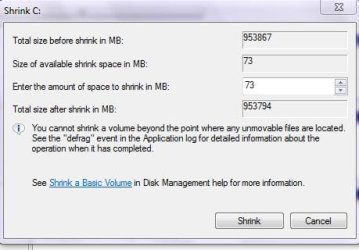
Got as far as see pic... not sure what to do about it!

Right I've Got 73Mb to play with...but I've got 285Gb free on C!!!!!!!!!!!!!
 

Attachments

  • shrink.JPG
    shrink.JPG
    26.9 KB · Views: 4

My Computer

OS
VISTA HP UPGRADED TO WIN7 HP
CPU
AND PHENOM II X4 965 BLACK EDITION 3.4 GHZSOCKET AM3CACHE
Motherboard
ASUS® CROSSHAIR II FORMULA: SATA II, 3 x PCI-Ex, 2 x PCI
Memory
8GB CORSAIR XMS2 DUAL-DDR2 800MHz - LIFETIME WARRANTY!
Graphics Card(s)
1GB NVIDIA GEFORCE 9600GT PCI EXPRESS
Screen Resolution
SONY TN 1024X768
Hard Drives
X2 1TB SERIAL ATA 3-Gb/s HARD DRIVE WITH 16MB CACHE (7,200rpm)
PSU
700W Quiet Quad Rail PSU + 120mm Case Fan
Other Info
Power Supply & Case Cooling
22x DUAL LAYER DVD WRITER ±R/±RW/RAM


700W Quiet Quad Rail PSU + 120mm Case Fan
Two approaches, both of which I've used:
1. Use Partition Wizard CD and use partition wizard to shrink. We have a couple of tutorials on using Partition Wizard. Just search the tutorial index for Partition Wizard

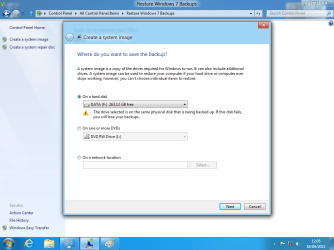
2. Use Win 7 Backup and Restore to make an image backup of C.
shrink the partition
Use Win 7 Backup and Restore to restore the image.
immediately shrink the partition.
Repeat the backup and restore until you get the partition down to where you want.

There is still another way but which is quicker but I'don't want to be responsible for any goofs.

If you use the Win 7 Backup and Restore, then first set to no paging file, turn hibernation off, reduce number of restore points to 1 and then decrease the space for restore points to just over the amount of space the 1 restore point needs., seartch of %temp% and delete everything found.

Win 7 puts some key files at about 1/2 of size of space available so that even if you had only 50gb of data,etc, if your disk was 1 TB you end up not being able to shrink past 500GB.

Now maybe you see why the repeated save the image. shrink, restore the image, shrink.

The easy way out is to use Partition Wizard, but you are going to need to make a backup first just in case anything goes wrong.
 

My Computer

Computer Manufacturer/Model Number
Toshiba Satellite S875D-S7239 laptop
OS
MS Windows 7 Ultimate SP1 64-bit
CPU
AMD A10-4600M
Motherboard
AMD Pumori (Socket FT1)
Memory
6.00 GB Dual-Channel DDR3 @ 798MHz (11-11-12-28)
Graphics Card(s)
AMD Radeon HD 7660G
Sound Card
High Definition Audio Device
Monitor(s) Displays
Generic PnP Monitor (1600x900@60Hz)
Screen Resolution
1600x900@60Hz
Hard Drives
SSD 119GB Corsair CSSD-V128GB2 ATA Device
Keyboard
Standard PS/2 Keyboard
Mouse
HP Wireless Optical Mobile Mouse Model FHA-3410
Internet Speed
What the local pub, local coffee shop offers.
Other Info
Optical Drive:MATSHITA BD-CMB UJ160B ATA Device


Also have an Asus ha1002xp netbook with Win 7 Ultimate installed.
Right. How much space did you shrink the C: drive by? In Disk Management is there some Unallocated Space equal to the amount you shrunk?
 

My Computer

Computer Manufacturer/Model Number
Custom Build
OS
Windows 7 Ultimate x64/Windows 8 Consumer Preview x64/Ubuntu 11.04
CPU
Intel Pentium Dual Core E6700 3.2GHz
Motherboard
ASUS P5G41T-M LX
Memory
Strontium 8192MB DDR3 1333Mhz
Graphics Card(s)
msi GeForce N560GTX-M2D1GD5 1GB
Sound Card
Realtek HD Audio
Monitor(s) Displays
CHIMEI CMV 221D 22"
Screen Resolution
1680x1050
Hard Drives
Seagate Barracuda LP Green 3.5'' 2TB Internal HDD 5900RPM + WD Elements Desktop 1TB External HDD 7200RPM
PSU
SHAW Viper-1500w Gaming PSU
Case
Black eMaxx ATX Mini Tower Case
Keyboard
Microsoft Wireless Keyboard 1000
Mouse
Microsoft Wireless Optical Mouse 2000
Internet Speed
100GB @ 4.76Mbps
Right. How much space did you shrink the C: drive by? In Disk Management is there some Unallocated Space equal to the amount you shrunk?
At all steps of the way, you shrink by as much as allowed until you've got things down to a size you want.
 

My Computer

Computer Manufacturer/Model Number
Toshiba Satellite S875D-S7239 laptop
OS
MS Windows 7 Ultimate SP1 64-bit
CPU
AMD A10-4600M
Motherboard
AMD Pumori (Socket FT1)
Memory
6.00 GB Dual-Channel DDR3 @ 798MHz (11-11-12-28)
Graphics Card(s)
AMD Radeon HD 7660G
Sound Card
High Definition Audio Device
Monitor(s) Displays
Generic PnP Monitor (1600x900@60Hz)
Screen Resolution
1600x900@60Hz
Hard Drives
SSD 119GB Corsair CSSD-V128GB2 ATA Device
Keyboard
Standard PS/2 Keyboard
Mouse
HP Wireless Optical Mobile Mouse Model FHA-3410
Internet Speed
What the local pub, local coffee shop offers.
Other Info
Optical Drive:MATSHITA BD-CMB UJ160B ATA Device


Also have an Asus ha1002xp netbook with Win 7 Ultimate installed.
I'm confused. Creating a partition on C won't create more space than the drive has. If left as is the room is there for more programs. :confused:


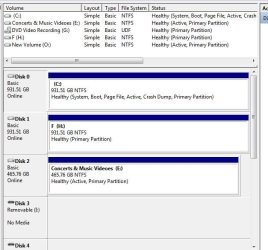
You are correct. You will gain nothing. The only thing I see wrong is the letters on disk 1.
 

My Computer

Computer Manufacturer/Model Number
Myself
OS
Windows 7 Ultimate 64Bit
CPU
C2D E8200
Motherboard
XFX 750i
Memory
8GB PNY PC2-6400
Graphics Card(s)
BFG 9600GT x 2
Sound Card
Stock XFX Optical
Monitor(s) Displays
Gateway 22" HD Display
Hard Drives
C: 1 TB G: 500 GB H: 500 GB
PSU
Ultra LSP 550 Pro Lifetime Series
Case
Xion2
Cooling
ThermalTake
Back
Top