Creating System Image, 0x80780119 error

somerando

New member
Local time
2:45 PM
Messages
5
Hi, I've recently reformatted my computer and I would like to make a backup drive this time around. However when I try and use the windows backup and restore it's always saying I don't have enough space. My understanding is that the problem is from my D: SYSTEM_DRV (120mb free, 1.17gb) not being able to create a shadow drive. I am not able to deselect it when I try to make a system image. I've looked at the problem from the site below. Fix the 0x80780119 error when creating a System Image in Windows 7 and 8 - TechRepublic Now I've also done some searching and that people have said that this SYSTEM_DRV is terribly important and that I can mess up my boot up if I delete it hence my fear. I have thought about merging it to my C drive as well as adding some unassigned space to it, neither of which could be done (even through third party partition software). Any help is appreciated, Thanks, Joe
 

My Computer

Computer type
PC/Desktop
OS
Win7 Pro 64
Post a screenshot of disk management window.
 

My Computers

System One System Two

  • Computer type
    PC/Desktop
    OS
    7 X64
    CPU
    i5 8400
    Motherboard
    gigabyte b365m ds3h
    Memory
    2x8gb 3200mhz
    Hard Drives
    various
    PSU
    pure power 11 400w cm
    Case
    Coolermaster
    Cooling
    cryorig m9i
  • Computer type
    PC/Desktop
    OS
    7x64
    CPU
    g5400
    Motherboard
    ga b365m ds3h
    Memory
    8gb ddr4 2400
    PSU
    xfx pro 450w
still haven't found a solution, any help is appreciated
 

My Computer

Computer type
PC/Desktop
OS
Win7 Pro 64
A few questions:

I notice you have a partition called "System_Drv". Did you give it that name? Normally, I'd expect it to be called "System Reserved".

That partition has about 1 GB of stuff in it, much more than I'd expect. Have you deliberately saved anything to that partition?

It has a drive letter D. Normally, I wouldn't expect it to have any drive letter. Did you deliberately give it the drive letter D?

Are you trying to save this image/backup to G, apparently an external drive?

Lastly, about this recent install---was it from an ordinary Windows 7 installation disc you bought? Or from a burned disk? Or from a disk supplied by the PC manufacturer? Or?
 

My Computer

Computer type
PC/Desktop
Computer Manufacturer/Model Number
Ignatz Special; 4 speed manual gearbox; factory air conditioning; one of one
OS
Windows 7 Home Premium SP1, 64-bit
CPU
Intel Skylake i5-6600K, not overclocked
Motherboard
AsRock Z170M Extreme 4, micro ATX
Memory
8 GB HyperX DDR4-2666 (2 x 4 GB)
Graphics Card(s)
none; graphics are integrated on CPU
Sound Card
onboard: Realtek ALC1150; external: USB Behringer UF0-202
Monitor(s) Displays
Dell S2340M 23 inch IPS
Screen Resolution
1600 x 900
Hard Drives
System: Crucial MX100 series SSD, 128 GB;
Data: Samsung Spinpoint 103SJ, 1 TB;
Backup: WD Caviar Green WD30EZRX-00D8PB0, 3 TB
PSU
Rosewill SilentNight 500 watt fanless, semi-modular
Case
Antec Solo II
Cooling
Noctua NH-U12S; Noctua F12 intake, Noctua S12A exhaust
Keyboard
Microsoft 200 6JH-00001 USB
Mouse
Dell or Microsoft optical wired; USB
Antivirus
Microsoft Security Essentials and Malwarebytes Premium
Browser
Pale Moon
Other Info
All fans PWM; speeds at idle: CPU circa 500 rpm; intake circa 600 rpm; exhaust circa 600 rpm; CPU temps 27 idle and 47 C load in a warm room (27 C/81 F) when running Intel Extreme Tuning Utility stress test.
You could try
http://www.sevenforums.com/tutorials/230477-backup-error-0x81000019-fix.html
I gather you have tried option one. So you could try Option Two, (2) or (3).
As you know from your link for system images the system reserved partition needs free shadow storage space.
Shadow storage space required:
1) for system reserved less than 500MB at least 50MB free space is required
2) for system reserved greater than 500MB at least 320MB is required. As you know you fail this requirement.

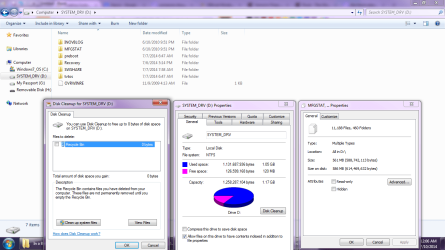
The system reserved partition is normally 100-200MB. Yours is 1.17GB!
The boot data in that partition should normally be ~30MB. So what else is in there to clean up other than USN journal files? List the contents.

If you keep the system reserved partition, it is best not to give it a partition letter.
 

My Computer

Computer type
PC/Desktop
Computer Manufacturer/Model Number
Own build
OS
Windows 7x64 Home Premium SP1
CPU
Intel i7 2600k
Motherboard
ASUS P8Z68 Deluxe
Memory
G.Skill Ripjaws (DDR3-1600) 2x4GB
Graphics Card(s)
Nvidia GeForce GTS 450; Intel HD Graphics 3000(GT2+)
Monitor(s) Displays
Dell Ultrasharp IPS panel U2311H, Samsung SyncMaster P2350
Screen Resolution
1920x1080
Hard Drives
Samsung 850 Pro SSD 256GB, Samsung SSD 840 120GB, Seagates 1TB Barracuda ST31000528AS x2
PSU
Seasonic M12II 520W
Case
Lian Li Lancool PC-K60
Cooling
Case: 1x120mm, 3x140mm CPU: Hyper 212+
Keyboard
Logitech MK520 (wireless)
Mouse
Logitech MK520
Internet Speed
6-7 Mbps
Antivirus
Norton Security Premium, Malwarebytes on 2 (MSE on 3rd PC)
Browser
FireFox
Other Info
Audio: Logitech Z523 2.1
A few questions:..

1. I notice you have a partition called "System_Drv". Did you give it that name? Normally, I'd expect it to be called "System Reserved".
No, I think it appeared when I installed Windows 7 but I'm not entirely sure. It definitely came from the whole 'me trying to reinstall my OS' fiasco.


2. That partition has about 1 GB of stuff in it, much more than I'd expect. Have you deliberately saved anything to that partition?
No, I havent touched it in any way.

3. It has a drive letter D. Normally, I wouldn't expect it to have any drive letter. Did you deliberately give it the drive letter D?

No

4. Are you trying to save this image/backup to G, apparently an external drive?
Yes I am trying to save it to my external hard drive. Windows didn't have a problem accepting the drive as a place to save the image/backup

5. Lastly, about this recent install---was it from an ordinary Windows 7 installation disc you bought? Or from a burned disk? Or from a disk supplied by the PC manufacturer? Or?
I've got a Lenovo, windows came preinstalled so I didn't get a CD. I downloaded the ISO from http://msft.digitalrivercontent which was supposed to be the official download for the CD. I installed Win7 Pro (the one that came installed and shoved my original key in it which worked fine).
 

My Computer

Computer type
PC/Desktop
OS
Win7 Pro 64
You could try...

Thank you, I will take a look. I don't actually understand a lot of what you're saying but I can follow tutorials and I will see if it works. My main concern is why something like this has happened. Surely windows shouldn't create a drive like that out of nowhere and prevent me from backing up my computer the easy way.

I'm still wondering if I should delete it.

Here's a photo of it, strange how the sizes don't match up.


EDIT: I've taken a look at OPTION TWO on the link you've given me and it all seems very complex where a mistake would lead to my computer unbootable. Thanks for the help, I'm going to see if I can find less risky method. I could scrap the idea of backing up all together and just reinstall everything next time I need to reformat as it's proving far more hassle than it's worth.
 

Attachments

  • Untitled2.png
    Untitled2.png
    65.8 KB · Views: 5

My Computer

Computer type
PC/Desktop
OS
Win7 Pro 64
I wouldn't scrap backing up under any circumstances!
The partition functioning as your system reserved has data in there that is far more than boot files. It looks like the remnants of a recovery partition. You could provide more information on your system specs and the history of the PC.

The last option was to use (free) Macrium Reflect for making system images. This is highly regarded software. In fact it is more flexible than Windows inbuilt imaging and quite straightforward to use. I and many people on this forum use it and if you have problems plenty of people here could help. This is a nice tutorial that guides you through using Macrium Reflect.
http://www.sevenforums.com/tutorials/73828-imaging-free-macrium.html
 

My Computer

Computer type
PC/Desktop
Computer Manufacturer/Model Number
Own build
OS
Windows 7x64 Home Premium SP1
CPU
Intel i7 2600k
Motherboard
ASUS P8Z68 Deluxe
Memory
G.Skill Ripjaws (DDR3-1600) 2x4GB
Graphics Card(s)
Nvidia GeForce GTS 450; Intel HD Graphics 3000(GT2+)
Monitor(s) Displays
Dell Ultrasharp IPS panel U2311H, Samsung SyncMaster P2350
Screen Resolution
1920x1080
Hard Drives
Samsung 850 Pro SSD 256GB, Samsung SSD 840 120GB, Seagates 1TB Barracuda ST31000528AS x2
PSU
Seasonic M12II 520W
Case
Lian Li Lancool PC-K60
Cooling
Case: 1x120mm, 3x140mm CPU: Hyper 212+
Keyboard
Logitech MK520 (wireless)
Mouse
Logitech MK520
Internet Speed
6-7 Mbps
Antivirus
Norton Security Premium, Malwarebytes on 2 (MSE on 3rd PC)
Browser
FireFox
Other Info
Audio: Logitech Z523 2.1
I will second MJF's nomination of Macrium. Much preferred to Windows built-in tool.

Having said that---

The answers to my first 3 questions above are highly peculiar and I have no explanation for why that small partition has that name, why it is D, or why it has more than 100 or 200 mb in it. Those things have never happened in any ordinary Windows installation I've seen.

Digital River is a good source for the ISO.
 

My Computer

Computer type
PC/Desktop
Computer Manufacturer/Model Number
Ignatz Special; 4 speed manual gearbox; factory air conditioning; one of one
OS
Windows 7 Home Premium SP1, 64-bit
CPU
Intel Skylake i5-6600K, not overclocked
Motherboard
AsRock Z170M Extreme 4, micro ATX
Memory
8 GB HyperX DDR4-2666 (2 x 4 GB)
Graphics Card(s)
none; graphics are integrated on CPU
Sound Card
onboard: Realtek ALC1150; external: USB Behringer UF0-202
Monitor(s) Displays
Dell S2340M 23 inch IPS
Screen Resolution
1600 x 900
Hard Drives
System: Crucial MX100 series SSD, 128 GB;
Data: Samsung Spinpoint 103SJ, 1 TB;
Backup: WD Caviar Green WD30EZRX-00D8PB0, 3 TB
PSU
Rosewill SilentNight 500 watt fanless, semi-modular
Case
Antec Solo II
Cooling
Noctua NH-U12S; Noctua F12 intake, Noctua S12A exhaust
Keyboard
Microsoft 200 6JH-00001 USB
Mouse
Dell or Microsoft optical wired; USB
Antivirus
Microsoft Security Essentials and Malwarebytes Premium
Browser
Pale Moon
Other Info
All fans PWM; speeds at idle: CPU circa 500 rpm; intake circa 600 rpm; exhaust circa 600 rpm; CPU temps 27 idle and 47 C load in a warm room (27 C/81 F) when running Intel Extreme Tuning Utility stress test.
Back
Top