Creative Audigy LS no sound through S/PDIF

Darkside748

New member
Local time
3:23 AM
Messages
4
Heey,

Recentley I bought the logitech Z-5500, along with a lot of cables.
I want to hook up 2 speaker sets to my Audigy LS, my standard speakers and the Z-5500. I connected the standard speakers with the 3 normal 3.5mm jacks. However now I want to connect my Z-5500 to my souncard using the digital input (I/O), I am doing this via a 3.5mm jack to Toslink (optical) and that Toslink cable goes into my Z-5500. Well the problem I am having at the moment is this:
a) Are the creative drivers screwing with my sound?
b) My set up is wrong and I need another approuch.

I definitely hope it's a) because I don't want to buy other cables and wasted 16 euro's on this one >.<. Anyways I hope someone can help me with this. Thanks in advance

~~Darkside748
 

My Computer My Computer

At a glance

Windows 7
OS
Windows 7
Sound Card
Soundblaster Audigy LS
Darkside748, welcome to the forums.

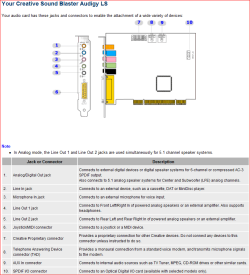
Unless your card came with the Optical Digital I/O card, according to this,

audigyls.PNG

what you are trying to do isn't possible.
 

My Computer My Computer

At a glance

Win 7 Ultimate x64FX-8350 @ 4.6 GHz so farADATA XPG V1 Series Black 8GB DDR3 1600Sapphire R9 270x Dual-X
Computer type
PC/Desktop
Computer Manufacturer/Model Number
Me
OS
Win 7 Ultimate x64
CPU
FX-8350 @ 4.6 GHz so far
Motherboard
Asus M5A97 EVO
Memory
ADATA XPG V1 Series Black 8GB DDR3 1600
Graphics Card(s)
Sapphire R9 270x Dual-X
Sound Card
Xonar DGX w/ Corsair Vengence 1300
Monitor(s) Displays
Acer S232HL Abid
Screen Resolution
1920x1080
Hard Drives
120 GB OCZ Vertex 3
500 GB Seagate 7200.12
PSU
Antec Earthwatts 650W Green
Case
Antec Three Hundred
Cooling
Cooler Master 212 EVO
Keyboard
Logitech G510
Mouse
Logitech G500s
Internet Speed
35000/3000
Umm I have a Digital I/O port

Screen:
img0112q.png

Or is that one different ^^?

~~Darkside748
 

My Computer My Computer

At a glance

Windows 7
OS
Windows 7
Sound Card
Soundblaster Audigy LS
Bump....
 

My Computer My Computer

At a glance

Windows 7
OS
Windows 7
Sound Card
Soundblaster Audigy LS
you are going to have to use a different input than optical for your speakers.

you can't 3.5mm jack to toslink you can however toslink to 3.5mm.

Optical carries its signal from one end to the other over fiber optic cable. So for example you can have your DVD player send the digital audio stream through the cable and have the other end in a toslink to 3.5mm converter to you speakers but you cannot send the stream through the 3.5mm jack converter into the optical cable.
 

My Computer My Computer

At a glance

Windows 7 Ultimate x64 RTMAMD Athlon II X2 240 @ 3.2Ghz6GB Mushkin DDR3 PC-1333ATI Radeon HD 4200 IGP Hybrid CrossFireX w\ S...
Computer Manufacturer/Model Number
Home Built
OS
Windows 7 Ultimate x64 RTM
CPU
AMD Athlon II X2 240 @ 3.2Ghz
Motherboard
Gigabyte GA-MA785GMT-UD2H
Memory
6GB Mushkin DDR3 PC-1333
Graphics Card(s)
ATI Radeon HD 4200 IGP Hybrid CrossFireX w\ Sapphire HD3450
Sound Card
Onboard Realtek HD audio controller
Monitor(s) Displays
D-SUB: LG W2343T-PF 23" LCD HDMI: LG 32LH20 32" LCD
Screen Resolution
1920*1080
Hard Drives
WD Caviar Green 1TB SATA3
PSU
Cooler Master Elite Power 400W
Case
Cooler Master Elite 360
Cooling
AMD Stock :)
Keyboard
Crappy wirelss logitech
Mouse
crappy wireless logitech
Internet Speed
792k
you are going to have to use a different input than optical for your speakers.

you can't 3.5mm jack to toslink you can however toslink to 3.5mm.

Optical carries its signal from one end to the other over fiber optic cable. So for example you can have your DVD player send the digital audio stream through the cable and have the other end in a toslink to 3.5mm converter to you speakers but you cannot send the stream through the 3.5mm jack converter into the optical cable.
Thanks you nailed it and crap now I need to buy another cable cause now this one is garbage ;c anyways thanks for your response :)

~~Yami_Bas
 

My Computer My Computer

At a glance

Windows 7
OS
Windows 7
Sound Card
Soundblaster Audigy LS
Back
Top