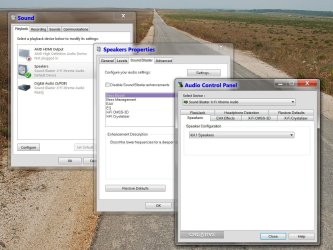
Creative XFI Xtreme problem

Also if I go into Program Files (X86) there is a Creative folder there and it contains all the features necessary like Alchemy, Console Launcher, etc.


And if I go to Device Manager I dont see sound but I do see something that wasn't there before, well I dont't think it was there before.

Other Devices (and it has ? on it)
Unknown Device (and it has ! on it)
 

My Computer My Computer

At a glance

Windows 7
OS
Windows 7
What does it show in Device Manager? Is it showing the name of the card, or is it listed as "unknown multimedia device" under Other?
 

My Computer My Computer

At a glance

Win 7 Ultimate x64FX-8350 @ 4.6 GHz so farADATA XPG V1 Series Black 8GB DDR3 1600Sapphire R9 270x Dual-X
Computer type
PC/Desktop
Computer Manufacturer/Model Number
Me
OS
Win 7 Ultimate x64
CPU
FX-8350 @ 4.6 GHz so far
Motherboard
Asus M5A97 EVO
Memory
ADATA XPG V1 Series Black 8GB DDR3 1600
Graphics Card(s)
Sapphire R9 270x Dual-X
Sound Card
Xonar DGX w/ Corsair Vengence 1300
Monitor(s) Displays
Acer S232HL Abid
Screen Resolution
1920x1080
Hard Drives
120 GB OCZ Vertex 3
500 GB Seagate 7200.12
PSU
Antec Earthwatts 650W Green
Case
Antec Three Hundred
Cooling
Cooler Master 212 EVO
Keyboard
Logitech G510
Mouse
Logitech G500s
Internet Speed
35000/3000
It just says

Other Device Unknown
PCI bus 5, device 1, function 0
 

My Computer My Computer

At a glance

Windows 7
OS
Windows 7
In device status it says

The drivers for this device are not installed. (Code 28)

To find a driver for this device, click Update Driver.
 

My Computer My Computer

At a glance

Windows 7
OS
Windows 7
In Device Manager I dont see

Sound

The name of the card or anything that says Multimedia

Just:

Other Device ?
Unknown Device !
 

My Computer My Computer

At a glance

Windows 7
OS
Windows 7

My Computer My Computer

At a glance

Win 7 Ultimate x64FX-8350 @ 4.6 GHz so farADATA XPG V1 Series Black 8GB DDR3 1600Sapphire R9 270x Dual-X
Computer type
PC/Desktop
Computer Manufacturer/Model Number
Me
OS
Win 7 Ultimate x64
CPU
FX-8350 @ 4.6 GHz so far
Motherboard
Asus M5A97 EVO
Memory
ADATA XPG V1 Series Black 8GB DDR3 1600
Graphics Card(s)
Sapphire R9 270x Dual-X
Sound Card
Xonar DGX w/ Corsair Vengence 1300
Monitor(s) Displays
Acer S232HL Abid
Screen Resolution
1920x1080
Hard Drives
120 GB OCZ Vertex 3
500 GB Seagate 7200.12
PSU
Antec Earthwatts 650W Green
Case
Antec Three Hundred
Cooling
Cooler Master 212 EVO
Keyboard
Logitech G510
Mouse
Logitech G500s
Internet Speed
35000/3000
Ok will go try that, tx. :)
 

My Computer My Computer

At a glance

Windows 7
OS
Windows 7
The driver installed and I have sound again. :)

Unfortunately my original problem did not get fixed. The Audio Console still gives the message "The current audio device is not supported by the application".

And in Sound---Playback---SoundBlaster I still cannot use Configure your Audio Settings, I get the same message

Well we tried and I can't thank you enough for your time and your excellent step by step instruction that even me could follow. I was so sure it was going to work!

Maybe all there is left to do is get a different soundcard that is more compatible with Windows 7. Any suggestions?
 

My Computer My Computer

At a glance

Windows 7
OS
Windows 7
Just thought of something...I never did part 2 where it shows to update the XP Drivers to Window 7... Am I supposed to do that also?

I didn't do it because I figured it would just bring me back to my original Version Driver 1.4.90
 

My Computer My Computer

At a glance

Windows 7
OS
Windows 7
Just thought of something...I never did part 2 where it shows to update the XP Drivers to Window 7... Am I supposed to do that also?

No, and all things considering should have never had XP drivers installed in the first place as there has been Windows 7 drivers for it since 7 came out.

One more thing to try, go here,

Uninstalling Sound Blaster Drivers and Applications

then click on "PCI Sound Blaster Cards" and start with Step 2. When you get to #6 don't use the disk, instead open the extracted folder, go to the Drivers folder and run the setup.exe there. When the utility comes up set it as shown, then move on to Step 3.
 

My Computer My Computer

At a glance

Win 7 Ultimate x64FX-8350 @ 4.6 GHz so farADATA XPG V1 Series Black 8GB DDR3 1600Sapphire R9 270x Dual-X
Computer type
PC/Desktop
Computer Manufacturer/Model Number
Me
OS
Win 7 Ultimate x64
CPU
FX-8350 @ 4.6 GHz so far
Motherboard
Asus M5A97 EVO
Memory
ADATA XPG V1 Series Black 8GB DDR3 1600
Graphics Card(s)
Sapphire R9 270x Dual-X
Sound Card
Xonar DGX w/ Corsair Vengence 1300
Monitor(s) Displays
Acer S232HL Abid
Screen Resolution
1920x1080
Hard Drives
120 GB OCZ Vertex 3
500 GB Seagate 7200.12
PSU
Antec Earthwatts 650W Green
Case
Antec Three Hundred
Cooling
Cooler Master 212 EVO
Keyboard
Logitech G510
Mouse
Logitech G500s
Internet Speed
35000/3000
Ok, thank you for not giving up on me. I'm gonna go give it a try and will report back.
 

My Computer My Computer

At a glance

Windows 7
OS
Windows 7
A bit confused here...

I go to Device manager but I don't see PCI Sound Blaster Card, what I do see is under Sound, video and game controller and Called SB X-Fi Audio is that the one you want me to use Step 2 on?
 

My Computer My Computer

At a glance

Windows 7
OS
Windows 7
Ellebrius, I feel for you man...(without sound and internet, a computer has no meaning..).

I also have the XFi Xtreme Audio soundcard, in Win7pro. But with none of your problems. It is a 7.1 card, but I use a 5.1 speaker system. Pssst, my 5.1's work better when I have 4.1 mode enabled, with surround.

Creative was slow to get on-board with drivers for Windows-7. They make a damn good soundcard(s), but are a bit tardy with current drivers.

When I first installed Windows-7, Mikey saw the soundcard, but there was no real control of it. So I wanted to install the soundcard drivers off the cd, but Mikey didn't like that. So I tried installing them with using "Compatibility Mode", and it worked.

Since then I have done Windows updates, and all stays put.

This is all I can say. Here are snapshots of how it works on my system...
 

Attachments

  • XFi Xteme Audio in my Program+Features.jpg
    XFi Xteme Audio in my Program+Features.jpg
    32.5 KB · Views: 17
  • XFi Audio in my Device Manager.jpg
    XFi Audio in my Device Manager.jpg
    21 KB · Views: 23
  • XFi Xtreme in Control-panel, Sound.jpg
    XFi Xtreme in Control-panel, Sound.jpg
    197.9 KB · Views: 92

My Computer My Computer

At a glance

Windows 7 Professional x64Intel 2.66x44-gigsATI 4850 chipset
Computer Manufacturer/Model Number
self-made
OS
Windows 7 Professional x64
CPU
Intel 2.66x4
Motherboard
ASUS P5QPL-VM EPU
Memory
4-gigs
Graphics Card(s)
ATI 4850 chipset
Sound Card
Creative Labs XFi Xtreme Audio
Monitor(s) Displays
ASUS VH242H, 24-inch
Screen Resolution
1920x1080, 16x9
Hard Drives
(1) 640-gig Western Digital Cavier Black, 64-meg cache
(1) 1 TiB Western Digital Cavier Black, 32-meg cache
PSU
Coolermaster 600-watt
Case
In Win Fanqua Mid Tower
Keyboard
an old Microsoft, natural, mult-media
Mouse
an old Logitech MX-500, (the newer mouse quit).
Internet Speed
1.2-megs per second down, 100 kBps up.
Other Info
--also, a MSI ms-163k laptop. Put in a 500-gig sata drive, increased ram to 4-gigs.
Yep, that's the one.
 

My Computer My Computer

At a glance

Win 7 Ultimate x64FX-8350 @ 4.6 GHz so farADATA XPG V1 Series Black 8GB DDR3 1600Sapphire R9 270x Dual-X
Computer type
PC/Desktop
Computer Manufacturer/Model Number
Me
OS
Win 7 Ultimate x64
CPU
FX-8350 @ 4.6 GHz so far
Motherboard
Asus M5A97 EVO
Memory
ADATA XPG V1 Series Black 8GB DDR3 1600
Graphics Card(s)
Sapphire R9 270x Dual-X
Sound Card
Xonar DGX w/ Corsair Vengence 1300
Monitor(s) Displays
Acer S232HL Abid
Screen Resolution
1920x1080
Hard Drives
120 GB OCZ Vertex 3
500 GB Seagate 7200.12
PSU
Antec Earthwatts 650W Green
Case
Antec Three Hundred
Cooling
Cooler Master 212 EVO
Keyboard
Logitech G510
Mouse
Logitech G500s
Internet Speed
35000/3000
Stuck at Step 6


Insert the Creative Sound Blaster installation CD into your CD/DVD-ROM drive.
Exit from the installation wizard if it autoruns.
Click Start, Run and Browse. Browse to Z:\AUDIO\DRIVERS (where Z:\ represents the CD Rom drive Letter), and run CTZAPXX.EXE.
If you have a Sound Blaster X-Fi card, run SETUP.EXE.

If you have a Windows Vista/Windows XP combination CD-ROM disk for your Sound Blaster Audgy SE (SB0570) card, browse to Z:\XP\AUDIO\DRIVERS, and run SETUP.EXE.

In the Creative Driver Update Utility screen, select Driver Uninstallation under Update Option and select WDM Drivers under Driver Type.
Select the option Delete all shared Creative audio driver files, and and click OK.

------------------------------

Here I point it to the setup file in the extracted folder you had me download but it doesn't a Creative Driver Utility Screen, it just goes straight to Updating and installing drivers???
 

My Computer My Computer

At a glance

Windows 7
OS
Windows 7
OK try the the one in the location specified on the disk. If it doesn't work download this one that is from the driver I am using for my card (that file shouldn't be card/driver specific and work with any Creative card/driver), and is a bit older than the one in the Xtreme Audio pack. Just extract and rep[lace the one in your extracted folder with it.

Also just to be clear you are running the setup.exe found in the Driver folder, and not the one found in the main folder?
 

Attachments

My Computer My Computer

At a glance

Win 7 Ultimate x64FX-8350 @ 4.6 GHz so farADATA XPG V1 Series Black 8GB DDR3 1600Sapphire R9 270x Dual-X
Computer type
PC/Desktop
Computer Manufacturer/Model Number
Me
OS
Win 7 Ultimate x64
CPU
FX-8350 @ 4.6 GHz so far
Motherboard
Asus M5A97 EVO
Memory
ADATA XPG V1 Series Black 8GB DDR3 1600
Graphics Card(s)
Sapphire R9 270x Dual-X
Sound Card
Xonar DGX w/ Corsair Vengence 1300
Monitor(s) Displays
Acer S232HL Abid
Screen Resolution
1920x1080
Hard Drives
120 GB OCZ Vertex 3
500 GB Seagate 7200.12
PSU
Antec Earthwatts 650W Green
Case
Antec Three Hundred
Cooling
Cooler Master 212 EVO
Keyboard
Logitech G510
Mouse
Logitech G500s
Internet Speed
35000/3000
Since I couldn't find Creative Driver Update Utility screen in the Daniel K utility folder I extracted I went to my CD and got it to open from there and continued with all the steps. I had some trouble deleting the files in the Windows Temp folder but I cleared the attributes and managed. I'm soo tired now I can,t remember if I emptied the Recycle bin or not. :D

I then restarted the computer and rand the setup file in my extracted folder and installed the drivers. I still have the same problem: sound but not Audio Console etc. that recognizes the Sound Card.

I'm gonna give it another try again tomorrow starting from scratch and using *all* the steps slowly and carefully. I'll post back with my results. Ty again so much for all your time and help and to all others who posted. :)
 

My Computer My Computer

At a glance

Windows 7
OS
Windows 7
By the way I just found the setup.exe file in the Driver folder. The instructions said got to Audio--Driver--setup.exe and there are no Audio folder. But there is a driver folder with it in it. Gonna start fresh tomorrow. Will let you know.
 

My Computer My Computer

At a glance

Windows 7
OS
Windows 7
OK, have a good night and see you here tomorrow.
 

My Computer My Computer

At a glance

Win 7 Ultimate x64FX-8350 @ 4.6 GHz so farADATA XPG V1 Series Black 8GB DDR3 1600Sapphire R9 270x Dual-X
Computer type
PC/Desktop
Computer Manufacturer/Model Number
Me
OS
Win 7 Ultimate x64
CPU
FX-8350 @ 4.6 GHz so far
Motherboard
Asus M5A97 EVO
Memory
ADATA XPG V1 Series Black 8GB DDR3 1600
Graphics Card(s)
Sapphire R9 270x Dual-X
Sound Card
Xonar DGX w/ Corsair Vengence 1300
Monitor(s) Displays
Acer S232HL Abid
Screen Resolution
1920x1080
Hard Drives
120 GB OCZ Vertex 3
500 GB Seagate 7200.12
PSU
Antec Earthwatts 650W Green
Case
Antec Three Hundred
Cooling
Cooler Master 212 EVO
Keyboard
Logitech G510
Mouse
Logitech G500s
Internet Speed
35000/3000
I couldn't resist and I tried again carefully.

Guess what? It WORKS!!!!!!!!!!!!!!!

Everything works! Audio Console etc. I can't believe it!

You're the best! Thanks sooo much for all your help and sticking with me through all this and persisting until the problem was resolved. Can't tell you enough how much I appreciate all your efforts.

Again thank you... and now dinner time, I deserve it.
 

My Computer My Computer

At a glance

Windows 7
OS
Windows 7
Back
Top