Creative's Sound Blaster X-Fi Xtreme Audio PCI Express

Beach

New member
Local time
12:44 AM
Messages
21
Hey mates,


Today I bought and installed a new sound card. Creative's Sound Blaster X-Fi Xtreme Audio PCI Express. More information about the card can be found here:

Creative Labs Online Store (Europe) | Sound Blaster | Buy Creative PCI Express X-Fi Xtreme Audio

Anyway, this card is a little bit weird because it has line-in and microphone in one port.

I read a costomer review from the internet:
Pros: Everything on this card works. EAX, Open AL, I cant think of something that doesnt work.

Cons: The mic does not work at first yes we know, theres a reason why though. read below to everyone having problems with this. i had this problem too!!

Other Thoughts: You need to install the drivers that come on the cd, or on the creative website. once you have creatives programs install, you need to go in and switch the Line in over to Microphone. Creative allows you to do that, its something that comes with The software that they bundle. then you just have to make sure it doesnt start up with your computer and you are good to use your mic now.


Now the problem is that when I connect my mic it detects it as a line-in thingy and says microphone not connected. Now, I'm trying to find out how to switch from line in over to microphone?

Can anyone help me do that? I have windows 7 ultimate.


And I don't know if its anyone connected to it I hear and see that others who have Creative's X-Fi have some kind of "What U hear" thing also? I don't see it anywhere :/ I have the latest drivers and some creative applications installed :)


Thanks
 

My Computer My Computer

At a glance

Windows 7 Ultimate
OS
Windows 7 Ultimate
Anyone? all I need to know is how to switch from line-in to microphone.
 

My Computer My Computer

At a glance

Windows 7 Ultimate
OS
Windows 7 Ultimate
What happens if you select "What You Hear" as the "Recording" device in the Sound panel, in the Control Panel? I looked at mine and the rear mic is listed as "unavailable".
 

My Computer My Computer

At a glance

Windows 10 64 bitIntel i7 6700K16GB Corsair DominatorIntel CPU Graphics
Computer type
PC/Desktop
Computer Manufacturer/Model Number
My Own Build
OS
Windows 10 64 bit
CPU
Intel i7 6700K
Motherboard
ASUS ROG Maximus VIII Hero
Memory
16GB Corsair Dominator
Graphics Card(s)
Intel CPU Graphics
Sound Card
RealTek
Monitor(s) Displays
27" Dell S2719dgf
Screen Resolution
2560X1440
Hard Drives
1 TB Samsung 850 EVO SSD for Win 10 Pro
500GB Samsung 850 EVO SSD for Win 10 Insider
2 TB drive for backup
PSU
EVGA Supernova 750G2
Case
BeQuiet Silent Base 600
Cooling
Deepcool Captain 120EX
Keyboard
Microsoft Wireless 2000
Mouse
Microsoft wireless
Internet Speed
100 MB/sec (Cable)
Antivirus
Microsoft Defender and Malwarebytes
Browser
Edge/Firefox
Other Info
Cakewalk (Sonar) by BandLab and Studio One 4.1 Pro recording studio software. MOTU 896Mk3 Hybrid recording interface, Frontier Tranzport wireless control unit, Behringer X-Touch Control Surface.
Five USB connected optical drives for CD Audio production using Nero BurningROM
Well, that's the thing. I don't have What U hear option available. I have "Microphone FP" ; "Line-in" and "Digital Audio (S/PDIF)" and I have both show disabled devices and show not allowed devices on.
 

My Computer My Computer

At a glance

Windows 7 Ultimate
OS
Windows 7 Ultimate
Uninstall the SoundBlaster in the Device Manager (DO NOT uninstall the Drivers) and then restart the PC and when Windows starts it should detect and reinstall the sound card. This may fix it.

If not, reinstall the Creative drivers (get the latest drivers from the Creative site). You should have the What You Hear (what SoundBlaster calls the "System Mixer") and the other missing recording devices.
 

My Computer My Computer

At a glance

Windows 10 64 bitIntel i7 6700K16GB Corsair DominatorIntel CPU Graphics
Computer type
PC/Desktop
Computer Manufacturer/Model Number
My Own Build
OS
Windows 10 64 bit
CPU
Intel i7 6700K
Motherboard
ASUS ROG Maximus VIII Hero
Memory
16GB Corsair Dominator
Graphics Card(s)
Intel CPU Graphics
Sound Card
RealTek
Monitor(s) Displays
27" Dell S2719dgf
Screen Resolution
2560X1440
Hard Drives
1 TB Samsung 850 EVO SSD for Win 10 Pro
500GB Samsung 850 EVO SSD for Win 10 Insider
2 TB drive for backup
PSU
EVGA Supernova 750G2
Case
BeQuiet Silent Base 600
Cooling
Deepcool Captain 120EX
Keyboard
Microsoft Wireless 2000
Mouse
Microsoft wireless
Internet Speed
100 MB/sec (Cable)
Antivirus
Microsoft Defender and Malwarebytes
Browser
Edge/Firefox
Other Info
Cakewalk (Sonar) by BandLab and Studio One 4.1 Pro recording studio software. MOTU 896Mk3 Hybrid recording interface, Frontier Tranzport wireless control unit, Behringer X-Touch Control Surface.
Five USB connected optical drives for CD Audio production using Nero BurningROM
Anyone?
 

My Computer My Computer

At a glance

Windows 7 Ultimate
OS
Windows 7 Ultimate
go to the 'Creative Audio Control Panel'- FlexiJack tab, there you can choose your option.

There should be a Creative icon in the notifications near your clock.
or go to All Programs- Creative.
 

My Computer My Computer

At a glance

Windows 78GB
Computer Manufacturer/Model Number
Dell XPS 9000
OS
Windows 7
Memory
8GB
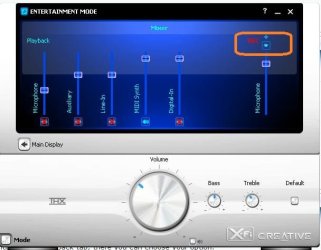
Open this,

miclinein.JPG

click on the little arrow and from the dropdown set it to microphone.
 

My Computer My Computer

At a glance

Win 7 Ultimate x64FX-8350 @ 4.6 GHz so farADATA XPG V1 Series Black 8GB DDR3 1600Sapphire R9 270x Dual-X
Computer type
PC/Desktop
Computer Manufacturer/Model Number
Me
OS
Win 7 Ultimate x64
CPU
FX-8350 @ 4.6 GHz so far
Motherboard
Asus M5A97 EVO
Memory
ADATA XPG V1 Series Black 8GB DDR3 1600
Graphics Card(s)
Sapphire R9 270x Dual-X
Sound Card
Xonar DGX w/ Corsair Vengence 1300
Monitor(s) Displays
Acer S232HL Abid
Screen Resolution
1920x1080
Hard Drives
120 GB OCZ Vertex 3
500 GB Seagate 7200.12
PSU
Antec Earthwatts 650W Green
Case
Antec Three Hundred
Cooling
Cooler Master 212 EVO
Keyboard
Logitech G510
Mouse
Logitech G500s
Internet Speed
35000/3000
Yea I figure that would help IF I had that kind of a control panel :(

All I have is what I posted on my picture... And on that control panel there is no FlexiJack tab tag. Any ideas? I mean I did download the latest drivers and some other stuff...
 

My Computer My Computer

At a glance

Windows 7 Ultimate
OS
Windows 7 Ultimate

My Computer My Computer

At a glance

Win 7 Ultimate x64FX-8350 @ 4.6 GHz so farADATA XPG V1 Series Black 8GB DDR3 1600Sapphire R9 270x Dual-X
Computer type
PC/Desktop
Computer Manufacturer/Model Number
Me
OS
Win 7 Ultimate x64
CPU
FX-8350 @ 4.6 GHz so far
Motherboard
Asus M5A97 EVO
Memory
ADATA XPG V1 Series Black 8GB DDR3 1600
Graphics Card(s)
Sapphire R9 270x Dual-X
Sound Card
Xonar DGX w/ Corsair Vengence 1300
Monitor(s) Displays
Acer S232HL Abid
Screen Resolution
1920x1080
Hard Drives
120 GB OCZ Vertex 3
500 GB Seagate 7200.12
PSU
Antec Earthwatts 650W Green
Case
Antec Three Hundred
Cooling
Cooler Master 212 EVO
Keyboard
Logitech G510
Mouse
Logitech G500s
Internet Speed
35000/3000
"Setup is unable to detect a supported product on your system. Please ensure that your product is proberly installed before running this setup program. Setup will exit"

Also tried compatibilty mode with Vista and XP. Also tried to run it as an administrator. Nothing.
 

My Computer My Computer

At a glance

Windows 7 Ultimate
OS
Windows 7 Ultimate
Any other ideas? All I want is to get my microphone to work.

Danke! :)
 

My Computer My Computer

At a glance

Windows 7 Ultimate
OS
Windows 7 Ultimate
**BUMP**
 

My Computer My Computer

At a glance

Windows 7 Ultimate
OS
Windows 7 Ultimate
Give this a try,

Creative Worldwide Support

if it installs it will give you the audio console like the one I posted, and then hopefully you can configure the mic.
 

My Computer My Computer

At a glance

Win 7 Ultimate x64FX-8350 @ 4.6 GHz so farADATA XPG V1 Series Black 8GB DDR3 1600Sapphire R9 270x Dual-X
Computer type
PC/Desktop
Computer Manufacturer/Model Number
Me
OS
Win 7 Ultimate x64
CPU
FX-8350 @ 4.6 GHz so far
Motherboard
Asus M5A97 EVO
Memory
ADATA XPG V1 Series Black 8GB DDR3 1600
Graphics Card(s)
Sapphire R9 270x Dual-X
Sound Card
Xonar DGX w/ Corsair Vengence 1300
Monitor(s) Displays
Acer S232HL Abid
Screen Resolution
1920x1080
Hard Drives
120 GB OCZ Vertex 3
500 GB Seagate 7200.12
PSU
Antec Earthwatts 650W Green
Case
Antec Three Hundred
Cooling
Cooler Master 212 EVO
Keyboard
Logitech G510
Mouse
Logitech G500s
Internet Speed
35000/3000
Thank You very much! It worked! Thank You!!!

Case closed.
 

My Computer My Computer

At a glance

Windows 7 Ultimate
OS
Windows 7 Ultimate
i have this same card. all you should have to do in install the card, install the drivers / software for vista from the disk that came with it, do not do the auto update, plugin the mic into the righthand plug, your speaker in the plug next to that. you should not have to make any adjustments other than the audio levels in the creative control counsel.
 

My Computer My Computer

At a glance

windows
OS
windows
Im very sorry to bump this topic.. but i got the same problem and the link that stormy13 gave doesn't work anymore.

Anyone that can give me that link? :D

// edit:

Found it.. but i get an error at launching the program.

It says that i dont have compattible audio-devices and that i need to close the program and click on OK. Can't do more then that.
 

My Computer My Computer

At a glance

Windows 7
OS
Windows 7
I just wanted to say thank you to Stormy 13. It is hard to believe that you have to install all the software just to change a setting from Line-in to Microphone. Your comment and illustration saved me a LOT of ADDITIONAL time. Finally finding the installation disk helped too.:D
 

My Computer My Computer

At a glance

Windows 7 Professional- 64Dual Core AMD 5000+8 GigsAti Radeon 4850
OS
Windows 7 Professional- 64
CPU
Dual Core AMD 5000+
Memory
8 Gigs
Graphics Card(s)
Ati Radeon 4850
Screen Resolution
1680 x 1050
Hard Drives
3-1TB
PSU
450
Keyboard
Keyboard Set MS 6000v.3

My Computer My Computer

At a glance

--
OS
--
Back
Top