CrossFire r9 280 Power Question

Master Turkey

New member
Local time
8:57 AM
Messages
158
Location
Nor Cal
Hello,

I recently purchased a second MSI r9 280 and was wondering if my Tt 750w toughpower gold will be able to power both cards. I have an i7 4790k (auto OC 4.4ghz), msi gaming 7, 16gb ddr3 1600 ram, a dvd drive, an ssd, an HD, a cpu cooler with 1 fan, and 4 other fans. I do not run my LED lights. And I can always disconnect the dvd drive (after making a bootable usb or something in case windows error). I use a mouse and keyboard and a wired 360 controller at times. There are plenty of empty plugs on my power supply.

The min req for crossfire looks like 750, but I'm wondering if I'll run into errors overclocking? Am I forced to buy a new psu? I've looked at other threads and some say it's ok , others say 850 or higher. but I have a feeling some folks just say 850 just to say 850.

Is there a way to test my systems power consumption?
 

My Computer

Computer type
PC/Desktop
Computer Manufacturer/Model Number
Custom Build
OS
Windows 7 Pro
CPU
i7 4790k (4.4ghz OC via Turbo)
Motherboard
MSI Gaming 7
Memory
16 GB DDR3 1600 (4x4)
Graphics Card(s)
2 X MSI Radeon R9 280 3G Gaming (Cross Fire) (OC 1150/1500)
Sound Card
onBoard Sound Blaster
Monitor(s) Displays
32" Sharp LCD (old)
Screen Resolution
720p
Hard Drives
120 Corsair GTX SSD (booting Windows 7)
2 TB WD Black (data, games)
PSU
EVGA 1300 G2
Case
Corsair 500R Black
Cooling
120mm Cool Master Closed Circuit RAD (CPU) + 5 fans
Keyboard
Rosewill Gaming Keyboard (cheapo)
Mouse
ETECITY Gaming Mouse (cheapo, but decent)
Internet Speed
25mbps
Antivirus
Norton
Browser
Chrome
Other Info
Upgrades for the future : 240mm corsair rad and a corsair keyboard.
750W is really the required wattage for CrossFire R9 280. But if you decide to go on 850W then it'll be a good idea for breathing room :)
 

My Computer

Computer type
PC/Desktop
Computer Manufacturer/Model Number
ASUS X550ZE
OS
Windows 7 Home Premium 64-BIT
CPU
AMD A8 7200P
Motherboard
N/A
Memory
8GB 1600mhz
Graphics Card(s)
Radeon R5 (APU) + Radeon R5 M230 2GB Dual Graphics
Sound Card
Realtek ALC269 with SonicMaster
Monitor(s) Displays
Laptop Display
Screen Resolution
1920 x 1080 @60hz
Hard Drives
WDC WD50 00LPVX-80V0TT0 (500GB)
PSU
Laptop Charger
Mouse
ARMAGGEDON TEXTRON SCORPION 7
Internet Speed
100 mbps DOWN / 50 mbps UP
Antivirus
Windows Defender
Browser
Mozzila FireFox, Valve Steam in-game internet browser
This review should shine some light on your question.

MSI Radeon R9 280 3GB Twin Frozr Gaming OC in CrossFire OCed Review - Power Consumption Testing

numbers are nearing the top, with a little over 800 watts being seen at load. This is quite high, and for something like this we'd really recommend that you're purchasing a quality PSU around the 1000 watts mark to make sure you're completely covered.

Read more at MSI Radeon R9 280 3GB Twin Frozr Gaming OC in CrossFire OCed Review - Power Consumption Testing
So to answer your question.
Can you get by with your power supply; maybe.
You won't know until you try.

If it was my computer it would get a higher wattage power supply.
Once the money has been spent on the rest of the system like yours it's no time to be skimpy on power.

Just my opinion.

Note:
Running two of those cards the case air circulation must be the best you can make it.
 

My Computer

Computer type
PC/Desktop
Computer Manufacturer/Model Number
Home made Desktop
OS
Windows 10 Pro. 64/ version 1709 Windows 7 Pro/64
CPU
Intel i7-6800K @ 4.3
Motherboard
ASUS X-99 Deluxe II
Memory
Corsair Platinum 16 gig @2400
Graphics Card(s)
EVGA GTX 1070 OC
Monitor(s) Displays
Asus 27" LED LCD/VE278Q
Screen Resolution
1920-1080 or 1280-720 HDMI
Hard Drives
INTEL SSD 730-240 Gb Sata 3.0/
PSU
EVGA Platium 1200W
Case
Phanteks Luxe Tempered Glass 8 fans/ one radiator
Cooling
XSPC/ Water Cooled CPU
Keyboard
Das 4 Professional
Mouse
Logitech M705/MX Anywhere 2-S
Internet Speed
100 mbits
Antivirus
Microsoft Security Essentials/ Malwarebytes Premium 3.0/ SAS
Browser
I.E. 11 default/Firefox/ ISP Time Warner Cable/Spectrum
Other Info
LG BluRay Burner/
Sound system-KLipsch-THX/
Icy Dock ssd Hot Swap bays.
This review should shine some light on your question.

MSI Radeon R9 280 3GB Twin Frozr Gaming OC in CrossFire OCed Review - Power Consumption Testing

numbers are nearing the top, with a little over 800 watts being seen at load. This is quite high, and for something like this we'd really recommend that you're purchasing a quality PSU around the 1000 watts mark to make sure you're completely covered.

Read more at MSI Radeon R9 280 3GB Twin Frozr Gaming OC in CrossFire OCed Review - Power Consumption Testing
So to answer your question.
Can you get by with your power supply; maybe.
You won't know until you try.

If it was my computer it would get a higher wattage power supply.
Once the money has been spent on the rest of the system like yours it's no time to be skimpy on power.

Just my opinion.

Note:
Running two of those cards the case air circulation must be the best you can make it.

Cool. Looks like minimum is 850w but I should get a 1000w. Is there a power supply that you could recommend for i7 4790k and z97 board? Corsair RM1000?
 

My Computer

Computer type
PC/Desktop
Computer Manufacturer/Model Number
Custom Build
OS
Windows 7 Pro
CPU
i7 4790k (4.4ghz OC via Turbo)
Motherboard
MSI Gaming 7
Memory
16 GB DDR3 1600 (4x4)
Graphics Card(s)
2 X MSI Radeon R9 280 3G Gaming (Cross Fire) (OC 1150/1500)
Sound Card
onBoard Sound Blaster
Monitor(s) Displays
32" Sharp LCD (old)
Screen Resolution
720p
Hard Drives
120 Corsair GTX SSD (booting Windows 7)
2 TB WD Black (data, games)
PSU
EVGA 1300 G2
Case
Corsair 500R Black
Cooling
120mm Cool Master Closed Circuit RAD (CPU) + 5 fans
Keyboard
Rosewill Gaming Keyboard (cheapo)
Mouse
ETECITY Gaming Mouse (cheapo, but decent)
Internet Speed
25mbps
Antivirus
Norton
Browser
Chrome
Other Info
Upgrades for the future : 240mm corsair rad and a corsair keyboard.
I use Corsair AX and AXi series power supplies. Never had a problem with them.
 

My Computer

Computer type
PC/Desktop
Computer Manufacturer/Model Number
Home made Desktop
OS
Windows 10 Pro. 64/ version 1709 Windows 7 Pro/64
CPU
Intel i7-6800K @ 4.3
Motherboard
ASUS X-99 Deluxe II
Memory
Corsair Platinum 16 gig @2400
Graphics Card(s)
EVGA GTX 1070 OC
Monitor(s) Displays
Asus 27" LED LCD/VE278Q
Screen Resolution
1920-1080 or 1280-720 HDMI
Hard Drives
INTEL SSD 730-240 Gb Sata 3.0/
PSU
EVGA Platium 1200W
Case
Phanteks Luxe Tempered Glass 8 fans/ one radiator
Cooling
XSPC/ Water Cooled CPU
Keyboard
Das 4 Professional
Mouse
Logitech M705/MX Anywhere 2-S
Internet Speed
100 mbits
Antivirus
Microsoft Security Essentials/ Malwarebytes Premium 3.0/ SAS
Browser
I.E. 11 default/Firefox/ ISP Time Warner Cable/Spectrum
Other Info
LG BluRay Burner/
Sound system-KLipsch-THX/
Icy Dock ssd Hot Swap bays.
This review should shine some light on your question.

Note:
Running two of those cards the case air circulation must be the best you can make it.

I have a large 200mm fan (corsair oem) on the side panel, but it's got mounting points for more smaller fans IF I remove the 200mm fan. The 200mm fan blows directly over my video card(s). I have an intake fan at the bottom next to the PSU. 2 intake fans on the front. 1 exhaust out the back. And an open hole / 120mm cpu cooler with fan at the top. I'm fairly certain the fan exhausts too. I'll be switching soon to a 240mm rad with dual fans (corsair h100i) that will both be exhaust fans (I'm assuming) on top of the rad. Do you think that's enough air flow?? Or maybe I should replace the side fan with a bunch of small fans?? I guess I could always upgrade the parts and then check/monitor temps and such under load.

PS. Going with the evga 1300 p2 gold. Fits in my budget and gets some solid reviews. ax etc, kinda sits out side of my price range.
 

My Computer

Computer type
PC/Desktop
Computer Manufacturer/Model Number
Custom Build
OS
Windows 7 Pro
CPU
i7 4790k (4.4ghz OC via Turbo)
Motherboard
MSI Gaming 7
Memory
16 GB DDR3 1600 (4x4)
Graphics Card(s)
2 X MSI Radeon R9 280 3G Gaming (Cross Fire) (OC 1150/1500)
Sound Card
onBoard Sound Blaster
Monitor(s) Displays
32" Sharp LCD (old)
Screen Resolution
720p
Hard Drives
120 Corsair GTX SSD (booting Windows 7)
2 TB WD Black (data, games)
PSU
EVGA 1300 G2
Case
Corsair 500R Black
Cooling
120mm Cool Master Closed Circuit RAD (CPU) + 5 fans
Keyboard
Rosewill Gaming Keyboard (cheapo)
Mouse
ETECITY Gaming Mouse (cheapo, but decent)
Internet Speed
25mbps
Antivirus
Norton
Browser
Chrome
Other Info
Upgrades for the future : 240mm corsair rad and a corsair keyboard.
When i ran Crossfire 7970's I had a AX850 and a hefty 4.8 Ghz on my AMD 8350 at the time

Now i run Intel which is a lot lower in power so i would say you should be safe given AMD uses much more power

Still getting a little more power doesn't hurt and insures stability
 

My Computer

Computer type
PC/Desktop
Computer Manufacturer/Model Number
CoreI7-6700K MrFingerIII Special Builds
OS
Windows 10 Home Premium 64bit sp1
CPU
Intel I7-6700K @ 4.6 Ghz 1.344 volts everyday OC
Motherboard
Asrock Fatality K6 Z170 Socket 1151
Memory
32GB G-Skill TridentZ 3200mhz 16-18-18-38 DDR4
Graphics Card(s)
Sli Gigabyte Windforce GTX 980 G1
Sound Card
AC97 Creative Rage Tactic 3D Headphones Bluetooth
Monitor(s) Displays
27" Asus ROG Swift PG278Q G-Sync 48" Vizio Smart HD TV
Screen Resolution
2560x1440p 27"- 48" Currently Gaming at 2560x1440p Res 2K
Hard Drives
250GB Samsung Evo840SSD Seagate baracuda 500 GB WD Mybook 500Gb 1TB Seagate Barracuda
PSU
HX1050w Corsair Silver 80plus certified crosfire/sli
Case
Enthod Pro Full Tower
Cooling
Corsair H110i GT 280 mm High Performance WaterBlock
Keyboard
Logitech wireless keyboard
Mouse
Logitech wireless mouse
Internet Speed
Cox Cable 100+ mb
Antivirus
WebRoot Spysweeper with Antivirus
Browser
IE-10, Chrome, Opera
Other Info
My Other Rig is a AMD FX8320E @4.6Ghz 16GB Ballistic Sport Ram
Mobo Asrock Fatality 990FX 120GB OCZ SSD 1TB Seagate Barracuda Corsair H75 Cooling PSU Corsair CX750
GPU GTX Gigabyte 970G1
Well monitoring you case temps is always a good just like monitoring all temps is

Small suggestion.
In my case the stock Corsair 200mm fan blows very little air. It can't even make a candle flicker. I think that Noctua and Phanteks have quality replacements if you can find them.

With the H100 exhausting out the top.
Two front fans intake
Bottom fan intake
Back fan exhaust
Side fan intake
You should be close to a positive pressure case.

I try to not only have more intake than exhaust. I also try to control the path the air takes.
I block all holes that don't have a fan mounted in them. I use the foam that comes with the video card and power supply packaging. Doing so would force the air to exhaust out the rear fan and through the radiator. I will see if I can find a picture.

I will have to boot my other computer where the pictures are.

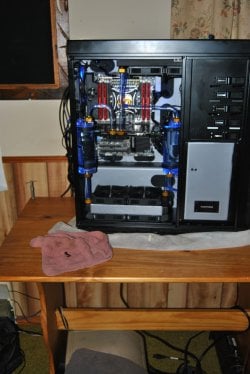
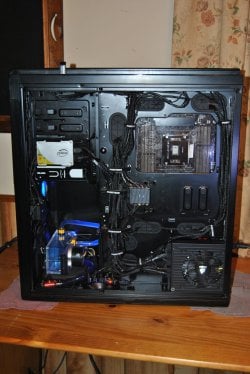
Well this is the best I can do for a picture.

Notice the back, just behind the water cylinder that every hole except where the fan is is covered. Except for the small hole at the back of the video card and the outlet for the motherboard fan exhaust. 99% of incoming air must exhaust out through the top radiator.
On the top their is one fan location that is blocked and on the bottom their is also one fan location that is blocked. In the front their is one fan location blocked because it is where my pumps are.

To make a long story shorter.
I control exactly where the air intakes and exactly where it exhaust and that creates a flow patter of the air movement through the case.
Air moving through a case and not doing its job makes no sense to me.

This also worked well even before I water cooled my video card.


DSC_0028.JPG

DSC_0012.JPG
 
Last edited:

My Computer

Computer type
PC/Desktop
Computer Manufacturer/Model Number
Home made Desktop
OS
Windows 10 Pro. 64/ version 1709 Windows 7 Pro/64
CPU
Intel i7-6800K @ 4.3
Motherboard
ASUS X-99 Deluxe II
Memory
Corsair Platinum 16 gig @2400
Graphics Card(s)
EVGA GTX 1070 OC
Monitor(s) Displays
Asus 27" LED LCD/VE278Q
Screen Resolution
1920-1080 or 1280-720 HDMI
Hard Drives
INTEL SSD 730-240 Gb Sata 3.0/
PSU
EVGA Platium 1200W
Case
Phanteks Luxe Tempered Glass 8 fans/ one radiator
Cooling
XSPC/ Water Cooled CPU
Keyboard
Das 4 Professional
Mouse
Logitech M705/MX Anywhere 2-S
Internet Speed
100 mbits
Antivirus
Microsoft Security Essentials/ Malwarebytes Premium 3.0/ SAS
Browser
I.E. 11 default/Firefox/ ISP Time Warner Cable/Spectrum
Other Info
LG BluRay Burner/
Sound system-KLipsch-THX/
Icy Dock ssd Hot Swap bays.
When i ran Crossfire 7970's I had a AX850 and a hefty 4.8 Ghz on my AMD 8350 at the time

Now i run Intel which is a lot lower in power so i would say you should be safe given AMD uses much more power

Still getting a little more power doesn't hurt and insures stability


Ya my buddy I work with told me about nvidea lower power consumption. I went with an intel chip (i7) so there's less power to power that than say an amd CPU. But for graphics cards this was my first time going with an amd GPU. I'm very pleased with the results and he bang for the buck ... But 250wats per card??!! That I'm not so happy about.
 

My Computer

Computer type
PC/Desktop
Computer Manufacturer/Model Number
Custom Build
OS
Windows 7 Pro
CPU
i7 4790k (4.4ghz OC via Turbo)
Motherboard
MSI Gaming 7
Memory
16 GB DDR3 1600 (4x4)
Graphics Card(s)
2 X MSI Radeon R9 280 3G Gaming (Cross Fire) (OC 1150/1500)
Sound Card
onBoard Sound Blaster
Monitor(s) Displays
32" Sharp LCD (old)
Screen Resolution
720p
Hard Drives
120 Corsair GTX SSD (booting Windows 7)
2 TB WD Black (data, games)
PSU
EVGA 1300 G2
Case
Corsair 500R Black
Cooling
120mm Cool Master Closed Circuit RAD (CPU) + 5 fans
Keyboard
Rosewill Gaming Keyboard (cheapo)
Mouse
ETECITY Gaming Mouse (cheapo, but decent)
Internet Speed
25mbps
Antivirus
Norton
Browser
Chrome
Other Info
Upgrades for the future : 240mm corsair rad and a corsair keyboard.
Well monitoring you case temps is always a good just like monitoring all temps is

Small suggestion.
In my case the stock Corsair 200mm fan blows very little air. It can't even make a candle flicker. I think that Noctua and Phanteks have quality replacements if you can find them.

With the H100 exhausting out the top.
Two front fans intake
Bottom fan intake
Back fan exhaust
Side fan intake
You should be close to a positive pressure case.

I try to not only have more intake than exhaust. I also try to control the path the air takes.
I block all holes that don't have a fan mounted in them. I use the foam that comes with the video card and power supply packaging. Doing so would force the air to exhaust out the rear fan and through the radiator. I will see if I can find a picture.

I will have to boot my other computer where the pictures are.

Well this is the best I can do for a picture.

Notice the back, just behind the water cylinder that every hole except where the fan is is covered. Except for the small hole at the back of the video card and the outlet for the motherboard fan exhaust. 99% of incoming air must exhaust out through the top radiator.
On the top their is one fan location that is blocked and on the bottom their is also one fan location that is blocked. In the front their is one fan location blocked because it is where my pumps are.

To make a long story shorter.
I control exactly where the air intakes and exactly where it exhaust and that creates a flow patter of the air movement through the case.
Air moving through a case and not doing its job makes no sense to me.

This also worked well even before I water cooled my video card.


View attachment 346487

View attachment 346488


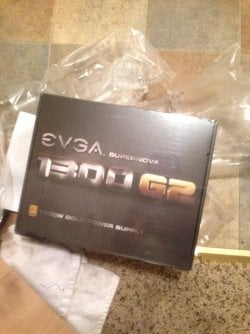
Hmmmmm ok. Lots to think about. I have my new power supply.

ImageUploadedByTapatalk1421455768.421337.jpg

And my 2nd graphic card and ram (not new just RMA replacement) are still on there way. :-/ So I'll have to find some stuff to block a hole at the top of the front of the case above the two intake fans around the DVD drive. But I think that's a good idea. I have the foam from the old graphics card in the garage but if not, new one is on it's way. I'm thinking about waiting to do that stuff for when I get the corsair bigger rad for up top. Plus I might yank the DVD drive and just block that whole area. But thanks for the tips. Really looking fwd to digging into her again. Several upgrades coming to my rig now, and the rad eventually. That will be the last thing ... (Famous last words?) ...
 

My Computer

Computer type
PC/Desktop
Computer Manufacturer/Model Number
Custom Build
OS
Windows 7 Pro
CPU
i7 4790k (4.4ghz OC via Turbo)
Motherboard
MSI Gaming 7
Memory
16 GB DDR3 1600 (4x4)
Graphics Card(s)
2 X MSI Radeon R9 280 3G Gaming (Cross Fire) (OC 1150/1500)
Sound Card
onBoard Sound Blaster
Monitor(s) Displays
32" Sharp LCD (old)
Screen Resolution
720p
Hard Drives
120 Corsair GTX SSD (booting Windows 7)
2 TB WD Black (data, games)
PSU
EVGA 1300 G2
Case
Corsair 500R Black
Cooling
120mm Cool Master Closed Circuit RAD (CPU) + 5 fans
Keyboard
Rosewill Gaming Keyboard (cheapo)
Mouse
ETECITY Gaming Mouse (cheapo, but decent)
Internet Speed
25mbps
Antivirus
Norton
Browser
Chrome
Other Info
Upgrades for the future : 240mm corsair rad and a corsair keyboard.
The padding I use is ablut 1/4 in. thick and is easy to cut and shape. It also serves as a sound deadener.
 

My Computer

Computer type
PC/Desktop
Computer Manufacturer/Model Number
Home made Desktop
OS
Windows 10 Pro. 64/ version 1709 Windows 7 Pro/64
CPU
Intel i7-6800K @ 4.3
Motherboard
ASUS X-99 Deluxe II
Memory
Corsair Platinum 16 gig @2400
Graphics Card(s)
EVGA GTX 1070 OC
Monitor(s) Displays
Asus 27" LED LCD/VE278Q
Screen Resolution
1920-1080 or 1280-720 HDMI
Hard Drives
INTEL SSD 730-240 Gb Sata 3.0/
PSU
EVGA Platium 1200W
Case
Phanteks Luxe Tempered Glass 8 fans/ one radiator
Cooling
XSPC/ Water Cooled CPU
Keyboard
Das 4 Professional
Mouse
Logitech M705/MX Anywhere 2-S
Internet Speed
100 mbits
Antivirus
Microsoft Security Essentials/ Malwarebytes Premium 3.0/ SAS
Browser
I.E. 11 default/Firefox/ ISP Time Warner Cable/Spectrum
Other Info
LG BluRay Burner/
Sound system-KLipsch-THX/
Icy Dock ssd Hot Swap bays.
The padding I use is ablut 1/4 in. thick and is easy to cut and shape. It also serves as a sound deadener.


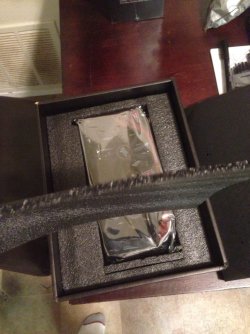
So the grey padding that comes in the graphics card boxes? Like this...

ImageUploadedByTapatalk1421537172.683394.jpg

And is it esd safe? Seems like it wouldn't be since the cards and components are usually shipped in poly esd safe bags.

Ps. USPS finally dropped off my card and ram. Feels like Xmas.

ImageUploadedByTapatalk1421537211.365548.jpg
 

My Computer

Computer type
PC/Desktop
Computer Manufacturer/Model Number
Custom Build
OS
Windows 7 Pro
CPU
i7 4790k (4.4ghz OC via Turbo)
Motherboard
MSI Gaming 7
Memory
16 GB DDR3 1600 (4x4)
Graphics Card(s)
2 X MSI Radeon R9 280 3G Gaming (Cross Fire) (OC 1150/1500)
Sound Card
onBoard Sound Blaster
Monitor(s) Displays
32" Sharp LCD (old)
Screen Resolution
720p
Hard Drives
120 Corsair GTX SSD (booting Windows 7)
2 TB WD Black (data, games)
PSU
EVGA 1300 G2
Case
Corsair 500R Black
Cooling
120mm Cool Master Closed Circuit RAD (CPU) + 5 fans
Keyboard
Rosewill Gaming Keyboard (cheapo)
Mouse
ETECITY Gaming Mouse (cheapo, but decent)
Internet Speed
25mbps
Antivirus
Norton
Browser
Chrome
Other Info
Upgrades for the future : 240mm corsair rad and a corsair keyboard.
The padding I use is ablut 1/4 in. thick and is easy to cut and shape. It also serves as a sound deadener.


So the grey padding that comes in the graphics card boxes? Like this...

View attachment 346759

And is it esd safe? Seems like it wouldn't be since the cards and components are usually shipped in poly esd safe bags.

Ps. USPS finally dropped off my card and ram. Feels like Xmas.

View attachment 346760

Merry Christmas i am Jealous that's one sexy PSU ;)
 

My Computer

Computer type
PC/Desktop
Computer Manufacturer/Model Number
CoreI7-6700K MrFingerIII Special Builds
OS
Windows 10 Home Premium 64bit sp1
CPU
Intel I7-6700K @ 4.6 Ghz 1.344 volts everyday OC
Motherboard
Asrock Fatality K6 Z170 Socket 1151
Memory
32GB G-Skill TridentZ 3200mhz 16-18-18-38 DDR4
Graphics Card(s)
Sli Gigabyte Windforce GTX 980 G1
Sound Card
AC97 Creative Rage Tactic 3D Headphones Bluetooth
Monitor(s) Displays
27" Asus ROG Swift PG278Q G-Sync 48" Vizio Smart HD TV
Screen Resolution
2560x1440p 27"- 48" Currently Gaming at 2560x1440p Res 2K
Hard Drives
250GB Samsung Evo840SSD Seagate baracuda 500 GB WD Mybook 500Gb 1TB Seagate Barracuda
PSU
HX1050w Corsair Silver 80plus certified crosfire/sli
Case
Enthod Pro Full Tower
Cooling
Corsair H110i GT 280 mm High Performance WaterBlock
Keyboard
Logitech wireless keyboard
Mouse
Logitech wireless mouse
Internet Speed
Cox Cable 100+ mb
Antivirus
WebRoot Spysweeper with Antivirus
Browser
IE-10, Chrome, Opera
Other Info
My Other Rig is a AMD FX8320E @4.6Ghz 16GB Ballistic Sport Ram
Mobo Asrock Fatality 990FX 120GB OCZ SSD 1TB Seagate Barracuda Corsair H75 Cooling PSU Corsair CX750
GPU GTX Gigabyte 970G1
You will be placing up against the metal of the case so I don't think you should have a problem with EDS. You should have some that came with the motherboard packaging also.

All I try to remember is.

I control where the air comes in with fans.

I control where the air exhaust with fans and blocking all other exits.
 

My Computer

Computer type
PC/Desktop
Computer Manufacturer/Model Number
Home made Desktop
OS
Windows 10 Pro. 64/ version 1709 Windows 7 Pro/64
CPU
Intel i7-6800K @ 4.3
Motherboard
ASUS X-99 Deluxe II
Memory
Corsair Platinum 16 gig @2400
Graphics Card(s)
EVGA GTX 1070 OC
Monitor(s) Displays
Asus 27" LED LCD/VE278Q
Screen Resolution
1920-1080 or 1280-720 HDMI
Hard Drives
INTEL SSD 730-240 Gb Sata 3.0/
PSU
EVGA Platium 1200W
Case
Phanteks Luxe Tempered Glass 8 fans/ one radiator
Cooling
XSPC/ Water Cooled CPU
Keyboard
Das 4 Professional
Mouse
Logitech M705/MX Anywhere 2-S
Internet Speed
100 mbits
Antivirus
Microsoft Security Essentials/ Malwarebytes Premium 3.0/ SAS
Browser
I.E. 11 default/Firefox/ ISP Time Warner Cable/Spectrum
Other Info
LG BluRay Burner/
Sound system-KLipsch-THX/
Icy Dock ssd Hot Swap bays.
Well I'll maybe do some more research then. I'm a little OCD about esd. Don't want to harm any if my internal components. But I guess it won't be touching anything. I'll Prob wait for the rad to do anything like that. And then I'll upgrade the side fan like you suggested to something more efficient, maybe bigger. Just finished the upgrades though and checked all the settings. Still think it needs some tweaking software wise, but mechanically everything is working fine.
 

My Computer

Computer type
PC/Desktop
Computer Manufacturer/Model Number
Custom Build
OS
Windows 7 Pro
CPU
i7 4790k (4.4ghz OC via Turbo)
Motherboard
MSI Gaming 7
Memory
16 GB DDR3 1600 (4x4)
Graphics Card(s)
2 X MSI Radeon R9 280 3G Gaming (Cross Fire) (OC 1150/1500)
Sound Card
onBoard Sound Blaster
Monitor(s) Displays
32" Sharp LCD (old)
Screen Resolution
720p
Hard Drives
120 Corsair GTX SSD (booting Windows 7)
2 TB WD Black (data, games)
PSU
EVGA 1300 G2
Case
Corsair 500R Black
Cooling
120mm Cool Master Closed Circuit RAD (CPU) + 5 fans
Keyboard
Rosewill Gaming Keyboard (cheapo)
Mouse
ETECITY Gaming Mouse (cheapo, but decent)
Internet Speed
25mbps
Antivirus
Norton
Browser
Chrome
Other Info
Upgrades for the future : 240mm corsair rad and a corsair keyboard.
You will be placing up against the metal of the case so I don't think you should have a problem with EDS. You should have some that came with the motherboard packaging also.

All I try to remember is.

I control where the air comes in with fans.

I control where the air exhaust with fans and blocking all other exits.


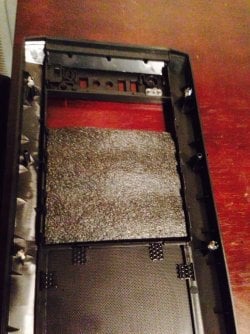
Like this or no? ...

ImageUploadedByTapatalk1421616005.157635.jpg
 

My Computer

Computer type
PC/Desktop
Computer Manufacturer/Model Number
Custom Build
OS
Windows 7 Pro
CPU
i7 4790k (4.4ghz OC via Turbo)
Motherboard
MSI Gaming 7
Memory
16 GB DDR3 1600 (4x4)
Graphics Card(s)
2 X MSI Radeon R9 280 3G Gaming (Cross Fire) (OC 1150/1500)
Sound Card
onBoard Sound Blaster
Monitor(s) Displays
32" Sharp LCD (old)
Screen Resolution
720p
Hard Drives
120 Corsair GTX SSD (booting Windows 7)
2 TB WD Black (data, games)
PSU
EVGA 1300 G2
Case
Corsair 500R Black
Cooling
120mm Cool Master Closed Circuit RAD (CPU) + 5 fans
Keyboard
Rosewill Gaming Keyboard (cheapo)
Mouse
ETECITY Gaming Mouse (cheapo, but decent)
Internet Speed
25mbps
Antivirus
Norton
Browser
Chrome
Other Info
Upgrades for the future : 240mm corsair rad and a corsair keyboard.
Yes.
I have all 5 1/4 bays blocked that are not in use.
In my case I want all the exhaust air going through my 360 radiator at the top.

I don't want it blowing out just anywhere into the room. I try to take full advantage of all the air I'm shoving into the case. These are my methods and they do work for me quite well. I takes a little extra work and planning but it's worth it. This method keeps the inside of my case about 2C above ambient. It keeps the water temps about 3C above ambient and I run at a constant 4.6 over clock. If its at idle or working hard it's at 4.6. Your millage may vary.
 

My Computer

Computer type
PC/Desktop
Computer Manufacturer/Model Number
Home made Desktop
OS
Windows 10 Pro. 64/ version 1709 Windows 7 Pro/64
CPU
Intel i7-6800K @ 4.3
Motherboard
ASUS X-99 Deluxe II
Memory
Corsair Platinum 16 gig @2400
Graphics Card(s)
EVGA GTX 1070 OC
Monitor(s) Displays
Asus 27" LED LCD/VE278Q
Screen Resolution
1920-1080 or 1280-720 HDMI
Hard Drives
INTEL SSD 730-240 Gb Sata 3.0/
PSU
EVGA Platium 1200W
Case
Phanteks Luxe Tempered Glass 8 fans/ one radiator
Cooling
XSPC/ Water Cooled CPU
Keyboard
Das 4 Professional
Mouse
Logitech M705/MX Anywhere 2-S
Internet Speed
100 mbits
Antivirus
Microsoft Security Essentials/ Malwarebytes Premium 3.0/ SAS
Browser
I.E. 11 default/Firefox/ ISP Time Warner Cable/Spectrum
Other Info
LG BluRay Burner/
Sound system-KLipsch-THX/
Icy Dock ssd Hot Swap bays.
Yes.
I have all 5 1/4 bays blocked that are not in use.
In my case I want all the exhaust air going through my 360 radiator at the top.

I don't want it blowing out just anywhere into the room. I try to take full advantage of all the air I'm shoving into the case. These are my methods and they do work for me quite well. I takes a little extra work and planning but it's worth it. This method keeps the inside of my case about 2C above ambient. It keeps the water temps about 3C above ambient and I run at a constant 4.6 over clock. If its at idle or working hard it's at 4.6. Your millage may vary.

Cool. Thanks for the tip. The only other hole I would have to plug (lol) would be at the top and I already plan on doing a bigger rad, so I won't mess with it... or the side, but i'll do that when I upgrade the side fan. Hopefully that helps direct the air a little better. Plus it would make sense that those front intake fans will pull better now. :)
 

My Computer

Computer type
PC/Desktop
Computer Manufacturer/Model Number
Custom Build
OS
Windows 7 Pro
CPU
i7 4790k (4.4ghz OC via Turbo)
Motherboard
MSI Gaming 7
Memory
16 GB DDR3 1600 (4x4)
Graphics Card(s)
2 X MSI Radeon R9 280 3G Gaming (Cross Fire) (OC 1150/1500)
Sound Card
onBoard Sound Blaster
Monitor(s) Displays
32" Sharp LCD (old)
Screen Resolution
720p
Hard Drives
120 Corsair GTX SSD (booting Windows 7)
2 TB WD Black (data, games)
PSU
EVGA 1300 G2
Case
Corsair 500R Black
Cooling
120mm Cool Master Closed Circuit RAD (CPU) + 5 fans
Keyboard
Rosewill Gaming Keyboard (cheapo)
Mouse
ETECITY Gaming Mouse (cheapo, but decent)
Internet Speed
25mbps
Antivirus
Norton
Browser
Chrome
Other Info
Upgrades for the future : 240mm corsair rad and a corsair keyboard.
Back
Top