Keyboard + mouse not functioning past BIOS following CPU+MB upgrade

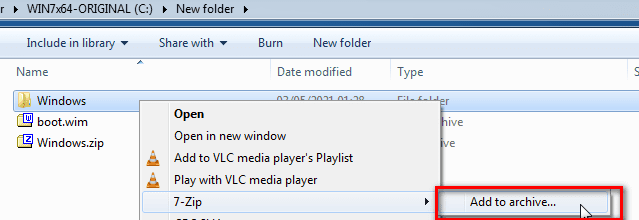
Rt click the extracted Windows folder and select add to archive

7Zaddtoarchive.png


Select wim in the dropdown

7Zselectwim.png


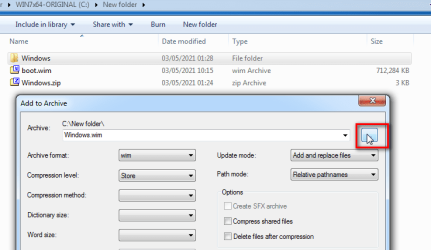
Click the button and browse to boot.wim

7Zbrowsetowim.png


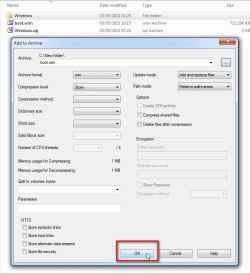
Click OK

7Zaddtowim.png
 

My Computers My Computers

System One System Two

  • Computer type
    PC/Desktop
    OS
    7 X64
    CPU
    i5 8400
    Motherboard
    gigabyte b365m ds3h
    Memory
    2x8gb 3200mhz
    Hard Drives
    various
    PSU
    pure power 11 400w cm
    Case
    Coolermaster
    Cooling
    cryorig m9i
  • Computer type
    PC/Desktop
    OS
    7x64
    CPU
    g5400
    Motherboard
    ga b365m ds3h
    Memory
    8gb ddr4 2400
    PSU
    xfx pro 450w
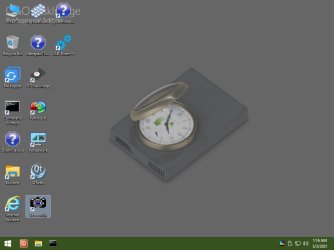
All done:

desktop.jpg
 

My Computers My Computers

System One System Two

  • Computer type
    PC/Desktop
    OS
    7 X64
    CPU
    i5 8400
    Motherboard
    gigabyte b365m ds3h
    Memory
    2x8gb 3200mhz
    Hard Drives
    various
    PSU
    pure power 11 400w cm
    Case
    Coolermaster
    Cooling
    cryorig m9i
  • Computer type
    PC/Desktop
    OS
    7x64
    CPU
    g5400
    Motherboard
    ga b365m ds3h
    Memory
    8gb ddr4 2400
    PSU
    xfx pro 450w
Assuming the O&O boot.wim was created from 1904v2 ( I suspect from your screenshots, that win7 winre.wim was used - because the bootmgr and bootmgr efi files are the size expected from win7 winre. That also explains the microsoft loading bar )

Thank you for the quick response and helpful advice.

Here's what I'm not clear on:

I took your original post on this subject...

Little cheat to create O&O boot media from win7

Rename your win7 winre.wim , and copy win10 winre.wim into the win 7 recovery folder, like this:

View attachment 413700

OR copy boot.wim from 1904v2.iso into the recovery folder and rename it winre.wim

...to mean that - prior to making the O&O boot media - I was to copy the boot.wim from 1904v2.iso into the recovery folder on the C: drive of my SSD and rename it winre.wim. Was that correct? Because that's what I did.

If, instead, it needs to be copied to the O&O bootable USB flash drive, I don't see a "recovery" folder there into which to copy it. I only see a "boot.wim" inside the "sources" folder.
 

My Computer My Computer

Computer type
PC/Desktop
Computer Manufacturer/Model Number
Custom Build
OS
Windows 7 Professional 64-bit
CPU
AMD Ryzen 7 3700X
Motherboard
ASUS TUF Gaming B550-PLUS AMD AM4
Memory
Corsair Vengeance LPX 16GB (2x8GB) DDR4 DRAM 3200MHz
Graphics Card(s)
Diamond ATI Radeon HD 5850
Hard Drives
Western Digital Blue 3D NAND 1TB Internal SSD - WDS100T2B0A
PSU
ASUS TUF Gaming 750W Bronze PSU
Antivirus
Kaspersky
Browser
Mozilla Firefox 64-bit
copy the boot.wim from 1904v2.iso into the recovery folder on the C: drive of my SSD and rename it winre.wim.

Win7 winre.wim will be in a folder called recovery\{some_long_number}

Yes, effectively replace windows7 winre.wim with 1904v2 boot.wim ( renamed to winre.wim ).

It seems to be in the right place because winre.wim is booted when you use the launch repair option.


So it is odd that apparently your O&O media has smaller bootmgr and bootmgr.efi files


Check the size of boot.wim on your O&O usb stick.


Check in the windows\temp folder and see if there is anything there.
 

Attachments

  • windows_error_recovery_01.jpg
    windows_error_recovery_01.jpg
    42.9 KB · Views: 0
  • windows_loading_files_02.jpg
    windows_loading_files_02.jpg
    29.4 KB · Views: 0
Last edited:

My Computers My Computers

System One System Two

  • Computer type
    PC/Desktop
    OS
    7 X64
    CPU
    i5 8400
    Motherboard
    gigabyte b365m ds3h
    Memory
    2x8gb 3200mhz
    Hard Drives
    various
    PSU
    pure power 11 400w cm
    Case
    Coolermaster
    Cooling
    cryorig m9i
  • Computer type
    PC/Desktop
    OS
    7x64
    CPU
    g5400
    Motherboard
    ga b365m ds3h
    Memory
    8gb ddr4 2400
    PSU
    xfx pro 450w
After having a night to sleep on it, I've considered that maybe I'm overthinking this. I have a family member with a Windows 10-based system.

I installed the licensed version onto my Windows 7 SSD. However, it appears O&O has a 30-day free trial period. So could I just use the trial version to make the bootable USB on the family member's Win 10 system? Then there's no need to worry about copying boot.wim from 1904v2.iso, renaming it, making sure it's in the correct folder, etc.?

Would that work? Or does the bootable USB have to be made from the HD/SSD to which the "Adapt to new hardware" module will be applied?
 

My Computer My Computer

Computer type
PC/Desktop
Computer Manufacturer/Model Number
Custom Build
OS
Windows 7 Professional 64-bit
CPU
AMD Ryzen 7 3700X
Motherboard
ASUS TUF Gaming B550-PLUS AMD AM4
Memory
Corsair Vengeance LPX 16GB (2x8GB) DDR4 DRAM 3200MHz
Graphics Card(s)
Diamond ATI Radeon HD 5850
Hard Drives
Western Digital Blue 3D NAND 1TB Internal SSD - WDS100T2B0A
PSU
ASUS TUF Gaming 750W Bronze PSU
Antivirus
Kaspersky
Browser
Mozilla Firefox 64-bit
So could I just use the trial version to make the bootable USB on the family member's Win 10 system?

yes
 

My Computers My Computers

System One System Two

  • Computer type
    PC/Desktop
    OS
    7 X64
    CPU
    i5 8400
    Motherboard
    gigabyte b365m ds3h
    Memory
    2x8gb 3200mhz
    Hard Drives
    various
    PSU
    pure power 11 400w cm
    Case
    Coolermaster
    Cooling
    cryorig m9i
  • Computer type
    PC/Desktop
    OS
    7x64
    CPU
    g5400
    Motherboard
    ga b365m ds3h
    Memory
    8gb ddr4 2400
    PSU
    xfx pro 450w
Latest progress:

1) Created the bootable O&O DiskImage 14 Professional USB flash drive using a family member's Windows 10 computer.

2) Inserted the bootable USB flash drive into my own computer and successfully booted into/accessed O&O.

3) Ran the adjust to new hardware module following your previous instructions. No issues or difficulties.

4) Shut down my computer, removed the O&O USB flash drive, inserted the 1904v2.iso/DIMM++ bootable USB flash drive, powered on my computer, and booted into/accessed this second USB.

5) Ran DISM++ per your previous instructions to install Canonkong's driver files.

6) Received message: Operation succeeded. Success 43, not applicable 0. Refer to "Config\DISM++.log for more information.

7) Clicked "OK" to close the message box, exited DISM++, ejected the USB flash drive, and restarted the computer.

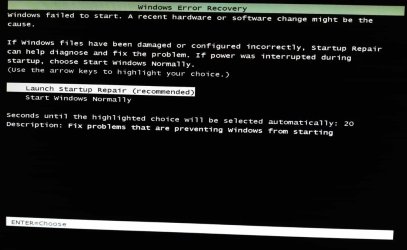
8) The "Windows Error Recovery" screen comes up.

9) I choose "Launch Startup Repair (recommended)".

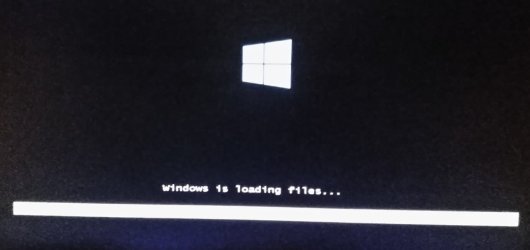
10) The "Windows is loading files..." window appears.

11) The Desktop appears in the minimalist Repair Mode.

12) I restart the computer, the "Windows Error Recovery" screen comes up again, and I choose "Start Windows Normally" this time.

13) Instant BSOD ! But - unlike previous BSODs - this one persists rather than flashing across the screen for only a fraction of a second before going black.

14) Power computer off and back on again.

15) The "Windows Error Recovery" screen comes up again.

16) I choose "Launch Startup Repair (recommended)" again.

17) After the "Windows is loading files..." window finishes, it's replaced with a black screen and a wite mouse cursor.

18) I can move the cursor. It disappears if moved to the bottom of the screen; as if it's passing behind an invisible / black Windows task bar. I can recover it/make it reappear by simply moving the mouse cursor back up the screen.

19) CTRL+ALT+DELETE brings p a visible Task Manager window.

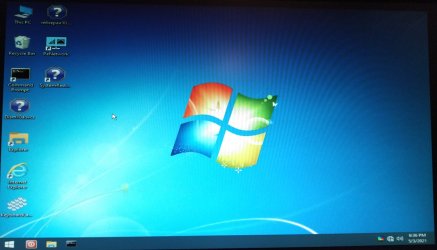
20) After a few minutes of black screen, the desktop spontaneously appears/becomes visible again. It is in minimalist Repair Mode.

21) I can use the mouse and keyboard. I can open Explorer. I can see my local disk as drive D: instead of the usual drive C: I can see all of my old folders and files on the D: drive.
desktop_01.jpg

22) A restart returns to "Windows Error Recovery Screen" again.

23) I choose "Start Windows Normally" this time, which again results in an instant BSOD.

24) Power off and back on.

25) A return to "Windows Error Recovery Screen" again.

26) I choose "Launch Startup Repair (recommended)" for the third time.

27) The black screen and white mouse cursor appear again.

28) Somewhere between 3 to 5 minutes the Desktop reappears again as it did in step 20. It's still in minimalist Repair Mode, my primary drive which was previously labeled C: is still labeled D:, I can use the mouse and keyboard, navigate Explorer, etc.

Though this represents progress over the previous few days, I'm stuck at this point. I can't seem to get Windows to start normally; it just goes straight to a BSOD. At a loss as to where to go from here.

 

My Computer My Computer

Computer type
PC/Desktop
Computer Manufacturer/Model Number
Custom Build
OS
Windows 7 Professional 64-bit
CPU
AMD Ryzen 7 3700X
Motherboard
ASUS TUF Gaming B550-PLUS AMD AM4
Memory
Corsair Vengeance LPX 16GB (2x8GB) DDR4 DRAM 3200MHz
Graphics Card(s)
Diamond ATI Radeon HD 5850
Hard Drives
Western Digital Blue 3D NAND 1TB Internal SSD - WDS100T2B0A
PSU
ASUS TUF Gaming 750W Bronze PSU
Antivirus
Kaspersky
Browser
Mozilla Firefox 64-bit
YES


You can put them there if you like. They can be anywhere that can be seen from the booted media.


In dism++ select the target os by clicking it in the top pane to highlight it in blue.
Then click open session.
Then click Drivers in the left pane.
Then click the ADD button at bottom right and browse to the FOLDER containing the extracted drivers

-is it enough to click "ADD" button to make the changes to the local windows installation disk or must there be another change, like "save image" or similar?

-must one run O&O (add new hardware layer) tool once more after a failed attempt before running dism++ again?


my problem is not having any USB anymore on stx-board a300 after upgrading CPU from A-Series to Picasso.
Even after adding the AMD Driver with the method above, there is no usb driver loaded, and the mobo has no chance to use ps/2.

- - - Updated - - -

all my windows 7 on ryzen system run in CSM mode only; maybe others have made to run it in UEFI; if i change processor, have to enable it CSM again, because for some reason it gets disabled.
 

My Computers My Computers

System One System Two

  • Computer type
    PC/Desktop
    OS
    windows 7 Pro x64
    CPU
    Ryzen 5 3600
    Memory
    16GB
    Graphics Card(s)
    GTX 1650
  • Computer type
    PC/Desktop
Back
Top