CSR Bluetooth Driver Windows Update

BasherClavain

New member
Local time
8:02 PM
Messages
4
Hi there,

I have just applied some Windows Updates today (25/01/2011), and have found that my USB Bluetooth dongle has stopped working. It was working fine before the updates, but now all I have is the device in the Device Manager list, showing Bluetooth Radios, then CSR Bluetooth 3.0 with a question mark next to it.

The updates I applied are:

- Cambridge Silicon Radio Limited - Audio, Other hardware - CSR BlueCore Nanosira

and then immediately after came this one:

- Cambridge Silicon Radio Limited - Audio, Other hardware - CSR Bluetooth 3.0

Now I am unable to roll back the drivers, and after a trawl of the Internet I can't find a replacement. Please can anyone let me know if they have experienced the same issue, and if they have been able to find a resolution?

Thanks,

CB.
 

My Computer

OS
Windows 7 Home Premium 32bit
Have you tried updating driver from within the device manager? It would help greatly if we had the complete make and model of said piece of hareware.
 

My Computer

Computer Manufacturer/Model Number
Custom built
OS
Windows 7 Ultimate 64 bit
CPU
AMD Phenom II X4 965 Black Edition
Motherboard
Gigabyte GA-MA790X-DS4
Memory
GSkill 4 X 2 GB PC 8500
Graphics Card(s)
XFX Radeon HD 6790 D
Sound Card
On board RealTek HD
Monitor(s) Displays
Dual monitors:Samsung SyncMaster S20B300
Screen Resolution
1600 X 900
Hard Drives
Seagate Barracuda 1TB (primary)
Seagate Barracuda 2 X 320 GB
PSU
Ultra X4 750 watt fully modular
Case
Thermaltake Overseer RX 1 full tower
Cooling
Core-Contact 92 mm CPU Cooler
Keyboard
Logitech G510
Mouse
Razor DeathAdder
Internet Speed
50/5 Mbps UL/DL
Other Info
Optical: Super Muliti DVD burner w/lightscribe, Hauppauge WinTV HVR-1800
Exact same thing happened to me. Ran Windows Update and my Bluetooth stopped working. The conditions are exactly the same as the original poster's. The hardware involved is a bluetooth dongle I picked up from meritline for $2. No idea who the manufacturer is or what the model number is or anything.
 

My Computer

OS
Windows 7 64x
Exact same thing happened to me. Ran Windows Update and my Bluetooth stopped working. The conditions are exactly the same as the original poster's. The hardware involved is a bluetooth dongle I picked up from meritline for $2. No idea who the manufacturer is or what the model number is or anything.

I have the same problem! but I bought it in dealextreme :p
 

My Computer

OS
7 home premium x64
Same problem here. Internal BT no longer working in my Fujitsu Sa 3650.

Manufacturer seems to be CSR www.csr.com

In device manager, the BT device now shows as csr_btport_01

No replacement driver can be found. :cry:

Jan
 

My Computer

Computer type
PC/Desktop
OS
Windows 8.1 Professional
I am having the same problems!

I was about to play l4d2 when I saw the "Windows update" notifier pop up and let me know that there were updates to install, so I did (stupid me, I should know better by now). One of them was the new CSR Bluetooth driver update. After installing the update, I noticed that my USB Bluetooth transceiver was no longer being recognized by the system. It was showing up as a: "csr_btport_01", which "Windows Driver Update" could not find a driver for! I then Googled the problem and came across this thread. I am very angry that Microsoft would not take the time to see if a driver update that they are going to release would brick any function of a system! I hope that MS will notice the huge problem they have caused and release a fix ASAP!

More info:
Yes My OS is 100% Legal!

Driver/update installed: Cambridge Silicon Radio Limited - Audio, Other hardware - CSR BlueCore Nanosira

Installation date: ‎1/‎25/‎2011 11:49 PM

My BT Radio: Standard USB 2.0 CSR EDR Bluetooth 2.1 Radio.


Thanks for any help guys!
 

My Computer

Computer Manufacturer/Model Number
Home Made (Main system built in late 2007)
OS
Windows 7 Ultimate x64
CPU
Core 2 Duo E6550 @ 2.33 GHz with 1066 MHZ FSB
Motherboard
Asus P5K-E WiFi version
Memory
Corsair Dominator 2Gigs
Graphics Card(s)
Nvidia EVGA gtx580 OC (display) Nvidia BFG 8800 GT (physX)
Sound Card
Creative Audigy 2 HD Digital PCI with Creative speakers(2.1)
Monitor(s) Displays
ViewSonic 1080p 24inch LCD
Screen Resolution
1920X1080 P @ 85Hz over DVI with HDCP
Hard Drives
2 two TB SATA 2.0 HDDs RAID 0+1
PSU
Roswill 800 watt Quad Graphics Card Support
Case
Custom Home Made, Briefcase Mod.
Cooling
Two Vantec Tornados 85CFM 80mm and a Thermaltake 72CFM 120mm
Keyboard
Logitech G19
Mouse
Standard Logitech USB Optical Mouse
Internet Speed
Very slow! (Frontier DSL) So sad, trying to get quest DSL!
Other Info
Other devices on this machine: Logitech USB Headset (for audio input), USB CSR EDR Bluetooth 2.1 Radio, EVGA Killer Xeno Pro NIC, SIIG SATA 3.0 6.0 Gb/s PCI-E 1x Hardware RAID controller, Sony 21 in 1 USB 2.0 Card reader, and a whole lot of high output blue LEDs.
That's why its not recommended to install hardware updates via WU.

Those who are experiencing problems should try to do a system restore before the update was applied. Windows, by default, automatically creates one.

If that doesn't work, uninstall the bluetooth component via Device manager and re-install it using 'Scan for hardware changes'.
 

My Computer

Computer Manufacturer/Model Number
HCL
OS
Winbdows 7 ultimate x64 | Ubuntu 12.04 x64 LTS
CPU
Core 2 Duo e7400 @ 2.90GHz
Motherboard
Gigabyte G31M-ES2L
Memory
3GB DDR2
Graphics Card(s)
Asus Nvidia GTX 560Ti 1GB
Sound Card
On-board
Monitor(s) Displays
HCL eZeeBee 18.5" LCD
Screen Resolution
1366x768 @ 60Hz
Hard Drives
Western Digital 320GB
PSU
Corsair CX500 V2 500W
Cooling
Stock
Keyboard
Stock
Mouse
Stock
Internet Speed
15-25kBps D/L | 10kBps U/L | Hey Don't laugh
Same problem here.
The worst thing is I bought the USB adapter yesterday and so I've tried it (besides the seller's computer). I emulated through VMWare a Ubuntu installation and it worked perfectly... Does anyone have the old drivers saved somewhere and can upload them to us?

Thanks in advance,
Leonardo.
 

My Computer

OS
Windows 7 Home Premium x64
CPU
QX6700
Motherboard
P5Q-E
Memory
4GB OCZ Gold Series DDR2 1066MHz
Graphics Card(s)
AMD ATI Radeon HD5770
Monitor(s) Displays
SAMSUNG 2232BW and LG 22LS4R
Hard Drives
2x 1TB Seagate Barracuda 7200.12
1x 750GB Seagate Barracuda 7200.11
1x 500GB Seagate Barracuda 7200.10
PSU
SevenTeam ZAF-850
Solved for me: Change driver of USB device "CSR BlueCore Nanosira"

Hi there!

I ran into the same problem* but I found a solution for me I'd like to share with you.

For me, uinstalling the driver didn't help.
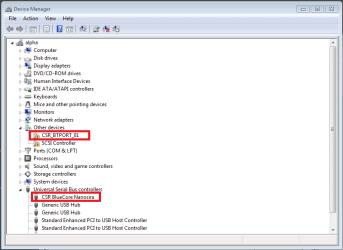
In the device manager I have the "CSR_BTPORT_01" entry under "Other devices". It had no driver installed and Windows added an exclamation mark to the device. Trying to find a suitable driver did not succeed (Windows Update, manual selection, etc.)
The second device was "CSR BlueCore Nanosira" under "Universal Serial Bus controllers" which had a new driver from 2011-01-13 with Driver Version 1.0.5.0 from Cambridge Silicon Radio Limited installed. Windows was claiming that the device was working properly.

You see my situation in screenshot 1.

My solution was to change the driver of "CSR BlueCore Nanosira" under "Universal Serial Bus controllers" back to the generic Bluetooth driver.

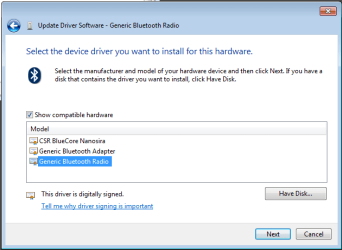
To accomplish this select "Update Driver Software" from "CSR BlueCore Nanosira" (the working device), then select "Browse my computer for driver software" and then "Let me pick form a list of device drivers on my computer". In my case Windows presents the new driver from CSR ("CSR BlueCore Nanosira") and two generic drivers as you can see in screenshot 2.

I selected "Generic Bluetooth Radio" from the list and clicked OK. Then I had "Generic Bluetooth Radio" and "Microsoft Bluetooth Enumerator" back under "Bluetooth Radios" and the Bluetooth icon appeard in the taskbar again. After that I was able to use my bluetooth mouse and keyboard again (even without pairing it again).

Hope this helps for you, too!

Best regards

* I accepted the update of the bluetooth driver by Windows update because I have some problems (unresponsive mouse) with Windows 7. The identical (!!!) hardware works flawlessly with Linux (in my dualboot configuration). So I was hoping for some improvement.
 

Attachments

  • screenshot1.png
    screenshot1.png
    15.4 KB · Views: 3,533
  • screenshot2.png
    screenshot2.png
    10.7 KB · Views: 2,383

My Computer

OS
Windows 7 Professional x64
Hi Everyone,

Thanks very much to you all for your replies.

Firstly, I did try uninstalling and reinstalling. No luck. Also, the BlueTooth dongle is just a generic one that uses CSR drivers.

I am going to try davewebb8211's solution and see if I have any luck!

Thanks,

Chris.
 

My Computer

OS
Windows 7 Home Premium 32bit
Thank you davewebb8211!
That solved my problem too.
I've tried switching between drives before but I haven't noticed that there was another device under USB controllers.

Now I can use my headset again, thank you again. :D
 

My Computer

OS
Windows 7 Home Premium x64
CPU
QX6700
Motherboard
P5Q-E
Memory
4GB OCZ Gold Series DDR2 1066MHz
Graphics Card(s)
AMD ATI Radeon HD5770
Monitor(s) Displays
SAMSUNG 2232BW and LG 22LS4R
Hard Drives
2x 1TB Seagate Barracuda 7200.12
1x 750GB Seagate Barracuda 7200.11
1x 500GB Seagate Barracuda 7200.10
PSU
SevenTeam ZAF-850
I tried the solution suggested by davewebb8211, but to no avail. Instead, I decided to restore to an earlier point and this resolved it. On my Windows Update history, the dodgy driver updates are showing as having been installed, so hopefully it won't happen again.

Thanks for all the help!
 

My Computer

OS
Windows 7 Home Premium 32bit
Hi there!

I ran into the same problem* but I found a solution for me I'd like to share with you.

For me, uinstalling the driver didn't help.
In the device manager I have the "CSR_BTPORT_01" entry under "Other devices". It had no driver installed and Windows added an exclamation mark to the device. Trying to find a suitable driver did not succeed (Windows Update, manual selection, etc.)
The second device was "CSR BlueCore Nanosira" under "Universal Serial Bus controllers" which had a new driver from 2011-01-13 with Driver Version 1.0.5.0 from Cambridge Silicon Radio Limited installed. Windows was claiming that the device was working properly.

You see my situation in screenshot 1.

My solution was to change the driver of "CSR BlueCore Nanosira" under "Universal Serial Bus controllers" back to the generic Bluetooth driver.

To accomplish this select "Update Driver Software" from "CSR BlueCore Nanosira" (the working device), then select "Browse my computer for driver software" and then "Let me pick form a list of device drivers on my computer". In my case Windows presents the new driver from CSR ("CSR BlueCore Nanosira") and two generic drivers as you can see in screenshot 2.

I selected "Generic Bluetooth Radio" from the list and clicked OK. Then I had "Generic Bluetooth Radio" and "Microsoft Bluetooth Enumerator" back under "Bluetooth Radios" and the Bluetooth icon appeard in the taskbar again. After that I was able to use my bluetooth mouse and keyboard again (even without pairing it again).

Hope this helps for you, too!

Best regards

* I accepted the update of the bluetooth driver by Windows update because I have some problems (unresponsive mouse) with Windows 7. The identical (!!!) hardware works flawlessly with Linux (in my dualboot configuration). So I was hoping for some improvement.


F'n brilliant!
 

My Computer

OS
Windows 7 64x
Windows optionial Bluetooth driver update.....Fix

I too lost access to my device after the optional CSR Radio Bluetooth update. If I removed the driver, it would just auto load in the non working update.
My solution:
Disconnect from the net. May not need to do this, but better safe.
Control Panel
View Devices
Right Click Bluetooth Radio
Click Properties
Select Bluetooth Radio
Click Properties
Select Driver
Select Roll Back Driver
OK
Connect back on the net

My Bluetooth Device is back to where it was.
;)
 
Last edited:

My Computer

Computer Manufacturer/Model Number
Lenovo G555
OS
7 64
CPU
AMD Athlon II Duel Core M320 2.10 ghz
Motherboard
n/a
Memory
4gb
Graphics Card(s)
n/a
Sound Card
n/a
Monitor(s) Displays
1366 x 768
Hard Drives
700gb
PSU
n/a
Case
n/a
Cooling
n/a
Hi All.

I had the same problem after accepting this update.Way to go Microsoft!
The only driver i could find was Toshiba Bluetooth stack v 8.00.05 which was okay BUT
it was a 30days trial.So searching a little more i found the v 7.00.08,that is for free and it also works good BUT only for up to 2.1 bluetooth devices.I am very curious to see the Microsofts solution for this.

Thats all folks.
Geia.
 

My Computer

OS
Microsoft Windows 7 Home Premium 32-bit 7601 Multiprocessor Free Service Pack 1
CPU
Intel(R) Core(TM)2 Duo CPU T5800 @ 2.00GHz
Motherboard
FUJITSU SIEMENS XY680
Memory
4,00 GB
Graphics Card(s)
(1) NVIDIA GeForce 9600M GT (2) Mobile Intel(R) 4 Series E
Sound Card
Realtek High Definition Audio
Screen Resolution
1680 x 945 x 32 bits (4294967296 colors) @ 60 Hz
Hard Drives
FUJITSU MHZ2320BH G2
You might wants trying that...:

Article ID: 980396 - Last Review: August 27, 2010 - Revision: 4.0
Bluetooth devices do not work correctly on a computer that is running Windows 7

Or wait for Windows 7 SP1 Rtm!

And related:

Article ID: 2495636 - Last Review: January 17, 2011 - Revision: 1.0
Windows 7 hangs at a black screen on shutdown when printing to a Bluetooth printer.
 

My Computer

Computer type
PC/Desktop
Computer Manufacturer/Model Number
Custom Build
OS
Windows 7 Professional SP1 - x64 [Non-UEFI Boot]
CPU
Ivy Bridge Core i5 3570K (Delidded)
Motherboard
Asus P8Z77-V LE PLUS
Memory
G.Skill "Ares" DDR3 PC3-12800 - 1600MHz (16Gb)
Graphics Card(s)
Asus Dual-RX480-O4G
Sound Card
Creative Sound Blaster Z w/5.1 sound system
Monitor(s) Displays
Asus IPS 23"
Screen Resolution
16/9
Hard Drives
Internal:
500Go Sata 6Gb/s (x2)
500Go Sata 3Gb/s (x2)
SSD 60Go Sata 6Gb/s
PSU
In Win C 900W Series 80+ Platinum
Case
Thermaltake Chaser A71
Cooling
Custom Water Cooling Loop
Keyboard
Cooler Master QuickFire XTi
Mouse
Razer Imperator 2012 (4G)
Antivirus
MSE
Browser
IE 11.0.xxx Rtm
Other Info
"Raid0" with Intel Smart Response Technology (HDD/SSD)
This is a great thread ,I have had a bluetooth for almost 9 months and wasn't able to link it correctly with other devices .

I came across this thread and it answered all my issue's with out me even asking ,so im betting alot more people have the same issue broken links or mis configuaration ......great thread none the less thanks guys for posting :geek:
 

My Computer

Computer type
PC/Desktop
Computer Manufacturer/Model Number
CoreI7-6700K MrFingerIII Special Builds
OS
Windows 10 Home Premium 64bit sp1
CPU
Intel I7-6700K @ 4.6 Ghz 1.344 volts everyday OC
Motherboard
Asrock Fatality K6 Z170 Socket 1151
Memory
32GB G-Skill TridentZ 3200mhz 16-18-18-38 DDR4
Graphics Card(s)
Sli Gigabyte Windforce GTX 980 G1
Sound Card
AC97 Creative Rage Tactic 3D Headphones Bluetooth
Monitor(s) Displays
27" Asus ROG Swift PG278Q G-Sync 48" Vizio Smart HD TV
Screen Resolution
2560x1440p 27"- 48" Currently Gaming at 2560x1440p Res 2K
Hard Drives
250GB Samsung Evo840SSD Seagate baracuda 500 GB WD Mybook 500Gb 1TB Seagate Barracuda
PSU
HX1050w Corsair Silver 80plus certified crosfire/sli
Case
Enthod Pro Full Tower
Cooling
Corsair H110i GT 280 mm High Performance WaterBlock
Keyboard
Logitech wireless keyboard
Mouse
Logitech wireless mouse
Internet Speed
Cox Cable 100+ mb
Antivirus
WebRoot Spysweeper with Antivirus
Browser
IE-10, Chrome, Opera
Other Info
My Other Rig is a AMD FX8320E @4.6Ghz 16GB Ballistic Sport Ram
Mobo Asrock Fatality 990FX 120GB OCZ SSD 1TB Seagate Barracuda Corsair H75 Cooling PSU Corsair CX750
GPU GTX Gigabyte 970G1
Thanks!

I had the exactly the same issue for months! :cry:
 

My Computer

OS
Windows 7
CPU
AMD Phenon II 905e X4
Motherboard
ASRock M3A770DE
Memory
4GB A-DATA DDR3 1333MHz
Graphics Card(s)
ATI Radeon 5850 HD
Sound Card
Sound Blaster X-Fi Xtreme Audio PCI Express
Monitor(s) Displays
Acer V233H, Acer X233H, Acer X233H
Screen Resolution
5760x1080 (Eyefinity)
Hard Drives
Samsung HD501LJ - 500GB (internal)
Western Digital My Book 1TB - 1000GB (external)
Lacie Petit Disk 320 GB USB 2.0 - 320GB (external)
PSU
Nexus 550W
Case
Antec 300
Cooling
Stock
Keyboard
Microsoft Comfort Curve 2000
Mouse
Microsoft IntelliMouse Explorer 3.0
Internet Speed
10M/1M
If your Bluetooth mouse quits working after an update, try the following.

Go into Control Panel -> Device and Printers and see if there is a mouse (or 2) already there. If so, right click on the mouse picture and Remove it. Repeat for all of the phantom mice.

Reboot and try the discovery process again.

Works on Vista also.
 

My Computer

OS
Windows 7 Home Premium 64bit
Back
Top