
cues and isos again

brenski

New member
Local time
3:21 PM
Messages
1
have just been trying to burn dts cds (it's in wav.cue format)

system refuses to burn both the images i try to burn
have had two different error messages:
"can't read file" and "cannot find image"

also now ashampoo just crashes with a windows "close program" message

any ideas/help? i'm pretty sure it's not software specific - as i've loaded 3 versions of ashampoo and also magic iso

could it be hardware? no it sounds silly but could there be drivers required for win7 to understand cue/bin files?

thanks
 

My Computer My Computer

OS
windows 7 home premium
Hello brenski and welcome to Seven Forums.

Have you had this problem before or has it just started? Are you using audio CDs? I'm not sure if Ashampoo or Windows 7 natively supports DTS burning. But you might see if this free tool works. It supposedly supports DTS-HD and Dolby TrueHD bitstreaming.

ffdshow tryouts | Official Website
 

My Computer My Computer

Computer type
Laptop
Computer Manufacturer/Model Number
Sony Vaio VPCEB47GM Laptop
OS
Win 7 Pro 64-bit
CPU
Intel i5 2.4 Ghz
Memory
8GB DDR3
Graphics Card(s)
Intel HD 3000
Sound Card
IDT High Definition
Monitor(s) Displays
15.6 WGXA Anti-Glare LED
Screen Resolution
1280x800
Hard Drives
640Gb 7200rpm
Antivirus
MSE
Browser
Opera (primary) with IE9 backup
Since you mention images and ISOs, I presume that you are trying to burn the ISOs into an optical media but the burning software you used failed. ( It is immaterial what the ISO contains since it is just the replica of the original.)

On this presumption, I would suggest that you defragment the ISOs using WinContig WinContig or Power Defragmenter RejZoR - Power Defragmenter 3.0 released! and then burn the defragmented ISOs.

May or may not work, but absolutely no harm in trying. ( When my multi-boot pendrive couldn't boot from a bootable ISO, the above defragmentation helped to fix it. After defragging the ISO, it booted.)
 

My Computer My Computer

OS
Windows 7 Home Premium 32 bit
Fragmented ISOs? Does such a thing even exist :confused: I've never ever seen an ISO containing a filesystem where any file was in more than one fragment.

brenski: you mention a "wav.cue" image, is this a .cue file with multiple .wav files? Or is your image a .bin/.cue set? The .cue file is actually plain readable text; if you could post it here that would be great.
 

My Computer My Computer

Computer type
PC/Desktop
Computer Manufacturer/Model Number
Custom-built
OS
Windows 7 Professional SP1 32-bit
CPU
Intel Core 2 Duo E6600 2.4GHz
Motherboard
Asus PL5D2
Memory
4GB DDR2-667 (4x1GB in dual-channel config)
Graphics Card(s)
nVidia GeForce 9800 GT
Sound Card
Creative X-Fi XtremeMusic
Monitor(s) Displays
Acer P236H
Screen Resolution
1920x1200 (DVI)
Hard Drives
OCZ SSD Vertex Plus 60GB SATA (Firmware 3.55), 64MB cache
Hitachi HD321KJ SATA, 320GB, 7200rpm, 16MB cache
PSU
Antec TruePower 2.0
Case
Cooler Master Centurion
Cooling
Too many fans
Keyboard
Standard
Mouse
Microsoft wireless optical mouse
Internet Speed
AT&T U-verse (18mbit/sec)
Antivirus
Microsoft Security Essentials
Browser
Firefox
Other Info
Other devices:
Compaq CQ-60 laptop
Google Nexus 7 (2012) tablet
Nvidia SHIELD tablet (US/LTE)
Hardkernel ODROID-XU single-board computer (Samsung Exynos 5420)
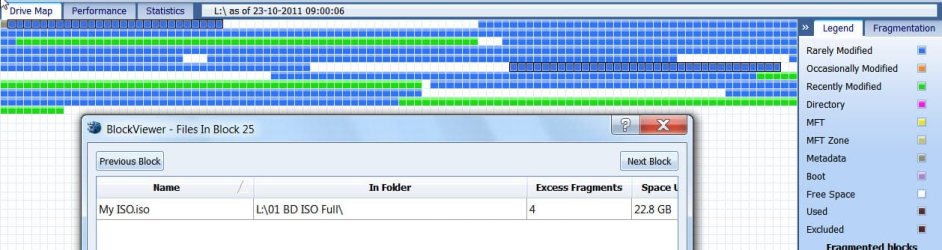
ISO itself is one single file. It can be broken and placed at different locations in segments in which case it is fragmented.

Such non-contiguous ISOs may not work/appear corrupt in certain situations like the multiboot pen drive I have mentioned previously.

WinContig or Power defragmenter can make the ISO contiguous by putting all the fragments together in one place. Defragmented.

Perfect Disk drive map of an HDD containing 13 large ISOs (no other file category) with no fragments:


contiguous ISOs.jpg

The same drive with one ISO fragmented:

fragmentedISO.jpg

WinContig and Power Defragmenter can list the fragmented files (ISOs in this case) and defragment the chosen files.
 

My Computer My Computer

OS
Windows 7 Home Premium 32 bit
I didn't realize you were talking about the ISO itself, I thought you meant the files within. Still, I don't think fragmentation should affect it anymore than it would affect an mp3 file or a video or a Word document. (Of course it's different if you try to burn it to a disc at high speed and the HD can't keep up with delivering the data - but that shouldn't cause actual read errors.)

But the OP's question was about a .cue/.wav image, or so he claims. We're not even dealing with .iso files here...
 

My Computer My Computer

Computer type
PC/Desktop
Computer Manufacturer/Model Number
Custom-built
OS
Windows 7 Professional SP1 32-bit
CPU
Intel Core 2 Duo E6600 2.4GHz
Motherboard
Asus PL5D2
Memory
4GB DDR2-667 (4x1GB in dual-channel config)
Graphics Card(s)
nVidia GeForce 9800 GT
Sound Card
Creative X-Fi XtremeMusic
Monitor(s) Displays
Acer P236H
Screen Resolution
1920x1200 (DVI)
Hard Drives
OCZ SSD Vertex Plus 60GB SATA (Firmware 3.55), 64MB cache
Hitachi HD321KJ SATA, 320GB, 7200rpm, 16MB cache
PSU
Antec TruePower 2.0
Case
Cooler Master Centurion
Cooling
Too many fans
Keyboard
Standard
Mouse
Microsoft wireless optical mouse
Internet Speed
AT&T U-verse (18mbit/sec)
Antivirus
Microsoft Security Essentials
Browser
Firefox
Other Info
Other devices:
Compaq CQ-60 laptop
Google Nexus 7 (2012) tablet
Nvidia SHIELD tablet (US/LTE)
Hardkernel ODROID-XU single-board computer (Samsung Exynos 5420)
Yep, Corazon, normally though a fragmented ISO shouldn't matter. It is just like any other fragmented file.

Recently when I added the latest Paragon WinPE recovery CD ISO to my multiboot pendrive it wouldn't boot. As recommended by the software author, I defragmented the ISO in the flash drive with Power Defragmenter and then it booted. So under certain conditions/situations defragmenting the ISO can help. ( I am not sure whether it will help only under a Linux environment.) So where one finds some difficulty in dealing with a particular ISO, my recommendation will be to try defragmenting the ISO. It may or may not help in that particular situation, but trying it does not cost anything except the little time it takes to defragment that single ISO.

Since the OP mentioned "cues and ISOs again" as the title, I had presumed certain things as clearly stated in my first post. Yes, my presumption was wrong.:)

Let us now hear from the OP and his response to your query.
 

My Computer My Computer

OS
Windows 7 Home Premium 32 bit
Yes, let's. But thanks for your useful information. :)
 

My Computer My Computer

Computer type
PC/Desktop
Computer Manufacturer/Model Number
Custom-built
OS
Windows 7 Professional SP1 32-bit
CPU
Intel Core 2 Duo E6600 2.4GHz
Motherboard
Asus PL5D2
Memory
4GB DDR2-667 (4x1GB in dual-channel config)
Graphics Card(s)
nVidia GeForce 9800 GT
Sound Card
Creative X-Fi XtremeMusic
Monitor(s) Displays
Acer P236H
Screen Resolution
1920x1200 (DVI)
Hard Drives
OCZ SSD Vertex Plus 60GB SATA (Firmware 3.55), 64MB cache
Hitachi HD321KJ SATA, 320GB, 7200rpm, 16MB cache
PSU
Antec TruePower 2.0
Case
Cooler Master Centurion
Cooling
Too many fans
Keyboard
Standard
Mouse
Microsoft wireless optical mouse
Internet Speed
AT&T U-verse (18mbit/sec)
Antivirus
Microsoft Security Essentials
Browser
Firefox
Other Info
Other devices:
Compaq CQ-60 laptop
Google Nexus 7 (2012) tablet
Nvidia SHIELD tablet (US/LTE)
Hardkernel ODROID-XU single-board computer (Samsung Exynos 5420)
Back
Top