Currency Format

gusz

New member
Local time
10:11 AM
Messages
10
I'm in Mexico and I have Windows 7 and Office 2007, both in spanish. In Excel,
my currency format displays in Euros, with commas as the thousands separator.
I want Mexican pesos as the currency, and period as the thousands separator.
I've tried installing the spanish (Mexico) language pack in Windows 7, and setting
pesos (Mexico) as the currency in Excel Options under the Office Button, but
I can't seem to get it right.

I'm guessing that somewhere I'm configured as if I'm in Spain, not Mexico, but
I can't figure out how/where. Can someone step me through how to configure
this correctly in Windows/Excel, or point me to a link how to do this?

Thx, Gus
 

My Computer My Computer

At a glance

Windows 7
OS
Windows 7
Here is the solution for the Thousands separator:

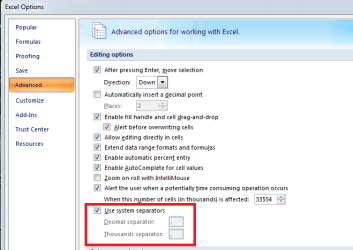
By default, Microsoft Excel uses the system separators that are defined in the regional settings in Control Panel. If you sometimes need to display numbers with different separators for thousands or decimals, you can temporarily replace the system separators with custom separators.

  1. Click the Microsoft Office Button
    ZA010077102.gif
    , and then click Excel Options.

  1. On the Advanced tab, under Editing options, clear the Use system separators check box.
  2. Type new separators in the Decimal separator and Thousands separator boxes.
Tip When you want to use the system separators again, select the Use system separators check box.
Note For a permanent solution, you must change the regional settings in Control Panel.

When you say that you want Mexican pesos as the currency, do you want to see $ or MXP as a prefix?
 

Attachments

  • separators.PNG
    separators.PNG
    16.6 KB · Views: 25

My Computer My Computer

At a glance

Windows 7 Home Premium 64bitIntel(R) Core(TM) i3-2120 CPU @ 3.30GHz3.00 GB(1) Intel(R) HD Graphics (2) VNC Mirror Driver
Computer type
PC/Desktop
Computer Manufacturer/Model Number
Packard Bell
OS
Windows 7 Home Premium 64bit
CPU
Intel(R) Core(TM) i3-2120 CPU @ 3.30GHz
Motherboard
Packard Bell IPISB-AG
Memory
3.00 GB
Graphics Card(s)
(1) Intel(R) HD Graphics (2) VNC Mirror Driver
Sound Card
Realtek High Definition Audio
Monitor(s) Displays
AIO LCD
Screen Resolution
1920 x 1080
Hard Drives
WDC WD10EADX-22TDHB0 ATA Device
Fixed hard disk media
4 partitions
931.51 GB
Keyboard
Wireless
Mouse
Wireless
Antivirus
Microsoft Security Essentials
Browser
IE; Firefox
Other Info
Also:
Samsung N220 Plus Netbook - Windows 7 Home
HP laptop
iPad 5
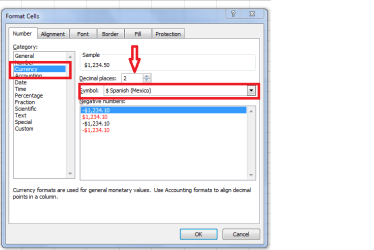
To display the currency, you need to format the cell(s) like this - also adjusting the decimal point for denominations below one peso:
.
 

Attachments

  • currency.png
    currency.png
    14.3 KB · Views: 34

My Computer My Computer

At a glance

Windows 7 Home Premium 64bitIntel(R) Core(TM) i3-2120 CPU @ 3.30GHz3.00 GB(1) Intel(R) HD Graphics (2) VNC Mirror Driver
Computer type
PC/Desktop
Computer Manufacturer/Model Number
Packard Bell
OS
Windows 7 Home Premium 64bit
CPU
Intel(R) Core(TM) i3-2120 CPU @ 3.30GHz
Motherboard
Packard Bell IPISB-AG
Memory
3.00 GB
Graphics Card(s)
(1) Intel(R) HD Graphics (2) VNC Mirror Driver
Sound Card
Realtek High Definition Audio
Monitor(s) Displays
AIO LCD
Screen Resolution
1920 x 1080
Hard Drives
WDC WD10EADX-22TDHB0 ATA Device
Fixed hard disk media
4 partitions
931.51 GB
Keyboard
Wireless
Mouse
Wireless
Antivirus
Microsoft Security Essentials
Browser
IE; Firefox
Other Info
Also:
Samsung N220 Plus Netbook - Windows 7 Home
HP laptop
iPad 5
Try to configure settings Control Panel -> Region and Language.
In Format tab set Spanish (Mexico)

MS article in Spanish
same article in English
 

My Computer My Computer

At a glance

Windows 8.1 ; Windows 7 x86 (Dec2008-Jan2013)
Computer type
PC/Desktop
OS
Windows 8.1 ; Windows 7 x86 (Dec2008-Jan2013)
Other Info
"The scale icon at the top right of a post or tutorial is how you can give rep to the member."
Back
Top