
This thread has led me to do some preliminary research into how Windows uses the 'Date' formats available.
Using 'Custom' date formats seems to result in an abnormality with the way applications read the current system date. I've included a couple of examples below...
1 prime example is if you wish to have a more detailed Date on the taskbar which included the day you'd set the following custom date format "ddd dd/mm/yyyy"..
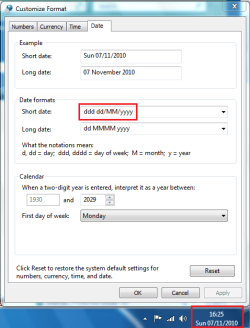
However...The space between the "ddd" and "dd" causes the following abnormalities.
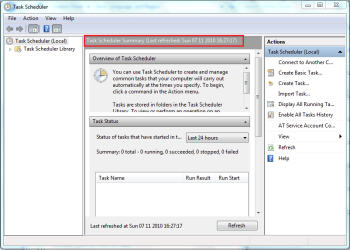
Task Scheduler - Notice the date now has spaces instead of "/"
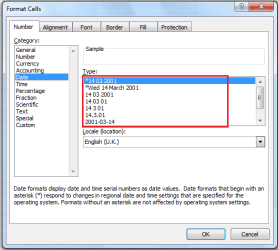
Same happens in Excel when formatting cells
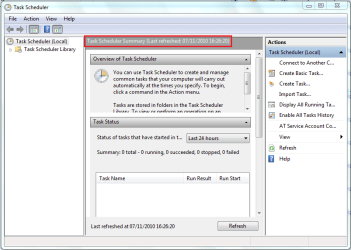
I also changed them back so as to demonstrate how the default settings work perfectly well.

Task Scheduler - Back to normal
Excel - Back to normal
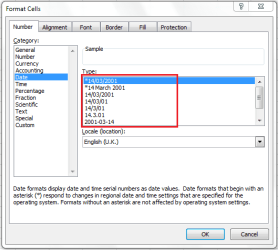
So as a warning to all who like to use 'Custom' date formats, please be aware that it will alter the way Windows & other apps read the current system date depending on what you've changed & how.
OS
Tip
To access custom date formats go to Control Panel -> Clock, Language, and Region -> Region and Language and click 'Additional Settings...'
Using 'Custom' date formats seems to result in an abnormality with the way applications read the current system date. I've included a couple of examples below...
1 prime example is if you wish to have a more detailed Date on the taskbar which included the day you'd set the following custom date format "ddd dd/mm/yyyy"..
However...The space between the "ddd" and "dd" causes the following abnormalities.
Task Scheduler - Notice the date now has spaces instead of "/"
Same happens in Excel when formatting cells
I also changed them back so as to demonstrate how the default settings work perfectly well.
Task Scheduler - Back to normal
Excel - Back to normal
So as a warning to all who like to use 'Custom' date formats, please be aware that it will alter the way Windows & other apps read the current system date depending on what you've changed & how.
OS
My Computer
- Computer Manufacturer/Model Number
- Compaq Desktop
- OS
- Windows 7 Ultimate x64
- CPU
- AMD Sempron Dual Core
- Memory
- 3GB
- Graphics Card(s)
- NVIDIA GeForce 6150SE nForce 430
- Screen Resolution
- 1024x768
- Hard Drives
- 150GB Sata


