Custom Start Buttons are Invisible

Chud57

New member
Local time
6:41 AM
Messages
15
Location
Georgia
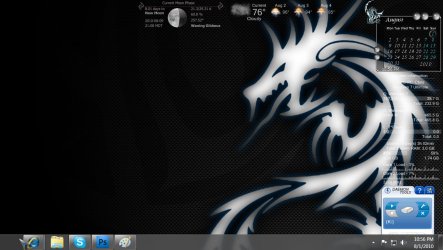
just as the title says, my custom start buttons dont show up when i apply them, the button is still there in the sence that i can still click it and the start menu pops up, my button is just not there.

when i reset it back to the default windows 7 start button it shows up fine but whenever i try to apply my custom start buttons it just dosnt show up.

here is a screenshot to explain further what im talking about.
 

Attachments

  • missing.jpg
    missing.jpg
    114.3 KB · Views: 61

My Computer

Computer Manufacturer/Model Number
Hp M9500y
OS
Windows 7 Ultimate x64 RTM 7600
CPU
Amd Quad Core 2.4ghz
Memory
8 gigs
Graphics Card(s)
512 video memory Nvidia 9600gs
Monitor(s) Displays
Hp w1907
Hard Drives
750 gig Sata drive
Hallo Chud, did you right click on the start button changer & select "Run as Administrator" ?
 

My Computer

Computer Manufacturer/Model Number
Hewlett Packard Compaq Presario CQ60-305au
OS
Windows Seven Home Premium 32bit SP1
CPU
AMD Athlon QI46 2.1Ghz
Motherboard
Wistron 303c
Memory
2048 Mb DDR2 SD RAM
Graphics Card(s)
NVidea GE GoForce 8200M G/256mb dedicated graphics memory
Sound Card
MCP78S NVidea high definition
Monitor(s) Displays
15.6" High definition Brightview Widescreen
Screen Resolution
1336x768
Hard Drives
Toshiba MK2555GSX ATA
yea it does the same thing
 

My Computer

Computer Manufacturer/Model Number
Hp M9500y
OS
Windows 7 Ultimate x64 RTM 7600
CPU
Amd Quad Core 2.4ghz
Memory
8 gigs
Graphics Card(s)
512 video memory Nvidia 9600gs
Monitor(s) Displays
Hp w1907
Hard Drives
750 gig Sata drive
If you made the start orb, then you have done it wrong...

Follow this vid:-


My Computer

Computer type
PC/Desktop
Computer Manufacturer/Model Number
Self Build
OS
MS Windows 7 Professional 64-bit SP1
CPU
AMD FX(tm)-6100 Six-Core Processor Socket AM3+ (942)
Motherboard
ASUSTeK COMPUTER INC. SABERTOOTH 990FX (AM3r2)
Memory
8.00 GB Dual-Channel DDR3 @ 802MHz (11-11-11-36) 1.5Volts
Graphics Card(s)
NVIDIA GeForce GTX 560 Ti
Sound Card
Onboard Realtek HD
Monitor(s) Displays
shimian (1920x1080@60Hz)
Screen Resolution
1920*1080
Hard Drives
OCZ-AGIL ITY3 SATA Disk Device 120GB
PSU
Corsair TX 750
Case
Corsair
Cooling
WaterCooled
Keyboard
Microsoft Wired
Mouse
Logitech USB Optical TiltWheel Mouse
Internet Speed
Realtek PCIe GBE Family Controller 20MB*1MB
Antivirus
Avast
Browser
Firefox
Other Info
150GB Internal Hard Drive for Backing Up Important Files -
Hauppauge Nova-DT Dual DVB-T Tuner Device (+IR) -
USB PC Camera with Mic (SN9C105)
no no, i didnt make them, it does it with ANY custom start buttons i use, the default works fine, it was fine with the custom one's till i changed my video card then it started doing this.
 

My Computer

Computer Manufacturer/Model Number
Hp M9500y
OS
Windows 7 Ultimate x64 RTM 7600
CPU
Amd Quad Core 2.4ghz
Memory
8 gigs
Graphics Card(s)
512 video memory Nvidia 9600gs
Monitor(s) Displays
Hp w1907
Hard Drives
750 gig Sata drive
EDIT: Before reading this i assume your account is (Username/Administrator)?

All i can suggest is, just in case make a restore point or better still image your system.

Copy & paste any custom start buttons you wish to keep to a file in another location.

Download a new copy of W7SBC. (Please note this program has to run from within its own folder);

http://www.door2windows.com/windows...e-your-windows-7-start-button-with-one-click/

If you have UAC turned off turn it on to at least the minimum setting

Run: http://www.sevenforums.com/tutorials/1538-sfc-scannow-command-system-file-checker.html then restart your computer, this will repair any corruptions in explorer.exe but will not restore your default permissions or ownership (but don't concern yourself with that.)

Delete your current copy of W7SBC.

Navigate to your C:Windows folder & locate explorer.exe there will also be 2 explorer.exe back up folders.
Drag these 2 folders to your documents folder (The back up folders NOT THE ONE TITLED ONLY explorer.exe) these can be deleted later if everything goes ok.
W7SBC will not create new back up folders if their is already existing ones (this is why if one is corrupted we have to remove the existing ones before running your new copy of W7SBC)

Now with your new copy of W7SBC open & set W7SBC itself http://www.sevenforums.com/tutorials/316-compatibility-mode.html to run this program as Admin, Step 6 in the Tutorial.

Now try running W7SBC again using http://www.sevenforums.com/tutorials/11841-run-administrator.html

If this doesnt work i am lost, as W7SBC flicks between its back up folders depending on whether your using a custom button or default (as far as i can make out? someone correct me if i am wrong) that one of those backups could be corrupted or your new Graphics card can not read the data in it (sfc scannow will not fix back ups that is why we needed to create new ones, which would of happened the first time you run your new copy of W7SBC after removing the old back up folders.)

PLEASE: do not forget to create a restore point or system image first. If you are not confident in following my instructions regarding the C:Windows folder then probably best left alone.

I hope this is of some help in resolving your issue

 
Last edited:

My Computer

Computer Manufacturer/Model Number
Hewlett Packard Compaq Presario CQ60-305au
OS
Windows Seven Home Premium 32bit SP1
CPU
AMD Athlon QI46 2.1Ghz
Motherboard
Wistron 303c
Memory
2048 Mb DDR2 SD RAM
Graphics Card(s)
NVidea GE GoForce 8200M G/256mb dedicated graphics memory
Sound Card
MCP78S NVidea high definition
Monitor(s) Displays
15.6" High definition Brightview Widescreen
Screen Resolution
1336x768
Hard Drives
Toshiba MK2555GSX ATA
Back
Top