Custom Start Menu Folder

HaGGardSmurf

New member
In my start menu I'd like to pin a folder or something that I can put my mouse over and it will expand and have a bunch of applications that I frequently use inside.

Like when I go Start > Paint my start menu will expand and I'll have a list of recent pics.

So I'd like to pin something to my start menu that when I mouse over it has app's I use. (I'd like to be able to add the apps on my own, and not use 'recent apps' or whatever)

Can this be done?
 
Last edited:

My Computer

OS
Windows 7 Ultimate x64
CPU
Athlon X2 6400+
Motherboard
Asus M2n-E
Memory
1GB Kingston DDR-2, 4GB no name DDR-2
Graphics Card(s)
HD 4870
Sound Card
Onboard
Monitor(s) Displays
Acer 22" LG 18"
Hard Drives
750GB Caviar Green
320GB Barracuda
PSU
Enermax Liberty
Case
Lian Li
Cooling
Zalman Cooler

My Computer

Computer type
Laptop
Computer Manufacturer/Model Number
Sager NP9170
OS
Win 7 Pro x64 / Win 10 Pro
CPU
Intel(R) Core(TM) i7-3630QM CPU @ 2.40GHz
Motherboard
CLEVO P170EM
Memory
12 GB
Graphics Card(s)
(1) Intel(R) HD Graphics 4000 (2) NVIDIA GeForce GTX 675M
Sound Card
(1) Realtek High Definition Audio (2) Intel(R) Display Aud
Monitor(s) Displays
17.3
Screen Resolution
1920x1080
Hard Drives
(1) Samsung 860 EVO 500GB(OS) (1) Samsung 860 EVO 500GB(Data)
Keyboard
Backlite
Antivirus
MSE, Malwarebytes Pro
Browser
Firefox
Other Info
DESKTOP: Custom-built.
OS: Win 10 Pro x64.
CASE: Rosewill R5.
CPU: Intel I5 4670K CPU @ 3.40GHz.
CPU COOLER: Cool Master Hyper 212 EVO.
MOTHERBOARD: Asus Z87-A.
MEMORY: Kingston HyperX 2x4 GB.
GPU: Nvidia Geforce 650 TI.
PSU: Corsair TX750.
DRIVES: (1) Samsung 840 120 GB SSD (2) Western Digital blue 500 GB 7200 RPM.
Thats what I want to do, however I dont want it on my taskbar I want it on my start menu.
 

My Computer

OS
Windows 7 Ultimate x64
CPU
Athlon X2 6400+
Motherboard
Asus M2n-E
Memory
1GB Kingston DDR-2, 4GB no name DDR-2
Graphics Card(s)
HD 4870
Sound Card
Onboard
Monitor(s) Displays
Acer 22" LG 18"
Hard Drives
750GB Caviar Green
320GB Barracuda
PSU
Enermax Liberty
Case
Lian Li
Cooling
Zalman Cooler
I'd like to pin something to my taskbar that when I mouse over it has app's I use. (I'd like to be able to add the apps on my own, and not use 'recent apps' or whatever)

You might get what you want by putting new toolbars on the taskbar:

1. Create a folder (anywhere) and put your shortcuts, including shortcuts to your app folders in it.
2. Right click on taskbar > select Toolbars > New toolbar. Navigate to, and open, the folder you created, then click "Select Folder".
3. On the taskbar, drag by the left vertical bar to where you want.
4. Drag the right vertical bar toward the left to hide the toolbar contents, as much as you like.
5. Right click on the left vertical bar and unselect "Show text" and "Show title".
6. Lock the taskbar, and the vertical bars vanish.

Now you only have to click on the >> button at the right to expand the toolbar list, after that the folder shortcuts in there will expand when you mouse hover.

You can also use as many toolbars as you need. If you want to space them, create an empty folder and a toolbar for it on the taskbar, and extend the empty space as required by dragging the right vertical bar.
 

My Computer

OS
Windows 7
Sorry I didnt realize I had the word taskbar in the first post.

I want to do this on my start menu.
 

My Computer

OS
Windows 7 Ultimate x64
CPU
Athlon X2 6400+
Motherboard
Asus M2n-E
Memory
1GB Kingston DDR-2, 4GB no name DDR-2
Graphics Card(s)
HD 4870
Sound Card
Onboard
Monitor(s) Displays
Acer 22" LG 18"
Hard Drives
750GB Caviar Green
320GB Barracuda
PSU
Enermax Liberty
Case
Lian Li
Cooling
Zalman Cooler
Sorry I didnt realize I had the word taskbar in the first post.

I want to do this on my start menu.

No problem. I'd be interested to hear if you get a way to do that.

I have found the toolbar setup to be a quicker and more usable route to files, folders and programs than the Start menu - think of it as a substitution for the Start button.
 

My Computer

OS
Windows 7
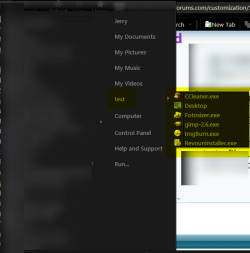
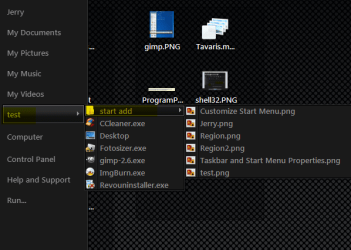
Something like this?
You can have it with programs.
Region.png
Or with programs and folders.
cc.png
Jerry
 

My Computer

Computer type
Laptop
Computer Manufacturer/Model Number
Sager NP9170
OS
Win 7 Pro x64 / Win 10 Pro
CPU
Intel(R) Core(TM) i7-3630QM CPU @ 2.40GHz
Motherboard
CLEVO P170EM
Memory
12 GB
Graphics Card(s)
(1) Intel(R) HD Graphics 4000 (2) NVIDIA GeForce GTX 675M
Sound Card
(1) Realtek High Definition Audio (2) Intel(R) Display Aud
Monitor(s) Displays
17.3
Screen Resolution
1920x1080
Hard Drives
(1) Samsung 860 EVO 500GB(OS) (1) Samsung 860 EVO 500GB(Data)
Keyboard
Backlite
Antivirus
MSE, Malwarebytes Pro
Browser
Firefox
Other Info
DESKTOP: Custom-built.
OS: Win 10 Pro x64.
CASE: Rosewill R5.
CPU: Intel I5 4670K CPU @ 3.40GHz.
CPU COOLER: Cool Master Hyper 212 EVO.
MOTHERBOARD: Asus Z87-A.
MEMORY: Kingston HyperX 2x4 GB.
GPU: Nvidia Geforce 650 TI.
PSU: Corsair TX750.
DRIVES: (1) Samsung 840 120 GB SSD (2) Western Digital blue 500 GB 7200 RPM.
Why have they messed with the brilliantly simple method in XP??

In XP it was o so simple - the start menu was a folder, accessible in explorer and with a shortcut by right clikcing on the start button.
Dead easy to customise.
tongue.gif

I collected all my installation folders into one folder called (you guessed) installation folders (everything installs with uninstall, readme etc etc). I then put the most frequently used programs in the order I wanted them, just the program icons under "programs) and created topical folders, "WEB" (browsers ftp, html editors page creation etc) "VIDEO" editors and players "SOUND" likewise, DOCUMENTS (word, page plus etc) & PHOTO (photshop, lightroom etc. Perfectly the way *I* use my computer.
Then on top I added a folder for frequently used files (shortcuts to things I use almost every session at some point):D

How can this be done in 7 - all this nonsense pinning individual programs to the start menu and it putiing them in random order etc - creates a chaotic mess - and having the last used programs move to the first layer WTF??? just cos I used it before does not mean I need it to hand now!!!
mad.png


Is there any equivalent in 7 - ie getting hold of real folders and arraning them with explorer, rather than messing about with so called customisation "options"??
confused.gif
 

My Computer

Computer Manufacturer/Model Number
Dell M101Z
OS
Windows 7 Professional x64
CPU
AMd duo 1.3
Motherboard
Dell M101Z (Inspiron 1120)
Memory
4GB
Graphics Card(s)
ATi mobile incorporated
Monitor(s) Displays
on MB
Hard Drives
OCZ Vertex 3 240Gb
PSU
laptop
Case
laptop
Cooling
fans
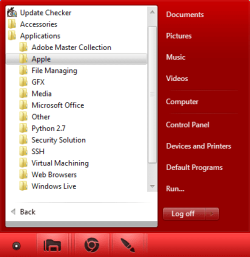
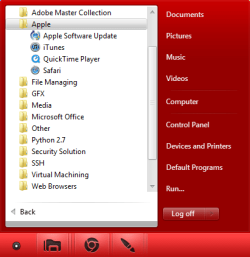
I do not know what you mean but I can take a guess. Do you mean organising your Start Menu Applications in folders like mine?

Example 1.pngExample 1.2.png

As you can see I have organised every application in categories and I have like 100 Applications. If you want you can also customise each Icon based on what they actually are.

To do what I have done there are two ways.

Method 1 - Click Start, All Programs and click (hold) and drag each Application to wherever
   Note
You can not make folders, only using Method 2
   Warning
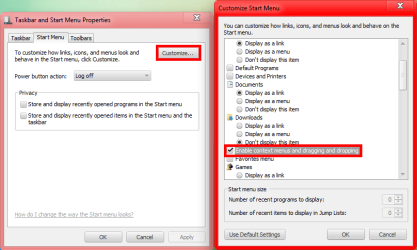
This will not work for you if you have Enable context menus and dragging and dropping.

Right Click on the Taskbar and select Properties. Click the Start Menu Tab and select Customize then simply enable the option:

Example 1.3.png
Method 2 - Click Start and Right Click on All Programs and select Open All Users, make whatever folders and cut/copy and paste it wherever.
 

My Computer

Computer type
PC/Desktop
Computer Manufacturer/Model Number
Novatech iRush Pro
OS
Windows 7 Ultimate SP1 - 64 Bit
CPU
Intel Core i5 2500k
Motherboard
Foxconn H67M-S/H67M-V/H67
Memory
2x4GB DDR3 1333Hz
Graphics Card(s)
Ati Radeon 6770
Sound Card
None
Monitor(s) Displays
Samsung S22B150
Screen Resolution
1920x1080
Hard Drives
2x500GB
PSU
500W
Cooling
Fan
Keyboard
HP KU0316
Mouse
Wireless Logitech M185
Internet Speed
20MB/s
Antivirus
Avast Free
Browser
Google Chrome
Other Info
Logitech M185 Mouse
KU-M316 Keyboard
Looks as if everything I did oin xp should be possible in 7,,,BUT
when I right click the start button I only get "properties" and "open windows explorer" (whichopens explorer in a general way). the otion to "open all users" and "explore all users" is missing.

Is the start menu off documents & settings, users etc as a real folder like it was in XP? if it is I could dig around and find it
 

My Computer

Computer Manufacturer/Model Number
Dell M101Z
OS
Windows 7 Professional x64
CPU
AMd duo 1.3
Motherboard
Dell M101Z (Inspiron 1120)
Memory
4GB
Graphics Card(s)
ATi mobile incorporated
Monitor(s) Displays
on MB
Hard Drives
OCZ Vertex 3 240Gb
PSU
laptop
Case
laptop
Cooling
fans
The start menu is a combination of what is here:
C:\Users\username\AppData\Roaming\Microsoft\Windows\Start Menu\Programs
and what is here:
C:\Users\All Users\Microsoft\Windows\Start Menu\Programs
 

My Computer

Computer type
Laptop
Computer Manufacturer/Model Number
Employer provided Dell Latitude
OS
W7 Pro SP1 64bit
CPU
i7
Memory
8GB
Graphics Card(s)
Intel HD Graphics
Hard Drives
crappy SSD
Antivirus
Employer mandated Symantec Endpoint Protection
Browser
Pale Moon 64bit, IE11 64bit & Chrome 64bit
Sometimes you have to right click on all programs a few times to get that open all user to show up.
Here is the actual location C:\ProgramData\Microsoft\Windows\Start Menu
You will also find some start menu items here C:\Users\USER NAME\AppData\Roaming\Microsoft\Windows\Start Menu\Programs
AppData is hidden use this tutorial to unhide it use Option 1 step 3 http://www.sevenforums.com/tutorials/56005-file-folder-hide-unhide.html
Jerry
 

My Computer

Computer type
Laptop
Computer Manufacturer/Model Number
Sager NP9170
OS
Win 7 Pro x64 / Win 10 Pro
CPU
Intel(R) Core(TM) i7-3630QM CPU @ 2.40GHz
Motherboard
CLEVO P170EM
Memory
12 GB
Graphics Card(s)
(1) Intel(R) HD Graphics 4000 (2) NVIDIA GeForce GTX 675M
Sound Card
(1) Realtek High Definition Audio (2) Intel(R) Display Aud
Monitor(s) Displays
17.3
Screen Resolution
1920x1080
Hard Drives
(1) Samsung 860 EVO 500GB(OS) (1) Samsung 860 EVO 500GB(Data)
Keyboard
Backlite
Antivirus
MSE, Malwarebytes Pro
Browser
Firefox
Other Info
DESKTOP: Custom-built.
OS: Win 10 Pro x64.
CASE: Rosewill R5.
CPU: Intel I5 4670K CPU @ 3.40GHz.
CPU COOLER: Cool Master Hyper 212 EVO.
MOTHERBOARD: Asus Z87-A.
MEMORY: Kingston HyperX 2x4 GB.
GPU: Nvidia Geforce 650 TI.
PSU: Corsair TX750.
DRIVES: (1) Samsung 840 120 GB SSD (2) Western Digital blue 500 GB 7200 RPM.
Thank you "Bongo" and "username issues", that is exactly what I was looking for - a bit more hidden than in XP but once I unhide it I can set up my start menu exactly as I would like it - job done!! (Ihope - I'll get back to you if I hit further trouble) :D
 

My Computer

Computer Manufacturer/Model Number
Dell M101Z
OS
Windows 7 Professional x64
CPU
AMd duo 1.3
Motherboard
Dell M101Z (Inspiron 1120)
Memory
4GB
Graphics Card(s)
ATi mobile incorporated
Monitor(s) Displays
on MB
Hard Drives
OCZ Vertex 3 240Gb
PSU
laptop
Case
laptop
Cooling
fans
You're Welcome
 

My Computer

Computer type
Laptop
Computer Manufacturer/Model Number
Sager NP9170
OS
Win 7 Pro x64 / Win 10 Pro
CPU
Intel(R) Core(TM) i7-3630QM CPU @ 2.40GHz
Motherboard
CLEVO P170EM
Memory
12 GB
Graphics Card(s)
(1) Intel(R) HD Graphics 4000 (2) NVIDIA GeForce GTX 675M
Sound Card
(1) Realtek High Definition Audio (2) Intel(R) Display Aud
Monitor(s) Displays
17.3
Screen Resolution
1920x1080
Hard Drives
(1) Samsung 860 EVO 500GB(OS) (1) Samsung 860 EVO 500GB(Data)
Keyboard
Backlite
Antivirus
MSE, Malwarebytes Pro
Browser
Firefox
Other Info
DESKTOP: Custom-built.
OS: Win 10 Pro x64.
CASE: Rosewill R5.
CPU: Intel I5 4670K CPU @ 3.40GHz.
CPU COOLER: Cool Master Hyper 212 EVO.
MOTHERBOARD: Asus Z87-A.
MEMORY: Kingston HyperX 2x4 GB.
GPU: Nvidia Geforce 650 TI.
PSU: Corsair TX750.
DRIVES: (1) Samsung 840 120 GB SSD (2) Western Digital blue 500 GB 7200 RPM.
Back
Top