Custom start orb help

LexyVr

New member
Local time
1:20 PM
Messages
4
Dear forum,

I have since quite some time gotten to customizing my explorer shell, navigation buttons, start orb etc. on windows 7 (64bit). However, after having had a particular start orb for a while, I thought it'd be nice to change it. So, I made my own new custom orb (following this guide: How to Create Your Own Windows 7 Start Button Orb Bitmap Image - YouTube). However, as I tried to change it with door2windows' start orb changer v5, the orb did not appear. My start button still works but is simply invisible... I then tried using customizergod, which resulted in the startorb being extremely white (Imgur: The most awesome images on the Internet). I did run both programs as admin as that could've been a problem.

Here's my custom start orb: Darksouls-orb.bmp - Google Drive

Another issue popped up. I read on a forum somewhere I should revert my explorer skin to the original, and by using the 'sfc /scannow' command in cmd would fix this. However, it changed my explorer skin to that of a win95, and everytime i go into the control panel to pick a theme & fix it, my explorer crashes...
Here's how it looks Imgur: The most awesome images on the Internet

Could anyone please help me get a fix for this?

Thanks in advance
Lexy
 
Last edited:

My Computer

Computer type
PC/Desktop
OS
Windows 7 64bit
Hello and welcome Lexy now I don't know if this will help Start Menu Button - Change - just a thought and there is another link near the top of this tutorial that could throw light on your icon issue;)

Edit: Another I found at the bottom of that tutorial and I suppose you could use any picture you like with this. How to Create Custom Start Orb Image
 

My Computer

Computer type
PC/Desktop
Computer Manufacturer/Model Number
Own build (new) Desk1 / Asus ROG Win 7 / Desk2 1st build
OS
Desk1 7 Home Prem / Desk2 10 Pro / Main lap Asus ROG 10 Pro 2 laptop Toshiba 7 Pro Asus P2520 7 & 10
CPU
Desk1 i5 3750K / Laptop i7 GTX 860M / Desk2 i5 2500
Motherboard
Desk1 Asus P877-V / Desk2 Gigabyte H67 UD3H / Laptop ?
Memory
Desk1 8GB (1866) / Desk2 16GB (1333) / Laptop 8Gb DDR3
Graphics Card(s)
Desk 1& 2NVidia GTX 650 & Laptops on board Intel
Sound Card
Desk 1 & 2 -XONAR DG Realtek High Def audio Laptop
Monitor(s) Displays
Desk 1 Benq HD 2450 / Desk2 Philips 24" / Laptop 17.5"
Screen Resolution
1920x1080 D1 & D2 & Laptop 1
Hard Drives
Desk1 Samsung 120GB 830 SSD
Asus ROG 256GB 850 Pro SSD
Desk2 Samsung 840 256 SSD
Toshiba 120GB EVO
PSU
Desk 1 Corsair HX 1050/ Laptop ? / Desk 2 Corsair HX 650
Case
Desk 1 Cooler HAF XM ? Toshiba laptop / Desk2 Coolermaster
Cooling
Fans on all Desk1 -2 Desk2 - all Coolermasters 5 Laptop ?
Keyboard
Desk 1 MS Sidewinder X6 Desk 2 MS Sidewinder X 4
Mouse
Desk 1&2 - Gigabyte MS 900 gamer - laptop - Logitec wireless
Internet Speed
ADSL2+
Other Info
One other Desktop (tester) and spare Toshba laptop both with SSD's
Running Kaspersky 2016 ISS on all machines config'd identically
Logitec audio stereo systems on each machine (x3)
Canon MG5250MFC
Router/modem TP-Link running WPA2SK
Dear ICIT2LOL,

This unfortunately did not resolve my issue... I'm looking for a way to either revert my explorer-skin to the original (it's changed to some win95 looking ui, as stated in the post - trying to change my explorer theme via win control panel doesn't work) aswell as fixing my start button.

I'd like this Imgur: The most awesome images on the Internet to be resolved, I don't care as much about the start orb.

Thanks anyway,
Lexy.
 

My Computer

Computer type
PC/Desktop
OS
Windows 7 64bit
I cannot see images [ISD firewall]; is the explorer.exe operations aok other than the appearance? If by any chance operations was compromised, I hope you have recent OS backups somewhere, such probably won't be needed, it's simply nice to have if/when ever needed.
 

My Computer

Computer type
PC/Desktop
Computer Manufacturer/Model Number
Antec desktop; Acer Aspire laptops
OS
Windows 7 Professional 64-bit
CPU
Desktop i5; Acers i5 & i7
Memory
desktop 16GB; 1 Acer 8GB & 1 Acer 16GB
Hard Drives
1TB split into 2 equal partitions [OS and data] usable by RJS
Internet Speed
AT&T DSL
Browser
FF, GChrome, msIE
Other Info
Windows 7 Firewall, Emsisoft AM/AV, MSE [scan-only], SpywareBlaster, Ruiware/BillP combine
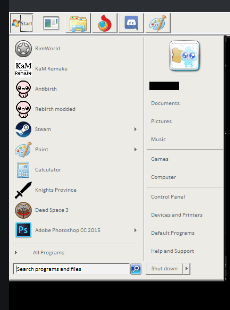
Ok now I really am not sure of how you put that together unless you mean having the start menu like in the pic and I am not sure how you did that either.
 

Attachments

  • ICON.PNG
    ICON.PNG
    24 KB · Views: 20

My Computer

Computer type
PC/Desktop
Computer Manufacturer/Model Number
Own build (new) Desk1 / Asus ROG Win 7 / Desk2 1st build
OS
Desk1 7 Home Prem / Desk2 10 Pro / Main lap Asus ROG 10 Pro 2 laptop Toshiba 7 Pro Asus P2520 7 & 10
CPU
Desk1 i5 3750K / Laptop i7 GTX 860M / Desk2 i5 2500
Motherboard
Desk1 Asus P877-V / Desk2 Gigabyte H67 UD3H / Laptop ?
Memory
Desk1 8GB (1866) / Desk2 16GB (1333) / Laptop 8Gb DDR3
Graphics Card(s)
Desk 1& 2NVidia GTX 650 & Laptops on board Intel
Sound Card
Desk 1 & 2 -XONAR DG Realtek High Def audio Laptop
Monitor(s) Displays
Desk 1 Benq HD 2450 / Desk2 Philips 24" / Laptop 17.5"
Screen Resolution
1920x1080 D1 & D2 & Laptop 1
Hard Drives
Desk1 Samsung 120GB 830 SSD
Asus ROG 256GB 850 Pro SSD
Desk2 Samsung 840 256 SSD
Toshiba 120GB EVO
PSU
Desk 1 Corsair HX 1050/ Laptop ? / Desk 2 Corsair HX 650
Case
Desk 1 Cooler HAF XM ? Toshiba laptop / Desk2 Coolermaster
Cooling
Fans on all Desk1 -2 Desk2 - all Coolermasters 5 Laptop ?
Keyboard
Desk 1 MS Sidewinder X6 Desk 2 MS Sidewinder X 4
Mouse
Desk 1&2 - Gigabyte MS 900 gamer - laptop - Logitec wireless
Internet Speed
ADSL2+
Other Info
One other Desktop (tester) and spare Toshba laptop both with SSD's
Running Kaspersky 2016 ISS on all machines config'd identically
Logitec audio stereo systems on each machine (x3)
Canon MG5250MFC
Router/modem TP-Link running WPA2SK
The explorer works, but I simply want to change it back to at least a normal win7 skin.

As i mentioned in the 1st post, somewhere on a forum I read that using the 'sfc /scannow' command in cmd would fix my start orb, though all it did was change my explorer skin to the one I posted. I would simply wanna know how to fix that issue because it's driving me nuts. Would using a windows system restore work? Had'nt thought of that.

Lexy.
 

My Computer

Computer type
PC/Desktop
OS
Windows 7 64bit
Windows system restore -- are you meaning a System Restore Point, or, are you meaning factory restore?
 

My Computer

Computer type
PC/Desktop
Computer Manufacturer/Model Number
Antec desktop; Acer Aspire laptops
OS
Windows 7 Professional 64-bit
CPU
Desktop i5; Acers i5 & i7
Memory
desktop 16GB; 1 Acer 8GB & 1 Acer 16GB
Hard Drives
1TB split into 2 equal partitions [OS and data] usable by RJS
Internet Speed
AT&T DSL
Browser
FF, GChrome, msIE
Other Info
Windows 7 Firewall, Emsisoft AM/AV, MSE [scan-only], SpywareBlaster, Ruiware/BillP combine
As i mentioned in the 1st post, somewhere on a forum I read that using the 'sfc /scannow' command in cmd would fix my start orb, though all it did was change my explorer skin to the one I posted.

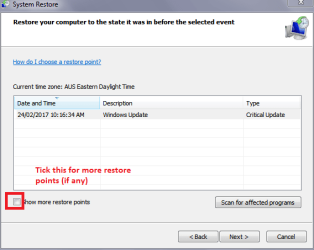
Hm that sounds very odd to me to be honest and if you mean the normal Windows system restore then do that and if you find there are not many restore points then check the small box at the left hand coner of the retsore window to get restore points further back.
 

Attachments

  • RESTORE POINT.PNG
    RESTORE POINT.PNG
    31.5 KB · Views: 17

My Computer

Computer type
PC/Desktop
Computer Manufacturer/Model Number
Own build (new) Desk1 / Asus ROG Win 7 / Desk2 1st build
OS
Desk1 7 Home Prem / Desk2 10 Pro / Main lap Asus ROG 10 Pro 2 laptop Toshiba 7 Pro Asus P2520 7 & 10
CPU
Desk1 i5 3750K / Laptop i7 GTX 860M / Desk2 i5 2500
Motherboard
Desk1 Asus P877-V / Desk2 Gigabyte H67 UD3H / Laptop ?
Memory
Desk1 8GB (1866) / Desk2 16GB (1333) / Laptop 8Gb DDR3
Graphics Card(s)
Desk 1& 2NVidia GTX 650 & Laptops on board Intel
Sound Card
Desk 1 & 2 -XONAR DG Realtek High Def audio Laptop
Monitor(s) Displays
Desk 1 Benq HD 2450 / Desk2 Philips 24" / Laptop 17.5"
Screen Resolution
1920x1080 D1 & D2 & Laptop 1
Hard Drives
Desk1 Samsung 120GB 830 SSD
Asus ROG 256GB 850 Pro SSD
Desk2 Samsung 840 256 SSD
Toshiba 120GB EVO
PSU
Desk 1 Corsair HX 1050/ Laptop ? / Desk 2 Corsair HX 650
Case
Desk 1 Cooler HAF XM ? Toshiba laptop / Desk2 Coolermaster
Cooling
Fans on all Desk1 -2 Desk2 - all Coolermasters 5 Laptop ?
Keyboard
Desk 1 MS Sidewinder X6 Desk 2 MS Sidewinder X 4
Mouse
Desk 1&2 - Gigabyte MS 900 gamer - laptop - Logitec wireless
Internet Speed
ADSL2+
Other Info
One other Desktop (tester) and spare Toshba laptop both with SSD's
Running Kaspersky 2016 ISS on all machines config'd identically
Logitec audio stereo systems on each machine (x3)
Canon MG5250MFC
Router/modem TP-Link running WPA2SK
Yeah I did mean a windows restore, not a factory one, I'll have a go at that then & report back.

Edit: No luck, even with 'show more restore points' on i only had a restore from 3 days ago when i installed directx, I already had the issue back then...
If no one else finds a solution I think I'll just have to factory reset it... Which might even give me more problems ontop of losing all my work documents etc.
 
Last edited:

My Computer

Computer type
PC/Desktop
OS
Windows 7 64bit
Ok mate might be an idea to backup your data anyway see this Imaging with free Macrium I do this on a regular basis with all my machines;)

Now why you don't have any other restore points maybe due to if you use a clean program like CCleaner or even use the Windows disk cleanup feature? or indeed some software that does clean ups in the background?

Now I don't know if this will do any good but try it
Disk Check < if necessary include the /f switch and if this does not make any improvement then just run this switch instead /r in the command line as per Option2
Run these in safe mode and the sfc often best run for two to three runs – you can leave out the /r switch in ckdsk if you feel it not necessary
 

My Computer

Computer type
PC/Desktop
Computer Manufacturer/Model Number
Own build (new) Desk1 / Asus ROG Win 7 / Desk2 1st build
OS
Desk1 7 Home Prem / Desk2 10 Pro / Main lap Asus ROG 10 Pro 2 laptop Toshiba 7 Pro Asus P2520 7 & 10
CPU
Desk1 i5 3750K / Laptop i7 GTX 860M / Desk2 i5 2500
Motherboard
Desk1 Asus P877-V / Desk2 Gigabyte H67 UD3H / Laptop ?
Memory
Desk1 8GB (1866) / Desk2 16GB (1333) / Laptop 8Gb DDR3
Graphics Card(s)
Desk 1& 2NVidia GTX 650 & Laptops on board Intel
Sound Card
Desk 1 & 2 -XONAR DG Realtek High Def audio Laptop
Monitor(s) Displays
Desk 1 Benq HD 2450 / Desk2 Philips 24" / Laptop 17.5"
Screen Resolution
1920x1080 D1 & D2 & Laptop 1
Hard Drives
Desk1 Samsung 120GB 830 SSD
Asus ROG 256GB 850 Pro SSD
Desk2 Samsung 840 256 SSD
Toshiba 120GB EVO
PSU
Desk 1 Corsair HX 1050/ Laptop ? / Desk 2 Corsair HX 650
Case
Desk 1 Cooler HAF XM ? Toshiba laptop / Desk2 Coolermaster
Cooling
Fans on all Desk1 -2 Desk2 - all Coolermasters 5 Laptop ?
Keyboard
Desk 1 MS Sidewinder X6 Desk 2 MS Sidewinder X 4
Mouse
Desk 1&2 - Gigabyte MS 900 gamer - laptop - Logitec wireless
Internet Speed
ADSL2+
Other Info
One other Desktop (tester) and spare Toshba laptop both with SSD's
Running Kaspersky 2016 ISS on all machines config'd identically
Logitec audio stereo systems on each machine (x3)
Canon MG5250MFC
Router/modem TP-Link running WPA2SK
Back
Top