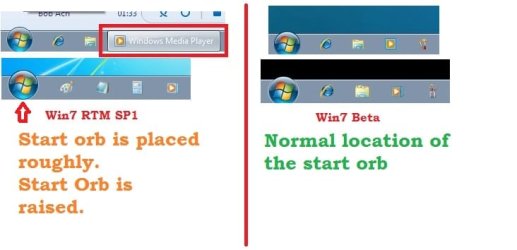
J john4506 New member Local time 10:01 PM Messages 2 Nov 21, 2016 #1 How fix the problem with the location of start orb ? I want to lower the start button down a bit. Attachments startorb1.jpg 26.8 KB · Views: 7 My Computer My Computer Computer typePC/DesktopOSWindows 7 Home Premium 64
torchwood Well-known member Guru Gold Member VIP Local time 4:01 AM Messages 7,392 Nov 21, 2016 #2 Hi John, All icons APART from the Orb are shrunk automatically when you change the properties of the task bar. Have a look at this thread, should help https://www.google.co.uk/url?sa=t&r...b.html&usg=AFQjCNFKHB5SJ3graAt1Md8tQVyf16VusQ Roy My Computer My Computer Computer typePC/DesktopComputer Manufacturer/Model Numbermedionl/Aspire 6930G/acer x55aOSW7 home premium 32bit/W7HP 64bit/w10 tp insider ringCPUE5300 dual coreMotherboardmedion MS7366Memory3gbGraphics Card(s)Nvidia Geforce 7100 Nforce 630iMonitor(s) DisplaysavixcInternet Speedn (isp resticted to 72)Antivirusmse/pandsBrowserpalemoonOther InfoBelkin Fd7050 n USB using Railink RT2870 drivers, more upto date
Hi John, All icons APART from the Orb are shrunk automatically when you change the properties of the task bar. Have a look at this thread, should help https://www.google.co.uk/url?sa=t&r...b.html&usg=AFQjCNFKHB5SJ3graAt1Md8tQVyf16VusQ Roy