Custom Theme interferes with Microsoft Office

MrAmazing50

New member
Local time
4:21 AM
Messages
3
Hello!

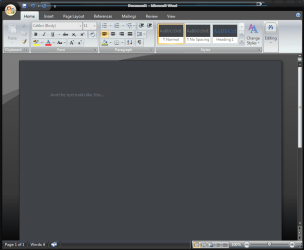
I've installed a custom theme (which is sweet to say the least!) onto my Windows 7 computer and after becoming familiar with it, I have found it has one major issue. The custom theme has changed the visuals of my Microsoft Office (most notably Microsoft Word) into something I'm having an issue working with.

I've attached a file to this threat with a Snip of what the issue looks like. I've tried changing the Microsoft Office theme, and currently it has black so it isn't such a strong contrast as the original was. I have also tried running a quick repair on the whole Microsoft Office suite, but no luck there either.

My first thought is that the new theme may have tweaked something in the registry, causing the change in colors, but I'm not about to dive into the registry without consulting higher knowledge.

If there is a way to resolve this issue without getting rid of the theme that would be great, but any help right now would be very appreciated :cool:
 

Attachments

  • Word issue.PNG
    Word issue.PNG
    30.1 KB · Views: 1

My Computer

Computer type
Laptop
Computer Manufacturer/Model Number
Dell
OS
Windows 7 Ultimate 32bit
Browser
Google Chrome
Hi and welcome to SevenForums,
On the off chance someone here might be familiar with the theme you downloaded you must first please post a link to it so we might know more about it ;)

Otherwise any settings would be part of the theme if they're editable or able to exclude office all together in the theme's settings
Cheers.
 

My Computer

Computer type
PC/Desktop
Computer Manufacturer/Model Number
Custom assembled by me :}
OS
Win-7-Pro64bit 7-H-Prem-64bit
CPU
i7-5930K 2nd i9-9940x both water blocked VRM's too
Motherboard
ASUS SABERTOOTH X99 2nd ASUS x299 Apex
Memory
Trident-z 3200C14 2nd Trident-z 3600C16
Graphics Card(s)
EVGA 1080ti ftw3 2nd Titan Xp both water blocked
Sound Card
Built-in Realtek
Monitor(s) Displays
1-AOC G2460PG 24"G-Sync 144Hz/ 2nd 1-ASUS VG248QE 24" 144Hz
Screen Resolution
1920 x 1080 144Hz
Hard Drives
2-Samsung M.2 Evo & Evo Plus
2-Samsung 850 EVO 500GB SSD's/ 3-2.5 W.D. Black 1tb-&3-1tb/3-3.5 WD Black 1tb hdd's
PSU
EVGA SuperNOVA 1000-P2 2nd 1200-P2
Case
2-Corsair Obsidian Series 450D Black ATX Mid Tower
Cooling
Custom water loops
Keyboard
Logitech G710+/ 2nd Logitech G910
Mouse
2-RedDragon M901 Perdition 16400 dpi Gaming mouse = wired
Internet Speed
Comcast Ping 19ms 89.31mbps download speed 6.12mbps upload
Antivirus
Malwarebytes Pro/ Superantispyware Pro
Browser
FireFox & Pale moon
Other Info
2nd ASUS X299 Apex/Intel i9-9940x with Custom water loop/7H-Prem-x64/Corsair 450D case/Ram Trident-z 3600C16 4x8gb / Samsung970Evo plus 500gb SSD/Dual ssd EZ swap evo/PSU EVGA SuperNova 1200w-P2 80+Platinum/GPU Titan Xp /8-ML-140 on push-pull on 2-280GTX rads
On the off chance someone here might be familiar with the theme you downloaded you must first please post a link to it so we might know more about it ;)

Thanks ThrashZone. So the theme that is installed is the Windows 7 Aqua Glass Theme and a download link for it can be found here:
10 Alienware And Windows 7 Movie Themes: GI Joe Retaliation, Dexter, Hansel and Gretel!

The one I am using is option #2, and this is the exact link I downloaded it from originally.

Thanks again!
 

My Computer

Computer type
Laptop
Computer Manufacturer/Model Number
Dell
OS
Windows 7 Ultimate 32bit
Browser
Google Chrome
Welcome to Seven Forums MrAmazing50. That installer is an exe file, so no clue what all it does when run. I personally never install themes via an exe. That said, it's not unusual for custom themes to change the background of office, browsers, notepad, etc.

Assuming you'd like to keep the theme, and find a workaround, are you happy with the background? Would you like to keep it but just have a text color change? Perhaps to white? It might be doable within word. I'm sure you can choose a custom font color, and make it default.

Changing Your Default Settings in Word | Learning and Living in the Online World

A Guy
 

My Computer

Computer type
PC/Desktop
OS
Windows 10 Home x64
CPU
INTEL Core i5-750 Quad-Core 3.37GHz
Motherboard
ASUS P7P55D
Memory
HyperX Fury Black Series 8GB (2 x 4GB) 1866Mhz
Graphics Card(s)
EVGA GeForce GTX 750 Superclocked 1GB 128-Bit GDDR5
Monitor(s) Displays
LG 32MA68HY 32" IPS
Screen Resolution
1920 x 1080
Hard Drives
Samsung 840 Evo 120GB, SEAGATE 500GB Barracuda® 7200.12, SATA 3 Gb/s, 7200 RPM, 16MB cache
PSU
ANTEC TruePower New TP-550, 80 PLUS, 550W
Case
ANTEC Three Hundred Illusion
Cooling
COOLER MASTER Hyper 212 Plus, 4 x 120mm 1 x 140mm Noctua's
Internet Speed
85 + Mbps
Antivirus
Avast
Browser
Vivaldi
Guy,

The back ground is mostly the issue. And it causes the text to be grey on a grey back ground. And that causes office to default the text to a lighter grey when printing, making it so I need to change the font the black for a professional presentation document.

Also, I have checked if there is any way to fix the cosmetics within the Word program, and no luck there. :huh:
 

My Computer

Computer type
Laptop
Computer Manufacturer/Model Number
Dell
OS
Windows 7 Ultimate 32bit
Browser
Google Chrome
I have certainly seen custom themes cause black background on office, and browsers. Sometimes the theme creator will post a fix. It is not Word causing this. If the theme installer was multiple files, you might be able to find out what is causing it and just not install that, but an exe file is all or nothing. There are certainly a great number of good themes out there that will not cause this. A Guy
 

My Computer

Computer type
PC/Desktop
OS
Windows 10 Home x64
CPU
INTEL Core i5-750 Quad-Core 3.37GHz
Motherboard
ASUS P7P55D
Memory
HyperX Fury Black Series 8GB (2 x 4GB) 1866Mhz
Graphics Card(s)
EVGA GeForce GTX 750 Superclocked 1GB 128-Bit GDDR5
Monitor(s) Displays
LG 32MA68HY 32" IPS
Screen Resolution
1920 x 1080
Hard Drives
Samsung 840 Evo 120GB, SEAGATE 500GB Barracuda® 7200.12, SATA 3 Gb/s, 7200 RPM, 16MB cache
PSU
ANTEC TruePower New TP-550, 80 PLUS, 550W
Case
ANTEC Three Hundred Illusion
Cooling
COOLER MASTER Hyper 212 Plus, 4 x 120mm 1 x 140mm Noctua's
Internet Speed
85 + Mbps
Antivirus
Avast
Browser
Vivaldi
Back
Top