Custom visual style theme not working, only shows Basic themes?

MrDeluxe

New member
Local time
11:13 AM
Messages
4
Every time I switch from one of the original Aero themes into a custom theme with visual styles, it turns into a Windows Basic theme? I can back to Aero fine, but switching into the same custom theme will only show the basic theme.
 

My Computer

Computer type
PC/Desktop
OS
Microsoft Windows 7 Home Premium 64-bit 7601 Multiprocessor Free Service Pack 1
CPU
Intel(R) Core(TM) i3-2330M CPU @ 2.20GHz
Motherboard
SAMSUNG ELECTRONICS CO., LTD. 300E4A/300E5A/300E7A
Memory
4.00 GB
Graphics Card(s)
Intel(R) HD Graphics 3000
Sound Card
(1) Realtek High Definition Audio (2) Intel(R) Display Aud
Screen Resolution
1366 x 768 x 32 bits (4294967296 colors) @ 60 Hz
Hard Drives
SAMSUNG HM641JI
I have patched the computer, however it hasn't worked, unfortunately. I did try repatching it but it has not worked.
 

My Computer

Computer type
PC/Desktop
OS
Microsoft Windows 7 Home Premium 64-bit 7601 Multiprocessor Free Service Pack 1
CPU
Intel(R) Core(TM) i3-2330M CPU @ 2.20GHz
Motherboard
SAMSUNG ELECTRONICS CO., LTD. 300E4A/300E5A/300E7A
Memory
4.00 GB
Graphics Card(s)
Intel(R) HD Graphics 3000
Sound Card
(1) Realtek High Definition Audio (2) Intel(R) Display Aud
Screen Resolution
1366 x 768 x 32 bits (4294967296 colors) @ 60 Hz
Hard Drives
SAMSUNG HM641JI
Welcome to Seven Forums MrDeluxe. If you can fill out your system specs, we can see what hardware you are working with.

http://www.sevenforums.com/tutorials/180324-system-info-see-your-system-specs.html

We ask for specs to know what we are working with, and confirm the necessary resources. Have you run the WEI assesment?

http://www.sevenforums.com/tutorials/263-windows-experience-index-update-refresh-score.html

What method did you use to patch the system files? If Universal Theme Patcher, did it appear to be successful?

http://www.sevenforums.com/tutorials/28377-theme-how-apply-custom-themes.html

You might try UxStyle if Theme Patcher does not work

http://www.sevenforums.com/tutorials/34579-enabling-custom-themes-windows-7-a.html

Have you been able to use custom themes in the past, and it stopped working? If so, have you changed any hardware?

A Guy
 

My Computer

Computer type
PC/Desktop
OS
Windows 10 Home x64
CPU
INTEL Core i5-750 Quad-Core 3.37GHz
Motherboard
ASUS P7P55D
Memory
HyperX Fury Black Series 8GB (2 x 4GB) 1866Mhz
Graphics Card(s)
EVGA GeForce GTX 750 Superclocked 1GB 128-Bit GDDR5
Monitor(s) Displays
LG 32MA68HY 32" IPS
Screen Resolution
1920 x 1080
Hard Drives
Samsung 840 Evo 120GB, SEAGATE 500GB Barracuda® 7200.12, SATA 3 Gb/s, 7200 RPM, 16MB cache
PSU
ANTEC TruePower New TP-550, 80 PLUS, 550W
Case
ANTEC Three Hundred Illusion
Cooling
COOLER MASTER Hyper 212 Plus, 4 x 120mm 1 x 140mm Noctua's
Internet Speed
85 + Mbps
Antivirus
Avast
Browser
Vivaldi
Updated the system specs on my profile. I ran the WEI assessment and got a score of 4.6.

The last time I patched, I was using the UxStyle patcher.

I was able to use custom themes in the past, though some visual aspects (the Windows start orb, to be specific) did not show the custom style I was expecting.
 

My Computer

Computer type
PC/Desktop
OS
Microsoft Windows 7 Home Premium 64-bit 7601 Multiprocessor Free Service Pack 1
CPU
Intel(R) Core(TM) i3-2330M CPU @ 2.20GHz
Motherboard
SAMSUNG ELECTRONICS CO., LTD. 300E4A/300E5A/300E7A
Memory
4.00 GB
Graphics Card(s)
Intel(R) HD Graphics 3000
Sound Card
(1) Realtek High Definition Audio (2) Intel(R) Display Aud
Screen Resolution
1366 x 768 x 32 bits (4294967296 colors) @ 60 Hz
Hard Drives
SAMSUNG HM641JI
This may seem counter intuitive, but I suggest you run the System File Checker

http://www.sevenforums.com/tutorials/1538-sfc-scannow-command-system-file-checker.html

   Warning
Be aware that if you have modified your system files as in theming explorer/system files, running sfc /scannow will revert the system files such as explorer.exe back to it's default state. Make the appropriate backups of your system files that you have modified for theming if you wish to save them before running sfc /scannow.


This will undo any patching, and modifications and return you to default Windows files if all goes as expected. You can see if there were any issues corrected, and have a clean slate to repatch and try again.

A Guy
 

My Computer

Computer type
PC/Desktop
OS
Windows 10 Home x64
CPU
INTEL Core i5-750 Quad-Core 3.37GHz
Motherboard
ASUS P7P55D
Memory
HyperX Fury Black Series 8GB (2 x 4GB) 1866Mhz
Graphics Card(s)
EVGA GeForce GTX 750 Superclocked 1GB 128-Bit GDDR5
Monitor(s) Displays
LG 32MA68HY 32" IPS
Screen Resolution
1920 x 1080
Hard Drives
Samsung 840 Evo 120GB, SEAGATE 500GB Barracuda® 7200.12, SATA 3 Gb/s, 7200 RPM, 16MB cache
PSU
ANTEC TruePower New TP-550, 80 PLUS, 550W
Case
ANTEC Three Hundred Illusion
Cooling
COOLER MASTER Hyper 212 Plus, 4 x 120mm 1 x 140mm Noctua's
Internet Speed
85 + Mbps
Antivirus
Avast
Browser
Vivaldi
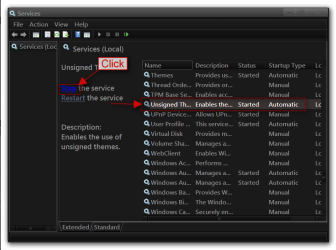
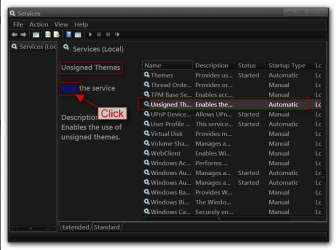
You said you used UxStyle sometimes you need to go into Services and scroll down and find unsigned themes and stop it and then start it to get the themes back.

Jerry
 

Attachments

  • 4.png
    4.png
    67.4 KB · Views: 1
  • 5.png
    5.png
    65.1 KB · Views: 1

My Computer

Computer type
Laptop
Computer Manufacturer/Model Number
Sager NP9170
OS
Win 7 Pro x64 / Win 10 Pro
CPU
Intel(R) Core(TM) i7-3630QM CPU @ 2.40GHz
Motherboard
CLEVO P170EM
Memory
12 GB
Graphics Card(s)
(1) Intel(R) HD Graphics 4000 (2) NVIDIA GeForce GTX 675M
Sound Card
(1) Realtek High Definition Audio (2) Intel(R) Display Aud
Monitor(s) Displays
17.3
Screen Resolution
1920x1080
Hard Drives
(1) Samsung 860 EVO 500GB(OS) (1) Samsung 860 EVO 500GB(Data)
Keyboard
Backlite
Antivirus
MSE, Malwarebytes Pro
Browser
Firefox
Other Info
DESKTOP: Custom-built.
OS: Win 10 Pro x64.
CASE: Rosewill R5.
CPU: Intel I5 4670K CPU @ 3.40GHz.
CPU COOLER: Cool Master Hyper 212 EVO.
MOTHERBOARD: Asus Z87-A.
MEMORY: Kingston HyperX 2x4 GB.
GPU: Nvidia Geforce 650 TI.
PSU: Corsair TX750.
DRIVES: (1) Samsung 840 120 GB SSD (2) Western Digital blue 500 GB 7200 RPM.
Strange, the Unsigned Theme service doesn't appear for me. I looked around and found the Themes service and decided to restart that instead, but it didn't work. :cry:
 

My Computer

Computer type
PC/Desktop
OS
Microsoft Windows 7 Home Premium 64-bit 7601 Multiprocessor Free Service Pack 1
CPU
Intel(R) Core(TM) i3-2330M CPU @ 2.20GHz
Motherboard
SAMSUNG ELECTRONICS CO., LTD. 300E4A/300E5A/300E7A
Memory
4.00 GB
Graphics Card(s)
Intel(R) HD Graphics 3000
Sound Card
(1) Realtek High Definition Audio (2) Intel(R) Display Aud
Screen Resolution
1366 x 768 x 32 bits (4294967296 colors) @ 60 Hz
Hard Drives
SAMSUNG HM641JI
That service is installed by UxStyle. I don't have it either. A Guy
 

My Computer

Computer type
PC/Desktop
OS
Windows 10 Home x64
CPU
INTEL Core i5-750 Quad-Core 3.37GHz
Motherboard
ASUS P7P55D
Memory
HyperX Fury Black Series 8GB (2 x 4GB) 1866Mhz
Graphics Card(s)
EVGA GeForce GTX 750 Superclocked 1GB 128-Bit GDDR5
Monitor(s) Displays
LG 32MA68HY 32" IPS
Screen Resolution
1920 x 1080
Hard Drives
Samsung 840 Evo 120GB, SEAGATE 500GB Barracuda® 7200.12, SATA 3 Gb/s, 7200 RPM, 16MB cache
PSU
ANTEC TruePower New TP-550, 80 PLUS, 550W
Case
ANTEC Three Hundred Illusion
Cooling
COOLER MASTER Hyper 212 Plus, 4 x 120mm 1 x 140mm Noctua's
Internet Speed
85 + Mbps
Antivirus
Avast
Browser
Vivaldi
Back
Top