
Solved Windows 7 aero theme not working?

dannyboy191

New member
Local time
10:27 PM
Messages
6
i try everything to get this custom theme working i tryed universal theme patcher but when i restart my computer it just says please wait and just goes on and of and keeps saying please wait :(
i try patching the files with Uxstyle that dont work :(
when i load the theme it goes into the windows Classic theme :/

can someone help tho teamview or just help?:)
thanks,

Danny
 

My Computer

Computer Manufacturer/Model Number
Acer Extensa 5230E
OS
Microsoft Windows 7 Ultimate 32-bit
CPU
Intel(R) Celeron(R) CPU 900 @ 2.20GHz
Motherboard
Acer Homa
Memory
1.00 GB
Graphics Card(s)
Mobile Intel(R) 4 Series Express Chipset Family
Sound Card
High Definition Audio Device

My Computer

Computer type
Laptop
Computer Manufacturer/Model Number
Toshiba C660-155
OS
Windows 7 Home Premium SP1 x64
CPU
Intel Core i3-380M 2.53GHz
Motherboard
Toshiba PWWAA
Memory
4GB 1333MHz DDR3
Graphics Card(s)
Intel HD 3000 Intergrated Graphics
Monitor(s) Displays
Generic 60Hz, Samsung TA350
Screen Resolution
1366x768, 1920x1080
Hard Drives
120GB Sandisk SSD
1TB WD Elements External
2TB WD My Book External

My Computer

Computer Manufacturer/Model Number
acer aspire 5935g
OS
Windows 7 Home Premium x64 SP1
CPU
intel(R)core(TM)2 duo CPU T6600 @ 2.20GHz
Motherboard
intel gm45/gm47 revision 07
Memory
3 gb ddr3
Graphics Card(s)
ati radeon hd4570/512mb
Monitor(s) Displays
lop156wh2-tle1 15.3 flat
Screen Resolution
1366x768
Hard Drives
OCZ-Agility3 60gig ssd
320gig external hdd
500gig external hdd
Mouse
Optical
Internet Speed
30Mbps Down/30Mbps Up
i try everything to get this custom theme working i tryed universal theme patcher but when i restart my computer it just says please wait and just goes on and of and keeps saying please wait :(
i try patching the files with Uxstyle that dont work :(
when i load the theme it goes into the windows Classic theme :/

can someone help tho teamview or just help?:)
thanks,

Danny
Welcome to the Seven Forums
1st uninstall Uxstyle And restart Then run this option two that will remove any patched files. http://www.sevenforums.com/tutorials/1538-sfc-scannow-command-system-file-checker.html

Then follow 1 of these 2 ways of Enabling custom themes? And try again
http://www.sevenforums.com/tutorials/34579-enabling-custom-themes-windows-7-a.html
Or
http://www.sevenforums.com/tutorials/28377-theme-how-apply-custom-themes.html?filter

When you installed Uxstyle if you turn off UAC then restart install Uxstyle then restart again and you got the right one they come in 32 bit and 64-bit
Jerry
 

My Computer

Computer type
Laptop
Computer Manufacturer/Model Number
Sager NP9170
OS
Win 7 Pro x64 / Win 10 Pro
CPU
Intel(R) Core(TM) i7-3630QM CPU @ 2.40GHz
Motherboard
CLEVO P170EM
Memory
12 GB
Graphics Card(s)
(1) Intel(R) HD Graphics 4000 (2) NVIDIA GeForce GTX 675M
Sound Card
(1) Realtek High Definition Audio (2) Intel(R) Display Aud
Monitor(s) Displays
17.3
Screen Resolution
1920x1080
Hard Drives
(1) Samsung 860 EVO 500GB(OS) (1) Samsung 860 EVO 500GB(Data)
Keyboard
Backlite
Antivirus
MSE, Malwarebytes Pro
Browser
Firefox
Other Info
DESKTOP: Custom-built.
OS: Win 10 Pro x64.
CASE: Rosewill R5.
CPU: Intel I5 4670K CPU @ 3.40GHz.
CPU COOLER: Cool Master Hyper 212 EVO.
MOTHERBOARD: Asus Z87-A.
MEMORY: Kingston HyperX 2x4 GB.
GPU: Nvidia Geforce 650 TI.
PSU: Corsair TX750.
DRIVES: (1) Samsung 840 120 GB SSD (2) Western Digital blue 500 GB 7200 RPM.
Thanks for replaying,
i will try everything everyone said and i will get back soon as possible
thank youu :)
 

My Computer

Computer Manufacturer/Model Number
Acer Extensa 5230E
OS
Microsoft Windows 7 Ultimate 32-bit
CPU
Intel(R) Celeron(R) CPU 900 @ 2.20GHz
Motherboard
Acer Homa
Memory
1.00 GB
Graphics Card(s)
Mobile Intel(R) 4 Series Express Chipset Family
Sound Card
High Definition Audio Device
Thanks for replaying,
i will try everything everyone said and i will get back soon as possible
thank youu :)
Do one at a time and try it don't get too much going at one time may get more confusing.
Jerry
 

My Computer

Computer type
Laptop
Computer Manufacturer/Model Number
Sager NP9170
OS
Win 7 Pro x64 / Win 10 Pro
CPU
Intel(R) Core(TM) i7-3630QM CPU @ 2.40GHz
Motherboard
CLEVO P170EM
Memory
12 GB
Graphics Card(s)
(1) Intel(R) HD Graphics 4000 (2) NVIDIA GeForce GTX 675M
Sound Card
(1) Realtek High Definition Audio (2) Intel(R) Display Aud
Monitor(s) Displays
17.3
Screen Resolution
1920x1080
Hard Drives
(1) Samsung 860 EVO 500GB(OS) (1) Samsung 860 EVO 500GB(Data)
Keyboard
Backlite
Antivirus
MSE, Malwarebytes Pro
Browser
Firefox
Other Info
DESKTOP: Custom-built.
OS: Win 10 Pro x64.
CASE: Rosewill R5.
CPU: Intel I5 4670K CPU @ 3.40GHz.
CPU COOLER: Cool Master Hyper 212 EVO.
MOTHERBOARD: Asus Z87-A.
MEMORY: Kingston HyperX 2x4 GB.
GPU: Nvidia Geforce 650 TI.
PSU: Corsair TX750.
DRIVES: (1) Samsung 840 120 GB SSD (2) Western Digital blue 500 GB 7200 RPM.

My Computer

Computer Manufacturer/Model Number
Acer Extensa 5230E
OS
Microsoft Windows 7 Ultimate 32-bit
CPU
Intel(R) Celeron(R) CPU 900 @ 2.20GHz
Motherboard
Acer Homa
Memory
1.00 GB
Graphics Card(s)
Mobile Intel(R) 4 Series Express Chipset Family
Sound Card
High Definition Audio Device
Ok nice work, leave the scan to finish, it will likely find issues and require a reboot.

Just to check you did get the 32bit version of the theme.

Post back when your done and we can wait and see which way Jerry thinks is best to go
 

My Computer

Computer Manufacturer/Model Number
acer aspire 5935g
OS
Windows 7 Home Premium x64 SP1
CPU
intel(R)core(TM)2 duo CPU T6600 @ 2.20GHz
Motherboard
intel gm45/gm47 revision 07
Memory
3 gb ddr3
Graphics Card(s)
ati radeon hd4570/512mb
Monitor(s) Displays
lop156wh2-tle1 15.3 flat
Screen Resolution
1366x768
Hard Drives
OCZ-Agility3 60gig ssd
320gig external hdd
500gig external hdd
Mouse
Optical
Internet Speed
30Mbps Down/30Mbps Up
Did aero work before you try this custom theme?
You are at the very minimum for memory at 1GB
I have an older desktop that started with 1GB and arrow did not work so I went to 3 and it works fine.

Here is the minimum requirements for arrow to work.
Aero Requirements to be Enabled in Windows 7
NOTE: If Aero is not enabled, then Aero Peek will not work even when turned on.
  • Aero is not included in Windows 7 Home Basic or Windows 7 Starter editions.
  • 1 GHz 32-bit or 64-bit processor
  • 1 GB of system memory
  • Support for DirectX 9 graphics with 128 MB memory (in order to enable Aero theme)
  • You must be have True Color (32 bit) set instead of High Color (16 bit).
  • The desktop composition and Animate controls and elements inside windows options need to be enabled in Visual Effects.
  • The Desktop Window Manager Session Manager and Themes Services need to be set as Started and Automatic.
  • Refresh or update your WEI score. You will need an WEI score minimum of 2.0 in both Graphics & Gaming graphics in order for Aero to be activated.
Jerry
 

My Computer

Computer type
Laptop
Computer Manufacturer/Model Number
Sager NP9170
OS
Win 7 Pro x64 / Win 10 Pro
CPU
Intel(R) Core(TM) i7-3630QM CPU @ 2.40GHz
Motherboard
CLEVO P170EM
Memory
12 GB
Graphics Card(s)
(1) Intel(R) HD Graphics 4000 (2) NVIDIA GeForce GTX 675M
Sound Card
(1) Realtek High Definition Audio (2) Intel(R) Display Aud
Monitor(s) Displays
17.3
Screen Resolution
1920x1080
Hard Drives
(1) Samsung 860 EVO 500GB(OS) (1) Samsung 860 EVO 500GB(Data)
Keyboard
Backlite
Antivirus
MSE, Malwarebytes Pro
Browser
Firefox
Other Info
DESKTOP: Custom-built.
OS: Win 10 Pro x64.
CASE: Rosewill R5.
CPU: Intel I5 4670K CPU @ 3.40GHz.
CPU COOLER: Cool Master Hyper 212 EVO.
MOTHERBOARD: Asus Z87-A.
MEMORY: Kingston HyperX 2x4 GB.
GPU: Nvidia Geforce 650 TI.
PSU: Corsair TX750.
DRIVES: (1) Samsung 840 120 GB SSD (2) Western Digital blue 500 GB 7200 RPM.
Did aero work before you try this custom theme?
You are at the very minimum for memory at 1GB
I have an older desktop that started with 1GB and arrow did not work so I went to 3 and it works fine.

Here is the minimum requirements for arrow to work.
Aero Requirements to be Enabled in Windows 7
NOTE: If Aero is not enabled, then Aero Peek will not work even when turned on.
  • Aero is not included in Windows 7 Home Basic or Windows 7 Starter editions.
  • 1 GHz 32-bit or 64-bit processor
  • 1 GB of system memory
  • Support for DirectX 9 graphics with 128 MB memory (in order to enable Aero theme)
  • You must be have True Color (32 bit) set instead of High Color (16 bit).
  • The desktop composition and Animate controls and elements inside windows options need to be enabled in Visual Effects.
  • The Desktop Window Manager Session Manager and Themes Services need to be set as Started and Automatic.
  • Refresh or update your WEI score. You will need an WEI score minimum of 2.0 in both Graphics & Gaming graphics in order for Aero to be activated.
Jerry

i just seen :/
aero is working fine before i just restore everything to how it was, but just when i try and set the custom theme it goes to the old windows theme :/
 

My Computer

Computer Manufacturer/Model Number
Acer Extensa 5230E
OS
Microsoft Windows 7 Ultimate 32-bit
CPU
Intel(R) Celeron(R) CPU 900 @ 2.20GHz
Motherboard
Acer Homa
Memory
1.00 GB
Graphics Card(s)
Mobile Intel(R) 4 Series Express Chipset Family
Sound Card
High Definition Audio Device
i got it to work :)
i restored all the files back, and installed vista glass and patch the files using that :)

Thank you everyone for helping out :)
+
Great website and the people on it !
 

My Computer

Computer Manufacturer/Model Number
Acer Extensa 5230E
OS
Microsoft Windows 7 Ultimate 32-bit
CPU
Intel(R) Celeron(R) CPU 900 @ 2.20GHz
Motherboard
Acer Homa
Memory
1.00 GB
Graphics Card(s)
Mobile Intel(R) 4 Series Express Chipset Family
Sound Card
High Definition Audio Device
Most likely you need more RAM
But try this just in case.
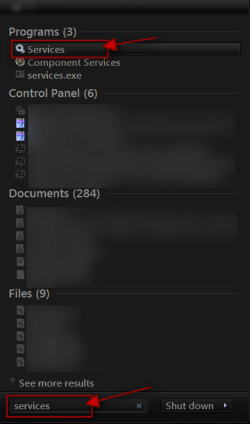
Click on the :orb:Start Button type in Services In the search box and then click on Services
1.png


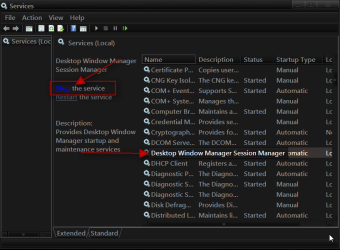
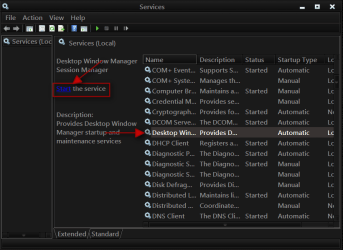
Scroll down until you see Desktop Windows Manager Sessions Manager select it in click on the Stop text and let it stop after that click on Start text and see if that works. Your screen may blink when you do this.
2.png3.png

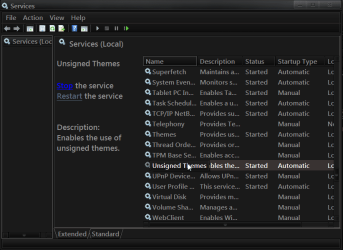
Do the same thing with Unsigned Themes if there.
4.png

Jerry
 

My Computer

Computer type
Laptop
Computer Manufacturer/Model Number
Sager NP9170
OS
Win 7 Pro x64 / Win 10 Pro
CPU
Intel(R) Core(TM) i7-3630QM CPU @ 2.40GHz
Motherboard
CLEVO P170EM
Memory
12 GB
Graphics Card(s)
(1) Intel(R) HD Graphics 4000 (2) NVIDIA GeForce GTX 675M
Sound Card
(1) Realtek High Definition Audio (2) Intel(R) Display Aud
Monitor(s) Displays
17.3
Screen Resolution
1920x1080
Hard Drives
(1) Samsung 860 EVO 500GB(OS) (1) Samsung 860 EVO 500GB(Data)
Keyboard
Backlite
Antivirus
MSE, Malwarebytes Pro
Browser
Firefox
Other Info
DESKTOP: Custom-built.
OS: Win 10 Pro x64.
CASE: Rosewill R5.
CPU: Intel I5 4670K CPU @ 3.40GHz.
CPU COOLER: Cool Master Hyper 212 EVO.
MOTHERBOARD: Asus Z87-A.
MEMORY: Kingston HyperX 2x4 GB.
GPU: Nvidia Geforce 650 TI.
PSU: Corsair TX750.
DRIVES: (1) Samsung 840 120 GB SSD (2) Western Digital blue 500 GB 7200 RPM.
Most likely you need more RAM
But try this just in case.
Click on the :orb:Start Button type in Services In the search box and then click on Services
View attachment 177774


Scroll down until you see Desktop Windows Manager Sessions Manager select it in click on the Stop text and let it stop after that click on Start text and see if that works. Your screen may blink when you do this.
View attachment 177775View attachment 177776

Do the same thing with Unsigned Themes if there.
View attachment 177777

Jerry

Thank you .
what ever the problem was it all fix :)
thank you agen
danny
 

My Computer

Computer Manufacturer/Model Number
Acer Extensa 5230E
OS
Microsoft Windows 7 Ultimate 32-bit
CPU
Intel(R) Celeron(R) CPU 900 @ 2.20GHz
Motherboard
Acer Homa
Memory
1.00 GB
Graphics Card(s)
Mobile Intel(R) 4 Series Express Chipset Family
Sound Card
High Definition Audio Device
i got it to work :)
i restored all the files back, and installed vista glass and patch the files using that :)

Thank you everyone for helping out :)
+
Great website and the people on it !
That's good to hear thanks for letting us know
Jerry
 

My Computer

Computer type
Laptop
Computer Manufacturer/Model Number
Sager NP9170
OS
Win 7 Pro x64 / Win 10 Pro
CPU
Intel(R) Core(TM) i7-3630QM CPU @ 2.40GHz
Motherboard
CLEVO P170EM
Memory
12 GB
Graphics Card(s)
(1) Intel(R) HD Graphics 4000 (2) NVIDIA GeForce GTX 675M
Sound Card
(1) Realtek High Definition Audio (2) Intel(R) Display Aud
Monitor(s) Displays
17.3
Screen Resolution
1920x1080
Hard Drives
(1) Samsung 860 EVO 500GB(OS) (1) Samsung 860 EVO 500GB(Data)
Keyboard
Backlite
Antivirus
MSE, Malwarebytes Pro
Browser
Firefox
Other Info
DESKTOP: Custom-built.
OS: Win 10 Pro x64.
CASE: Rosewill R5.
CPU: Intel I5 4670K CPU @ 3.40GHz.
CPU COOLER: Cool Master Hyper 212 EVO.
MOTHERBOARD: Asus Z87-A.
MEMORY: Kingston HyperX 2x4 GB.
GPU: Nvidia Geforce 650 TI.
PSU: Corsair TX750.
DRIVES: (1) Samsung 840 120 GB SSD (2) Western Digital blue 500 GB 7200 RPM.
Most likely you need more RAM
But try this just in case.
Click on the :orb:Start Button type in Services In the search box and then click on Services
View attachment 177774


Scroll down until you see Desktop Windows Manager Sessions Manager select it in click on the Stop text and let it stop after that click on Start text and see if that works. Your screen may blink when you do this.
View attachment 177775View attachment 177776

Do the same thing with Unsigned Themes if there.
View attachment 177777

Jerry

Thank you .
what ever the problem was it all fix :)
thank you agen
danny

Good news Danny
 

My Computer

Computer Manufacturer/Model Number
acer aspire 5935g
OS
Windows 7 Home Premium x64 SP1
CPU
intel(R)core(TM)2 duo CPU T6600 @ 2.20GHz
Motherboard
intel gm45/gm47 revision 07
Memory
3 gb ddr3
Graphics Card(s)
ati radeon hd4570/512mb
Monitor(s) Displays
lop156wh2-tle1 15.3 flat
Screen Resolution
1366x768
Hard Drives
OCZ-Agility3 60gig ssd
320gig external hdd
500gig external hdd
Mouse
Optical
Internet Speed
30Mbps Down/30Mbps Up
Double check the Windows 7 "Themes" Service is running.

Some folks, including me, followed a performance tweak and were stuck with the Windows 7 toolbar being a white (Windows Classic). Altering the theme did not correct this. It turned out the Themes service was not automatic.

If you have this problem, where Desktop (right-click) "Personalize" "Windows Color" showing only as Windows Classic).

Run "services.msc", ensure the "Themes" service is Automatic (and Started). That is the Windows 7 default mode for this Service.

Then you can then select any Windows Aero theme and it will provide the toolbar transparency again
 

My Computer

Computer Manufacturer/Model Number
HP Pavilion Elite 490t
OS
Windows 7 Home Premium 64bit
CPU
Intel Core i7-970 Six-Core 3.2GHz 1.5MBL2+12MB shared L3
Motherboard
Pegatron Corp 2A86
Memory
12GB
Graphics Card(s)
1GB ATI Radeon HD 5770
Sound Card
Integrated
Monitor(s) Displays
HP 2710m / w2207
Hard Drives
dual 1.5GB RAID1 (considering RAID0 with restore)
PSU
450w
Case
HP std
Cooling
as manufactured
Thanks for this, Jerry. I just had a problem where I couldn't change the colour of the taskbar on my aero theme. This fixed it. Much appreciated.:D


Most likely you need more RAM
But try this just in case.
Click on the :orb:Start Button type in Services In the search box and then click on Services
View attachment 177774


Scroll down until you see Desktop Windows Manager Sessions Manager select it in click on the Stop text and let it stop after that click on Start text and see if that works. Your screen may blink when you do this.
View attachment 177775View attachment 177776

Do the same thing with Unsigned Themes if there.
View attachment 177777

Jerry
 

My Computer

Computer Manufacturer/Model Number
Acer Aspire 5811
OS
Windows 7 64bit Home Premium - Version 6.1.7601 Service Pack 1 Build 7601
CPU
Processor Intel(R) Core(TM) i5 CPU 650 @ 3.20GHz, 3
Memory
12gb
Monitor(s) Displays
Samsung SyncMaster P2450
Thanks for this, Jerry. I just had a problem where I couldn't change the colour of the taskbar on my aero theme. This fixed it. Much appreciated.:D


Most likely you need more RAM
But try this just in case.
Click on the :orb:Start Button type in Services In the search box and then click on Services
View attachment 177774


Scroll down until you see Desktop Windows Manager Sessions Manager select it in click on the Stop text and let it stop after that click on Start text and see if that works. Your screen may blink when you do this.
View attachment 177775View attachment 177776

Do the same thing with Unsigned Themes if there.
View attachment 177777

Jerry

You're welcome
 

My Computer

Computer type
Laptop
Computer Manufacturer/Model Number
Sager NP9170
OS
Win 7 Pro x64 / Win 10 Pro
CPU
Intel(R) Core(TM) i7-3630QM CPU @ 2.40GHz
Motherboard
CLEVO P170EM
Memory
12 GB
Graphics Card(s)
(1) Intel(R) HD Graphics 4000 (2) NVIDIA GeForce GTX 675M
Sound Card
(1) Realtek High Definition Audio (2) Intel(R) Display Aud
Monitor(s) Displays
17.3
Screen Resolution
1920x1080
Hard Drives
(1) Samsung 860 EVO 500GB(OS) (1) Samsung 860 EVO 500GB(Data)
Keyboard
Backlite
Antivirus
MSE, Malwarebytes Pro
Browser
Firefox
Other Info
DESKTOP: Custom-built.
OS: Win 10 Pro x64.
CASE: Rosewill R5.
CPU: Intel I5 4670K CPU @ 3.40GHz.
CPU COOLER: Cool Master Hyper 212 EVO.
MOTHERBOARD: Asus Z87-A.
MEMORY: Kingston HyperX 2x4 GB.
GPU: Nvidia Geforce 650 TI.
PSU: Corsair TX750.
DRIVES: (1) Samsung 840 120 GB SSD (2) Western Digital blue 500 GB 7200 RPM.
Aero Not working

In order for aero to run, you need to establish a system rating first, this way Windows will know if your hardware will support aero features.

To get your system rating, go to system properties and run the System Rating.
 

My Computer

Computer type
PC/Desktop
Computer Manufacturer/Model Number
HP
OS
Windows 7 Professional x64
Back
Top