Customised user account picture

keithr

New member
Member
Local time
9:45 PM
Messages
48
Hi all,

Some time back, I set up two user accounts on my Windows 7 PC, customised to use desk top icons from my personal photo library. Now I would like to copy these images to another Windows 7 PC. Of course I cant now remember where I got them from, and whats more cant find where they are located on the first machine.:confused: Can anyone point me to the right place?
 

My Computer

Computer type
PC/Desktop
Computer Manufacturer/Model Number
Custom Build
OS
Windows 7 Home Premium 64 bit
I dont quite understand what you mean but I think this will help ;)

C:\ProgramData\Microsoft\User Account Pictures\Default Pictures
 

My Computer

Computer Manufacturer/Model Number
HP G62-340US Notebook
OS
Win7 Pro SP1 x64
CPU
AMD K10 Athlon(tm) II P340 Dual-Core Processor ~2.2GHz
Motherboard
Hewlett-Packard 1444 69.37/AMD 785GX/BIOS F29
Memory
DDR3 4.0GB (3.74 Usable)
Graphics Card(s)
AMD M880G with ATI Mobility Radeon HD 4250 256MB Video
Sound Card
ATI RS785/RS880 - High Definition Audio Controller
Monitor(s) Displays
SAMSUNG 156AT09-H04
Screen Resolution
1366x768 - 344 x 194 mm, Pixel Clock 69.30 MHz
Hard Drives
WDC WD3200BEVT-60A23T0 320GB
Other Info
Bought on July 03, 2011
Hi Netbox

That location only shows all the default images. As I tried to explain, I didnt use any of them , but used a more meaningful image from my my personal photo collection. Its those images I cant now find.
 

My Computer

Computer type
PC/Desktop
Computer Manufacturer/Model Number
Custom Build
OS
Windows 7 Home Premium 64 bit
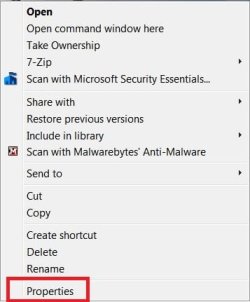
Have you tried to right click on the icon/image to check its properties?

It may tell you the location under the General or Shortcut tabs.
 

My Computer

Computer type
PC/Desktop
Computer Manufacturer/Model Number
Gateway DX4831-01e (Mid-Tower Desktop)
OS
Originally Win 7 Hm Prem x64 Ver 6.1.7600 Build 7601-SP1 | Upgraded to Windows 10 December 14, 2019
CPU
Intel i3 530 2.93GHz, 2933MHz 2 Cores 4 Logical Processors
Motherboard
Gateway H57M01 133 megahertz
Memory
6GB of 1,333MHz DDR3 SDRAM
Graphics Card(s)
32MB Intel Graphics Media Accelerator HD IGChip
Sound Card
Realtek High Definition Audio
Monitor(s) Displays
Gateway HX2000 20inch TFT active matrix TN
Screen Resolution
1600 x 900 x 59 hertz
Hard Drives
WDC WD10EADS-00M2B0 [HDD] (1000.20 GB) -- drive 0,
HL-DT-ST DVDRAM GH41N [CD-ROM dr]
Four card readers, and Four USB 2.0
PSU
300watts.
Case
Mid-Tower Desktop
Cooling
Stock from Gateway
Keyboard
Natural Ergonomic Keyboard 4000, see Other Info
Mouse
Orig. Gateway wore out now using Insignia USB wired optical
Internet Speed
Vz FIOS 10ms png 57.64Mbps down 65.53Mbps up Speedtest.org
Antivirus
Zamana Anti-logger with Anti-malware, MSE, Windows Firewall,
Browser
IE11.0.9600.19399-Upd ver11.0.135, Firefox 68.0.1 x64
Other Info
System Specs by Belarc.

BIOS: American Megatrends Inc. P01-A0 11/17/2009

Replaced the MS 'Natural' Standard PS/2 Enhanced 101-102 Keyboard with a new Natural Ergonomic Keyboard 4000 on August 1st 2014.

Canon Pixma MG3222 Printer.

Updated to IE11 on 12102015 | Fios Quantum Router g1100

Additional AV: SpywareBlaster, manual Mbam, SAS
Have you tried to right click on the icon/image to check its properties?

It may tell you the location under the General or Shortcut tabs.


Yes tried that. It doesnt do anything :mad:
 

My Computer

Computer type
PC/Desktop
Computer Manufacturer/Model Number
Custom Build
OS
Windows 7 Home Premium 64 bit
Some time back, I set up two user accounts on my Windows 7 PC, customised to use desk top icons from my personal photo library.
Do you still have access to your personal photo library (PPL) Folder?

I cant now remember where I got them from,
Do you mean online, scanned, or your PPL?

and whats more cant find where they are located on the first machine.
There are several options here. You will need a third party search program that works with images, I do not think windows search will be able to handle this, although you could try typing images into the Start >Search box to see what it can find, and then trying any Folder or files that show.

I have used Picasa, but found it to be a little too intrusive.

I use XnView now. or you can pick one from Best Free Digital Photo Organizers

You can install any of these, and once run, they will find any image on your machine, no matter how insignificant.

With any of these methods it will still be tedious to find the images you are looking for, as long as they still exist.
 

My Computer

Computer type
PC/Desktop
Computer Manufacturer/Model Number
Gateway DX4831-01e (Mid-Tower Desktop)
OS
Originally Win 7 Hm Prem x64 Ver 6.1.7600 Build 7601-SP1 | Upgraded to Windows 10 December 14, 2019
CPU
Intel i3 530 2.93GHz, 2933MHz 2 Cores 4 Logical Processors
Motherboard
Gateway H57M01 133 megahertz
Memory
6GB of 1,333MHz DDR3 SDRAM
Graphics Card(s)
32MB Intel Graphics Media Accelerator HD IGChip
Sound Card
Realtek High Definition Audio
Monitor(s) Displays
Gateway HX2000 20inch TFT active matrix TN
Screen Resolution
1600 x 900 x 59 hertz
Hard Drives
WDC WD10EADS-00M2B0 [HDD] (1000.20 GB) -- drive 0,
HL-DT-ST DVDRAM GH41N [CD-ROM dr]
Four card readers, and Four USB 2.0
PSU
300watts.
Case
Mid-Tower Desktop
Cooling
Stock from Gateway
Keyboard
Natural Ergonomic Keyboard 4000, see Other Info
Mouse
Orig. Gateway wore out now using Insignia USB wired optical
Internet Speed
Vz FIOS 10ms png 57.64Mbps down 65.53Mbps up Speedtest.org
Antivirus
Zamana Anti-logger with Anti-malware, MSE, Windows Firewall,
Browser
IE11.0.9600.19399-Upd ver11.0.135, Firefox 68.0.1 x64
Other Info
System Specs by Belarc.

BIOS: American Megatrends Inc. P01-A0 11/17/2009

Replaced the MS 'Natural' Standard PS/2 Enhanced 101-102 Keyboard with a new Natural Ergonomic Keyboard 4000 on August 1st 2014.

Canon Pixma MG3222 Printer.

Updated to IE11 on 12102015 | Fios Quantum Router g1100

Additional AV: SpywareBlaster, manual Mbam, SAS
Anak,

Yes I still have access to these photos. I'm just too lazy to search through them all. They are all oganised in folders so I could find them again with enough effort.

I thought the simplest way to do it was find the location of these customised icons where they are setup on my first machine.
 

My Computer

Computer type
PC/Desktop
Computer Manufacturer/Model Number
Custom Build
OS
Windows 7 Home Premium 64 bit
Yes I still have access to these photos. I'm just too lazy to search through them all.
Well, I certainly can not fault you for not being honest! :p

I thought the simplest way to do it was find the location of these customised icons where they are setup on my first machine.
Jeez, I can not understand why, when you right click on these images, and you look in their properties.....Wait a minute,

Have you tried to right click on the icon/image to check its properties?

It may tell you the location under the General or Shortcut tabs.


Yes tried that. It doesnt do anything :mad:
When you right click, you are not seeing a context menu?

Like the one I have of an icon shortcut on my desktop?:

context menu.jpg

Do you remember if you tagged them with a name? A date?
 

My Computer

Computer type
PC/Desktop
Computer Manufacturer/Model Number
Gateway DX4831-01e (Mid-Tower Desktop)
OS
Originally Win 7 Hm Prem x64 Ver 6.1.7600 Build 7601-SP1 | Upgraded to Windows 10 December 14, 2019
CPU
Intel i3 530 2.93GHz, 2933MHz 2 Cores 4 Logical Processors
Motherboard
Gateway H57M01 133 megahertz
Memory
6GB of 1,333MHz DDR3 SDRAM
Graphics Card(s)
32MB Intel Graphics Media Accelerator HD IGChip
Sound Card
Realtek High Definition Audio
Monitor(s) Displays
Gateway HX2000 20inch TFT active matrix TN
Screen Resolution
1600 x 900 x 59 hertz
Hard Drives
WDC WD10EADS-00M2B0 [HDD] (1000.20 GB) -- drive 0,
HL-DT-ST DVDRAM GH41N [CD-ROM dr]
Four card readers, and Four USB 2.0
PSU
300watts.
Case
Mid-Tower Desktop
Cooling
Stock from Gateway
Keyboard
Natural Ergonomic Keyboard 4000, see Other Info
Mouse
Orig. Gateway wore out now using Insignia USB wired optical
Internet Speed
Vz FIOS 10ms png 57.64Mbps down 65.53Mbps up Speedtest.org
Antivirus
Zamana Anti-logger with Anti-malware, MSE, Windows Firewall,
Browser
IE11.0.9600.19399-Upd ver11.0.135, Firefox 68.0.1 x64
Other Info
System Specs by Belarc.

BIOS: American Megatrends Inc. P01-A0 11/17/2009

Replaced the MS 'Natural' Standard PS/2 Enhanced 101-102 Keyboard with a new Natural Ergonomic Keyboard 4000 on August 1st 2014.

Canon Pixma MG3222 Printer.

Updated to IE11 on 12102015 | Fios Quantum Router g1100

Additional AV: SpywareBlaster, manual Mbam, SAS
Type following command on run box
C:\Users\(eneter your computer name i mean admin name)\appdata

you will find folders here
Go through on each entry and you will find image
 

My Computer

Computer Manufacturer/Model Number
Sony VAIO VPCSB25FG/B
OS
Windows 7 Professional x32
CPU
Intel® Core™ i3-2310M Processor 2.10 GHz*1
Motherboard
Asus
Memory
4GB
Graphics Card(s)
AMD Radeon™ HD 6470M (SPEED MODE) / Intel® HD Graphics 3000
Sound Card
Intel® High Definition Audio
Monitor(s) Displays
13.3 (33.8cm) wide (WXGA: 1366x768) TFT colour display (VAIO
Screen Resolution
1366x768
Hard Drives
500 GB*4 (Serial ATA, 5400 rpm)
When you right click, you are not seeing a context menu?

Like the one I have of an icon shortcut on my desktop?:


Do you remember if you tagged them with a name? A date?[/QUOTE]

When I right click, I dont get a context menu

Sorry cant remember any date info, but I definitely didnt tag them
 

My Computer

Computer type
PC/Desktop
Computer Manufacturer/Model Number
Custom Build
OS
Windows 7 Home Premium 64 bit
GamePlanner,

I found that if I was logged in as Administrator, then the image data was at C:\users\(admin name)\appdata\local\temp

Sorted - Thanks! :D
 

My Computer

Computer type
PC/Desktop
Computer Manufacturer/Model Number
Custom Build
OS
Windows 7 Home Premium 64 bit
GamePlanner,

I found that if I was logged in as Administrator, then the image data was at C:\users\(admin name)\appdata\local\temp

Sorted - Thanks! :D

Welcome :D
 

My Computer

Computer Manufacturer/Model Number
Sony VAIO VPCSB25FG/B
OS
Windows 7 Professional x32
CPU
Intel® Core™ i3-2310M Processor 2.10 GHz*1
Motherboard
Asus
Memory
4GB
Graphics Card(s)
AMD Radeon™ HD 6470M (SPEED MODE) / Intel® HD Graphics 3000
Sound Card
Intel® High Definition Audio
Monitor(s) Displays
13.3 (33.8cm) wide (WXGA: 1366x768) TFT colour display (VAIO
Screen Resolution
1366x768
Hard Drives
500 GB*4 (Serial ATA, 5400 rpm)
Back
Top