Customizing Start Menu

TonyWilliams

New member
Local time
11:03 PM
Messages
20
Not sure if this is the correct forum but here goes, only just installed 7.
In XP I could go to StartMenu and edit the way the programmes are grouped together eg all creative programs in a folder called Creative, business software eg Office and accounting, in a folder called Business.

I used to do this by right clicking on the start button and then Explore. I don't see to be able to do this with 7, there doesn't seem to be a folder called Startmenu. Does anyone know how I can group my programmes in the Start Menu?
Thanks
Tony
 

My Computer

OS
Windows 7 Pro
Motherboard
NF520-A2 TE
Memory
AMD
Graphics Card(s)
Nvidia GeForce
Sound Card
Onboard
Monitor(s) Displays
LG 1919S
Last edited by a moderator:

My Computer

Computer Manufacturer/Model Number
Me :) I build all my PCs
OS
Windows 7 Home 64, Vista Ultimate 64
You can rename folders (right click) and drag and drop shortcuts on the All Programs menu. Just remember to hover over the folder until it opens up before dropping the shortcut into the list. It's a bit fiddly but it will do the job.
 

Attachments

  • Start.png
    Start.png
    28.5 KB · Views: 9

My Computer

OS
Windows 7
Thanks Ivo, that's what I used to do in XP but 7 doesn't seem to follow that rationale. That sequence doesn't take me to a folder called Start Menu as XP used to.
Also thanks Dunfiddlin but there isn't a choice to create new folders into which I can put my system created folders?

Thanks guys
Tony
 

My Computer

OS
Windows 7 Pro
Motherboard
NF520-A2 TE
Memory
AMD
Graphics Card(s)
Nvidia GeForce
Sound Card
Onboard
Monitor(s) Displays
LG 1919S
Thanks Ivo, that's what I used to do in XP but 7 doesn't seem to follow that rationale. That sequence doesn't take me to a folder called Start Menu as XP used to.
Also thanks Dunfiddlin but there isn't a choice to create new folders into which I can put my system created folders?

Thanks guys
Tony

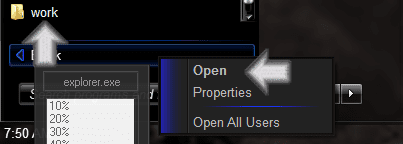
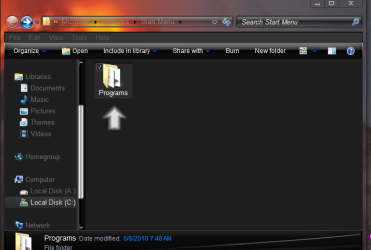
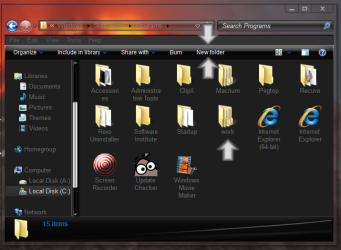
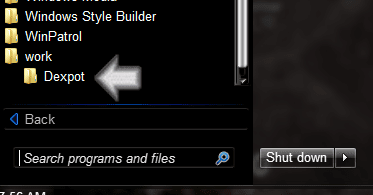
Tony I just followed Ivo's post & it worked then followed Dunfiddlin's post.
Right click on all programs click on open in the open window double click on
Programs folder then click on new folder name it close the window then drag the program into the new folder in the start menu like Dunfiddlin said.

Hope that helped Jerry
 

Attachments

  • Capture.PNG
    Capture.PNG
    7.7 KB · Views: 3
  • Capture2.PNG
    Capture2.PNG
    32.3 KB · Views: 8
  • Capture3.PNG
    Capture3.PNG
    52 KB · Views: 10
  • Capture4.PNG
    Capture4.PNG
    8.7 KB · Views: 6

My Computer

Computer type
Laptop
Computer Manufacturer/Model Number
Sager NP9170
OS
Win 7 Pro x64 / Win 10 Pro
CPU
Intel(R) Core(TM) i7-3630QM CPU @ 2.40GHz
Motherboard
CLEVO P170EM
Memory
12 GB
Graphics Card(s)
(1) Intel(R) HD Graphics 4000 (2) NVIDIA GeForce GTX 675M
Sound Card
(1) Realtek High Definition Audio (2) Intel(R) Display Aud
Monitor(s) Displays
17.3
Screen Resolution
1920x1080
Hard Drives
(1) Samsung 860 EVO 500GB(OS) (1) Samsung 860 EVO 500GB(Data)
Keyboard
Backlite
Antivirus
MSE, Malwarebytes Pro
Browser
Firefox
Other Info
DESKTOP: Custom-built.
OS: Win 10 Pro x64.
CASE: Rosewill R5.
CPU: Intel I5 4670K CPU @ 3.40GHz.
CPU COOLER: Cool Master Hyper 212 EVO.
MOTHERBOARD: Asus Z87-A.
MEMORY: Kingston HyperX 2x4 GB.
GPU: Nvidia Geforce 650 TI.
PSU: Corsair TX750.
DRIVES: (1) Samsung 840 120 GB SSD (2) Western Digital blue 500 GB 7200 RPM.
Thanks Bongo (and my apologies to Ivo and Dunfiddlin) I was clicking on the Start button like I used to in XP not the All Programs.
Thanks again guys
Tony
 

My Computer

OS
Windows 7 Pro
Motherboard
NF520-A2 TE
Memory
AMD
Graphics Card(s)
Nvidia GeForce
Sound Card
Onboard
Monitor(s) Displays
LG 1919S

My Computer

Computer type
PC/Desktop
Computer Manufacturer/Model Number
Scan 3XS P55 liteDAW
OS
Windows Home Premium (64)
CPU
Intel Core i7 860
Motherboard
Gigabyte GA-P55A-UD4
Memory
8GB (4x2GB) Corsair TwinX XMS3
Graphics Card(s)
1GB Gainward 9500 GT
Sound Card
M-Audio Delta 66
Monitor(s) Displays
Acer v223wBBd
Screen Resolution
1680 x 1050
Hard Drives
1 x 500 GB WD Barracuda (OS+Docs)
2 x 1TB Samsung Spinpoint F3 (Data)
PSU
Enermax EMD625AWT II - 625W Enermax Modu82+ II
Case
Fractal Design Define R2 Black
Cooling
Prolima Megahalems Super 6 Heatpipe Tower Cooler
Keyboard
Microsoft Digital Media Pro
Mouse
Belkin Optical Ergo
Internet Speed
8 Mbps nominal (14.9 achieved !)
Other Info
Digital Audio Workstation
Back
Top