Solved Customizing Windows Captions In Explorer etc.

eimer96

New member
Local time
2:44 AM
Messages
4
I am quite new to modifications to Windows and would like to know how to make the minimize, maximize and exit captions appear two dimensional (as they appear in a window that is not selected). In other words, all window captions will appear as if they are not selected, with no red in the corner, just the two dimensional unselected captions.

Do I need resource hacker to do this? Where can I find the files that contain these captions so as to copy them?
 

My Computer

Computer type
PC/Desktop
OS
Windows 7 Home Premium x64
Welcome to the Seven Forums

I would recommend first that you start a new custom theme so you do not corrupt the original, look at Post #38 Here it will show you how.

You will need to do 1 of these 2 ways of Enabling custom themes for it to work.
http://www.sevenforums.com/tutorials/34579-enabling-custom-themes-windows-7-a.html
Or
http://www.sevenforums.com/tutorials/28377-theme-how-apply-custom-themes.html?filter

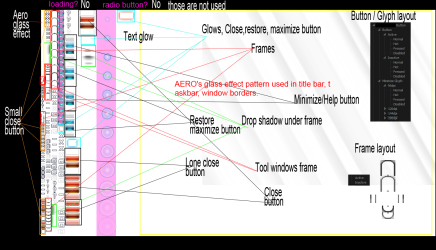
OK the images you will need to edit our in the Steam image #971 in the .msstyles in the new theme folder that you should make from above. Yes resource hacker can be used (I never have much luck with it)
STREAM 971.png

If it's too difficult I have Ave's Windows7 Style Builder and could make those changes to the buttons.(This program breaks down that Steam image #971 into individual locations) and posted here in a zip folder. Or if you would happen to purchase it I could show you what to do.

Let me know.

Jerry
 

My Computer

Computer type
Laptop
Computer Manufacturer/Model Number
Sager NP9170
OS
Win 7 Pro x64 / Win 10 Pro
CPU
Intel(R) Core(TM) i7-3630QM CPU @ 2.40GHz
Motherboard
CLEVO P170EM
Memory
12 GB
Graphics Card(s)
(1) Intel(R) HD Graphics 4000 (2) NVIDIA GeForce GTX 675M
Sound Card
(1) Realtek High Definition Audio (2) Intel(R) Display Aud
Monitor(s) Displays
17.3
Screen Resolution
1920x1080
Hard Drives
(1) Samsung 860 EVO 500GB(OS) (1) Samsung 860 EVO 500GB(Data)
Keyboard
Backlite
Antivirus
MSE, Malwarebytes Pro
Browser
Firefox
Other Info
DESKTOP: Custom-built.
OS: Win 10 Pro x64.
CASE: Rosewill R5.
CPU: Intel I5 4670K CPU @ 3.40GHz.
CPU COOLER: Cool Master Hyper 212 EVO.
MOTHERBOARD: Asus Z87-A.
MEMORY: Kingston HyperX 2x4 GB.
GPU: Nvidia Geforce 650 TI.
PSU: Corsair TX750.
DRIVES: (1) Samsung 840 120 GB SSD (2) Western Digital blue 500 GB 7200 RPM.
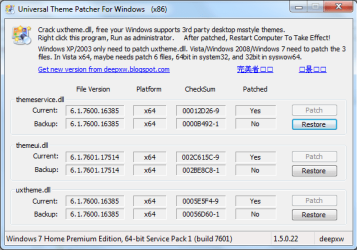
I chose the second way of enabling custom themes, I have included a screencapture of the result. I then edited the image using the Windows Style Builder and overwrote the renamed "aero_flat.msstyles" (my theme) with the edited "aero_flat.msstyles". I have included the theme in a .zip folder. I have only made alterations to the aero buttons (I think).

Anyway I tried to use the theme but it just reverted to classic, what do I do?

ThemePatcher.PNG

View attachment aero_flat.zip
 

My Computer

Computer type
PC/Desktop
OS
Windows 7 Home Premium x64
One thing I see is in the screenshot of universal theme patcher the caption text says X86, your system specs say X64 are you using a 64-bit system, if so do Option 2 of this tutorial http://www.sevenforums.com/tutorials/1538-sfc-scannow-command-system-file-checker.html it will not harm any data or programs you have installed it will try to find and repair any corrupt system files that you have. You may need to do this up to 3 times with a reboot after each scan.

Then use the right universal theme patcher.

Your .msstyles was also corrupt I made a new one and put it in the zip folder below give it a try.

Jerry
 

Attachments

My Computer

Computer type
Laptop
Computer Manufacturer/Model Number
Sager NP9170
OS
Win 7 Pro x64 / Win 10 Pro
CPU
Intel(R) Core(TM) i7-3630QM CPU @ 2.40GHz
Motherboard
CLEVO P170EM
Memory
12 GB
Graphics Card(s)
(1) Intel(R) HD Graphics 4000 (2) NVIDIA GeForce GTX 675M
Sound Card
(1) Realtek High Definition Audio (2) Intel(R) Display Aud
Monitor(s) Displays
17.3
Screen Resolution
1920x1080
Hard Drives
(1) Samsung 860 EVO 500GB(OS) (1) Samsung 860 EVO 500GB(Data)
Keyboard
Backlite
Antivirus
MSE, Malwarebytes Pro
Browser
Firefox
Other Info
DESKTOP: Custom-built.
OS: Win 10 Pro x64.
CASE: Rosewill R5.
CPU: Intel I5 4670K CPU @ 3.40GHz.
CPU COOLER: Cool Master Hyper 212 EVO.
MOTHERBOARD: Asus Z87-A.
MEMORY: Kingston HyperX 2x4 GB.
GPU: Nvidia Geforce 650 TI.
PSU: Corsair TX750.
DRIVES: (1) Samsung 840 120 GB SSD (2) Western Digital blue 500 GB 7200 RPM.
That is strange because I used the x64 version, I am certain of that. Anyway I ended up restoring the drivers using that tool and then using the ux core program to serve as the theme workaround. The file you uploaded worked like a charm, is it normal/easy for .msstyles files to become corrupted? I only edited a small area of the steam image.

I did not run the file checker as I have edited so authui.dll's and would like them to stay as is. Thanks, though, if I ever decide to bring the system back to clean I will pull it up.

As a completely off topic question, I noticed on the forum that you had some awesome-looking black icons. Would you be able to post a link? That for all the help.
 

My Computer

Computer type
PC/Desktop
OS
Windows 7 Home Premium x64

My Computer

Computer type
Laptop
Computer Manufacturer/Model Number
Sager NP9170
OS
Win 7 Pro x64 / Win 10 Pro
CPU
Intel(R) Core(TM) i7-3630QM CPU @ 2.40GHz
Motherboard
CLEVO P170EM
Memory
12 GB
Graphics Card(s)
(1) Intel(R) HD Graphics 4000 (2) NVIDIA GeForce GTX 675M
Sound Card
(1) Realtek High Definition Audio (2) Intel(R) Display Aud
Monitor(s) Displays
17.3
Screen Resolution
1920x1080
Hard Drives
(1) Samsung 860 EVO 500GB(OS) (1) Samsung 860 EVO 500GB(Data)
Keyboard
Backlite
Antivirus
MSE, Malwarebytes Pro
Browser
Firefox
Other Info
DESKTOP: Custom-built.
OS: Win 10 Pro x64.
CASE: Rosewill R5.
CPU: Intel I5 4670K CPU @ 3.40GHz.
CPU COOLER: Cool Master Hyper 212 EVO.
MOTHERBOARD: Asus Z87-A.
MEMORY: Kingston HyperX 2x4 GB.
GPU: Nvidia Geforce 650 TI.
PSU: Corsair TX750.
DRIVES: (1) Samsung 840 120 GB SSD (2) Western Digital blue 500 GB 7200 RPM.
Back
Top