D drive missing, some Windows programs not working

sqrtofneg1

New member
Local time
4:38 PM
Messages
6
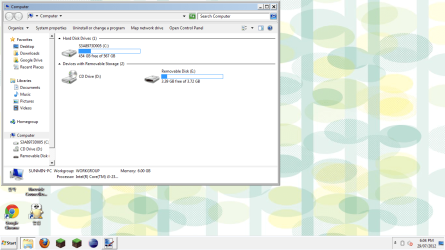
The D drive (partition) is missing, no wireless, no disk management, the theme is messed up, and this happened overnight when booting it up.
D drive missing.png
Windows 7, Home premium, 64 bit.
Ideas?
 

My Computer

OS
Windows 7 Home Premium 64bit
Internet Speed
Horrible.
try to make a system restore to restore the PC before the problem occurred. just type in the search box system restore
 

My Computer

Computer Manufacturer/Model Number
Dell Inspirion n430
OS
Windows 8 Pro
try to make a system restore to restore the PC before the problem occurred. just type in the search box system restore
System restore is one of the windows programs that don't work.
 

My Computer

OS
Windows 7 Home Premium 64bit
Internet Speed
Horrible.
First install and run a full scan with Malwarebytes to see if you have an infection which could affect recovery. If this is a problem download and burn to CD or write to flash stick, boot and run a full scan with Windows Defender Offline

If the partition is missing you can often recover it by booting free Partition Wizard Partition Recovery Wizard - Video Help. Post back a camera snap of the drive map and listings if possible.

As suggested try to System Restore.

Well, I have recovered D, but everything else, (Wireless, system restore, windows theme, taskbar) Is still the same. Any other ideas?
 

My Computer

OS
Windows 7 Home Premium 64bit
Internet Speed
Horrible.

My Computer

OS
Windows 7 Home Premium 64bit
Internet Speed
Horrible.
No there is no guarantee that Factory Recovery will always work. That's why you should make the Recovery disks to have another method in case running Recovery from its partition fails. If both methods fail then you can Clean Reinstall.

Had you posted your Specs or even mentioned the computer brand we could have provided the exact steps to recover.

But first there is a long list of steps to take to assure everything's been done to repair the OS in Troubleshooting Steps for Windows 7 and Troubleshooting Windows 7 Failure to Boot.

What were the results of the Malwarebytes scan? If it won't run then download, burn to CD and run a full scan with Windows Defender Offline.

We need to see how serious the infection is. It may require advanced removal tools such as Combofix to repair infection.

 
No there is no guarantee that Factory Recovery will always work. That's why you should make the Recovery disks to have another method in case running Recovery from its partition fails. If both methods fail then you can Clean Reinstall.

Had you posted your Specs or even mentioned the computer brand we could have provided the exact steps to recover.

But first there is a long list of steps to take to assure everything's been done to repair the OS in Troubleshooting Steps for Windows 7 and Troubleshooting Windows 7 Failure to Boot.

What were the results of the Malwarebytes scan? If it won't run then download, burn to CD and run a full scan with Windows Defender Offline.

We need to see how serious the infection is. It may require advanced removal tools such as Combofix to repair infection.
Thank you for your help.
I've fixed the problem by going into Advanced Boot Options - Fix your computer - System restore. System restore worked by doing so.
Again, thank you.
 

My Computer

OS
Windows 7 Home Premium 64bit
Internet Speed
Horrible.
Back
Top