
Darik's Boot and Nuke - Use to Wipe a Hard Drive
Let's begin:
1. You need to download Darik's Boot and Nuke. It can be downloaded from here:
Download
2. You will need to burn the iso file to a cd. This tutorial will show you how to if ou don't know how: http://www.sevenforums.com/tutorials/548-burn-disc-image-iso-img-file.html
3. Restart your computer, go into the BIOS and set it to boot from CD/DVD first.
4. Insert your Darik's Boot and Nuke CD so your computer can boot off of it.
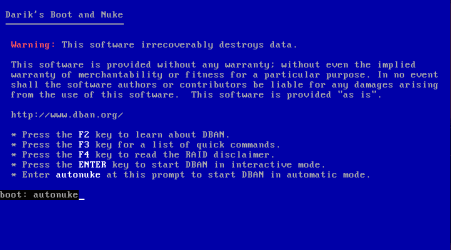
5. Darik's Boot and Nuke will come up at a screen asking you what you want to do.
7. The process will take several hours depending on the size of your drive. Once it has completed, you can hold down the power button on your computer to shut your computer off.
I would like to thank Shawn for making some adjustments to this tutorial and helping me with this tutorial. If you have any questions or comments, feel free to post them below.
How to Securely Wipe a Hard Disk with "Darik's Boot and Nuke"
Information
This tutorial will show you how to use Darik's Boot and Nuke to help you secure wipe a hard drive that has data that you need to have destroyed.
Warning
Before we start:
Darik's Boot and Nuke will irrecoverably erase all data on the hard drive. It will also erase any hard drive/ flash drive that is connected to your computer, so be sure to unplug drives that you don't want to have erased before you use Darik's Boot and Nuke. Also, Darik's Boot and Nuke will take several hours depending on the options you choose, so be sure you have time to do this.
Darik's Boot and Nuke will irrecoverably erase all data on the hard drive. It will also erase any hard drive/ flash drive that is connected to your computer, so be sure to unplug drives that you don't want to have erased before you use Darik's Boot and Nuke. Also, Darik's Boot and Nuke will take several hours depending on the options you choose, so be sure you have time to do this.
Let's begin:
1. You need to download Darik's Boot and Nuke. It can be downloaded from here:
Download
2. You will need to burn the iso file to a cd. This tutorial will show you how to if ou don't know how: http://www.sevenforums.com/tutorials/548-burn-disc-image-iso-img-file.html
3. Restart your computer, go into the BIOS and set it to boot from CD/DVD first.
4. Insert your Darik's Boot and Nuke CD so your computer can boot off of it.
5. Darik's Boot and Nuke will come up at a screen asking you what you want to do.
- F2 to learn more about Darik's Boot and Nuke
- F3 for a list of quick commands
- F4 for the disclaimer
- Enter to start Darik's Boot and Nuke in Interactive Mode
- You can type in autonuke to automatically erase your hard drive with the DoD Short method which is a 3 pass secure erase on your hard drive. I recommend that you choose autonuke.
7. The process will take several hours depending on the size of your drive. Once it has completed, you can hold down the power button on your computer to shut your computer off.
I would like to thank Shawn for making some adjustments to this tutorial and helping me with this tutorial. If you have any questions or comments, feel free to post them below.
Last edited by a moderator:


