
Date and Time - Allow or Prevent Users and Groups from Changing

How to Allow or Prevent Specific Users and Groups from Changing the Date and Time in Windows

   Information
This will show you how to allow or prevent specific users and groups from being able to change the computer date and time in Vista, Windows 7, and Windows 8.

You will need to be an administrator to open the Local Security Policy Editor.
   Note
Default Users and Groups Allowed to Change the Date and Time
NOTE: This user right determines which users and groups can change the time and date on the internal clock of the computer. Users that are assigned this user right can affect the appearance of event logs. If the system time is changed, events that are logged will reflect this new time, not the actual time that the events occurred.

On Local Computer, Workstation, and Servers: Administrators, LOCAL SERVICE

On Domain: Administrators, Server Operators, LOCAL SERVICE


OPTION ONE

Allow or Prevent Changing Date and Time using Local Security Policy
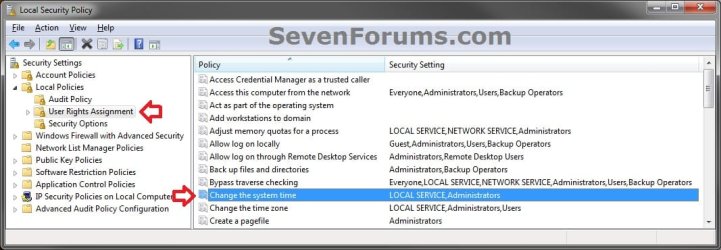
1. Open the Local Security Policy window, double click/tap on Local Policies and User Rights Assignment in the left pane to expand them open. (see screenshot below)
Step1.jpg
2. In the right pane of User Rights Assignment, double click/tap on Change the system time. (see screenshot above)

3. To Prevent Users and Groups from Changing the Date and Time
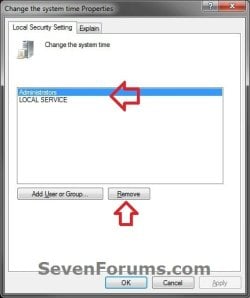
:warn:WARNING: Do not remove LOCAL SERVICE. A) Select (highlight) listed user(s) and/or group(s) that you do not want to be allowed to change the computer date and time, then click/tap on the Remove button. (see screenshot below)
NOTE: You can press and hold the CTRL key and click/tap on listed users and groups to select more than one. Remove-1.jpg

   Tip
To Only Prevent Specific Administrators
  • You will also need to remove the Administrators group in addition to step 3A first, then only add each administrator user account name in step 4A that you want to be able to change the date and time.

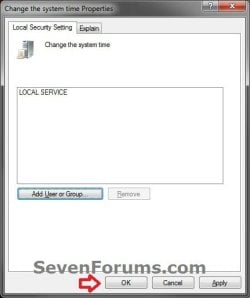
B) Click/tap on Apply. (see screenshot below) Remove-2.jpg
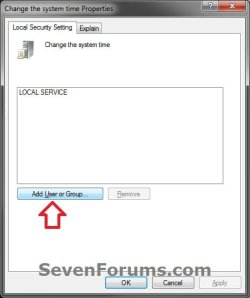
4. To Allow Users and Groups to Change the Date and Time A) Click/tap on the Add User or Group button. (see screenshot below) Add-1.jpg
B) To Change the Location to Search for "Object Types"

NOTE: This is only if you wanted to search for object types to allow from a location other than your local computer. If you only want to search from your computer, then skip this step and go to step 4C.
  • Click/tap on the Locations button. (see screenshot below step 4C)
  • Select a location, and click/tap on OK. (see screenshot below)
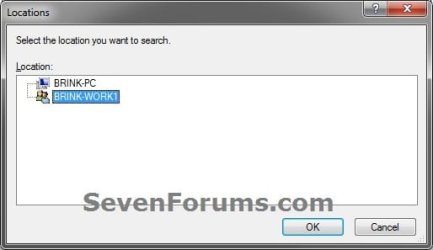
Location-1.jpg
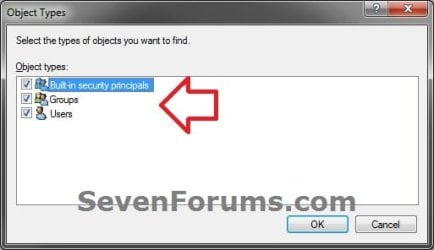
C) Click/tap on the Object Types button. (see screenshot below) Add-2.jpg
D) Check all boxes or the "object types" (ex: Users or Groups) that you want to find and select from in step 4G, and click/tap on OK. (see screenshot below) Add-3.jpg
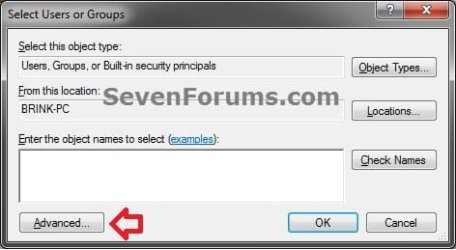
E) Click/tap on the Advanced button. (see screenshot below) Add-4.jpg
F) Click/tap on the Find Now button. (see screenshot below) Add-5.jpg
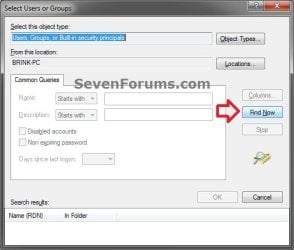
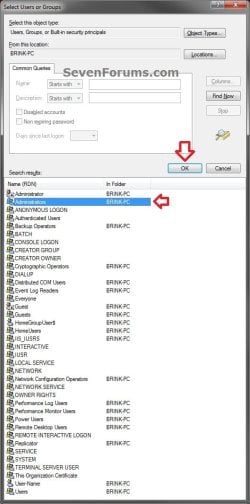
G) In the bottom pane under Search results, select one or more listed users or groups that you want to allow to be able to change the computer date and time, then click/tap on OK. (see screenshot below)
NOTE: You can press and hold the CTRL key and click/tap on listed users and groups to select more than one. Add-6.jpg

   Tip
To Only Allow Specific Administrators
  • You will need to remove the Administrators group in step 3A first, then add each administrator user account name that you want to be able to change the date and time.

H) Click/tap on OK. (see screenshot below) Add-7.jpg
I) Click/tap on Apply. (see screenshot below) Add-8.jpg
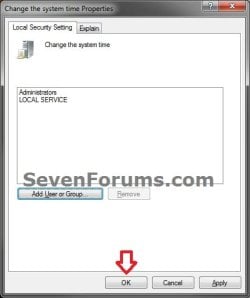
5. When finished, click/tap on OK. (see screenshots below steps 3B and 4I)

6. Close the Local Security Policy window. (see screenshot below step 1)


OPTION TWO

Allow or Prevent Changing Date and Time using an Elevated Command Prompt


NOTE: Be sure to write down changes you make to the user rights assignment so that you will know what you changed later. Please see the NOTE box at the top of the tutorial for the default user rights assignments. 1. If you have not already, click/tap on the Download button below to download the ntrights.exe file originally from within the Windows Server 2003 Resource Kit Tools.
Download


A) Save the ntrights.exe file to your desktop.

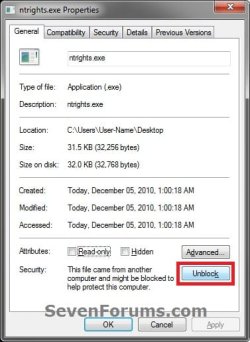
B) Right click or press and hold on the ntrights.exe file, click/tap on Properties, General tab, and click/tap on the Unblock button if available. (see screenshot below)
NOTE: If you do not have a Unblock button under the General tab, then the file is already unblocked and you can continue on to step 1C. Unblock.jpg
C) Right click or press and hold on the ntrights.exe file and click/tap on Move.

D) Open Windows Explorer and navigate to and open the C:\Windows\System32 folder, then Paste the ntrights.exe file to move it here.

E) If prompted, click/tap on Continue and Yes to approve moving the ntrights.exe file into the System32 folder, then close the Windows Explorer window.
2. Open an elevated command prompt (Run as administrator).

3. Prevent Users or Groups to be able to Change the Date and Time
:warn:WARNING: Do not remove LOCAL SERVICE. A) In the elevated command prompt type in the command below and press enter.
NOTE: Substitute User or Group in the command below with the actual user account name (ex: Users) or group name within quotes that you want to prevent.
ntrights -U "User or Group" -R SeSystemtimePrivilege


   Tip
To Only Prevent Specific Administrators
  • You will also need to remove the Administrators group in addition to step 3A first, then only add each administrator user account name in step 4A that you want to be able to change the date and time.

4. Allow Users or Groups to be able to Change the Date and Time A) In the elevated command prompt type in the command below and press enter.
NOTE: Substitute User or Group in the command below with the actual user account name (ex: Users) or group name within quotes that you want to allow.
ntrights -U "User or Group" +R SeSystemtimePrivilege


   Tip
To Only Allow Specific Administrators
  • You will need to remove the Administrators group in step 3A first, then add each administrator user account name that you want to be able to change the date and time.

5. When finished, close the elevated command prompt.


That's it,
Shawn


Attachments

Last edited:
error ntrights.exe

An error is reported by Vista home Premium.

If user have Administrator rights: ***Error*** OpenPolicy -1073741790

If user do not have Administrator rights: ***Error*** OpenPolicy -1073741790

There is a reason for this errror?

Thanks.
 

My Computer My Computer

OS
Vista HomePremium 32
Hello jhonalone, and welcome to Seven Forums.

That error just means that you did not open a "elevated" (run as administrator) command prompt. You can click on the link in step 2 of OPTION TWO for more details on how to open one. :)
 

My Computer My Computer

Computer type
PC/Desktop
Computer Manufacturer/Model Number
Self built custom
OS
64-bit Windows 11 Pro for Workstations
CPU
Intel i7-8700K OC'd to 5 GHz
Motherboard
ASUS ROG Maximus XI Formula Z390
Memory
64 GB (4x16GB) G.SKILL TridentZ RGB DDR4 3600 MHz
Graphics Card(s)
ASUS ROG-STRIX-GTX1080TI-O11G-GAMING
Sound Card
Integrated
Monitor(s) Displays
2 x Samsung Odyssey G7 27"
Screen Resolution
2560x1440
Hard Drives
1TB Samsung 990 PRO M.2,
4TB Samsung 990 PRO PRO M.2,
TerraMaster F8 SSD Plus NAS
PSU
Seasonic Prime Titanium 850W
Case
Thermaltake Core P3
Cooling
Corsair Hydro H115i
Keyboard
Logitech wireless K800
Mouse
Logitech MX Master 4
Internet Speed
2 Gb/s Download and 100 Mb/s Upload
Antivirus
Malwarebyte Anti-Malware Premium
Browser
Google Chrome
Other Info
Logitech Z625 speaker system,
Logitech BRIO 4K Pro webcam,
HP Color LaserJet Pro MFP M477fdn,
APC SMART-UPS RT 1000 XL - SURT1000XLI,
Galaxy S23 Plus phone
Hello FrozenPixel, and welcome to Seven Forums.

Any user or group that is not listed is already restricted, so no need to do anything if that's what you wanted.

Only listed users and groups are allowed to change the date and time. You'll just need to add any user or group that you want to allow to change the date and time.

Hope this helps, :)
Shawn
 

My Computer My Computer

Computer type
PC/Desktop
Computer Manufacturer/Model Number
Self built custom
OS
64-bit Windows 11 Pro for Workstations
CPU
Intel i7-8700K OC'd to 5 GHz
Motherboard
ASUS ROG Maximus XI Formula Z390
Memory
64 GB (4x16GB) G.SKILL TridentZ RGB DDR4 3600 MHz
Graphics Card(s)
ASUS ROG-STRIX-GTX1080TI-O11G-GAMING
Sound Card
Integrated
Monitor(s) Displays
2 x Samsung Odyssey G7 27"
Screen Resolution
2560x1440
Hard Drives
1TB Samsung 990 PRO M.2,
4TB Samsung 990 PRO PRO M.2,
TerraMaster F8 SSD Plus NAS
PSU
Seasonic Prime Titanium 850W
Case
Thermaltake Core P3
Cooling
Corsair Hydro H115i
Keyboard
Logitech wireless K800
Mouse
Logitech MX Master 4
Internet Speed
2 Gb/s Download and 100 Mb/s Upload
Antivirus
Malwarebyte Anti-Malware Premium
Browser
Google Chrome
Other Info
Logitech Z625 speaker system,
Logitech BRIO 4K Pro webcam,
HP Color LaserJet Pro MFP M477fdn,
APC SMART-UPS RT 1000 XL - SURT1000XLI,
Galaxy S23 Plus phone
HELP!

***ERROR*** AddUserRightToAccount -1073741728

how to solve this?
 

My Computer My Computer

Computer type
PC/Desktop
Computer Manufacturer/Model Number
unknown
OS
windos ultimate x64
CPU
gigabyte
Graphics Card(s)
2gb
Hard Drives
2
Antivirus
avas
Browser
chrome
Hello nesszel, and welcome to Seven Forums. :)

Please provide more details.
 

My Computer My Computer

Computer type
PC/Desktop
Computer Manufacturer/Model Number
Self built custom
OS
64-bit Windows 11 Pro for Workstations
CPU
Intel i7-8700K OC'd to 5 GHz
Motherboard
ASUS ROG Maximus XI Formula Z390
Memory
64 GB (4x16GB) G.SKILL TridentZ RGB DDR4 3600 MHz
Graphics Card(s)
ASUS ROG-STRIX-GTX1080TI-O11G-GAMING
Sound Card
Integrated
Monitor(s) Displays
2 x Samsung Odyssey G7 27"
Screen Resolution
2560x1440
Hard Drives
1TB Samsung 990 PRO M.2,
4TB Samsung 990 PRO PRO M.2,
TerraMaster F8 SSD Plus NAS
PSU
Seasonic Prime Titanium 850W
Case
Thermaltake Core P3
Cooling
Corsair Hydro H115i
Keyboard
Logitech wireless K800
Mouse
Logitech MX Master 4
Internet Speed
2 Gb/s Download and 100 Mb/s Upload
Antivirus
Malwarebyte Anti-Malware Premium
Browser
Google Chrome
Other Info
Logitech Z625 speaker system,
Logitech BRIO 4K Pro webcam,
HP Color LaserJet Pro MFP M477fdn,
APC SMART-UPS RT 1000 XL - SURT1000XLI,
Galaxy S23 Plus phone
I have granted everyone full access to change the system time in group policy. I verified the policy is being applied to the PC. I granted all users access to the HKEY_LOCAL_MACHINE\System\CurrentControlSet\Control\TimeZoneInformation key.

The user is not a local administrator but it still prompts them for admin credentials when try to change the date/time. They are able to change the timezone.

This is on a Windows 64 bit machine
 

My Computer My Computer

Computer type
PC/Desktop
OS
Windows 7 and Windows 10
Hello paradox42x, and welcome to Seven Forums. :)

As a test, set the policy for the "Users" group instead to see if it may work afterwards.
 

My Computer My Computer

Computer type
PC/Desktop
Computer Manufacturer/Model Number
Self built custom
OS
64-bit Windows 11 Pro for Workstations
CPU
Intel i7-8700K OC'd to 5 GHz
Motherboard
ASUS ROG Maximus XI Formula Z390
Memory
64 GB (4x16GB) G.SKILL TridentZ RGB DDR4 3600 MHz
Graphics Card(s)
ASUS ROG-STRIX-GTX1080TI-O11G-GAMING
Sound Card
Integrated
Monitor(s) Displays
2 x Samsung Odyssey G7 27"
Screen Resolution
2560x1440
Hard Drives
1TB Samsung 990 PRO M.2,
4TB Samsung 990 PRO PRO M.2,
TerraMaster F8 SSD Plus NAS
PSU
Seasonic Prime Titanium 850W
Case
Thermaltake Core P3
Cooling
Corsair Hydro H115i
Keyboard
Logitech wireless K800
Mouse
Logitech MX Master 4
Internet Speed
2 Gb/s Download and 100 Mb/s Upload
Antivirus
Malwarebyte Anti-Malware Premium
Browser
Google Chrome
Other Info
Logitech Z625 speaker system,
Logitech BRIO 4K Pro webcam,
HP Color LaserJet Pro MFP M477fdn,
APC SMART-UPS RT 1000 XL - SURT1000XLI,
Galaxy S23 Plus phone
Thank you for the quick response. the Users group did not work. I also tried Everyone.

still prompts for the admin username/password.

It does not do it when I try to change the time zone
 

My Computer My Computer

Computer type
PC/Desktop
OS
Windows 7 and Windows 10
As another test, how does it work if you specify the standard user account's name instead?
 

My Computer My Computer

Computer type
PC/Desktop
Computer Manufacturer/Model Number
Self built custom
OS
64-bit Windows 11 Pro for Workstations
CPU
Intel i7-8700K OC'd to 5 GHz
Motherboard
ASUS ROG Maximus XI Formula Z390
Memory
64 GB (4x16GB) G.SKILL TridentZ RGB DDR4 3600 MHz
Graphics Card(s)
ASUS ROG-STRIX-GTX1080TI-O11G-GAMING
Sound Card
Integrated
Monitor(s) Displays
2 x Samsung Odyssey G7 27"
Screen Resolution
2560x1440
Hard Drives
1TB Samsung 990 PRO M.2,
4TB Samsung 990 PRO PRO M.2,
TerraMaster F8 SSD Plus NAS
PSU
Seasonic Prime Titanium 850W
Case
Thermaltake Core P3
Cooling
Corsair Hydro H115i
Keyboard
Logitech wireless K800
Mouse
Logitech MX Master 4
Internet Speed
2 Gb/s Download and 100 Mb/s Upload
Antivirus
Malwarebyte Anti-Malware Premium
Browser
Google Chrome
Other Info
Logitech Z625 speaker system,
Logitech BRIO 4K Pro webcam,
HP Color LaserJet Pro MFP M477fdn,
APC SMART-UPS RT 1000 XL - SURT1000XLI,
Galaxy S23 Plus phone
No luck on adding the ID :(
 

My Computer My Computer

Computer type
PC/Desktop
OS
Windows 7 and Windows 10
I must admit that I'm at a loss as well. :(
 

My Computer My Computer

Computer type
PC/Desktop
Computer Manufacturer/Model Number
Self built custom
OS
64-bit Windows 11 Pro for Workstations
CPU
Intel i7-8700K OC'd to 5 GHz
Motherboard
ASUS ROG Maximus XI Formula Z390
Memory
64 GB (4x16GB) G.SKILL TridentZ RGB DDR4 3600 MHz
Graphics Card(s)
ASUS ROG-STRIX-GTX1080TI-O11G-GAMING
Sound Card
Integrated
Monitor(s) Displays
2 x Samsung Odyssey G7 27"
Screen Resolution
2560x1440
Hard Drives
1TB Samsung 990 PRO M.2,
4TB Samsung 990 PRO PRO M.2,
TerraMaster F8 SSD Plus NAS
PSU
Seasonic Prime Titanium 850W
Case
Thermaltake Core P3
Cooling
Corsair Hydro H115i
Keyboard
Logitech wireless K800
Mouse
Logitech MX Master 4
Internet Speed
2 Gb/s Download and 100 Mb/s Upload
Antivirus
Malwarebyte Anti-Malware Premium
Browser
Google Chrome
Other Info
Logitech Z625 speaker system,
Logitech BRIO 4K Pro webcam,
HP Color LaserJet Pro MFP M477fdn,
APC SMART-UPS RT 1000 XL - SURT1000XLI,
Galaxy S23 Plus phone
Back
Top