
Date and Time - Change

How to Change the Date and Time in Windows 7

   Information
This tutorial will show you how to set or change the date and time for the system clock of your PC in Windows 7.

You must be logged in as an administrator to be able to change the date and time in Windows.


Here's How: 1. Do step 2, 3, or 4 below for what you would like to do.

2. Right click or press and hold on the clock on the taskbar, click on Adjust Date/Time, and go to step 5 below. (see screenshot below) Right_Click.jpg
3. Click on the clock on the taskbar, click on Change date and time settings, and go to step 5 below. (see screenshot below) Left_Click.jpg
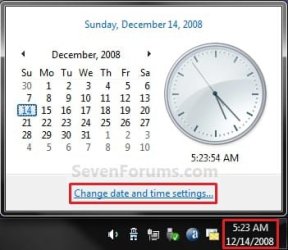
4. Open the Control Panel (icons view), click on the Date and Time icon, close Control Panel, and go to step 5 below.

5. Click/tap on the Change date and time button. (see screenshot below) Time_and_Date_1.jpg
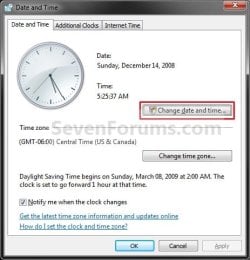
6. If prompted by UAC, then click on Yes.

7. To Change the Date A) Under the left Date section, select a month and day for your current date. (see screenshot below step 9)
8. To Change the Time A) Under the right Time section, select or type in your current time. (see screenshot below step 9)
9. Click on OK. (see screenshot below) Time_and_Date_2.jpg
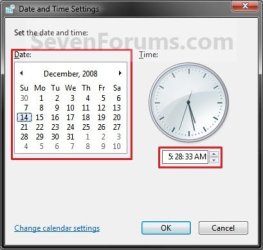
10. Click on OK. (see screenshot below step 5)

That's it,
Shawn


Last edited:
Win XP Date and Time Window

Is there a way to get the date and window to stay opened like in Windows XP?

or
From the instructions in this message:
have the image in step 9 stay without out having to go through steps 1-5.

Thanks
 

My Computer

Computer type
Laptop
Computer Manufacturer/Model Number
Toshiba Satellite U505-S2005
OS
Windows 7 Home Premium 64bit
CPU
Intel Core i3 CPU M 330 @ 2.13GHz
Memory
4 GB
Graphics Card(s)
Intel® HD Graphics with 32MB-1696MB dynamically allocated sh
Hard Drives
500GB (5400 RPM) Serial ATA hard disk drive
TOSHIBA Hard Drive Impact Sensor (3D sensor)
Antivirus
Microsoft Security Essentials
Browser
Microsoft Internet Explorer 11
Hello spjr, and welcome to Seven Forums.

If you like, you could add an additional clock to have this below show every time you hover over the time on the taskbar.


http://www.sevenforums.com/tutorials/178060-clock-add-additional-clocks.html


167646d1312009616-clock-add-additional-clocks-clock1.jpg


Hope this helps, :)
Shawn
 

My Computer

Computer type
PC/Desktop
Computer Manufacturer/Model Number
Self built custom
OS
64-bit Windows 11 Pro for Workstations
CPU
Intel i7-8700K OC'd to 5 GHz
Motherboard
ASUS ROG Maximus XI Formula Z390
Memory
64 GB (4x16GB) G.SKILL TridentZ RGB DDR4 3600 MHz
Graphics Card(s)
ASUS ROG-STRIX-GTX1080TI-O11G-GAMING
Sound Card
Integrated
Monitor(s) Displays
2 x Samsung Odyssey G7 27"
Screen Resolution
2560x1440
Hard Drives
1TB Samsung 990 PRO M.2,
4TB Samsung 990 PRO PRO M.2,
TerraMaster F8 SSD Plus NAS
PSU
Seasonic Prime Titanium 850W
Case
Thermaltake Core P3
Cooling
Corsair Hydro H115i
Keyboard
Logitech wireless K800
Mouse
Logitech MX Master 4
Internet Speed
2 Gb/s Download and 100 Mb/s Upload
Antivirus
Malwarebyte Anti-Malware Premium
Browser
Google Chrome
Other Info
Logitech Z625 speaker system,
Logitech BRIO 4K Pro webcam,
HP Color LaserJet Pro MFP M477fdn,
APC SMART-UPS RT 1000 XL - SURT1000XLI,
Galaxy S23 Plus phone
Is there a registry hack to get the clock to stay in a window when you click on the system tray time?
Like the image in step 9.
With the steps shown the Date and Time window (step 5) stays open along with the Date and Time Settings window (step 9).
Thanks
 

My Computer

Computer type
Laptop
Computer Manufacturer/Model Number
Toshiba Satellite U505-S2005
OS
Windows 7 Home Premium 64bit
CPU
Intel Core i3 CPU M 330 @ 2.13GHz
Memory
4 GB
Graphics Card(s)
Intel® HD Graphics with 32MB-1696MB dynamically allocated sh
Hard Drives
500GB (5400 RPM) Serial ATA hard disk drive
TOSHIBA Hard Drive Impact Sensor (3D sensor)
Antivirus
Microsoft Security Essentials
Browser
Microsoft Internet Explorer 11
Hello spjr,

Not that I'm aware of. :(
 

My Computer

Computer type
PC/Desktop
Computer Manufacturer/Model Number
Self built custom
OS
64-bit Windows 11 Pro for Workstations
CPU
Intel i7-8700K OC'd to 5 GHz
Motherboard
ASUS ROG Maximus XI Formula Z390
Memory
64 GB (4x16GB) G.SKILL TridentZ RGB DDR4 3600 MHz
Graphics Card(s)
ASUS ROG-STRIX-GTX1080TI-O11G-GAMING
Sound Card
Integrated
Monitor(s) Displays
2 x Samsung Odyssey G7 27"
Screen Resolution
2560x1440
Hard Drives
1TB Samsung 990 PRO M.2,
4TB Samsung 990 PRO PRO M.2,
TerraMaster F8 SSD Plus NAS
PSU
Seasonic Prime Titanium 850W
Case
Thermaltake Core P3
Cooling
Corsair Hydro H115i
Keyboard
Logitech wireless K800
Mouse
Logitech MX Master 4
Internet Speed
2 Gb/s Download and 100 Mb/s Upload
Antivirus
Malwarebyte Anti-Malware Premium
Browser
Google Chrome
Other Info
Logitech Z625 speaker system,
Logitech BRIO 4K Pro webcam,
HP Color LaserJet Pro MFP M477fdn,
APC SMART-UPS RT 1000 XL - SURT1000XLI,
Galaxy S23 Plus phone
Thanks,
I do not understand why MS changes this so much.
They changed the clock on Windows 10.
There is a registry hack to make the clock look like the Win 7 & 8.
I liked the clock on Win 10 but it did not have the analog clock so I changed it to the old style.
I thought there may be a hack for the clock to appear in a window.

Thanks again.
 

My Computer

Computer type
Laptop
Computer Manufacturer/Model Number
Toshiba Satellite U505-S2005
OS
Windows 7 Home Premium 64bit
CPU
Intel Core i3 CPU M 330 @ 2.13GHz
Memory
4 GB
Graphics Card(s)
Intel® HD Graphics with 32MB-1696MB dynamically allocated sh
Hard Drives
500GB (5400 RPM) Serial ATA hard disk drive
TOSHIBA Hard Drive Impact Sensor (3D sensor)
Antivirus
Microsoft Security Essentials
Browser
Microsoft Internet Explorer 11
I just set both computers by Internet Time, and there's a minute difference. I've read that this can cause problems when sending files over my network. Does the exact time really matter?
 

My Computer

Computer type
PC/Desktop
Computer Manufacturer/Model Number
HP p6-2020t
OS
Win 7 Ult 64-bit
CPU
G620 2.6GHZ Pentium R
Memory
6 GB
Monitor(s) Displays
25" HPLV2311
Screen Resolution
1920 x 1200
Hard Drives
1 SATA, 1 exterior SATA
Case
HP
Cooling
PSU
Antivirus
Glasswire
Browser
Waterfox; Firefox; Chrome for work
Other Info
Firewall--Glasswire
Similar specs in Gateway DX4200
Verizon FIOS Wired network

1 other Win7 computer-- has SSD
Hi, i am encountering error while synchronizing internet time with times windows com. Sometimes, access denied error, some times error occurred due to timeout etc.
Brink, you could update on internet time. Moreover, whenever I click on update INternet time, it goes smooth and changes the time at the instant.But nowadays, it gives error. Why this behaviour
 

Attachments

  • error screen shot example.jpg
    error screen shot example.jpg
    323.3 KB · Views: 1

My Computer

Computer type
PC/Desktop
Computer Manufacturer/Model Number
custom build
OS
Microsoft Windows 7 Ultimate 64-bit 7601 Multiprocessor Free Service Pack 1
CPU
Intel(R) Core(TM)2 Duo CPU E7200 @ 2.53GHz
Motherboard
To be filled by O.E.M. To be filled by O.E.M.
Memory
4.00 GB
Graphics Card(s)
NVIDIA GeForce 210
Sound Card
(1) NVIDIA High Definition Audio (2) Realtek High Definiti
Screen Resolution
1920 x 1080 x 32 bits (4294967296 colors) @ 60 Hz
Hard Drives
ST3500312CS ATA Device
Hi, i am encountering error while synchronizing internet time with times windows com. Sometimes, access denied error, some times error occurred due to timeout etc.
Brink, you could update on internet time. Moreover, whenever I click on update INternet time, it goes smooth and changes the time at the instant.But nowadays, it gives error. Why this behaviour

Hello mate, :-)

This can happen sometimes when there's an interruption or time out while syncing with the selected time server.

You could test using a different time server to see if one may work better when getting this error.
 

My Computer

Computer type
PC/Desktop
Computer Manufacturer/Model Number
Self built custom
OS
64-bit Windows 11 Pro for Workstations
CPU
Intel i7-8700K OC'd to 5 GHz
Motherboard
ASUS ROG Maximus XI Formula Z390
Memory
64 GB (4x16GB) G.SKILL TridentZ RGB DDR4 3600 MHz
Graphics Card(s)
ASUS ROG-STRIX-GTX1080TI-O11G-GAMING
Sound Card
Integrated
Monitor(s) Displays
2 x Samsung Odyssey G7 27"
Screen Resolution
2560x1440
Hard Drives
1TB Samsung 990 PRO M.2,
4TB Samsung 990 PRO PRO M.2,
TerraMaster F8 SSD Plus NAS
PSU
Seasonic Prime Titanium 850W
Case
Thermaltake Core P3
Cooling
Corsair Hydro H115i
Keyboard
Logitech wireless K800
Mouse
Logitech MX Master 4
Internet Speed
2 Gb/s Download and 100 Mb/s Upload
Antivirus
Malwarebyte Anti-Malware Premium
Browser
Google Chrome
Other Info
Logitech Z625 speaker system,
Logitech BRIO 4K Pro webcam,
HP Color LaserJet Pro MFP M477fdn,
APC SMART-UPS RT 1000 XL - SURT1000XLI,
Galaxy S23 Plus phone
Hi, bRINK, I have tried all but getting errors. Is that a windows bug due to some later updates.
i have tried pool.ntp.org, time.google.com etc. I also added some in the registry. But error like peer is unreachable, timeout, Access denied etc are some of the errors .
i tried all sorts of things including registering w32 time and dll etc. But update now does not work simply.
 

My Computer

Computer type
PC/Desktop
Computer Manufacturer/Model Number
custom build
OS
Microsoft Windows 7 Ultimate 64-bit 7601 Multiprocessor Free Service Pack 1
CPU
Intel(R) Core(TM)2 Duo CPU E7200 @ 2.53GHz
Motherboard
To be filled by O.E.M. To be filled by O.E.M.
Memory
4.00 GB
Graphics Card(s)
NVIDIA GeForce 210
Sound Card
(1) NVIDIA High Definition Audio (2) Realtek High Definiti
Screen Resolution
1920 x 1080 x 32 bits (4294967296 colors) @ 60 Hz
Hard Drives
ST3500312CS ATA Device
Hi, bRINK, I have tried all but getting errors. Is that a windows bug due to some later updates.
i have tried pool.ntp.org, time.google.com etc. I also added some in the registry. But error like peer is unreachable, timeout, Access denied etc are some of the errors .
i tried all sorts of things including registering w32 time and dll etc. But update now does not work simply.

Could be a bug. You can try a few times to see if it may successfully sync. If not, try later during off peak hours.
 

My Computer

Computer type
PC/Desktop
Computer Manufacturer/Model Number
Self built custom
OS
64-bit Windows 11 Pro for Workstations
CPU
Intel i7-8700K OC'd to 5 GHz
Motherboard
ASUS ROG Maximus XI Formula Z390
Memory
64 GB (4x16GB) G.SKILL TridentZ RGB DDR4 3600 MHz
Graphics Card(s)
ASUS ROG-STRIX-GTX1080TI-O11G-GAMING
Sound Card
Integrated
Monitor(s) Displays
2 x Samsung Odyssey G7 27"
Screen Resolution
2560x1440
Hard Drives
1TB Samsung 990 PRO M.2,
4TB Samsung 990 PRO PRO M.2,
TerraMaster F8 SSD Plus NAS
PSU
Seasonic Prime Titanium 850W
Case
Thermaltake Core P3
Cooling
Corsair Hydro H115i
Keyboard
Logitech wireless K800
Mouse
Logitech MX Master 4
Internet Speed
2 Gb/s Download and 100 Mb/s Upload
Antivirus
Malwarebyte Anti-Malware Premium
Browser
Google Chrome
Other Info
Logitech Z625 speaker system,
Logitech BRIO 4K Pro webcam,
HP Color LaserJet Pro MFP M477fdn,
APC SMART-UPS RT 1000 XL - SURT1000XLI,
Galaxy S23 Plus phone
Back
Top