Solved Default file open program. Cannot select Photoshop CS6

brooksro

New member
Local time
6:01 AM
Messages
9
If I open Photoshop CS6 and select a Nikon NEF file using File|Open, the file opens in Photoshop the way it should. If I select a NEF file on the desktop and select Open|With, the file selection window opens as it should. If I browse to the CS6 icon, nothing happens. What can I do? All updates are installed.
 

My Computer

Computer type
PC/Desktop
Computer Manufacturer/Model Number
Custom
OS
windows 7 home 64
CPU
Intel I7
Motherboard
Intel
Memory
8 gig
Graphics Card(s)
Nvidia
Hard Drives
WEstern Dig
Antivirus
MS
Browser
IE9
Hi brooksro and welcome to Seven Forums.

Is this within ( Start - All Programs - Photoshop?) Or is it a icon on the desktop?
 

My Computer

Computer type
PC/Desktop
Computer Manufacturer/Model Number
Dell / Lenovo g550
OS
Windows 7 Ultimate 64-bit
CPU
Intel Core 2 Duo E6550 @2.33GHz
Motherboard
foxconn g33m02
Memory
4GB DDR"
Graphics Card(s)
NVIDIA GeForce 8600 GS
Hard Drives
HDD 1 = 150GB
HDD 2 = 1.5TB
PSU
450W
Cooling
Stock fan
Internet Speed
12Mb
Antivirus
AVG Internet Security
I start PS from a shortcut on the taskbar. That all works fine. Its clicking on a nef file where I cannot change the file association to PS using conventional Win 7 methods. It simply will not recognize CS6 as the prog I want to use to open nef files.
 

My Computer

Computer type
PC/Desktop
Computer Manufacturer/Model Number
Custom
OS
windows 7 home 64
CPU
Intel I7
Motherboard
Intel
Memory
8 gig
Graphics Card(s)
Nvidia
Hard Drives
WEstern Dig
Antivirus
MS
Browser
IE9
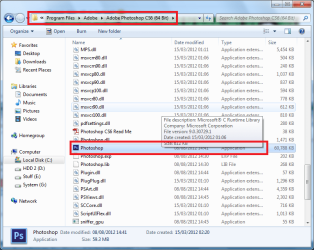
Ok when you select open with please go to the directory as shown in the picture and select the application:
 

Attachments

  • Untitled.png
    Untitled.png
    143.8 KB · Views: 8

My Computer

Computer type
PC/Desktop
Computer Manufacturer/Model Number
Dell / Lenovo g550
OS
Windows 7 Ultimate 64-bit
CPU
Intel Core 2 Duo E6550 @2.33GHz
Motherboard
foxconn g33m02
Memory
4GB DDR"
Graphics Card(s)
NVIDIA GeForce 8600 GS
Hard Drives
HDD 1 = 150GB
HDD 2 = 1.5TB
PSU
450W
Cooling
Stock fan
Internet Speed
12Mb
Antivirus
AVG Internet Security

My Computer

Computer type
PC/Desktop
Computer Manufacturer/Model Number
Self Built
OS
Win 10 Pro x64
CPU
Intel I5-2500K @3.3GHz
Motherboard
Asrock P67 Extreme4
Memory
16GB G.Skill Ripjaws X (4x4GB)
Graphics Card(s)
EVGA GeForce 750 Ti SC 2GB
Sound Card
ASUS Xonar DG 5.1 Channels 24-bit 96KHz PCI Interface Sound
Monitor(s) Displays
auria eq2367
Screen Resolution
1920 x 1080
Hard Drives
250GB Samsung 850 EVO SSD
1TB WD Blue
1TB Hitachi
PSU
SeaSonic X 650W 80 Plus Gold
Case
Corsair Obsidian 750D
Cooling
Corsair H60, Three 140mm case fans
Keyboard
Logitech Wireless Keyboard K520
Mouse
Logitech Wireless Mouse M310
Internet Speed
Wave Broadband ~ 100 dn 5 up
Antivirus
Windows Defender, Malwarebytes Premium
Browser
Edge, IE11, Chrome
Other Info
Laptop specs: HP g7-1365dx /
CPU: AMD A6-3420M APU with Radeon(tm) HD Graphics /
RAM: Crucial 8Gb (2x4Gb) /
SSD: Crucial M4-CT128M4SSD2 ATA Device/ FW 000F /
GFX: AMD Radeon HD 6520G /
OS: Windows 10 Pro x64
Benjy,
Therein lies the problem. After selecting PS, it does not appear on the open with list.
 

My Computer

Computer type
PC/Desktop
Computer Manufacturer/Model Number
Custom
OS
windows 7 home 64
CPU
Intel I7
Motherboard
Intel
Memory
8 gig
Graphics Card(s)
Nvidia
Hard Drives
WEstern Dig
Antivirus
MS
Browser
IE9
Benjy,
Therein lies the problem. After selecting PS, it does not appear on the open with list.
When you click open with
If you then click browse, you should be able to search the programs list and select cs6 and set as default.
 

My Computer

Computer type
PC/Desktop
Computer Manufacturer/Model Number
gigabyte z77-d3sh
OS
win 7 home premium 64 bit
CPU
intel I5 3470 3.2ghz
Motherboard
gigabyte z77-d3sh
Memory
12gb
Graphics Card(s)
asus radeon 5450 512mb
Sound Card
no
Monitor(s) Displays
viewsonic
Screen Resolution
1920*1080
Hard Drives
Crucial m4 sata 3 SSD
PSU
0cz
Case
corair carbide 200
Cooling
corsair h60
Keyboard
wireless logitech
Internet Speed
60 mbs
I guess you didn't understand. I know what you are saying. Selecting the PS icon and clicking on open, does nothing. It's like I clicked on open space.
 

My Computer

Computer type
PC/Desktop
Computer Manufacturer/Model Number
Custom
OS
windows 7 home 64
CPU
Intel I7
Motherboard
Intel
Memory
8 gig
Graphics Card(s)
Nvidia
Hard Drives
WEstern Dig
Antivirus
MS
Browser
IE9
I do understand. But did you try going into your C: drive? C:\program files\adobe\photoshop cs6?
 

My Computer

Computer type
PC/Desktop
Computer Manufacturer/Model Number
Dell / Lenovo g550
OS
Windows 7 Ultimate 64-bit
CPU
Intel Core 2 Duo E6550 @2.33GHz
Motherboard
foxconn g33m02
Memory
4GB DDR"
Graphics Card(s)
NVIDIA GeForce 8600 GS
Hard Drives
HDD 1 = 150GB
HDD 2 = 1.5TB
PSU
450W
Cooling
Stock fan
Internet Speed
12Mb
Antivirus
AVG Internet Security

My Computer

Computer type
PC/Desktop
Computer Manufacturer/Model Number
Self Built
OS
Win 10 Pro x64
CPU
Intel I5-2500K @3.3GHz
Motherboard
Asrock P67 Extreme4
Memory
16GB G.Skill Ripjaws X (4x4GB)
Graphics Card(s)
EVGA GeForce 750 Ti SC 2GB
Sound Card
ASUS Xonar DG 5.1 Channels 24-bit 96KHz PCI Interface Sound
Monitor(s) Displays
auria eq2367
Screen Resolution
1920 x 1080
Hard Drives
250GB Samsung 850 EVO SSD
1TB WD Blue
1TB Hitachi
PSU
SeaSonic X 650W 80 Plus Gold
Case
Corsair Obsidian 750D
Cooling
Corsair H60, Three 140mm case fans
Keyboard
Logitech Wireless Keyboard K520
Mouse
Logitech Wireless Mouse M310
Internet Speed
Wave Broadband ~ 100 dn 5 up
Antivirus
Windows Defender, Malwarebytes Premium
Browser
Edge, IE11, Chrome
Other Info
Laptop specs: HP g7-1365dx /
CPU: AMD A6-3420M APU with Radeon(tm) HD Graphics /
RAM: Crucial 8Gb (2x4Gb) /
SSD: Crucial M4-CT128M4SSD2 ATA Device/ FW 000F /
GFX: AMD Radeon HD 6520G /
OS: Windows 10 Pro x64
  • Like
Reactions: Arc

My Computer

Computer type
PC/Desktop
OS
Windows 10 Home x64
CPU
INTEL Core i5-750 Quad-Core 3.37GHz
Motherboard
ASUS P7P55D
Memory
HyperX Fury Black Series 8GB (2 x 4GB) 1866Mhz
Graphics Card(s)
EVGA GeForce GTX 750 Superclocked 1GB 128-Bit GDDR5
Monitor(s) Displays
LG 32MA68HY 32" IPS
Screen Resolution
1920 x 1080
Hard Drives
Samsung 840 Evo 120GB, SEAGATE 500GB Barracuda® 7200.12, SATA 3 Gb/s, 7200 RPM, 16MB cache
PSU
ANTEC TruePower New TP-550, 80 PLUS, 550W
Case
ANTEC Three Hundred Illusion
Cooling
COOLER MASTER Hyper 212 Plus, 4 x 120mm 1 x 140mm Noctua's
Internet Speed
85 + Mbps
Antivirus
Avast
Browser
Vivaldi
I had read this thread already. There is nothing in it that applies to my problem. Thanks. This problem is still open.
 

My Computer

Computer type
PC/Desktop
Computer Manufacturer/Model Number
Custom
OS
windows 7 home 64
CPU
Intel I7
Motherboard
Intel
Memory
8 gig
Graphics Card(s)
Nvidia
Hard Drives
WEstern Dig
Antivirus
MS
Browser
IE9

My Computer

Computer type
PC/Desktop
Computer Manufacturer/Model Number
Custom
OS
windows 7 home 64
CPU
Intel I7
Motherboard
Intel
Memory
8 gig
Graphics Card(s)
Nvidia
Hard Drives
WEstern Dig
Antivirus
MS
Browser
IE9
I do understand. But did you try going into your C: drive? C:\program files\adobe\photoshop cs6?


Yes Benji, that is the method I am using. It simply does not work. If I select PS from the directory and OPEN, nothing happens. It does not get added to the list.
 

My Computer

Computer type
PC/Desktop
Computer Manufacturer/Model Number
Custom
OS
windows 7 home 64
CPU
Intel I7
Motherboard
Intel
Memory
8 gig
Graphics Card(s)
Nvidia
Hard Drives
WEstern Dig
Antivirus
MS
Browser
IE9
Sorry brooksro, I got stuck on opening and lost sight of the fact that you have that ability. Most of the threads I find mention opening through bridge. The last post on this thread mentions a method to create a default association, although I can't speak to it's success. I'd back up the registry just in case, but since it involves creating a new entry, deleting the entry if it doesn't work should quickly return it to how it was before.

http://www.sevenforums.com/tutorials/4230-registry-backup-restore.html

.NEF files do not open in photoshop CS - Photo.net Nikon Forum

Obviously change as necessary for your version.

A Guy
 

My Computer

Computer type
PC/Desktop
OS
Windows 10 Home x64
CPU
INTEL Core i5-750 Quad-Core 3.37GHz
Motherboard
ASUS P7P55D
Memory
HyperX Fury Black Series 8GB (2 x 4GB) 1866Mhz
Graphics Card(s)
EVGA GeForce GTX 750 Superclocked 1GB 128-Bit GDDR5
Monitor(s) Displays
LG 32MA68HY 32" IPS
Screen Resolution
1920 x 1080
Hard Drives
Samsung 840 Evo 120GB, SEAGATE 500GB Barracuda® 7200.12, SATA 3 Gb/s, 7200 RPM, 16MB cache
PSU
ANTEC TruePower New TP-550, 80 PLUS, 550W
Case
ANTEC Three Hundred Illusion
Cooling
COOLER MASTER Hyper 212 Plus, 4 x 120mm 1 x 140mm Noctua's
Internet Speed
85 + Mbps
Antivirus
Avast
Browser
Vivaldi
Sorry brooksro, I got stuck on opening and lost sight of the fact that you have that ability. Most of the threads I find mention opening through bridge. The last post on this thread mentions a method to create a default association, although I can't speak to it's success. I'd back up the registry just in case, but since it involves creating a new entry, deleting the entry if it doesn't work should quickly return it to how it was before.

http://www.sevenforums.com/tutorials/4230-registry-backup-restore.html

.NEF files do not open in photoshop CS - Photo.net Nikon Forum

Obviously change as necessary for your version.

A Guy

Thanks A Guy. That just puts CS6 on the context menu, not in the Open With list.
 

My Computer

Computer type
PC/Desktop
Computer Manufacturer/Model Number
Custom
OS
windows 7 home 64
CPU
Intel I7
Motherboard
Intel
Memory
8 gig
Graphics Card(s)
Nvidia
Hard Drives
WEstern Dig
Antivirus
MS
Browser
IE9
This problem has been solved by de-activating CS6, uninstalling, and re-installing.
 

My Computer

Computer type
PC/Desktop
Computer Manufacturer/Model Number
Custom
OS
windows 7 home 64
CPU
Intel I7
Motherboard
Intel
Memory
8 gig
Graphics Card(s)
Nvidia
Hard Drives
WEstern Dig
Antivirus
MS
Browser
IE9
This problem has been solved by de-activating CS6, uninstalling, and re-installing.

Thanks for posting back with your solution.
 

My Computer

Computer type
PC/Desktop
Computer Manufacturer/Model Number
Self Built
OS
Win 10 Pro x64
CPU
Intel I5-2500K @3.3GHz
Motherboard
Asrock P67 Extreme4
Memory
16GB G.Skill Ripjaws X (4x4GB)
Graphics Card(s)
EVGA GeForce 750 Ti SC 2GB
Sound Card
ASUS Xonar DG 5.1 Channels 24-bit 96KHz PCI Interface Sound
Monitor(s) Displays
auria eq2367
Screen Resolution
1920 x 1080
Hard Drives
250GB Samsung 850 EVO SSD
1TB WD Blue
1TB Hitachi
PSU
SeaSonic X 650W 80 Plus Gold
Case
Corsair Obsidian 750D
Cooling
Corsair H60, Three 140mm case fans
Keyboard
Logitech Wireless Keyboard K520
Mouse
Logitech Wireless Mouse M310
Internet Speed
Wave Broadband ~ 100 dn 5 up
Antivirus
Windows Defender, Malwarebytes Premium
Browser
Edge, IE11, Chrome
Other Info
Laptop specs: HP g7-1365dx /
CPU: AMD A6-3420M APU with Radeon(tm) HD Graphics /
RAM: Crucial 8Gb (2x4Gb) /
SSD: Crucial M4-CT128M4SSD2 ATA Device/ FW 000F /
GFX: AMD Radeon HD 6520G /
OS: Windows 10 Pro x64
This problem has been solved by de-activating CS6, uninstalling, and re-installing.

The irony is, that is often the 1st thing suggested...to the point we don't suggest it, lol. Glad you got it sorted ;)

A Guy
 

My Computer

Computer type
PC/Desktop
OS
Windows 10 Home x64
CPU
INTEL Core i5-750 Quad-Core 3.37GHz
Motherboard
ASUS P7P55D
Memory
HyperX Fury Black Series 8GB (2 x 4GB) 1866Mhz
Graphics Card(s)
EVGA GeForce GTX 750 Superclocked 1GB 128-Bit GDDR5
Monitor(s) Displays
LG 32MA68HY 32" IPS
Screen Resolution
1920 x 1080
Hard Drives
Samsung 840 Evo 120GB, SEAGATE 500GB Barracuda® 7200.12, SATA 3 Gb/s, 7200 RPM, 16MB cache
PSU
ANTEC TruePower New TP-550, 80 PLUS, 550W
Case
ANTEC Three Hundred Illusion
Cooling
COOLER MASTER Hyper 212 Plus, 4 x 120mm 1 x 140mm Noctua's
Internet Speed
85 + Mbps
Antivirus
Avast
Browser
Vivaldi
Back
Top