
Default Gateway not Available

flankd

New member
Local time
5:47 PM
Messages
7
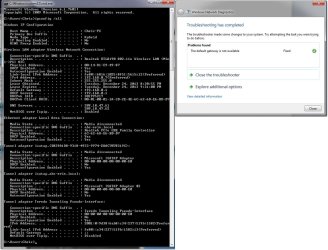
Hey everyone, I have a desktop computer with an Ethernet card, I disconnect every 10-15 minutes most of the time. Sometimes it won't go out for a couple of hours, but every time it's the same routine. I have to click "Troubleshoot Problems" and it always resets my Wireless adapter. I'm a gamer and I just can't afford to be disconnecting in the middle of a game all the time, please help... it's Christmas Eve and I want to play League of Legends. I attached the ipconfig.
 

Attachments
  • gatewayipconfig.jpg
    gatewayipconfig.jpg
    139.1 KB · Views: 8

My Computer

OS
Windows 7 64 Bit
have you tried to do a ipconfig /release and then a ipconfig /renew?
 

My Computer

Computer type
PC/Desktop
Computer Manufacturer/Model Number
custom built
OS
Windows 7 ultimate 64-bit
CPU
Intel I7 2600K 3.4ghz
Motherboard
Asus Evo P8P67
Memory
Corsair 16gb ddr3 1600mhz
Graphics Card(s)
Nvidia Geforce gt 430
Sound Card
Sound Blaster Titanium x-fi pci express
Monitor(s) Displays
Dell E198WFP
Hard Drives
1 western digital 2TB drive.
PSU
Antec 1200 watt
Case
Inwin Dragon Rider
Cooling
6 case supplied cooling fans
Keyboard
logitech mk700
Mouse
logitech m705
Internet Speed
25-50mbps download; 10mbps upload(i think)
Antivirus
avg free 2014
Browser
mozilla firefox
Other Info
Also have a pretty bad speaker setup which is a klipsch promedia 5.1 surround speaker setup with huge subwoofer and lg blu ray player/writer. Also a hp officejet pro 8600 plus wireless all in one and a logitech s7500 webcam.
Isn't that what the microsoft troubleshooting routine does automatically?
 

My Computer

OS
Windows 7 64 Bit
Hey everyone, I have a desktop computer with an Ethernet card, I disconnect every 10-15 minutes most of the time. Sometimes it won't go out for a couple of hours, but every time it's the same routine. I have to click "Troubleshoot Problems" and it always resets my Wireless adapter. I'm a gamer and I just can't afford to be disconnecting in the middle of a game all the time, please help... it's Christmas Eve and I want to play League of Legends. I attached the ipconfig.


If you can unzip and then click on the Network Information application, it will place a .txt page on your desktop, just attach the file so I can have a look. With default gateway problems it sometimes helps to add the gateway IP "192.168.0.1" to the IPv4 properties, Advanced settings tab, where it says Default Gateway.
 

Attachments

My Computer

Computer type
PC/Desktop
Computer Manufacturer/Model Number
Home built
OS
Windows 7 Ult, Windows 8.1 Pro,
CPU
Q9650-4.275GHz, E8600 4.5GHz, E6750-3.8GHz
Motherboard
Evga 780i FTW
Memory
G.Skill PC2 9600 1200Mhz 5 5 5 15 2T
Graphics Card(s)
GTX480
Sound Card
Asus Xonar D2
Monitor(s) Displays
HannsG
Screen Resolution
1680X1050
Hard Drives
GSkill Phoenix Pro 120GB SSD
PSU
ThermalTake Toughpower 1000Watt modular
Case
ThermalTake XaserV
Cooling
Xigmatek S1283
Keyboard
Logitech G15
Mouse
Logitech G9
Internet Speed
T1
Indeed; that address is pretty much one of the standard port addresses that most gateways use to connect to the internet, etc. so you might try what Chev suggested above; by adding that ip address to the advanced tab.
 

My Computer

Computer type
PC/Desktop
Computer Manufacturer/Model Number
custom built
OS
Windows 7 ultimate 64-bit
CPU
Intel I7 2600K 3.4ghz
Motherboard
Asus Evo P8P67
Memory
Corsair 16gb ddr3 1600mhz
Graphics Card(s)
Nvidia Geforce gt 430
Sound Card
Sound Blaster Titanium x-fi pci express
Monitor(s) Displays
Dell E198WFP
Hard Drives
1 western digital 2TB drive.
PSU
Antec 1200 watt
Case
Inwin Dragon Rider
Cooling
6 case supplied cooling fans
Keyboard
logitech mk700
Mouse
logitech m705
Internet Speed
25-50mbps download; 10mbps upload(i think)
Antivirus
avg free 2014
Browser
mozilla firefox
Other Info
Also have a pretty bad speaker setup which is a klipsch promedia 5.1 surround speaker setup with huge subwoofer and lg blu ray player/writer. Also a hp officejet pro 8600 plus wireless all in one and a logitech s7500 webcam.
From what I can tell the driver for the Realtek RTL8192 might not be a WHQL Microsoft approved driver so it may help to install a different driver version or let Windows install it's own driver which may work best in this case. Also uninstall any type of third party "Realtek" wireless connection software.
Realtek

You also appear to be using wireless G rather than N so changing some of the routers settings to use 802.11N only with standard WPA2 security and AES encryption might also help.
 
Last edited:

My Computer

Computer type
PC/Desktop
Computer Manufacturer/Model Number
Home built
OS
Windows 7 Ult, Windows 8.1 Pro,
CPU
Q9650-4.275GHz, E8600 4.5GHz, E6750-3.8GHz
Motherboard
Evga 780i FTW
Memory
G.Skill PC2 9600 1200Mhz 5 5 5 15 2T
Graphics Card(s)
GTX480
Sound Card
Asus Xonar D2
Monitor(s) Displays
HannsG
Screen Resolution
1680X1050
Hard Drives
GSkill Phoenix Pro 120GB SSD
PSU
ThermalTake Toughpower 1000Watt modular
Case
ThermalTake XaserV
Cooling
Xigmatek S1283
Keyboard
Logitech G15
Mouse
Logitech G9
Internet Speed
T1
BUMP. I still need help, I keep losing connection and it's pissing me the **** off.
 

My Computer

OS
Windows 7 64 Bit
Can someone please help me? I need a networking guru.
 

My Computer

OS
Windows 7 64 Bit
I knowl it sounds simple but have you tried contacting your ISP to see if they have had any issues as of late? If not I would search google for resetting windows winsock as I've forgotten off the top of my head how to do that.
 

My Computer

Computer type
PC/Desktop
Computer Manufacturer/Model Number
custom built
OS
Windows 7 ultimate 64-bit
CPU
Intel I7 2600K 3.4ghz
Motherboard
Asus Evo P8P67
Memory
Corsair 16gb ddr3 1600mhz
Graphics Card(s)
Nvidia Geforce gt 430
Sound Card
Sound Blaster Titanium x-fi pci express
Monitor(s) Displays
Dell E198WFP
Hard Drives
1 western digital 2TB drive.
PSU
Antec 1200 watt
Case
Inwin Dragon Rider
Cooling
6 case supplied cooling fans
Keyboard
logitech mk700
Mouse
logitech m705
Internet Speed
25-50mbps download; 10mbps upload(i think)
Antivirus
avg free 2014
Browser
mozilla firefox
Other Info
Also have a pretty bad speaker setup which is a klipsch promedia 5.1 surround speaker setup with huge subwoofer and lg blu ray player/writer. Also a hp officejet pro 8600 plus wireless all in one and a logitech s7500 webcam.
Check the Power Management tab in the properties of the wifi card to see if any power saving features are checked.
 

My Computer

Computer type
Laptop
Computer Manufacturer/Model Number
HP 17-ak0xx, dv7 3173nr
OS
Win7 Home Premium x64 W10Pro&Home
CPU
A12 9720p 4+8 TurionII M520
Motherboard
HP 3839
Memory
6GB 8GB
Graphics Card(s)
R7
Monitor(s) Displays
24" sa550
Screen Resolution
1600x900 1920x1080
Mouse
Logitechx2
Internet Speed
120Mb/s down 12up
BUMP. I still need help, I keep losing connection and it's pissing me the **** off.

No explanation about the driver I posted, did it help or not? No explanation as to why you are using outdated wireless G? No explanation at all to anything I asked about?

The complete lack of a useable response isn't helping you here.

I'm pretty sure I'm a network guru but your not helping me or yourself with responses like this one. :sarc:
 
Last edited:

My Computer

Computer type
PC/Desktop
Computer Manufacturer/Model Number
Home built
OS
Windows 7 Ult, Windows 8.1 Pro,
CPU
Q9650-4.275GHz, E8600 4.5GHz, E6750-3.8GHz
Motherboard
Evga 780i FTW
Memory
G.Skill PC2 9600 1200Mhz 5 5 5 15 2T
Graphics Card(s)
GTX480
Sound Card
Asus Xonar D2
Monitor(s) Displays
HannsG
Screen Resolution
1680X1050
Hard Drives
GSkill Phoenix Pro 120GB SSD
PSU
ThermalTake Toughpower 1000Watt modular
Case
ThermalTake XaserV
Cooling
Xigmatek S1283
Keyboard
Logitech G15
Mouse
Logitech G9
Internet Speed
T1
Back
Top