Default Gateway not found

DewVoltage

New member
Local time
12:42 PM
Messages
12
So, I've been encountering this problem for a LONG time. even after I wipe my hard drive and re-install everything, update drivers, etc. I cannot get it to go away. The issue is basically that every hour to a few minutes my internet will go to "limited to no connectivity" then when I use the diagnostics tool it tells me "Default Gateway not found: Fixed" but then the problem comes back. I've searched everywhere for a fix and tried about everything. Tell me what I need to do to try to get this problem resolved. (I'm a little bit uneducated about computers so step by step instructions would help) Also, I am connected by cable.
 

Attachments

  • IPconfig.JPG
    IPconfig.JPG
    120.7 KB · Views: 12

My Computer

Computer type
PC/Desktop
OS
64
Welcome to Seven Forums,

Are you connected directly to the Modem or Router? Have you tried both? How about replacing the Ethernet cable and make sure that you are using at least Cat5e or higher cable?
 

My Computer

Computer Manufacturer/Model Number
Lenovo Desktop/Samsung Laptop
OS
Win7 & Win8 64bit
CPU
Intel i5
Internet Speed
Charter-20 Mbps
Antivirus
Avast
Browser
FF, IE9 and Chrome
I am directly connected, I have not tried wireless due to the fact that I don't have any wireless adapters sitting around, I just recently replaced my Ethernet recently, but im not sure what a Cat5e even is...
 

My Computer

Computer type
PC/Desktop
OS
64
So, I've been encountering this problem for a LONG time. even after I wipe my hard drive and re-install everything, update drivers, etc. I cannot get it to go away. The issue is basically that every hour to a few minutes my internet will go to "limited to no connectivity" then when I use the diagnostics tool it tells me "Default Gateway not found: Fixed" but then the problem comes back. I've searched everywhere for a fix and tried about everything. Tell me what I need to do to try to get this problem resolved. (I'm a little bit uneducated about computers so step by step instructions would help) Also, I am connected by cable.

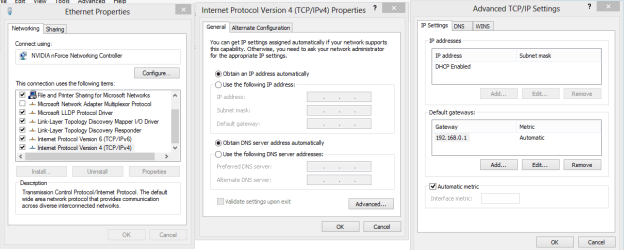
Looks to me like someone typed in the DNS and probably a few other things into the IPv4 and IPv6 properties which aren't really required when using DHCP. You should try removing all info typed into the IPv4/IPv6 properties and leave it at DHCP enabled on IPv4 only.

For the gateway problem it can sometimes help to type the default gateway manually into the IPv4 properties, right click on the network adaptor and choose properties then click on IPv4 then choose properties again, click the advanced tab then click the "add" button and type in your default gateway >192.168.0.1, hit apply, ok etc., this will sometimes fix the problem with the gateway dropping out.

Windows 7 Unidentified Network, Limited Access, No Internet Connection Problem Resolved
 

Attachments

  • gateway type in IPv4 manually.PNG
    gateway type in IPv4 manually.PNG
    52.7 KB · Views: 7

My Computer

Computer type
PC/Desktop
Computer Manufacturer/Model Number
Home built
OS
Windows 7 Ult, Windows 8.1 Pro,
CPU
Q9650-4.275GHz, E8600 4.5GHz, E6750-3.8GHz
Motherboard
Evga 780i FTW
Memory
G.Skill PC2 9600 1200Mhz 5 5 5 15 2T
Graphics Card(s)
GTX480
Sound Card
Asus Xonar D2
Monitor(s) Displays
HannsG
Screen Resolution
1680X1050
Hard Drives
GSkill Phoenix Pro 120GB SSD
PSU
ThermalTake Toughpower 1000Watt modular
Case
ThermalTake XaserV
Cooling
Xigmatek S1283
Keyboard
Logitech G15
Mouse
Logitech G9
Internet Speed
T1
I tried this and it worked for a night, then it cut out again the next day. but now it cuts out a lot less frequently. Anything else that might help?

EDIT: I just noticed that the change reverted itself over night for some reason, reapplying it, we'll see if it works.
 

My Computer

Computer type
PC/Desktop
OS
64
I tried this and it worked for a night, then it cut out again the next day. but now it cuts out a lot less frequently. Anything else that might help?

EDIT: I just noticed that the change reverted itself over night for some reason, reapplying it, we'll see if it works.

Hitting the Apply then Ok button should hold the settings. Updating the driver might also help.
 

My Computer

Computer type
PC/Desktop
Computer Manufacturer/Model Number
Home built
OS
Windows 7 Ult, Windows 8.1 Pro,
CPU
Q9650-4.275GHz, E8600 4.5GHz, E6750-3.8GHz
Motherboard
Evga 780i FTW
Memory
G.Skill PC2 9600 1200Mhz 5 5 5 15 2T
Graphics Card(s)
GTX480
Sound Card
Asus Xonar D2
Monitor(s) Displays
HannsG
Screen Resolution
1680X1050
Hard Drives
GSkill Phoenix Pro 120GB SSD
PSU
ThermalTake Toughpower 1000Watt modular
Case
ThermalTake XaserV
Cooling
Xigmatek S1283
Keyboard
Logitech G15
Mouse
Logitech G9
Internet Speed
T1
So, it seems that every time I turn off my computer the change reverts itself, but when I put in the gateway again, I don't disconnect at all. I don't know why the changes aren't saving, Im turning my computer off normally and everything.
 

My Computer

Computer type
PC/Desktop
OS
64
So, the problem slightly persists now, its a lot less often now, but know when I diagnose it doesnt show up with anything now. But I've noticed, I have 2 connects, 1 unidentified and one normal when I disconnect. I also noticed I have about 1.5 million bytes recieved and only 150,000 sent. almost like I was DDoSed
 

My Computer

Computer type
PC/Desktop
OS
64
Try running this IPReset .exe file, it will reset everything IP related and flush the DNS cache, it will also reboot your machine automatically. After rebooting please post the ipconfig/all again as there were some anomalies there.
 

Attachments

My Computer

Computer type
PC/Desktop
Computer Manufacturer/Model Number
Home built
OS
Windows 7 Ult, Windows 8.1 Pro,
CPU
Q9650-4.275GHz, E8600 4.5GHz, E6750-3.8GHz
Motherboard
Evga 780i FTW
Memory
G.Skill PC2 9600 1200Mhz 5 5 5 15 2T
Graphics Card(s)
GTX480
Sound Card
Asus Xonar D2
Monitor(s) Displays
HannsG
Screen Resolution
1680X1050
Hard Drives
GSkill Phoenix Pro 120GB SSD
PSU
ThermalTake Toughpower 1000Watt modular
Case
ThermalTake XaserV
Cooling
Xigmatek S1283
Keyboard
Logitech G15
Mouse
Logitech G9
Internet Speed
T1
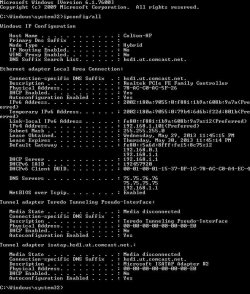
Sorry for the late response, I've been gone for a while, but here it is, I did what you said.
 

Attachments

  • IP config.JPG
    IP config.JPG
    113.3 KB · Views: 5

My Computer

Computer type
PC/Desktop
OS
64
OK I'm starting to get an idea of what's going on here. What I'm seeing is two different default IP's, this usually means that what you think is just a modem is actually a modem/router then it appears as if you are plugging that into another router with a different default gateway.

In order to confirm this I need to know the model number and name of the modem you are using, I also need the model number of the router you are using.

This is a very common problem and isn't so easily diagnosed, you would usually just need to turn off DHCP on the secondary router and plug the cable from the modem/router into the LAN port on the secondary router. Although there may be a bit more set up involved depending on a few different factors.
 

My Computer

Computer type
PC/Desktop
Computer Manufacturer/Model Number
Home built
OS
Windows 7 Ult, Windows 8.1 Pro,
CPU
Q9650-4.275GHz, E8600 4.5GHz, E6750-3.8GHz
Motherboard
Evga 780i FTW
Memory
G.Skill PC2 9600 1200Mhz 5 5 5 15 2T
Graphics Card(s)
GTX480
Sound Card
Asus Xonar D2
Monitor(s) Displays
HannsG
Screen Resolution
1680X1050
Hard Drives
GSkill Phoenix Pro 120GB SSD
PSU
ThermalTake Toughpower 1000Watt modular
Case
ThermalTake XaserV
Cooling
Xigmatek S1283
Keyboard
Logitech G15
Mouse
Logitech G9
Internet Speed
T1
Modem name: Motorola Surfboard
Number: SB6120

Router Number (May be wrong, I couldnt see it very well): 5251-8690

I would love some help.
 

My Computer

Computer type
PC/Desktop
OS
64
Well it's just a regular modem so something else is causing the problem. I'm seeing DNS entries in the IPv4 properties that don't need to be there as the router should be handling DNS, best to just type the DNS servers into the routers settings for DNS.

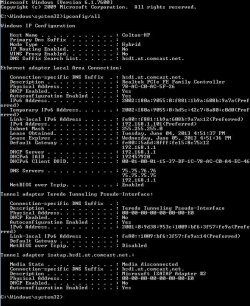
Which default gateway are you typing in? It looks like you need to use 192.168.1.1 but I see another gateway of 192.168.0.1?
 

My Computer

Computer type
PC/Desktop
Computer Manufacturer/Model Number
Home built
OS
Windows 7 Ult, Windows 8.1 Pro,
CPU
Q9650-4.275GHz, E8600 4.5GHz, E6750-3.8GHz
Motherboard
Evga 780i FTW
Memory
G.Skill PC2 9600 1200Mhz 5 5 5 15 2T
Graphics Card(s)
GTX480
Sound Card
Asus Xonar D2
Monitor(s) Displays
HannsG
Screen Resolution
1680X1050
Hard Drives
GSkill Phoenix Pro 120GB SSD
PSU
ThermalTake Toughpower 1000Watt modular
Case
ThermalTake XaserV
Cooling
Xigmatek S1283
Keyboard
Logitech G15
Mouse
Logitech G9
Internet Speed
T1
I just changed it to 192.168.1.1 I noticed that now that you said it too, I'll report back if that fixes it
 

My Computer

Computer type
PC/Desktop
OS
64
I'm still getting disconnected like it normally would. Anything else that I can try? I also don't know what you mean by put the gateway into the router settings. Sorry.
 

My Computer

Computer type
PC/Desktop
OS
64
I'm still getting disconnected like it normally would. Anything else that I can try? I also don't know what you mean by put the gateway into the router settings. Sorry.

In the routers settings there is a place where you can type in the DNS IP's that you want to use like Google at 8.8.8.8 and 8.8.4.4

I'm still not sure where the secondary gateway is coming from but I think that is part of the problem.
 

My Computer

Computer type
PC/Desktop
Computer Manufacturer/Model Number
Home built
OS
Windows 7 Ult, Windows 8.1 Pro,
CPU
Q9650-4.275GHz, E8600 4.5GHz, E6750-3.8GHz
Motherboard
Evga 780i FTW
Memory
G.Skill PC2 9600 1200Mhz 5 5 5 15 2T
Graphics Card(s)
GTX480
Sound Card
Asus Xonar D2
Monitor(s) Displays
HannsG
Screen Resolution
1680X1050
Hard Drives
GSkill Phoenix Pro 120GB SSD
PSU
ThermalTake Toughpower 1000Watt modular
Case
ThermalTake XaserV
Cooling
Xigmatek S1283
Keyboard
Logitech G15
Mouse
Logitech G9
Internet Speed
T1
I'm very sorry for my stupidity, but I still don't quite understand, the 2nd network is gone but now my internet is disconnecting like normal. I dont understand what you're telling me to do with the router DNS
 

My Computer

Computer type
PC/Desktop
OS
64
The problem is still occurring no matter what I try. Any suggestions for anything? Latest IPconfig/all I'm down for trying about anything cause I am so lost as to whats going on.
 

Attachments

  • IP config.JPG
    IP config.JPG
    126.8 KB · Views: 2

My Computer

Computer type
PC/Desktop
OS
64
So, I just factory reset my computer, due to slowness and clutter not for the problem, and yet its still happening, I dont understand whats wrong I REALLY need help...
 

My Computer

Computer type
PC/Desktop
OS
64
Back
Top