Solved Default HD no longer bootable after adding a SSD

caballo

New member
Local time
9:24 PM
Messages
13
  1. A new Desktop I purchased came with a WD 1 TB HD with Win 7 Home Premium Installed on it.
  2. Created Recovery Disks
  3. Purchased a 80 GB Corsair SSD
  4. Disconnected WD from Desktop and Installed Win 7 on Corsair 80 GB SSD using Recovery Disks
  5. Connected WD back but booted from Corsair SSD
  6. Western Digital showed capacity as 931 GB in Windows Disk Management program. This was split between various volumes as follows: 16 GB for “Recovery Partition”. This has no volume label. 100 MB with a volume label of “SYSTEM RESERVED”. 457 GB for ACER volume, this has the OS installed. Another 457GB for DATA volume with nothing on it. Made the following changes to this disk: Did a shrink volume on “ACER” and reduced its size to 229.78 GB (size suggested by windows) and gave it a drive letter “Z” and new label - “WD-System”. Formatted the 227 GB space squeezed out of original ACER volume and gave it a label as WD-DATA1 and drive letter “E”. Original DATA volume (457.96 GB) has been given a new label - “WD-DATA2” and drive letter “F”.
  7. After doing all of the above, the WD Drive now shows as “Dynamic” instead of “Basic” and is no longer bootable.
  8. Is there anyway I can make the WD Drive bootable again?
 

My Computer

Computer type
PC/Desktop
Computer Manufacturer/Model Number
Acer Aspire Predator G3610
OS
Windows 7 Home Premium 64bit
Memory
16 GB
Graphics Card(s)
GeForce GT520, GeForce GT630
Monitor(s) Displays
ASUS 24" x4
If you try to make more then 3 primary partitions with windows, your disk will convert to dynamic. I have no idea why windows does this, because you can actually have 4 with windows, Partition Wizard does it no problem.

Didn`t you get a warning message ?

http://www.sevenforums.com/tutorials/26829-convert-dynamic-disk-basic-disk.html

Disk Management does not allow the creation of 4 primary partitions. This is because the MBR partitioning scheme allows at most 4 primary partitions, or 3 primary and 1 extended partition. If you created 4 primary partitions, you would be stuck and would not be able to create any more partitions without deleting an existing one. I believe the only way to create the 4th primary partition in Windows is by using DiskPart from an elevated command prompt, or with Partition Wizard. Or any 3rd party software, I prefer and use PW ;)

You already had 4 primary partitions and when you made the 5th, the disk became dynamic and that`s why it won`t boot, 1st, delete the extra partition you made, and just make it a logical partition, then use Partition Wizard from the SSD to convert the HDD back to basic. If the newest version of Partition Wizard won`t let you, then you`ll have to use version 4.2 from the tutorial. Just download the iso file, burn to cd, then boot from the cd.
 
Last edited:

My Computer

Computer type
PC/Desktop
Computer Manufacturer/Model Number
Skylake Special #666
OS
Windows 10 Pro x64
CPU
Intel Core i7 6700K
Motherboard
Asus Sabertooth Z170 Mark 1
Memory
GSkill TridentZ RGB 16GB 3600 16-16-16-36
Graphics Card(s)
EVGA GTX 980 Ti SC x2
Sound Card
Realtek High Definition
Monitor(s) Displays
AOC G2460PG
Screen Resolution
1920 x 1080 144Hz
Hard Drives
Samsung 860 Pro 256GB, Seagate Barracuda 4TB x2
PSU
EVGA 1000 P2, EVGA White Custom Braided Cables
Case
Corsair Vengeance C70 Gunmetal Black
Cooling
Corsair H100i v2, Corsair ML120 x2, Thermal Grizzly Kryonaut
Keyboard
Logitech G910 Orion Spectrum
Mouse
Logitech G700s
Internet Speed
Verizon Fios Quantum Gateway 75/75
Antivirus
Windows Defender, Malwarebytes Free 3.8.3
Browser
Chrome
Other Info
Corsair SP120 x4, LG Blu-ray Drive, Durabrand HT-395 100 Watt Dolby Digital Amp, Corsair H2100 Wireless 7.1 Headset
Hmm....you say you've got Win 7 installed on the SSD and can boot from the SSD.

What's the intended purpose for the WD drive? I'm just wondering why you want it to be bootable.

But AddRAM's got it--you need Partition Wizard to get you back to "basic" from dynamic. Dynamic disks are to be avoided at all costs for an ordinary home user. Back up your data first.
 

My Computer

Computer type
PC/Desktop
Computer Manufacturer/Model Number
Ignatz Special; 4 speed manual gearbox; factory air conditioning; one of one
OS
Windows 7 Home Premium SP1, 64-bit
CPU
Intel Skylake i5-6600K, not overclocked
Motherboard
AsRock Z170M Extreme 4, micro ATX
Memory
8 GB HyperX DDR4-2666 (2 x 4 GB)
Graphics Card(s)
none; graphics are integrated on CPU
Sound Card
onboard: Realtek ALC1150; external: USB Behringer UF0-202
Monitor(s) Displays
Dell S2340M 23 inch IPS
Screen Resolution
1600 x 900
Hard Drives
System: Crucial MX100 series SSD, 128 GB;
Data: Samsung Spinpoint 103SJ, 1 TB;
Backup: WD Caviar Green WD30EZRX-00D8PB0, 3 TB
PSU
Rosewill SilentNight 500 watt fanless, semi-modular
Case
Antec Solo II
Cooling
Noctua NH-U12S; Noctua F12 intake, Noctua S12A exhaust
Keyboard
Microsoft 200 6JH-00001 USB
Mouse
Dell or Microsoft optical wired; USB
Antivirus
Microsoft Security Essentials and Malwarebytes Premium
Browser
Pale Moon
Other Info
All fans PWM; speeds at idle: CPU circa 500 rpm; intake circa 600 rpm; exhaust circa 600 rpm; CPU temps 27 idle and 47 C load in a warm room (27 C/81 F) when running Intel Extreme Tuning Utility stress test.
The correct way to uninstall an OS is to always delete its partition in Disk Mgmt. Move the data off your HD, convert it to Basic as shown in tutorial given, delete all partitions and create new Logical data partitions as you please to move the data back in.
 
Post a shot of Disk Management after you bring the drive back to Basic.

Then we can tell you what needs to be done to get it booting agagin.
 

My Computer

Computer type
PC/Desktop
Computer Manufacturer/Model Number
Skylake Special #666
OS
Windows 10 Pro x64
CPU
Intel Core i7 6700K
Motherboard
Asus Sabertooth Z170 Mark 1
Memory
GSkill TridentZ RGB 16GB 3600 16-16-16-36
Graphics Card(s)
EVGA GTX 980 Ti SC x2
Sound Card
Realtek High Definition
Monitor(s) Displays
AOC G2460PG
Screen Resolution
1920 x 1080 144Hz
Hard Drives
Samsung 860 Pro 256GB, Seagate Barracuda 4TB x2
PSU
EVGA 1000 P2, EVGA White Custom Braided Cables
Case
Corsair Vengeance C70 Gunmetal Black
Cooling
Corsair H100i v2, Corsair ML120 x2, Thermal Grizzly Kryonaut
Keyboard
Logitech G910 Orion Spectrum
Mouse
Logitech G700s
Internet Speed
Verizon Fios Quantum Gateway 75/75
Antivirus
Windows Defender, Malwarebytes Free 3.8.3
Browser
Chrome
Other Info
Corsair SP120 x4, LG Blu-ray Drive, Durabrand HT-395 100 Watt Dolby Digital Amp, Corsair H2100 Wireless 7.1 Headset
AddRAM, gregrocker, ignatzatsonic : Thanks for taking the time to respond back.

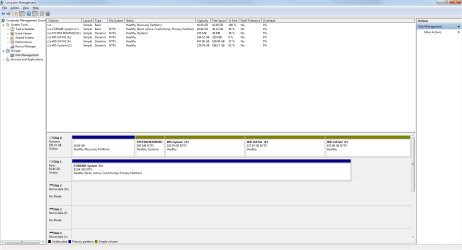
Disk Management screenshot is attached.

AddRAM : Step 6 in my original post above was done a while back when I did not pay any attention to what Primary, active, basic , dynamic were. So, I honestly do not remember if I got a warning.
As you can see in the screenshot none of the other partitions are mentioned as primary.
Will Partition Wizard let me convert a disk from dynamic to basic without deleting the exisiting volumes on WD?

ignatzatsonic : Because the SSD is not stable and gives me BSOD often. I will probably post that issue as a new thread. Also, the WD has recovery partition on it which I would like to keep.

gregrocker: I am aware of this method. I was just checking if anyone knows a way to make the WD bootable without having to delete the existing volumes on it.
 

Attachments

  • screenshot.png
    screenshot.png
    39.3 KB · Views: 8

My Computer

Computer type
PC/Desktop
Computer Manufacturer/Model Number
Acer Aspire Predator G3610
OS
Windows 7 Home Premium 64bit
Memory
16 GB
Graphics Card(s)
GeForce GT520, GeForce GT630
Monitor(s) Displays
ASUS 24" x4
You would have to delete that last partition you made up.

Did you read the Tutorial ?

You wanna use Option 1
 

My Computer

Computer type
PC/Desktop
Computer Manufacturer/Model Number
Skylake Special #666
OS
Windows 10 Pro x64
CPU
Intel Core i7 6700K
Motherboard
Asus Sabertooth Z170 Mark 1
Memory
GSkill TridentZ RGB 16GB 3600 16-16-16-36
Graphics Card(s)
EVGA GTX 980 Ti SC x2
Sound Card
Realtek High Definition
Monitor(s) Displays
AOC G2460PG
Screen Resolution
1920 x 1080 144Hz
Hard Drives
Samsung 860 Pro 256GB, Seagate Barracuda 4TB x2
PSU
EVGA 1000 P2, EVGA White Custom Braided Cables
Case
Corsair Vengeance C70 Gunmetal Black
Cooling
Corsair H100i v2, Corsair ML120 x2, Thermal Grizzly Kryonaut
Keyboard
Logitech G910 Orion Spectrum
Mouse
Logitech G700s
Internet Speed
Verizon Fios Quantum Gateway 75/75
Antivirus
Windows Defender, Malwarebytes Free 3.8.3
Browser
Chrome
Other Info
Corsair SP120 x4, LG Blu-ray Drive, Durabrand HT-395 100 Watt Dolby Digital Amp, Corsair H2100 Wireless 7.1 Headset
AddRAM : Sorry, I missed the hyperlink in your original post. I am reading the tutorial right now. I will post an update after I try to convert the WD from dynamic to basic.
 

My Computer

Computer type
PC/Desktop
Computer Manufacturer/Model Number
Acer Aspire Predator G3610
OS
Windows 7 Home Premium 64bit
Memory
16 GB
Graphics Card(s)
GeForce GT520, GeForce GT630
Monitor(s) Displays
ASUS 24" x4
AddRAM : Partition Wizard converted the WD back to BASIC right away, I didn't have to delete the last partition I created on WD. Now all Z:\, E:\ and F:\ partitions show as Primary in Disk Management. I made Z:\ Active.
When I tried to boot from WD, I got the message - bootmgr was missing. So I made Z:\ bootable using EasyBCD. My original WD HardDrive that came with the Desktop is now bootable again.
Thanks a lot for your help. You saved me from deleting the volumes on WD.
Thanks again.
 

My Computer

Computer type
PC/Desktop
Computer Manufacturer/Model Number
Acer Aspire Predator G3610
OS
Windows 7 Home Premium 64bit
Memory
16 GB
Graphics Card(s)
GeForce GT520, GeForce GT630
Monitor(s) Displays
ASUS 24" x4
Awesome, can you post a shot of disk management :)
 

My Computer

Computer type
PC/Desktop
Computer Manufacturer/Model Number
Skylake Special #666
OS
Windows 10 Pro x64
CPU
Intel Core i7 6700K
Motherboard
Asus Sabertooth Z170 Mark 1
Memory
GSkill TridentZ RGB 16GB 3600 16-16-16-36
Graphics Card(s)
EVGA GTX 980 Ti SC x2
Sound Card
Realtek High Definition
Monitor(s) Displays
AOC G2460PG
Screen Resolution
1920 x 1080 144Hz
Hard Drives
Samsung 860 Pro 256GB, Seagate Barracuda 4TB x2
PSU
EVGA 1000 P2, EVGA White Custom Braided Cables
Case
Corsair Vengeance C70 Gunmetal Black
Cooling
Corsair H100i v2, Corsair ML120 x2, Thermal Grizzly Kryonaut
Keyboard
Logitech G910 Orion Spectrum
Mouse
Logitech G700s
Internet Speed
Verizon Fios Quantum Gateway 75/75
Antivirus
Windows Defender, Malwarebytes Free 3.8.3
Browser
Chrome
Other Info
Corsair SP120 x4, LG Blu-ray Drive, Durabrand HT-395 100 Watt Dolby Digital Amp, Corsair H2100 Wireless 7.1 Headset
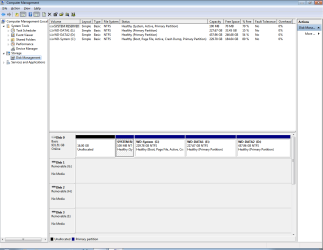
AddRAM: Here is a screenshot of the Disk Management with only the WD connected. The drive letters were automatically assigned by Windows as C, D, E. May be they will change to Z, E, F when both the WD and Corsair are connected.
 

Attachments

  • screenshot.png
    screenshot.png
    28.1 KB · Views: 4

My Computer

Computer type
PC/Desktop
Computer Manufacturer/Model Number
Acer Aspire Predator G3610
OS
Windows 7 Home Premium 64bit
Memory
16 GB
Graphics Card(s)
GeForce GT520, GeForce GT630
Monitor(s) Displays
ASUS 24" x4
But, I see you deleted the Recovery Partition.

If you ever want to delete the system reserved partition and add it and the 16 GB of un allocated space to C, let us know we`ll help you with that ;)
 

My Computer

Computer type
PC/Desktop
Computer Manufacturer/Model Number
Skylake Special #666
OS
Windows 10 Pro x64
CPU
Intel Core i7 6700K
Motherboard
Asus Sabertooth Z170 Mark 1
Memory
GSkill TridentZ RGB 16GB 3600 16-16-16-36
Graphics Card(s)
EVGA GTX 980 Ti SC x2
Sound Card
Realtek High Definition
Monitor(s) Displays
AOC G2460PG
Screen Resolution
1920 x 1080 144Hz
Hard Drives
Samsung 860 Pro 256GB, Seagate Barracuda 4TB x2
PSU
EVGA 1000 P2, EVGA White Custom Braided Cables
Case
Corsair Vengeance C70 Gunmetal Black
Cooling
Corsair H100i v2, Corsair ML120 x2, Thermal Grizzly Kryonaut
Keyboard
Logitech G910 Orion Spectrum
Mouse
Logitech G700s
Internet Speed
Verizon Fios Quantum Gateway 75/75
Antivirus
Windows Defender, Malwarebytes Free 3.8.3
Browser
Chrome
Other Info
Corsair SP120 x4, LG Blu-ray Drive, Durabrand HT-395 100 Watt Dolby Digital Amp, Corsair H2100 Wireless 7.1 Headset
I didn't notice it :( Maybe the PW tool did it.
But thats okay, I am glad it didn't delete my E: or F: ( though I have backups of E and F, they are linked to Dropbox and SugarSync and having to copy again is a pain)
I now have 2 bootable disks and recovery disks, so I should be okay.
I will ask right away, how do I add the 16GB to the current C or D or E volumes? :D

Edit 1: I found the following Warning on EasyBCD Tutorial:

Warning : When you copy the bootmgr from the 100MB System Partition to the C:\ partition, you loose the Windows Recovery Environment on that system. It is recommended you make frequent images to protect your system.

Maybe this caused the loss of Recovery Partition ??
 
Last edited:

My Computer

Computer type
PC/Desktop
Computer Manufacturer/Model Number
Acer Aspire Predator G3610
OS
Windows 7 Home Premium 64bit
Memory
16 GB
Graphics Card(s)
GeForce GT520, GeForce GT630
Monitor(s) Displays
ASUS 24" x4
You can only add it to C because that`s what it is next to.

You would first have to delete the system reserved partition, then you would have to run startup repair to write the system files to the C partition. As you can see now, the system files are on the system reserved partition, and it`s marked active, you need to mark it inactive. PW will do this.

You would use the Windows 7 install dvd to run startup repair, up to 3x to get windows booting off the C partition once you delete the SR partition.

You can then use PW to add the space to C.

http://www.sevenforums.com/tutorials/681-startup-repair.html

http://www.sevenforums.com/tutorials/105541-startup-repair-run-3-separate-times.html
 

My Computer

Computer type
PC/Desktop
Computer Manufacturer/Model Number
Skylake Special #666
OS
Windows 10 Pro x64
CPU
Intel Core i7 6700K
Motherboard
Asus Sabertooth Z170 Mark 1
Memory
GSkill TridentZ RGB 16GB 3600 16-16-16-36
Graphics Card(s)
EVGA GTX 980 Ti SC x2
Sound Card
Realtek High Definition
Monitor(s) Displays
AOC G2460PG
Screen Resolution
1920 x 1080 144Hz
Hard Drives
Samsung 860 Pro 256GB, Seagate Barracuda 4TB x2
PSU
EVGA 1000 P2, EVGA White Custom Braided Cables
Case
Corsair Vengeance C70 Gunmetal Black
Cooling
Corsair H100i v2, Corsair ML120 x2, Thermal Grizzly Kryonaut
Keyboard
Logitech G910 Orion Spectrum
Mouse
Logitech G700s
Internet Speed
Verizon Fios Quantum Gateway 75/75
Antivirus
Windows Defender, Malwarebytes Free 3.8.3
Browser
Chrome
Other Info
Corsair SP120 x4, LG Blu-ray Drive, Durabrand HT-395 100 Watt Dolby Digital Amp, Corsair H2100 Wireless 7.1 Headset
System Reserved is still marked System which means it is set up to boot the OS, but the Active flag has wrongly been moved off of it to C without doing the necessary 3 repairs to move the System flag to C.

If you want to keep System Reserved since it is already set up to boot the OS then Mark SysReserved Partition Active to run Startup Repair - Run 3 Separate Times.

If you want to get rid of System Reserved and gather all of that space into C then run 3 Startup Repairs with C marked Active until the System Flag moves to C, Delete System Reserved, then follow these steps to use the PW feature that allows you to annex space to/from any partition or unallocated space even if the partitions aren't adjacent or differ in type: How to extend partition easily with Partition Wizard - video help.

Don't delete System Reserved first if you want rid of it because if the repairs to C fail you have no fallback.

If you want to add more data partitions then convert the existing one to Logical using How to set partition as Primary or Logical with Partition Wizard then add as many adjacent Logical partitions as you want.
 
AddRAM, gregrocker: Thank you for the details.
I decided to leave the WD drive like this for now. My main intention of this thread was to figure out a way to make the WD Drive bootable without having to delete the original E:\ and F:\ volumes. This is now achieved.
I wish the recovery partition was not lost, but that is okay. 16GB lost space is not that important.
Really appreciate you taking the time to help out.
 

My Computer

Computer type
PC/Desktop
Computer Manufacturer/Model Number
Acer Aspire Predator G3610
OS
Windows 7 Home Premium 64bit
Memory
16 GB
Graphics Card(s)
GeForce GT520, GeForce GT630
Monitor(s) Displays
ASUS 24" x4
If you don`t have 2 Windows 7 licenses, 1 of the OS`s will not be usable after 30 days anyway. ( Not positive on this as you used Recovery Discs ) but 99% probability.

So I`d get your ssd perfect and activated for when that day comes, then you can delete the C partition and the system reserved partition on the Hard drive, then make 1 partition out of the unallocated space you`ll have.

Very Important: As Greg has said, the system files are still on the hard drive, are you POSITIVE you DISCONNECTED the hard drive when you installed windows 7 on the ssd ?

Unplug the HD and boot to the SSD, does it boot ok ? I know you said it does, but check again.

If done properly, and windows is installed to a pre partitioned drive, it should look like this. Note the system files are included. Normally you would also see a Page File, yours shows on the hard drive, which also makes me think you didn`t unplug the hard drive, unless you turned off the page file on the SSD.

 
Last edited:

My Computer

Computer type
PC/Desktop
Computer Manufacturer/Model Number
Skylake Special #666
OS
Windows 10 Pro x64
CPU
Intel Core i7 6700K
Motherboard
Asus Sabertooth Z170 Mark 1
Memory
GSkill TridentZ RGB 16GB 3600 16-16-16-36
Graphics Card(s)
EVGA GTX 980 Ti SC x2
Sound Card
Realtek High Definition
Monitor(s) Displays
AOC G2460PG
Screen Resolution
1920 x 1080 144Hz
Hard Drives
Samsung 860 Pro 256GB, Seagate Barracuda 4TB x2
PSU
EVGA 1000 P2, EVGA White Custom Braided Cables
Case
Corsair Vengeance C70 Gunmetal Black
Cooling
Corsair H100i v2, Corsair ML120 x2, Thermal Grizzly Kryonaut
Keyboard
Logitech G910 Orion Spectrum
Mouse
Logitech G700s
Internet Speed
Verizon Fios Quantum Gateway 75/75
Antivirus
Windows Defender, Malwarebytes Free 3.8.3
Browser
Chrome
Other Info
Corsair SP120 x4, LG Blu-ray Drive, Durabrand HT-395 100 Watt Dolby Digital Amp, Corsair H2100 Wireless 7.1 Headset
I didn't think about the licensing. Thanks for letting me know. Will the license get disabled even if both hard drives are installed on the same Motherboard?

To give you a complete picture, here are more details:

Aug 2011 -
  • Purchased Desktop that came with 6GB RAM and 1TB 5200 RPM WD HD
Sep 2011 -
  • Purchased 16GB RAM and 90GB Corsair SSD.
  • Replaced 6GB Factory RAM with 16GB Purchased RAM
  • Created Recovery Disks
  • Unplugged WD and Connected SSD and Installed Win 7 using recovery disks.
  • Connected WD back and made partitions on it into Z:\, E:\, F:\ as mentioned in the original post.


Didn't realize at that time that WD got converted to Dynamic.
Since then I have been using SSD only to boot and WD was just secondary drive for storing files.
Had BSOD once every few days since the SSD was installed, got tired of it and last week starting working on trying to boot from WD.

Currently, the SSD is disconnected and only WD is connected.
I will disconnect WD later tonight and check if I can still boot from SSD.
 

My Computer

Computer type
PC/Desktop
Computer Manufacturer/Model Number
Acer Aspire Predator G3610
OS
Windows 7 Home Premium 64bit
Memory
16 GB
Graphics Card(s)
GeForce GT520, GeForce GT630
Monitor(s) Displays
ASUS 24" x4
Eventually the SSD would ask you to activate windows, do you have a COA on the computer case ?

Use that to activate windows 7 on the ssd, delete the windows 7 and System reserved partition off the hard drive and make a new partition for storage and disk images.

Personally, I would do a clean install on the ssd, with the HD UNPLUGGED ;) because the ssd is still not right. You have to be positive the ssd boots on it`s own.

http://www.sevenforums.com/tutorials/1649-clean-install-windows-7-a.html

http://www.sevenforums.com/tutorials/91339-ssd-hdd-optimize-windows-reinstallation.html

http://www.sevenforums.com/tutorials/113967-ssd-alignment.html
 
Last edited:

My Computer

Computer type
PC/Desktop
Computer Manufacturer/Model Number
Skylake Special #666
OS
Windows 10 Pro x64
CPU
Intel Core i7 6700K
Motherboard
Asus Sabertooth Z170 Mark 1
Memory
GSkill TridentZ RGB 16GB 3600 16-16-16-36
Graphics Card(s)
EVGA GTX 980 Ti SC x2
Sound Card
Realtek High Definition
Monitor(s) Displays
AOC G2460PG
Screen Resolution
1920 x 1080 144Hz
Hard Drives
Samsung 860 Pro 256GB, Seagate Barracuda 4TB x2
PSU
EVGA 1000 P2, EVGA White Custom Braided Cables
Case
Corsair Vengeance C70 Gunmetal Black
Cooling
Corsair H100i v2, Corsair ML120 x2, Thermal Grizzly Kryonaut
Keyboard
Logitech G910 Orion Spectrum
Mouse
Logitech G700s
Internet Speed
Verizon Fios Quantum Gateway 75/75
Antivirus
Windows Defender, Malwarebytes Free 3.8.3
Browser
Chrome
Other Info
Corsair SP120 x4, LG Blu-ray Drive, Durabrand HT-395 100 Watt Dolby Digital Amp, Corsair H2100 Wireless 7.1 Headset
Are you suggesting this because of the BSOD?
 

My Computer

Computer type
PC/Desktop
Computer Manufacturer/Model Number
Acer Aspire Predator G3610
OS
Windows 7 Home Premium 64bit
Memory
16 GB
Graphics Card(s)
GeForce GT520, GeForce GT630
Monitor(s) Displays
ASUS 24" x4
Back
Top