Default Programs - Associate a File Type or Protocol

How to Associate a File Type or Protocol Default Program in Window 7

   Information
This will show you how to associate a file extension type or protocol to open with a program you select by default in Windows 7.

These Default Programs association settings are a per user setting and not applied to all users.

   Warning
The program that you select as the default for the file extension type or protocol must support opening that file extension or protocol for the program to be able to open it. For example, a .TXT will open with Notepad or Wordpad, but it will not open with MSPaint.


OPTION ONE

Restore Default File Associations Using a Download


1. Go to the link below to select a file extension to download a .reg file for to merge and restore it's default associations for.

Restore Default Windows 7 File Extension Type Associations


OPTION TWO

Set File Associations Through Default Programs


1. Open the Control Panel (Icons view), and double click on the Default Programs icon.
2. Click on the Associate a file type or protocol with a program link. (See screenshot below)
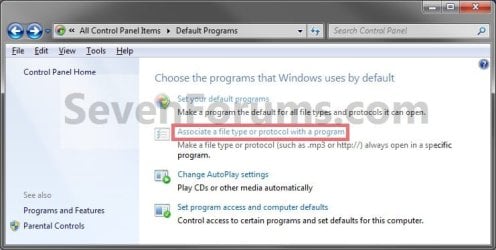
Step1.jpg
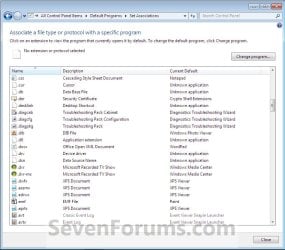
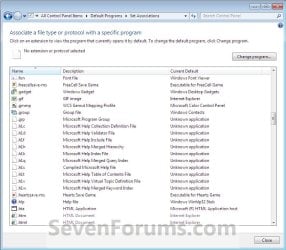
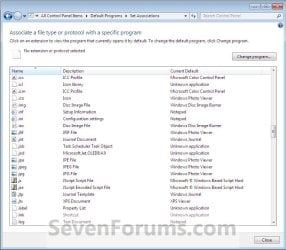
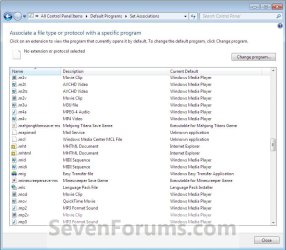
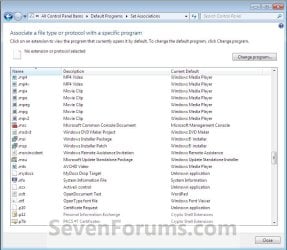
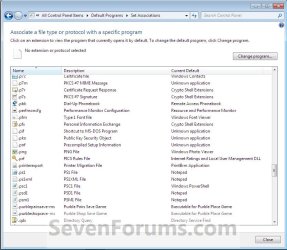
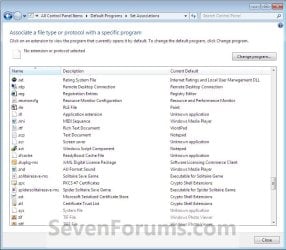
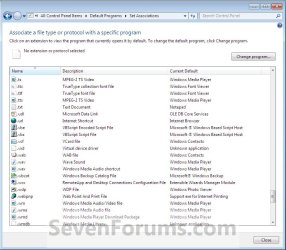
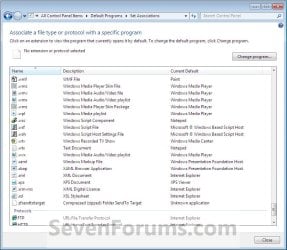
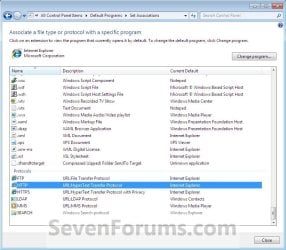
3. Under the left Name column, select a file extension type or protocol that you want to change what program will open it by default, then click on the Change Program button. (See screenshots below)
NOTE: These are the default associations in Windows 7 for these Extensions and Protocols.
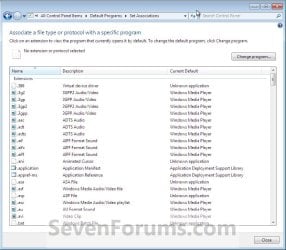
Step2.jpgStep3.jpg
Step4.jpgStep5.jpg
Step6.jpgStep7.jpg
Step8.jpgStep9.jpg
Step10.jpgStep11.jpg
Step12.jpgStep13.jpg
4. To Select a Listed Program in Open With
NOTE: This is for when the program you want to use to open the file extension type or protocol by default with is listed the Open with window.
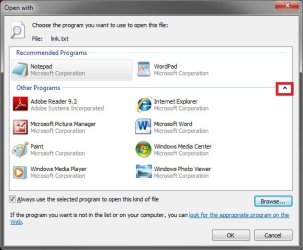
A) Click on the arrow next to the right of Other Programs to show additional programs. (See screenshot below)
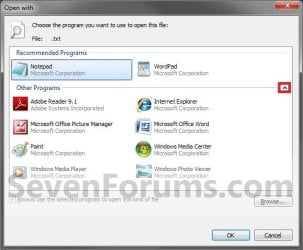
Step14.jpg
B) Go to step 6.
5. To Browse for a Program
NOTE: This is for when the program you want to use to open the file extension type or protocol by default with is not listed the Open with window.
A) Click on the Browse button. (See screenshot above)

B) Navigate to the program's exe file, select it, and click on the Open button. (See screenshot below)
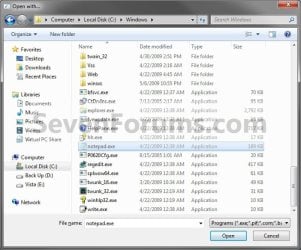
Step15.jpg
6. Select the program that you want to use as the default for the file type or protocol you selected in step 3, and click on OK. (See screenshot below step 4A)

7. Repeat the steps above to change any other file extension type or protocol default program association.

8. When finished, click on the Close button. (See screenshots below step 3)

9. Close the Default Programs window. (See screenshot below step 2)
That's it,
Shawn


Last edited:
Bob,

I do not know if OpenBugs supports opening .odc files, but did you select the winbugs.exe file for OpenBugs. Are you able to open the .odc manually with (File - Open) menu bar from within OpenBugs?
 

My Computer

Computer type
PC/Desktop
Computer Manufacturer/Model Number
Self built custom
OS
64-bit Windows 11 Pro for Workstations
CPU
Intel i7-8700K OC'd to 5 GHz
Motherboard
ASUS ROG Maximus XI Formula Z390
Memory
64 GB (4x16GB) G.SKILL TridentZ RGB DDR4 3600 MHz
Graphics Card(s)
ASUS ROG-STRIX-GTX1080TI-O11G-GAMING
Sound Card
Integrated
Monitor(s) Displays
2 x Samsung Odyssey G7 27"
Screen Resolution
2560x1440
Hard Drives
1TB Samsung 990 PRO M.2,
4TB Samsung 990 PRO PRO M.2,
TerraMaster F8 SSD Plus NAS
PSU
Seasonic Prime Titanium 850W
Case
Thermaltake Core P3
Cooling
Corsair Hydro H115i
Keyboard
Logitech wireless K800
Mouse
Logitech MX Master 4
Internet Speed
2 Gb/s Download and 100 Mb/s Upload
Antivirus
Malwarebyte Anti-Malware Premium
Browser
Google Chrome
Other Info
Logitech Z625 speaker system,
Logitech BRIO 4K Pro webcam,
HP Color LaserJet Pro MFP M477fdn,
APC SMART-UPS RT 1000 XL - SURT1000XLI,
Galaxy S23 Plus phone
I did select winbugs.exe, and the file also opened fine from OpenBUGS.

I think the .odc suffix has more than one use: for OpenBUGS it is a specific format, which I think has its origins in the Black Box compiler for Component Pascal. I don't know if this helps or hinders.
 

My Computer

OS
Windows 7
Well, since you selected winbugs.exe to be the default program and it will not work that way, then seems that it does not support being a default program for it. I'm not sure what else you could do other than contact OpenBUGS to see if they have an update that may allow it. :(
 

My Computer

Computer type
PC/Desktop
Computer Manufacturer/Model Number
Self built custom
OS
64-bit Windows 11 Pro for Workstations
CPU
Intel i7-8700K OC'd to 5 GHz
Motherboard
ASUS ROG Maximus XI Formula Z390
Memory
64 GB (4x16GB) G.SKILL TridentZ RGB DDR4 3600 MHz
Graphics Card(s)
ASUS ROG-STRIX-GTX1080TI-O11G-GAMING
Sound Card
Integrated
Monitor(s) Displays
2 x Samsung Odyssey G7 27"
Screen Resolution
2560x1440
Hard Drives
1TB Samsung 990 PRO M.2,
4TB Samsung 990 PRO PRO M.2,
TerraMaster F8 SSD Plus NAS
PSU
Seasonic Prime Titanium 850W
Case
Thermaltake Core P3
Cooling
Corsair Hydro H115i
Keyboard
Logitech wireless K800
Mouse
Logitech MX Master 4
Internet Speed
2 Gb/s Download and 100 Mb/s Upload
Antivirus
Malwarebyte Anti-Malware Premium
Browser
Google Chrome
Other Info
Logitech Z625 speaker system,
Logitech BRIO 4K Pro webcam,
HP Color LaserJet Pro MFP M477fdn,
APC SMART-UPS RT 1000 XL - SURT1000XLI,
Galaxy S23 Plus phone
I don't understand why Windows 7 doesn't accept any .exe to be a default program. As far as I can see, the problem is in associating *.odc with winbugs.exe. I didn't get as far as trying to open a .odc file!
 

My Computer

OS
Windows 7
Bob,

You might see if using Open With may work better.
 

My Computer

Computer type
PC/Desktop
Computer Manufacturer/Model Number
Self built custom
OS
64-bit Windows 11 Pro for Workstations
CPU
Intel i7-8700K OC'd to 5 GHz
Motherboard
ASUS ROG Maximus XI Formula Z390
Memory
64 GB (4x16GB) G.SKILL TridentZ RGB DDR4 3600 MHz
Graphics Card(s)
ASUS ROG-STRIX-GTX1080TI-O11G-GAMING
Sound Card
Integrated
Monitor(s) Displays
2 x Samsung Odyssey G7 27"
Screen Resolution
2560x1440
Hard Drives
1TB Samsung 990 PRO M.2,
4TB Samsung 990 PRO PRO M.2,
TerraMaster F8 SSD Plus NAS
PSU
Seasonic Prime Titanium 850W
Case
Thermaltake Core P3
Cooling
Corsair Hydro H115i
Keyboard
Logitech wireless K800
Mouse
Logitech MX Master 4
Internet Speed
2 Gb/s Download and 100 Mb/s Upload
Antivirus
Malwarebyte Anti-Malware Premium
Browser
Google Chrome
Other Info
Logitech Z625 speaker system,
Logitech BRIO 4K Pro webcam,
HP Color LaserJet Pro MFP M477fdn,
APC SMART-UPS RT 1000 XL - SURT1000XLI,
Galaxy S23 Plus phone
Ah, cunning. Didn't work, but still worth a try.

anyway, thanks for your help so far.
 

My Computer

OS
Windows 7
HI Brink,
I believe I have the same problem as Bob OH. I have STAT (a statistical program) installed and when in stata I could open a .gph file (graph) but when I clicked on the .gph file in a folder it asked what program to use to open it -unfortunately I accidently clicked on WORD. Now, as I try to change the program to open with a different program (method 2 step 5b) the Stata.exe program doesn't appear. Also, now within Stata I can't open these .gph files. I get a message that states file type not supported. Even though the file extension still appears to be .gph. I looked in your tutorial files as you directed Bob OH but .gph isn't there either. I'm at wits end. Can you help me?
 

My Computer

Computer Manufacturer/Model Number
dell inspiron 1545
OS
windows 7
Memory
4 gb
Hello Kgriffin, and welcome to Seven Forums.

When you tried to use (Method 2 step 5b), were you not able to navigate (browse) to the location where the Stat program's exe file is to select it and click on "Open"?
 

My Computer

Computer type
PC/Desktop
Computer Manufacturer/Model Number
Self built custom
OS
64-bit Windows 11 Pro for Workstations
CPU
Intel i7-8700K OC'd to 5 GHz
Motherboard
ASUS ROG Maximus XI Formula Z390
Memory
64 GB (4x16GB) G.SKILL TridentZ RGB DDR4 3600 MHz
Graphics Card(s)
ASUS ROG-STRIX-GTX1080TI-O11G-GAMING
Sound Card
Integrated
Monitor(s) Displays
2 x Samsung Odyssey G7 27"
Screen Resolution
2560x1440
Hard Drives
1TB Samsung 990 PRO M.2,
4TB Samsung 990 PRO PRO M.2,
TerraMaster F8 SSD Plus NAS
PSU
Seasonic Prime Titanium 850W
Case
Thermaltake Core P3
Cooling
Corsair Hydro H115i
Keyboard
Logitech wireless K800
Mouse
Logitech MX Master 4
Internet Speed
2 Gb/s Download and 100 Mb/s Upload
Antivirus
Malwarebyte Anti-Malware Premium
Browser
Google Chrome
Other Info
Logitech Z625 speaker system,
Logitech BRIO 4K Pro webcam,
HP Color LaserJet Pro MFP M477fdn,
APC SMART-UPS RT 1000 XL - SURT1000XLI,
Galaxy S23 Plus phone
Hi Brink,
Yes, I was able to browse to the Stata.exe program and click on it but when I do nothing happens. The program never appears as an option to use to open the file.

I don't know if this is important but I recently upgraded from Vista to Windows 7. In doing this I saved all files and programs to an external harddrive, put Windows 7 on and then copy and pasted all my files/programs etc back on to the c-drive. All my programs work fine and I can open them all and retrieve files. Everything was fine until I accidently linked my .gph files to WORD.
 

My Computer

Computer Manufacturer/Model Number
dell inspiron 1545
OS
windows 7
Memory
4 gb
Did you check the "Always use...." box after selecting the Stata.exe?

Normally you will need to reinstall programs instead of copying them back for them to work or work properly since they install files in locations other than just the C:\Program Files folder. You might see in uninstalling and reinstalling the program may allow this to work afterwards though.
 

My Computer

Computer type
PC/Desktop
Computer Manufacturer/Model Number
Self built custom
OS
64-bit Windows 11 Pro for Workstations
CPU
Intel i7-8700K OC'd to 5 GHz
Motherboard
ASUS ROG Maximus XI Formula Z390
Memory
64 GB (4x16GB) G.SKILL TridentZ RGB DDR4 3600 MHz
Graphics Card(s)
ASUS ROG-STRIX-GTX1080TI-O11G-GAMING
Sound Card
Integrated
Monitor(s) Displays
2 x Samsung Odyssey G7 27"
Screen Resolution
2560x1440
Hard Drives
1TB Samsung 990 PRO M.2,
4TB Samsung 990 PRO PRO M.2,
TerraMaster F8 SSD Plus NAS
PSU
Seasonic Prime Titanium 850W
Case
Thermaltake Core P3
Cooling
Corsair Hydro H115i
Keyboard
Logitech wireless K800
Mouse
Logitech MX Master 4
Internet Speed
2 Gb/s Download and 100 Mb/s Upload
Antivirus
Malwarebyte Anti-Malware Premium
Browser
Google Chrome
Other Info
Logitech Z625 speaker system,
Logitech BRIO 4K Pro webcam,
HP Color LaserJet Pro MFP M477fdn,
APC SMART-UPS RT 1000 XL - SURT1000XLI,
Galaxy S23 Plus phone
It doesn't matter if the "alway...' box is checked or not, Stata.exe doesn't appear as an option.

I was mistaken when I said I removed everything from c-drive to an external drive (well, I did this as a precaution in case the upgrade didn't work I didn't want to lose anything). When I upgraded from Vista to Windows 7 all my programs remained on the c-drive and I didn't have to reinstall any of them. Unfortuately, I can not easily reinstall Stata b/c it is a limited # student license and as a grad student I am working in the field and not anywhere near the university.

I thought about doing a "restore" on my computer (although I've never tried this so I'm a bit apprehensive) back a few days but in the meantime with the upgrade to window7 I also had to have Dell reinstall my wireless capability which was removed in the upgrade. If I "restore" I would lose my wireless again, wouldn't I?
 
Last edited:

My Computer

Computer Manufacturer/Model Number
dell inspiron 1545
OS
windows 7
Memory
4 gb
Kgriffin,

I'm afraid that I'm a bit confused. In the Open with window of the file you want opened by this program, you say you can "Browse" to and select the Stata.exe file that opens the program, but at the same time you say it's not available as an option. Could you please claify this a bit more?

In Open with, are you also expanding the "Other Programs" area to see if it is there after you have selected it?

Open_with.jpg
 

My Computer

Computer type
PC/Desktop
Computer Manufacturer/Model Number
Self built custom
OS
64-bit Windows 11 Pro for Workstations
CPU
Intel i7-8700K OC'd to 5 GHz
Motherboard
ASUS ROG Maximus XI Formula Z390
Memory
64 GB (4x16GB) G.SKILL TridentZ RGB DDR4 3600 MHz
Graphics Card(s)
ASUS ROG-STRIX-GTX1080TI-O11G-GAMING
Sound Card
Integrated
Monitor(s) Displays
2 x Samsung Odyssey G7 27"
Screen Resolution
2560x1440
Hard Drives
1TB Samsung 990 PRO M.2,
4TB Samsung 990 PRO PRO M.2,
TerraMaster F8 SSD Plus NAS
PSU
Seasonic Prime Titanium 850W
Case
Thermaltake Core P3
Cooling
Corsair Hydro H115i
Keyboard
Logitech wireless K800
Mouse
Logitech MX Master 4
Internet Speed
2 Gb/s Download and 100 Mb/s Upload
Antivirus
Malwarebyte Anti-Malware Premium
Browser
Google Chrome
Other Info
Logitech Z625 speaker system,
Logitech BRIO 4K Pro webcam,
HP Color LaserJet Pro MFP M477fdn,
APC SMART-UPS RT 1000 XL - SURT1000XLI,
Galaxy S23 Plus phone
Sorry for the confusion! In the "Open with..." window of the file I want opened with Stata, I expand "other programs" and Stata.exe is not there. So I browse to locate stata.exe and then click "open" which brings me back to the "Open with..." window but stata.exe does not appear as an option in the "other programs" I have tried this procedure with and without the "always use..." box checked. Does this make more sense?!
 

My Computer

Computer Manufacturer/Model Number
dell inspiron 1545
OS
windows 7
Memory
4 gb
Ok, I see now. Thank you for clearing that up. Are you sure that is the correct exe file to use, or that the STAT program suports opening files in that manner?

As an alternative for now, are you able to open the file from within the program instead?
 

My Computer

Computer type
PC/Desktop
Computer Manufacturer/Model Number
Self built custom
OS
64-bit Windows 11 Pro for Workstations
CPU
Intel i7-8700K OC'd to 5 GHz
Motherboard
ASUS ROG Maximus XI Formula Z390
Memory
64 GB (4x16GB) G.SKILL TridentZ RGB DDR4 3600 MHz
Graphics Card(s)
ASUS ROG-STRIX-GTX1080TI-O11G-GAMING
Sound Card
Integrated
Monitor(s) Displays
2 x Samsung Odyssey G7 27"
Screen Resolution
2560x1440
Hard Drives
1TB Samsung 990 PRO M.2,
4TB Samsung 990 PRO PRO M.2,
TerraMaster F8 SSD Plus NAS
PSU
Seasonic Prime Titanium 850W
Case
Thermaltake Core P3
Cooling
Corsair Hydro H115i
Keyboard
Logitech wireless K800
Mouse
Logitech MX Master 4
Internet Speed
2 Gb/s Download and 100 Mb/s Upload
Antivirus
Malwarebyte Anti-Malware Premium
Browser
Google Chrome
Other Info
Logitech Z625 speaker system,
Logitech BRIO 4K Pro webcam,
HP Color LaserJet Pro MFP M477fdn,
APC SMART-UPS RT 1000 XL - SURT1000XLI,
Galaxy S23 Plus phone
In Windows XP I used Crimson Editor to edit .xml files. GREAT old program.

In Windows 7, I cannot associate a .xml file type to Crimson Editor, by any method above.

Can I set this manually in the Registry?
 

My Computer

Computer Manufacturer/Model Number
home built
OS
Windows 7 Ultimate 64-bit
CPU
AMD Athlon 64 X2 6400+ 3.2GHz
Motherboard
ASUS Crosshair I
Memory
Corsair Dominator DDR2 1066 4GB
Graphics Card(s)
Gigabyte ATI Radeon HD 4890 1GB GDDR5
Sound Card
on mobo
Monitor(s) Displays
Samsung SyncMaster 245BW 24" LCD
Hard Drives
(2) Western Digital Blue 80GB SATA in RAID 0
(1) Hitachi DeskStar 250GB SATA
PSU
Corsair 850W
Case
Silverstone Temjin
Cooling
lots of fans
Hello Chazcon,

If you cannot associate the XML file extension to Crimson Editor using the method in this tutorial or by using Open With, then that program may not be fully Windows 7 compatible. I see that the latest version is 3.70 released September 22, 2004, so it may not be.

Are you able to open the XML file from within Crimson Editor itself?
 

My Computer

Computer type
PC/Desktop
Computer Manufacturer/Model Number
Self built custom
OS
64-bit Windows 11 Pro for Workstations
CPU
Intel i7-8700K OC'd to 5 GHz
Motherboard
ASUS ROG Maximus XI Formula Z390
Memory
64 GB (4x16GB) G.SKILL TridentZ RGB DDR4 3600 MHz
Graphics Card(s)
ASUS ROG-STRIX-GTX1080TI-O11G-GAMING
Sound Card
Integrated
Monitor(s) Displays
2 x Samsung Odyssey G7 27"
Screen Resolution
2560x1440
Hard Drives
1TB Samsung 990 PRO M.2,
4TB Samsung 990 PRO PRO M.2,
TerraMaster F8 SSD Plus NAS
PSU
Seasonic Prime Titanium 850W
Case
Thermaltake Core P3
Cooling
Corsair Hydro H115i
Keyboard
Logitech wireless K800
Mouse
Logitech MX Master 4
Internet Speed
2 Gb/s Download and 100 Mb/s Upload
Antivirus
Malwarebyte Anti-Malware Premium
Browser
Google Chrome
Other Info
Logitech Z625 speaker system,
Logitech BRIO 4K Pro webcam,
HP Color LaserJet Pro MFP M477fdn,
APC SMART-UPS RT 1000 XL - SURT1000XLI,
Galaxy S23 Plus phone
Thanks for the reply.

Yes, in order to open an XML file in Crimson Editor I must launch CE and then open the XML.

I noticed on SourceForge - where CE is now being 'maintained' as Emerald Editor - that they have not updated version numbers properly, and the link to CE version 3.72 release 5/14/08 gives you a version 2.63. As installed the version number is SVN263.

In any case, 'Open With' does not work and I wonder in the Registry how I can make this happen manually? I edited the Registry entry for .xml to open with Crimson Editor but this must not be the correct 'name' for the program.

It's a shame CE is not being properly maintained, it's a great program and has been a standby of mine, and many others, for years now.

I've tried several things, editing the Registry at Computer\HKEY_CLASSES_ROOT\.xml\(Default) name to Crimson Editor, Crimson Editor SVN263, cedt.exe, no luck.

I also added a new entry to Computer\HKEY_CLASSES_ROOT\.xml\OpenWithList named cedt.exe

Intuitively, I suspect that when you install a program on Windows 7, the installation program must add the program name to a list in the OS somewhere that the OS can then parse when creating the Open With list. And Crimson Editor has not been updated for Windows 7 to do this. CE does show up in the uninstall list.

Can I manually add the program name into this list?

Thoughts?
 
Last edited by a moderator:

My Computer

Computer Manufacturer/Model Number
home built
OS
Windows 7 Ultimate 64-bit
CPU
AMD Athlon 64 X2 6400+ 3.2GHz
Motherboard
ASUS Crosshair I
Memory
Corsair Dominator DDR2 1066 4GB
Graphics Card(s)
Gigabyte ATI Radeon HD 4890 1GB GDDR5
Sound Card
on mobo
Monitor(s) Displays
Samsung SyncMaster 245BW 24" LCD
Hard Drives
(2) Western Digital Blue 80GB SATA in RAID 0
(1) Hitachi DeskStar 250GB SATA
PSU
Corsair 850W
Case
Silverstone Temjin
Cooling
lots of fans
Chazcon,

It doesn't appear that the program is going to compatible for this in Windows 7 since it is so old.

I do not know how to, so I'm not sure if there may be a way to add it manually. :(
 

My Computer

Computer type
PC/Desktop
Computer Manufacturer/Model Number
Self built custom
OS
64-bit Windows 11 Pro for Workstations
CPU
Intel i7-8700K OC'd to 5 GHz
Motherboard
ASUS ROG Maximus XI Formula Z390
Memory
64 GB (4x16GB) G.SKILL TridentZ RGB DDR4 3600 MHz
Graphics Card(s)
ASUS ROG-STRIX-GTX1080TI-O11G-GAMING
Sound Card
Integrated
Monitor(s) Displays
2 x Samsung Odyssey G7 27"
Screen Resolution
2560x1440
Hard Drives
1TB Samsung 990 PRO M.2,
4TB Samsung 990 PRO PRO M.2,
TerraMaster F8 SSD Plus NAS
PSU
Seasonic Prime Titanium 850W
Case
Thermaltake Core P3
Cooling
Corsair Hydro H115i
Keyboard
Logitech wireless K800
Mouse
Logitech MX Master 4
Internet Speed
2 Gb/s Download and 100 Mb/s Upload
Antivirus
Malwarebyte Anti-Malware Premium
Browser
Google Chrome
Other Info
Logitech Z625 speaker system,
Logitech BRIO 4K Pro webcam,
HP Color LaserJet Pro MFP M477fdn,
APC SMART-UPS RT 1000 XL - SURT1000XLI,
Galaxy S23 Plus phone
It doesn't matter if the "alway...' box is checked or not, Stata.exe doesn't appear as an option.

I'm actually having a similar problem.
I want to associate .flac files with a program called foobar2000. This is a portable application and I originally had the folder for this app somewhere else.

I decided to move the app to the program files folder and now flac files won't allow me to open with foobar unless if I manually open foobar and drop the files in.

When I move the app folder back into the original location, it shows up in the window for open with, but when I move it back to program files, it doesn't appear anymore. I tried to use the browse and manually add the program, but when I click the app in the program files location, the open with window just doesn't want to add the app in.
 

My Computer

OS
Windows 7
Hello Concentrate, and welcome to Seven Forums.

You might see if using this foobar2000 version may work better instead since it installs.

Hope this helps,
Shawn
 

My Computer

Computer type
PC/Desktop
Computer Manufacturer/Model Number
Self built custom
OS
64-bit Windows 11 Pro for Workstations
CPU
Intel i7-8700K OC'd to 5 GHz
Motherboard
ASUS ROG Maximus XI Formula Z390
Memory
64 GB (4x16GB) G.SKILL TridentZ RGB DDR4 3600 MHz
Graphics Card(s)
ASUS ROG-STRIX-GTX1080TI-O11G-GAMING
Sound Card
Integrated
Monitor(s) Displays
2 x Samsung Odyssey G7 27"
Screen Resolution
2560x1440
Hard Drives
1TB Samsung 990 PRO M.2,
4TB Samsung 990 PRO PRO M.2,
TerraMaster F8 SSD Plus NAS
PSU
Seasonic Prime Titanium 850W
Case
Thermaltake Core P3
Cooling
Corsair Hydro H115i
Keyboard
Logitech wireless K800
Mouse
Logitech MX Master 4
Internet Speed
2 Gb/s Download and 100 Mb/s Upload
Antivirus
Malwarebyte Anti-Malware Premium
Browser
Google Chrome
Other Info
Logitech Z625 speaker system,
Logitech BRIO 4K Pro webcam,
HP Color LaserJet Pro MFP M477fdn,
APC SMART-UPS RT 1000 XL - SURT1000XLI,
Galaxy S23 Plus phone
Back
Top