zarfs
New member
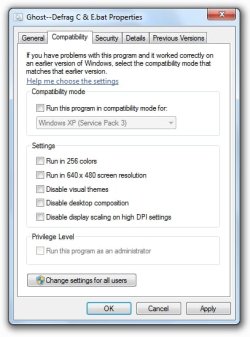
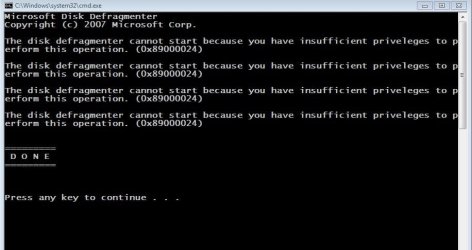
Defrag.exe won't run from a batch file. "Insufficient permission."
I want to defrag my C and E drives before Norton Ghost backs them up.
Norton Ghost will run a batch file before the backup, so I made a simple one:
C:\Windows\System32\Defrag.exe C: E:
It won't run, however. I get an error message saying I have "insufficient permission" to run Defrag.exe.
The permission for my user name on this file allows reading and execution. It does not permit any permission revisions, even though I have administrator status.
Any suggestions?
I want to defrag my C and E drives before Norton Ghost backs them up.
Norton Ghost will run a batch file before the backup, so I made a simple one:
C:\Windows\System32\Defrag.exe C: E:
It won't run, however. I get an error message saying I have "insufficient permission" to run Defrag.exe.
The permission for my user name on this file allows reading and execution. It does not permit any permission revisions, even though I have administrator status.
Any suggestions?
My Computer
At a glance
Windows 7, 64-bitIntel Core i3-3240 CPU @ 3.40GHz, 3404 GBIn motherboard
- Computer type
- PC/Desktop
- Computer Manufacturer/Model Number
- Dell Inspiron 660
- OS
- Windows 7, 64-bit
- CPU
- Intel Core i3-3240 CPU @ 3.40GHz, 340
- Memory
- 4 GB
- Graphics Card(s)
- In motherboard
- Sound Card
- In motherboard
- Monitor(s) Displays
- NEC MultiSync FE992 CRT
- Screen Resolution
- 1280 x 1024
- Hard Drives
- Main drive: Manufacturer not specified. Model ST500DM002-1BD142 SATA 500 GB
Supplemental drive: Maxtor 6L300S0 SATA 300 GB
- Cooling
- 1 CPU fan, 1 chassis fan.
- Keyboard
- Standard
- Mouse
- Dell optical USB
- Internet Speed
- 11 Mb/sec
- Antivirus
- Norton Internet Security 20.4.0.40
- Browser
- Firefox