Defrag Windows 7 ?

marossity

New member
Local time
2:42 PM
Messages
16
Location
Beer Sheva, Israel
I haven't been able to locate a defrag application. Is there such an animal in Windows 7? If so, please help me find it. If not, please explain why not.:shock:
 

My Computer My Computer

At a glance

MS Windows 7 Home x64Pentium(R) Dual-Core CPU E5400 @ 2.70 GHz4 GB DDR3-SDRAM (1333 Mhz)Intel(R) G45/G53 Express Chipset 1.76 GB memory
Computer Manufacturer/Model Number
HP All-in-One 200
OS
MS Windows 7 Home x64
CPU
Pentium(R) Dual-Core CPU E5400 @ 2.70 GHz
Motherboard
HP 2AA2 Chipset Intel G45/G43/P45/P43 Southbridge Intel ICH1
Memory
4 GB DDR3-SDRAM (1333 Mhz)
Graphics Card(s)
Intel(R) G45/G53 Express Chipset 1.76 GB memory
Sound Card
Realtek High Definition Audio
Monitor(s) Displays
Generic PnP Monitor 1920x1080 (32-bit) (60Hz)
Hard Drives
Samsung HD502HJ 500 GB 7200 RPM
Case
All-in-one
Keyboard
HP wireless
Mouse
HP wireless
Internet Speed
Down - 1.6 Mbps Up - 0.16 Mbps
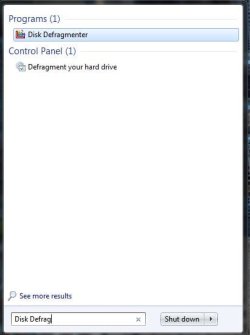
Yeah... its called Disk Defragmenter.

Just do a search for it in the start menu :)

Capture.JPG

Regards,
JDobbsy1987
 

My Computer My Computer

At a glance

Windows 8.1 Pro x64Intel Core i5-2500K @ 3.30GHz - S11558GB Corsair DDR3 XMS3, PC3-12800NVIDIA GeForce GTX 650
Computer type
PC/Desktop
Computer Manufacturer/Model Number
Self Built
OS
Windows 8.1 Pro x64
CPU
Intel Core i5-2500K @ 3.30GHz - S1155
Motherboard
Asus P8P67 LE Rev3, Intel P67, S115
Memory
8GB Corsair DDR3 XMS3, PC3-12800
Graphics Card(s)
NVIDIA GeForce GTX 650
Sound Card
On-Board
Monitor(s) Displays
3 x 24" {Extended Display}
Screen Resolution
1920 x 1080
Hard Drives
300GB Seagate Barracuda 7200
PSU
550W Coolermaster GX550
Case
Silverstone Precision PS04B
Cooling
Stock
Keyboard
Logitech K120
Mouse
World of Warcraft Cataclysm MMO Gaming Mouse
Internet Speed
80 MB
Antivirus
MSE / Windows Defender
Browser
Chrome

My Computer My Computer

At a glance

Windows 8.1 Pro x64Intel Core i5-2500K @ 3.30GHz - S11558GB Corsair DDR3 XMS3, PC3-12800NVIDIA GeForce GTX 650
Computer type
PC/Desktop
Computer Manufacturer/Model Number
Self Built
OS
Windows 8.1 Pro x64
CPU
Intel Core i5-2500K @ 3.30GHz - S1155
Motherboard
Asus P8P67 LE Rev3, Intel P67, S115
Memory
8GB Corsair DDR3 XMS3, PC3-12800
Graphics Card(s)
NVIDIA GeForce GTX 650
Sound Card
On-Board
Monitor(s) Displays
3 x 24" {Extended Display}
Screen Resolution
1920 x 1080
Hard Drives
300GB Seagate Barracuda 7200
PSU
550W Coolermaster GX550
Case
Silverstone Precision PS04B
Cooling
Stock
Keyboard
Logitech K120
Mouse
World of Warcraft Cataclysm MMO Gaming Mouse
Internet Speed
80 MB
Antivirus
MSE / Windows Defender
Browser
Chrome
The defraggers I've found which work really great are free Auslogics Disk and Registry defraggers.

I run them monthly after CCleaner to keep my disks perfectly clean and ordered.
 
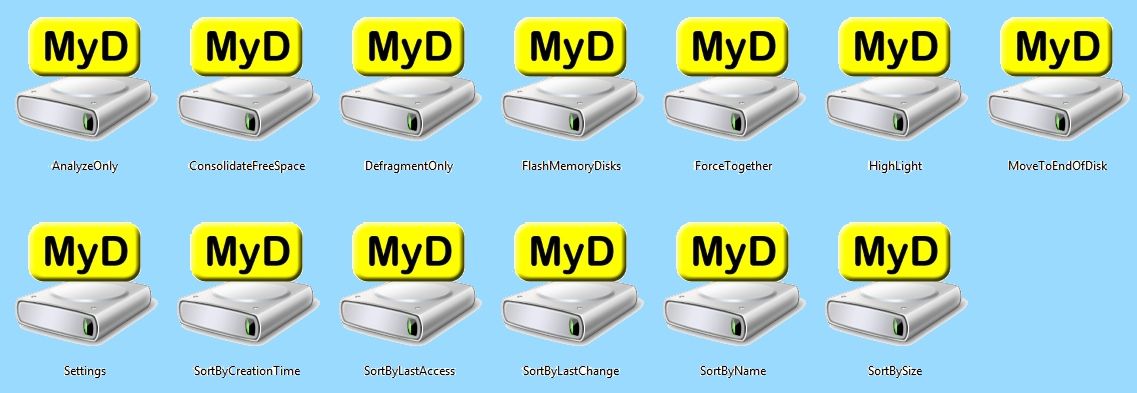
marossity- If you could use freeware defragmentation software that will both defrag as well as place files on the HDD in any order you choose check out My Defrag. You can even create your own optimization scripts if you like.

2b5eab2d.jpg


~Maxx~
.
da59fa57.png
 

My Computer My Computer

At a glance

Windows 7 x64 Home PremiumIntel Core i7 930 @ 2.8 Ghz Socket 1366 LGA8 GB 1366 Mhz DDR3 (PC3-10700) RAMATI Radeon 5770 1 GB DDR5 RAM
Computer Manufacturer/Model Number
HP HPE 270f
OS
Windows 7 x64 Home Premium
CPU
Intel Core i7 930 @ 2.8 Ghz Socket 1366 LGA
Motherboard
Pegatron Truckee v1.04E41
Memory
8 GB 1366 Mhz DDR3 (PC3-10700) RAM
Graphics Card(s)
ATI Radeon 5770 1 GB DDR5 RAM
Sound Card
Realtech High Definition
Monitor(s) Displays
32" Sony Bravia
Screen Resolution
1366 X 768
Hard Drives
Intel 25nm 120 GB Series 320 SSD HD Tune- 265 MBps Read/ 130 MBps Write

LaCie 1TB + 1TB RAID 0 eSATA Drive HD Tune- 160 MBps Read/ 90 MBps Write
Keyboard
Logitech Illuminated
Mouse
Logitech MX Revolution
Internet Speed
36.4 Mbps Maximum on a 37 Mbps Motorola SB501 Modem
Just do what JDobbsy1987 said. The inbuilt "Disk Defragmenter" should be trusted above any other third party softwares. :)
 

My Computer My Computer

At a glance

32-bit Windows 7 Home Premium & Windows 8 Rel...Intel(R) Core(TM)2 Duo4 GB RAM DDR3NVIDIA GeForce G 105M
Computer Manufacturer/Model Number
Acer Aspire 5738G
OS
32-bit Windows 7 Home Premium & Windows 8 Release Preview
CPU
Intel(R) Core(TM)2 Duo
Motherboard
Acer JV50
Memory
4 GB RAM DDR3
Graphics Card(s)
NVIDIA GeForce G 105M
Sound Card
Realtek High Definition
Monitor(s) Displays
1x Generic PnP Monitor
Screen Resolution
1366 x 768 - 32 bit
Hard Drives
C: (263 GB)
K: (24.3 GB)
Keyboard
Acer Inbuilt
Mouse
5 Button Wheel Laser Mouse
Internet Speed
3 MBPS Download and 2 MBPS Upload
Thanks to all. I did find the application. But now I see that some recommend only using the built-in program , while others think a third party app is better. I am wondering why one would be better than another. Also, is a weekly defrag enough?
 

My Computer My Computer

At a glance

MS Windows 7 Home x64Pentium(R) Dual-Core CPU E5400 @ 2.70 GHz4 GB DDR3-SDRAM (1333 Mhz)Intel(R) G45/G53 Express Chipset 1.76 GB memory
Computer Manufacturer/Model Number
HP All-in-One 200
OS
MS Windows 7 Home x64
CPU
Pentium(R) Dual-Core CPU E5400 @ 2.70 GHz
Motherboard
HP 2AA2 Chipset Intel G45/G43/P45/P43 Southbridge Intel ICH1
Memory
4 GB DDR3-SDRAM (1333 Mhz)
Graphics Card(s)
Intel(R) G45/G53 Express Chipset 1.76 GB memory
Sound Card
Realtek High Definition Audio
Monitor(s) Displays
Generic PnP Monitor 1920x1080 (32-bit) (60Hz)
Hard Drives
Samsung HD502HJ 500 GB 7200 RPM
Case
All-in-one
Keyboard
HP wireless
Mouse
HP wireless
Internet Speed
Down - 1.6 Mbps Up - 0.16 Mbps

The built in defragmenter is just fine.

How often you defrag really depends on how fragmented your discs get. Weekly should be fine.
If Im not mistaken, the built in deframenter will only defrag if the disc/partition is 10% fragmented or more

.
Many 3rd party defragmenters offer more features, better scheduling, and more File Placement options.

You will get many different opinions on what is best.


Personally, I like Perfect Disc the best. It is also capable of safely defragmenting SSD drives. Although this should not be done often, it does help if done in moderation.

You can also set the threshhold of when, how often, and how to defrag the HDs. (I/E Consolodate, Smart Placement, or even your own Custom Defrag/Performance Schemes for each drive or partition)

Its MS certified as well.

PerfectDisk | Best Disk Defrag Software

Its a paid software, but is one of the best IMHO.
 

My Computer My Computer

At a glance

Windows 7 Home Premium 64bitIntel Core i7 2700k8GB Mushkin Redline Ridgebacks @1866EVGA GTX570 SC
Computer Manufacturer/Model Number
Custom (Self Build)
OS
Windows 7 Home Premium 64bit
CPU
Intel Core i7 2700k
Motherboard
eVGA P67 SLI
Memory
8GB Mushkin Redline Ridgebacks @1866
Graphics Card(s)
EVGA GTX570 SC
Sound Card
XiFi Titanium HD
Monitor(s) Displays
LG W2453V
Screen Resolution
1920x1080
Hard Drives
Intel 320 80GB -- Intel X25-V 40GB --WD Black 1TB x2 -- WD Blue 640GB
PSU
Seasonic x750
Case
Corsair 600T SE White
Cooling
eVGA Superclocked CPU Cooler
Keyboard
Saitek Cyborg
Antivirus
Kaspersky
Browser
IE
Other Info
LG BD/DVD
I have used many HDD defrafmentation and optimization programs such as O&O, Auslogics, Perfect Disk, IObit and JK Defrag which currently goes by the name of My Defrag and the one and only software that could both defrag and decrease start up and access time was My Defrag using its 'Sort by Last Access Script' which reorganized the random placement of programs on the disk and moved the most frequently accessed programs to the outside of the disk where access is fastest and incurs the least amount of wear to the disk's optical reader.

Many HDD defrag and optimization programs make claims regarding increased performance, but only after using My Defrag freeware could my computer actually start up and access programs faster as proven by numerous time comparisons.

80ab02fc.png


~Maxx~
.
da59fa57.png
 

My Computer My Computer

At a glance

Windows 7 x64 Home PremiumIntel Core i7 930 @ 2.8 Ghz Socket 1366 LGA8 GB 1366 Mhz DDR3 (PC3-10700) RAMATI Radeon 5770 1 GB DDR5 RAM
Computer Manufacturer/Model Number
HP HPE 270f
OS
Windows 7 x64 Home Premium
CPU
Intel Core i7 930 @ 2.8 Ghz Socket 1366 LGA
Motherboard
Pegatron Truckee v1.04E41
Memory
8 GB 1366 Mhz DDR3 (PC3-10700) RAM
Graphics Card(s)
ATI Radeon 5770 1 GB DDR5 RAM
Sound Card
Realtech High Definition
Monitor(s) Displays
32" Sony Bravia
Screen Resolution
1366 X 768
Hard Drives
Intel 25nm 120 GB Series 320 SSD HD Tune- 265 MBps Read/ 130 MBps Write

LaCie 1TB + 1TB RAID 0 eSATA Drive HD Tune- 160 MBps Read/ 90 MBps Write
Keyboard
Logitech Illuminated
Mouse
Logitech MX Revolution
Internet Speed
36.4 Mbps Maximum on a 37 Mbps Motorola SB501 Modem
personally I use jkdefrag gui v1.15, (now called mydefrag) which works well in xp, vista, and 7.. It's freeware, not some neutered trial software.

I think most people either never defrag their HDD, or they do it way too often. I only defrag after doing one of the following:
Once about a week after installing windows for the first time, to rearrange start up files into the order they're most often used
After uninstalling a program that used a significant portion of the HDD
After doing a system restore or a major disk cleanup when files have been scattered throughout the HDD

Otherwise I don't worry about it unless the system starts to slow down noticeably.. usually after about 6 months. Fragmented files don't have nearly the detrimental effect some people think. It's only when files have been written to and deleted from every sector on the HDD that you end up with non-sequential fragments and it starts to slow down.
 
O&O Defrag is by far the best in my opinion for many reasons which I don't have time to list right now. But I highly recommend it.

Also, be sure to check out Acronis products. They make the best Backup/Restore/Disk Utilities out there. Their software is extremely reliable and easy to use.
 

My Computer My Computer

At a glance

Windows Server 2010 Ultimate Workstation RC1Intel Core i7 920 @ 4.2 GHz12 GB Corsair Dominator 1600 MHz DDR3 Tri-Cha...Geforce GTX 260 - 216 Core Edition
Computer Manufacturer/Model Number
Self Built
OS
Windows Server 2010 Ultimate Workstation RC1
CPU
Intel Core i7 920 @ 4.2 GHz
Motherboard
EVGA x58 3 Way SLi Classified E760
Memory
12 GB Corsair Dominator 1600 MHz DDR3 Tri-Channel RAM
Graphics Card(s)
Geforce GTX 260 - 216 Core Edition
Sound Card
Onboard Realtek
Monitor(s) Displays
Dual 19" Viewsonic LCD
Screen Resolution
1280x1024
Hard Drives
4 x 500gb Seagate Barricuda 7200.11 in RAID-0
PSU
Ultra X4 1050 Watt
Case
Cooler Master HAF 932
Cooling
Corsair Liquid Cooling
Keyboard
Razer Tarantula with Battle Light
Mouse
Razer Mamba
Internet Speed
50 Mbps/Down 10 Mbps/Up
Other Info
I built this beast by hand and it's actually not even finished yet lol.
After I read about O&O it became the first 3rd party defragger I tired, but unfortunately after repeated installation attempts it just would not run on my computer which is too bad because it sounds like a great program.

~Maxx~
.
da59fa57.png
 

My Computer My Computer

At a glance

Windows 7 x64 Home PremiumIntel Core i7 930 @ 2.8 Ghz Socket 1366 LGA8 GB 1366 Mhz DDR3 (PC3-10700) RAMATI Radeon 5770 1 GB DDR5 RAM
Computer Manufacturer/Model Number
HP HPE 270f
OS
Windows 7 x64 Home Premium
CPU
Intel Core i7 930 @ 2.8 Ghz Socket 1366 LGA
Motherboard
Pegatron Truckee v1.04E41
Memory
8 GB 1366 Mhz DDR3 (PC3-10700) RAM
Graphics Card(s)
ATI Radeon 5770 1 GB DDR5 RAM
Sound Card
Realtech High Definition
Monitor(s) Displays
32" Sony Bravia
Screen Resolution
1366 X 768
Hard Drives
Intel 25nm 120 GB Series 320 SSD HD Tune- 265 MBps Read/ 130 MBps Write

LaCie 1TB + 1TB RAID 0 eSATA Drive HD Tune- 160 MBps Read/ 90 MBps Write
Keyboard
Logitech Illuminated
Mouse
Logitech MX Revolution
Internet Speed
36.4 Mbps Maximum on a 37 Mbps Motorola SB501 Modem
The biggest problem with the built in windows defragger is that using it only guarantees the HDD will become fragmented more quickly after its finished.

....and then there's the fact that the UI has been dumbed-down so much that only the most completely moronic users can stand it..... no options, no indication of progress or time until it's finished.. just that stupid spinning circle?
 
Thanks to all. I did find the application. But now I see that some recommend only using the built-in program , while others think a third party app is better. I am wondering why one would be better than another. Also, is a weekly defrag enough?

I think a weekly defrag is OVERKILL to the 10th degree. In my opinion, people spend way too much time and effort in defragging hard drives in an attempt to increase or maintain performance and I just don't agree that it is necessary.

Unless you are doing a massive amount of file deletes on a regular basis...your disks are probably not becoming very fragmented at all.

I would say to defrag about every 3 months.
 

My Computer My Computer

At a glance

Windows 7 Ultimate x64Intel Q9550 2.83Ghz OC'd to 3.40Ghz8GB G.Skill PI DDR2-800, 4-4-4-12 timingsEVGA 1280MB Nvidia GeForce GTX570
Computer Manufacturer/Model Number
Self-Built in July 2009
OS
Windows 7 Ultimate x64
CPU
Intel Q9550 2.83Ghz OC'd to 3.40Ghz
Motherboard
Gigabyte GA-EP45-UD3R rev. 1.1, F12 BIOS
Memory
8GB G.Skill PI DDR2-800, 4-4-4-12 timings
Graphics Card(s)
EVGA 1280MB Nvidia GeForce GTX570
Sound Card
Realtek ALC899A 8 channel onboard audio
Monitor(s) Displays
23" Acer x233H
Screen Resolution
1920x1080
Hard Drives
Intel X25-M 80GB Gen 2 SSD
Western Digital 1TB Caviar Black, 32MB cache. WD1001FALS
PSU
Corsair 620HX modular
Case
Antec P182
Cooling
stock
Keyboard
ABS M1 Mechanical
Mouse
Logitech G9 Laser Mouse
Internet Speed
15/2 cable modem
Other Info
Windows and Linux enthusiast. Logitech G35 Headset.
Well third party defraggers are usually free, they are faster and may offer more info about what's going on such as detailed color charts of the defragging activity, defrag reports and some of them even claim "smart" technologies that make disk defrag even better than Windows' own utility.

Some defraggers are even integrated into single apps along with other tweaking utilities such as a disk cleaner and performance optimizer.
 

My Computer My Computer

At a glance

Windows 7 Ultimate 32 Bit, Windows Developer ...Intel Pentium Dual CPU E2180@2GHzNVIDIA GeForce 7200 GS
Computer Manufacturer/Model Number
Custom Built
OS
Windows 7 Ultimate 32 Bit, Windows Developer Preview, Linux Mint 9 Gnome 32 Bit
CPU
Intel Pentium Dual CPU E2180@2GHz
Motherboard
Elitegroup 671T-M3
Graphics Card(s)
NVIDIA GeForce 7200 GS
Monitor(s) Displays
AOC TFT1560 15" LCD Monitor
Screen Resolution
1024x768
Keyboard
Logitech USB Keyboard
I've tried just about all the available defraggers on Win7.64 and my general conclusion is that so far, none of the 3rd party ones seem to get it dead right. They may do a better job overall but they always make bootup take longer in my experience, sometimes twice as long compared with a Win7 setup that's been optimised with xbootmgr, part of Microsoft's Windows Performance Toolkit. The built in MS defragger doesn't have this problem, but on the downside it's slow as molasses completing a defrag compared with some and doesn't have the optimisations of 3rd party defraggers that boost general performance (after bootup that is).
 

My Computer My Computer

At a glance

Windows 7
OS
Windows 7
Testing in my own little way between Windows 7 built in defragger and 3rd party defragger is a little bit of time, about 2 min. Windows 7 being slower. Of course W7 doesn't have the little colored boxes jumping around. Another thing that I have found that no two defrag program do it the same way. You can defrag with one and check with another and there will always be a slight difference. So I stick with Windows 7 built in. I'm of the belief that Microsoft should be able to defrag Window 7 as well as any or maybe better. If you choose W7 defrag you can check every now and again by using the analyzer part of the program first to see if you need to defrag. For what ever reason on my computer, Windows 7 Home Premium doesn't seem to get fragmented much at all. In a month it's 1 to 2 %. It can be scheduled to run in the back ground or on demand if that is what you like.
 

My Computer My Computer

At a glance

Windows 10 Pro. 64/ version 1709 Windows 7 Pr...Intel i7-6800K @ 4.3Corsair Platinum 16 gig @2400EVGA GTX 1070 OC
Computer type
PC/Desktop
Computer Manufacturer/Model Number
Home made Desktop
OS
Windows 10 Pro. 64/ version 1709 Windows 7 Pro/64
CPU
Intel i7-6800K @ 4.3
Motherboard
ASUS X-99 Deluxe II
Memory
Corsair Platinum 16 gig @2400
Graphics Card(s)
EVGA GTX 1070 OC
Monitor(s) Displays
Asus 27" LED LCD/VE278Q
Screen Resolution
1920-1080 or 1280-720 HDMI
Hard Drives
INTEL SSD 730-240 Gb Sata 3.0/
PSU
EVGA Platium 1200W
Case
Phanteks Luxe Tempered Glass 8 fans/ one radiator
Cooling
XSPC/ Water Cooled CPU
Keyboard
Das 4 Professional
Mouse
Logitech M705/MX Anywhere 2-S
Internet Speed
100 mbits
Antivirus
Microsoft Security Essentials/ Malwarebytes Premium 3.0/ SAS
Browser
I.E. 11 default/Firefox/ ISP Time Warner Cable/Spectrum
Other Info
LG BluRay Burner/
Sound system-KLipsch-THX/
Icy Dock ssd Hot Swap bays.
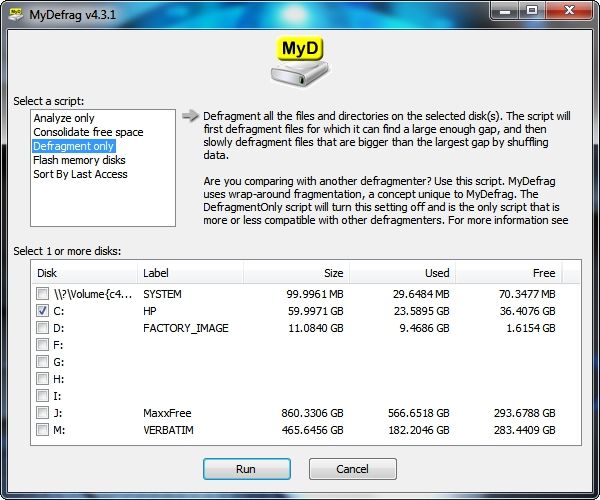
You are right that different Defraggers use different algorithms. The My Defrag software that I use first uses Wrap Around Defragmentation for files for which it can find large enough gaps and then use Data Shuffling for files that are bigger than the largest gap.

80e5ca63.jpg


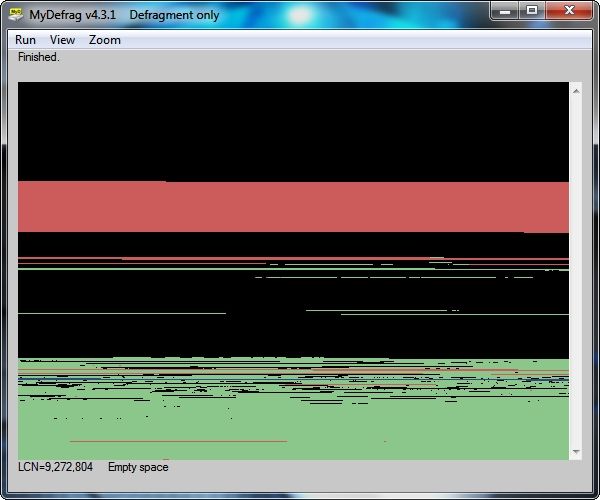
The last time I defragmented the 23 GB on the Win 7 partition it was analyzed at 6% fragmentation and it took MyD 14 seconds to completely defrag it...

abd266d8.jpg


Combined with the execution of MyD's 'sort by last access' disk optimization script which took 14 minutes to complete all of my programs open faster including the 1 GB GIMP Image Management Program program which used to open in 6 seconds and now opens in 3.42 seconds which is 43% faster than before MyD optimization which for me constitutes a very noticeable and welcomed improvement.

~Maxx~

f0e9f094.png
 

My Computer My Computer

At a glance

Windows 7 x64 Home PremiumIntel Core i7 930 @ 2.8 Ghz Socket 1366 LGA8 GB 1366 Mhz DDR3 (PC3-10700) RAMATI Radeon 5770 1 GB DDR5 RAM
Computer Manufacturer/Model Number
HP HPE 270f
OS
Windows 7 x64 Home Premium
CPU
Intel Core i7 930 @ 2.8 Ghz Socket 1366 LGA
Motherboard
Pegatron Truckee v1.04E41
Memory
8 GB 1366 Mhz DDR3 (PC3-10700) RAM
Graphics Card(s)
ATI Radeon 5770 1 GB DDR5 RAM
Sound Card
Realtech High Definition
Monitor(s) Displays
32" Sony Bravia
Screen Resolution
1366 X 768
Hard Drives
Intel 25nm 120 GB Series 320 SSD HD Tune- 265 MBps Read/ 130 MBps Write

LaCie 1TB + 1TB RAID 0 eSATA Drive HD Tune- 160 MBps Read/ 90 MBps Write
Keyboard
Logitech Illuminated
Mouse
Logitech MX Revolution
Internet Speed
36.4 Mbps Maximum on a 37 Mbps Motorola SB501 Modem
Thanks to all. I did find the application. But now I see that some recommend only using the built-in program , while others think a third party app is better. I am wondering why one would be better than another. Also, is a weekly defrag enough?

Windows defragger lags the commercial utilities in some areas like speed, flexibility/customization, GUI and the 'deepness' of the defrag. So those who place a premium on these features often prefer third party utilities.:)
 

My Computer My Computer

At a glance

XP Pro SP3, Windows 7 Pro x64i25008GB 1333 MHzGTX260
OS
XP Pro SP3, Windows 7 Pro x64
CPU
i2500
Motherboard
Asus P8P67
Memory
8GB 1333 MHz
Graphics Card(s)
GTX260
Sound Card
Asus Xonar DG
Monitor(s) Displays
Dell 2407WFP-HC
Screen Resolution
1920x1200
Hard Drives
Several; total 4TB
PSU
Silverstone Zeus 750W
Case
Gigabyte Full Tower
Cooling
Stock
Keyboard
Logitech G15
Mouse
Razer Deathadder
Internet Speed
10Mbps
Back
Top