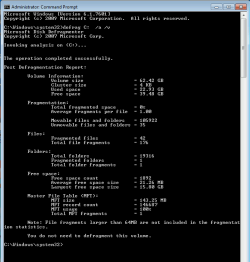
Defragment detail information

ddh

Banned
Local time
6:42 AM
Messages
2
Is there information available after a defragment routine that is like the information found after a scan disc?
I have looked at the Windows Event Viewer but I did not know what to look for.
Thank you for your help.
 

My Computer

Computer type
PC/Desktop
OS
Windows 7 Home Premium
Is there information available after a defragment routine that is like the information found after a scan disc?
I have looked at the Windows Event Viewer but I did not know what to look for.
Welcome to Seven Forums ddh.

No, there is nothing recorded in Event Viewer. But you can generate an analysis report at any time by using defrag from the command line in an elevated command prompt.

The command DEFRAG C: /A /V will generate an analysis report only. The command DEFRAG C: /U /V will defragment the C: drive and give a before and after analysis report.
 

Attachments

  • defrag analysis.PNG
    defrag analysis.PNG
    11.1 KB · Views: 21

My Computers

System One System Two

  • Computer type
    Laptop
    Computer Manufacturer/Model Number
    Toshiba satellite C650D
    OS
    Windows 7 Home Premium x64
    CPU
    AMD V120
    Memory
    4GB
    Internet Speed
    150 Mbps
    Antivirus
    MSE
    Browser
    IE11, Edge, Firefox
    Other Info
    I also have W7 Pro on my System Two, and several W7 Hyper-V VMs. My other machines run Windows 10/11. Their specs are in my Ten Forums & Eleven Forum profiles.
  • Computer type
    Laptop
    System Manufacturer/Model Number
    Lenovo Thinkpad T430
    OS
    Windows 7 Pro x64
    CPU
    Intel i5-3320M
    Memory
    8 GB
    Hard Drives
    250GB Samsung SSD 860 EVO
    Antivirus
    MSE
Bree - Thank you for your reply.

I don't know where the "command line in an elevated command prompt"
is located, please let me know where to enter it.

I would use the command " DEFRAG C: /U /V " to view the information before and after.

Thank you for your help.
 

My Computer

Computer type
PC/Desktop
OS
Windows 7 Home Premium
I don't know where the "command line in an elevated command prompt"
is located, please let me know where to enter it.

It simply means when you open a Command Prompt you should run it as an administrator. See this tutorial...

Elevated Command Prompt
 

My Computers

System One System Two

  • Computer type
    Laptop
    Computer Manufacturer/Model Number
    Toshiba satellite C650D
    OS
    Windows 7 Home Premium x64
    CPU
    AMD V120
    Memory
    4GB
    Internet Speed
    150 Mbps
    Antivirus
    MSE
    Browser
    IE11, Edge, Firefox
    Other Info
    I also have W7 Pro on my System Two, and several W7 Hyper-V VMs. My other machines run Windows 10/11. Their specs are in my Ten Forums & Eleven Forum profiles.
  • Computer type
    Laptop
    System Manufacturer/Model Number
    Lenovo Thinkpad T430
    OS
    Windows 7 Pro x64
    CPU
    Intel i5-3320M
    Memory
    8 GB
    Hard Drives
    250GB Samsung SSD 860 EVO
    Antivirus
    MSE
NOTE:


Just don't EVER try to do a Defrag on an SSD. They don't like that!!!


An SSD is just like a USB Flash Drive. To refresh it, you backup all its contents, then wipe it and do a restore of the backup. (you can skip the WIPE if you want) A Restore of a backup Image, will simply overwrite all the drives contents.


I've been using a Ghost Backup followed by a Ghost restore, to Defrag my HD's for years. Works great.


Y'all have a great 2020 now, Y'hear?


TM :cool:
 

My Computer

Computer type
PC/Desktop
Computer Manufacturer/Model Number
Various
OS
Win 7 Pro, SP1, x86, Win-11/Pro/64
CPU
AMD
Motherboard
Various
Memory
8GB Crucial
Graphics Card(s)
Various
Sound Card
OnBoard
Monitor(s) Displays
Acer 21.5"
Hard Drives
Crucial SSD, 500 GB
PSU
OEM
Case
SFF Slim Line Case
Cooling
OEM
Keyboard
eMachines
Mouse
Logitech Wireless
Internet Speed
varies
Antivirus
Windows Defender/Super Anti-Spyware
Browser
Firefox
One can TRIM an SSD; avoid defragging as TechnoMage said.
 

My Computer

Computer type
PC/Desktop
Computer Manufacturer/Model Number
Antec desktop; Acer Aspire laptops
OS
Windows 7 Professional 64-bit
CPU
Desktop i5; Acers i5 & i7
Memory
desktop 16GB; 1 Acer 8GB & 1 Acer 16GB
Hard Drives
1TB split into 2 equal partitions [OS and data] usable by RJS
Internet Speed
AT&T DSL
Browser
FF, GChrome, msIE
Other Info
Windows 7 Firewall, Emsisoft AM/AV, MSE [scan-only], SpywareBlaster, Ruiware/BillP combine
Back
Top