Defragmenter programs can delete System Restore Points

A Guy

Righteous Dude
Guru
VIP
SF Team
Local time
4:31 AM
Messages
33,043
Location
Bay Area
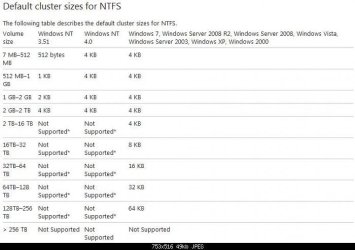
I believe it's possible for any defrag program to cause loss of restore points. It has to do with the Volume Shadow Service cluster size

The System Shadow Copy provider uses a copy-on-write mechanism that operates at a 16-KB block level. This is independent of the file system's cluster allocation unit size. If the file system's cluster size is smaller than 16 KB, the System Shadow Copy provider cannot easily determine that disk defragmentation I/O is different from typical write I/O, and performs a copy-on-write operation. This might cause the Shadow Copy storage area to grow very quickly. If the storage area reaches its user-defined limit, the oldest shadow copies are deleted first.

Shadow copies may be lost when you defragment a volume

Trick #3: Don't lose your system restore points!

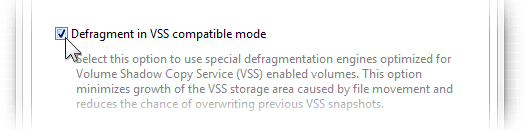
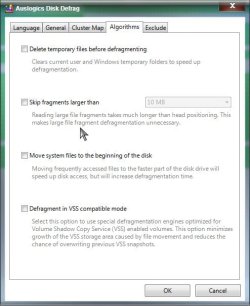
Lost system restore points in Windows are a common complaint with people using disk defragmenters on machines running Vista and later Windows versions. What happens is the defrag operation moves files around causing the Volume Shadow Copy Service (VSS) to create snapshots that overwrite older ones and cause restore points to get deleted. If you have VSS enabled on your hard drive, or if you are not sure if you do, the first thing you should do after installing Auslogics Disk Defrag is go to Program Settings - Algorithms and set the program to defragment in VSS-compatible mode. This prevents excessive growth of the VSS storage area and ensures that your system restore points will remain intact.

Not all defraggers have this option, so be sure to never use the ones that don't if you have VSS enabled.

vss.png

How to Defrag Your Hard Drive Properly

#1 Restore Points/VSS

This issue is addressed in Microsoft KB 312067. Defrag activity can purge snapshots off a system. If the drive is formatted in 16K clusters (or a multiple) then steps are taken to minimize purging snapshots or shadow copies. On VSS-enabled drives with a cluster size less than 16K, you need to minimize file movement in order to avoid purging snapshots. By default, PerfectDisk addresses this issue by running in VSS Compatibility Mode with a configurable threshold. The Windows 7 defrag tool has no compatibility mode and will purge the snapshots off a VSS-enabled system.

8 Reasons Why the Best Windows 7 Defrag is Not the Built-in Windows Disk Defragmenter | Raxco Software Blog

Minimizing interactions between defragmentation and shadow copies

When possible, move data in blocks aligned relative to each other in 16-kilobyte (KB) increments. This reduces copy-on-write overhead when shadow copies are enabled, because shadow copy space is increased and performance is reduced when the following conditions occur:
The move request block size is less than or equal to 16 KB.
The move delta is not in increments of 16 KB.

The move delta is the number of bytes between the start of the source block and the start of the target block. In other words, a block starting at offset X (on-disk) can be moved to a starting offset Y if the absolute value of X minus Y is an even multiple of 16 KB. So, assuming 4-KB clusters, a move from cluster 3 to cluster 27 will be optimized, but a move from cluster 18 to cluster 24 will not. Note that mod(3,4) = 3 = mod(27,4). Mod 4 is chosen because four clusters at 4 KB each is equivalent to 16 KB. Therefore, a volume formatted to a 16-KB cluster size will result in all move files being optimized.

Defragmenting Files (Windows)

Puran Defrag and VSS

"You can uncheck all additional operations in Puran Defrag to run it in VSS compatibility mode. However it is recommended that you format your disk with cluster size > 16K. Please read Puran Defrag help VSS Compatibility section for more info."

Simply excluding "System Volume Information" wont help. Here is the text from Puran Defrag help file "VSS Compatibility" section -

· It is highly recommended that you format your drive with cluster size of 16K if you want to defrag it and also do not want to loose Shadow Copies.

· If above is not possible for you then to configure Puran Defrag so that data movement is minimum and shadow copies are not lost or the loss is minimum, uncheck Additional Operations including Fill Gaps, Optimize Drectories, Free Space and PIOZR.

Puran Defrag and VSS | Wilders Security Forums

Some programs have settings to prevent or mitigate this issue, a VSS compatibility mode. Most do not.
Windows by default has a 4K cluster size, and it does not seem wise to change that to a 16K size for this inconsistent issue.

You can determine a drives cluster size by opening a command prompt and typing

fsutil fsinfo ntfsinfo C: (Replace the C with the letter of the drive you want to check)

I think 4k is default? Even my SSD reports that size
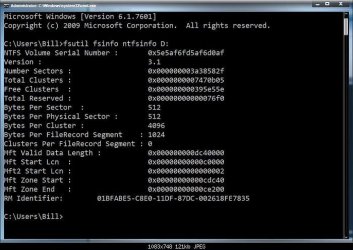
Clusters.jpg

Default.jpg

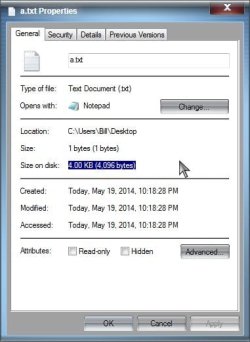
Also, you can create a text file in notepad with only 1 character and save it. Right click the new text file> Properties

It will show
Size: 1 bytes (1 bytes)
Size on disk: 4.0KB (4,096 bytes)
for example
Notepad.jpg

Showing a cluster size of 4k

I think we can assume that most (if not all) users will not have a cluster size of greater then 16k. I think 4k is set as a reason? Therefore, anyone defragging runs the risk of losing restore points. Since it is not that common, I'll assume free space, and space allocated for SR points are the main causes?

Let's use this thread to discuss the issue. A Guy
 
Last edited:

My Computer

Computer type
PC/Desktop
OS
Windows 10 Home x64
CPU
INTEL Core i5-750 Quad-Core 3.37GHz
Motherboard
ASUS P7P55D
Memory
HyperX Fury Black Series 8GB (2 x 4GB) 1866Mhz
Graphics Card(s)
EVGA GeForce GTX 750 Superclocked 1GB 128-Bit GDDR5
Monitor(s) Displays
LG 32MA68HY 32" IPS
Screen Resolution
1920 x 1080
Hard Drives
Samsung 840 Evo 120GB, SEAGATE 500GB Barracuda® 7200.12, SATA 3 Gb/s, 7200 RPM, 16MB cache
PSU
ANTEC TruePower New TP-550, 80 PLUS, 550W
Case
ANTEC Three Hundred Illusion
Cooling
COOLER MASTER Hyper 212 Plus, 4 x 120mm 1 x 140mm Noctua's
Internet Speed
85 + Mbps
Antivirus
Avast
Browser
Vivaldi
Thanks Bill. Brilliant explication. This will be good to get the discussion going further, attract google hits on the subject, also to link for those reporting or asking about it. I am hearing about this for some months now.

I guess what I'm still wondering is if there is any way to avoid it. That brings up the discussion if defrag is really even needed. I notice Win7 apparently doesn't any longer schedule a weekly default defrag, at least on my installs recently.

I had migrated to Puran for its boot-time defrag after it helped cut a 2 minute startup time in half. But the reports on Puran causing restore points loss are making me reconsider even advising defrag at all.
 
There is likely a commonality amongst those who have the problem. I surmised perhaps free space on the drive, and space allocated for SR points are the main causes, but we may find that there is plenty of both, and yet it still happens. I have used many defragmenter programs over the years (Auslogics, Puran, JK Defrag, etc.), and have never has an issue.

I also use Power Defragmenter which is a GUI for Contig written by Mark Russinovich for Windows Sysinternals

How it Works

Contig uses the native Windows NT defragmentation support that was introduced with NT 4.0 (see my documentation of the defrag APIs for more information). It first scans the disk collecting the locations and sizes of free areas. Then it determines where the file in question is located. Next, Contig decides whether the file can be optimized, based on free areas and the number of fragments the file currently consists of. If the file can be optimized, it is moved into the free spaces of the disk.

Contig

Contig is designed to defragment individual files,[1] or specified groups of files, and does not attempt to move files to the beginning of the partition. Unlike the Windows built-in defragmenter tool, Contig can defragment individual files, individual directories, and subsets of the file system using wildcards.

Contig does not move any data except that belonging to the file in the question, so the amount it can defragment a file is limited to the largest contiguous block of free space on a system. Use of contig exchanges decreased file fragmentation for increased free space fragmentation.

Contig Defragmentation Utility Wikipedia

I don't know if Contig would have the same issue. If any defrag program could conceivably?

A Guy
 

My Computer

Computer type
PC/Desktop
OS
Windows 10 Home x64
CPU
INTEL Core i5-750 Quad-Core 3.37GHz
Motherboard
ASUS P7P55D
Memory
HyperX Fury Black Series 8GB (2 x 4GB) 1866Mhz
Graphics Card(s)
EVGA GeForce GTX 750 Superclocked 1GB 128-Bit GDDR5
Monitor(s) Displays
LG 32MA68HY 32" IPS
Screen Resolution
1920 x 1080
Hard Drives
Samsung 840 Evo 120GB, SEAGATE 500GB Barracuda® 7200.12, SATA 3 Gb/s, 7200 RPM, 16MB cache
PSU
ANTEC TruePower New TP-550, 80 PLUS, 550W
Case
ANTEC Three Hundred Illusion
Cooling
COOLER MASTER Hyper 212 Plus, 4 x 120mm 1 x 140mm Noctua's
Internet Speed
85 + Mbps
Antivirus
Avast
Browser
Vivaldi
Puran Defrag

Hi,

I was directed here by gregrocker. I recently used Puran Defrag and created restore points beforehand only to check right after and discover that they had all been deleted. I ran a full boot defrag of my OS drive. If you want some more details let me know.
 

My Computer

Computer type
PC/Desktop
Computer Manufacturer/Model Number
Custom Build
OS
Windows 7 Ultimate x64 SP1
CPU
AMD FX-8320 @ 4.5 GHz (4.3 Volts)
Motherboard
ASUS M5A99X EVO R2.0 AM3+
Memory
2 X 4 GB G Skill Ares 1600 @ 8-8-8-24
Graphics Card(s)
Gigabyte G1 Gaming GTX 970
Sound Card
On Board
Monitor(s) Displays
Asus 24" @ 144 Hz
Screen Resolution
1920 X 1080
Hard Drives
Samsung 840 EVO 120 GB SSD + WD Black Series 1 TB 7200 RPM
PSU
Corsair CXM 600 Watt
Case
NZXT Phantom 410
Cooling
3x 120 mm + 3x 140 mm + Corsair H80i Push/Pull
Keyboard
CM Storm QuickFire Rapid (mechanical)
Mouse
Anker 4000 DPI Gaming Mouse
Internet Speed
90 DL & 90 UL
Antivirus
MSE
Browser
Firefox
Other Info
Logitech Z-906 Speakers
I'm wondering if Event viewer would document the deletion of Restore Points for any reason?

A Guy
 

My Computer

Computer type
PC/Desktop
OS
Windows 10 Home x64
CPU
INTEL Core i5-750 Quad-Core 3.37GHz
Motherboard
ASUS P7P55D
Memory
HyperX Fury Black Series 8GB (2 x 4GB) 1866Mhz
Graphics Card(s)
EVGA GeForce GTX 750 Superclocked 1GB 128-Bit GDDR5
Monitor(s) Displays
LG 32MA68HY 32" IPS
Screen Resolution
1920 x 1080
Hard Drives
Samsung 840 Evo 120GB, SEAGATE 500GB Barracuda® 7200.12, SATA 3 Gb/s, 7200 RPM, 16MB cache
PSU
ANTEC TruePower New TP-550, 80 PLUS, 550W
Case
ANTEC Three Hundred Illusion
Cooling
COOLER MASTER Hyper 212 Plus, 4 x 120mm 1 x 140mm Noctua's
Internet Speed
85 + Mbps
Antivirus
Avast
Browser
Vivaldi
I'm wondering if Event viewer would document the deletion of Restore Points for any reason?

A Guy

I could post my event logs here if you want. Just be aware there are probably a bunch of other problems in those logs from my computer haha :huh:
 

My Computer

Computer type
PC/Desktop
Computer Manufacturer/Model Number
Custom Build
OS
Windows 7 Ultimate x64 SP1
CPU
AMD FX-8320 @ 4.5 GHz (4.3 Volts)
Motherboard
ASUS M5A99X EVO R2.0 AM3+
Memory
2 X 4 GB G Skill Ares 1600 @ 8-8-8-24
Graphics Card(s)
Gigabyte G1 Gaming GTX 970
Sound Card
On Board
Monitor(s) Displays
Asus 24" @ 144 Hz
Screen Resolution
1920 X 1080
Hard Drives
Samsung 840 EVO 120 GB SSD + WD Black Series 1 TB 7200 RPM
PSU
Corsair CXM 600 Watt
Case
NZXT Phantom 410
Cooling
3x 120 mm + 3x 140 mm + Corsair H80i Push/Pull
Keyboard
CM Storm QuickFire Rapid (mechanical)
Mouse
Anker 4000 DPI Gaming Mouse
Internet Speed
90 DL & 90 UL
Antivirus
MSE
Browser
Firefox
Other Info
Logitech Z-906 Speakers
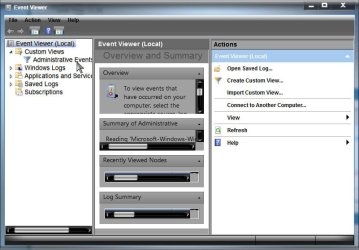
Every computer has a ton of entries in Event Viewer. You can try

Start> In search box type Event Viewer> Enter> When the Event viewer opens expand Custom Views, and click on Administrative events

Event.jpg

Find the timestamp from when you did the defrag, and see if anything jumps out at you. You could also use the http://www.sevenforums.com/tutorials/92394-sf-diagnostic-tool-using-troubleshooting.html to capture events. Someone much wiser than I would be required to analyse them though :o

A Guy
 

My Computer

Computer type
PC/Desktop
OS
Windows 10 Home x64
CPU
INTEL Core i5-750 Quad-Core 3.37GHz
Motherboard
ASUS P7P55D
Memory
HyperX Fury Black Series 8GB (2 x 4GB) 1866Mhz
Graphics Card(s)
EVGA GeForce GTX 750 Superclocked 1GB 128-Bit GDDR5
Monitor(s) Displays
LG 32MA68HY 32" IPS
Screen Resolution
1920 x 1080
Hard Drives
Samsung 840 Evo 120GB, SEAGATE 500GB Barracuda® 7200.12, SATA 3 Gb/s, 7200 RPM, 16MB cache
PSU
ANTEC TruePower New TP-550, 80 PLUS, 550W
Case
ANTEC Three Hundred Illusion
Cooling
COOLER MASTER Hyper 212 Plus, 4 x 120mm 1 x 140mm Noctua's
Internet Speed
85 + Mbps
Antivirus
Avast
Browser
Vivaldi
Every computer has a ton of entries in Event Viewer. You can try

Start> In search box type Event Viewer> Enter> When the Event viewer opens expand Custom Views, and click on Administrative events

Find the timestamp from when you did the defrag, and see if anything jumps out at you. You could also use the http://www.sevenforums.com/tutorials/92394-sf-diagnostic-tool-using-troubleshooting.html to capture events. Someone much wiser than I would be required to analyse them though :o

A Guy

All the stuff in event viewer is too complicated for me to understand :( I don't know what to look for. However for future reference to anybody that does want to look at my events, I have attached them.
 

Attachments

My Computer

Computer type
PC/Desktop
Computer Manufacturer/Model Number
Custom Build
OS
Windows 7 Ultimate x64 SP1
CPU
AMD FX-8320 @ 4.5 GHz (4.3 Volts)
Motherboard
ASUS M5A99X EVO R2.0 AM3+
Memory
2 X 4 GB G Skill Ares 1600 @ 8-8-8-24
Graphics Card(s)
Gigabyte G1 Gaming GTX 970
Sound Card
On Board
Monitor(s) Displays
Asus 24" @ 144 Hz
Screen Resolution
1920 X 1080
Hard Drives
Samsung 840 EVO 120 GB SSD + WD Black Series 1 TB 7200 RPM
PSU
Corsair CXM 600 Watt
Case
NZXT Phantom 410
Cooling
3x 120 mm + 3x 140 mm + Corsair H80i Push/Pull
Keyboard
CM Storm QuickFire Rapid (mechanical)
Mouse
Anker 4000 DPI Gaming Mouse
Internet Speed
90 DL & 90 UL
Antivirus
MSE
Browser
Firefox
Other Info
Logitech Z-906 Speakers
I use Defraggler and it seems to delete System Restore points.
 

My Computer

Computer type
PC/Desktop
Computer Manufacturer/Model Number
n/a
OS
W7 Ultimate SP1, LM19.2 MATE, W10 Home 1703, W10 Pro 1703 VM, #All 64 bit
CPU
AMD Phenom II x6 1100T, 3.3 GHz
Motherboard
ASUS M4A88T-M/USB3 (AM3)
Memory
12GB DDR3 1333 G-Skill (4GB x 2), G-Skill (2GB x 2)
Graphics Card(s)
NVIDIA GeForce GTX 660
Sound Card
Realtek?
Monitor(s) Displays
Samsung S23B350
Screen Resolution
1920x1080
Hard Drives
WD Green 2TB (SATA), WD Green 3TB (SATA), WD Blue 4TB (SATA), WD Blue 6TB (SATA)
PSU
Cooler Master
Case
Antec GX300 Tower
Cooling
3x Antec TRICOOL 120mm Fans
Mouse
Wired Optical
Internet Speed
DSL
Antivirus
Avast
Browser
Pale Moon (64 bit)
Other Info
2018-12-27 Upgraded HDDs
2015-12-10 Upgraded case, graphics card, storage
2015-08-15 Upgraded motherboard & RAM
2015-07-15 Upgraded LM17.1 to LM17.2
Almost all third party antivirus programs will delete restore points if it finds infections in them. If you have a rootkit, sometimes it uses the av software to delete all the restore points the user has on purpose by infecting them with a little something. Basically setting a trap for the user.

Not that that matters anyway, under no circumstance should you use system restore to recover from a threat. It is not a good idea in the slightest.

You should always Disable system protection on a very infected pc to clean all restore points for the very nasty ones. This will delete all restore points on the system and will help keep malware from hiding. Then once all the infections are cleaned up, re-enable system protection.
 

My Computer

Computer type
PC/Desktop
Computer Manufacturer/Model Number
Custom Built
OS
Windows 10 Pro
CPU
AMD Ryzen 5 2400G Processor with Radeon RX Vega 11 Graphics
Motherboard
ASRock X470 Master SLI/AC AM4 AMD Promontory X470 SATA 6Gb/s
Memory
G.SKILL Ripjaws V Series 16GB (2 x 8GB) 288-Pin DDR4 SDRAM D
Graphics Card(s)
2047MB NVIDIA GeForce GTX 1060 6GB (EVGA)
Sound Card
Motherboard Built in
Monitor(s) Displays
Acer R240HY bidx 23.8-Inch IPS HDMI DVI VGA (1920 x 1080) Wi
Screen Resolution
1920 x 1080
Hard Drives
1TB Sandisk SSD PLUS (Main drive)
500 GB Seagate 7200 RPM (Games)
500 GB Western Digital 7200 RPM (Virtual Machines)
PSU
CORSAIR TX Series TX650M 650W 80+ Gold Modular Power Supply
Case
CORSAIR CARBIDE SPEC-02 Mid-Tower Gaming Case, Red LED Fan
Cooling
220mm, two 120mm, and four 60mm fans
Keyboard
Wired Dell keyboard
Mouse
Wireless Logitech mouse
Internet Speed
250mb down, 30mb up
Antivirus
Panda Cloud Antivirus
Browser
Chrome-ish x64
Other Info
Your awesome for reading this.
I use Defraggler and it seems to delete System Restore points.

Try Defraggler Settings menu, Advance options tab:

picture.php
Stop VSS when defragmenting NTFS volume

picture.php
Use custom fragmentation settings [define] button
picture.php
exclude restore point file​
 

My Computer

Computer type
Laptop
Computer Manufacturer/Model Number
HP Pavilion dv6-6c10us
OS
x64 (6.3.9600) Win8.1 Pro & soon dual boot x64 (6.1.7601) Win7_SP1 HomePrem
CPU
AMD A6-3420M APU with Radeon(tm) HD Graphics
Motherboard
Hewlett-Packard 1805
Memory
6.00 GB
Graphics Card(s)
AMD Radeon(TM) HD 6520G
Sound Card
(1) AMD High Definition Audio Device (2) IDT High Definiti
Monitor(s) Displays
HP W2072a 20" LCD (1600 x 900) @ 60 Hz
Screen Resolution
1366 x 768 x 32 bits (4294967296 colors) @ 60 Hz
Hard Drives
ST640LM0 00 HM641JI SATA Disk Device
Keyboard
Logitech k520 wireless KB
Mouse
Logitech m320 wireless mouse (bundled with KB)
Internet Speed
15/5 | 54 MB Wireless 'n'
Antivirus
Realtime: Defender or Avast | On-demand: Malwarebytes, ESET
Browser
IE 11 on Win8, IE 10 on win 7
Other Info
Media: [Gimp, Audacity, VLC] || Comm: [WEmail 2012, Skype] || Productivity: [OpenOffice,| Textpad] || Utils: [Sysinternals, cCleaner, Speccy, Defraggler]
Thanks Slartybart

I use Defraggler and it seems to delete System Restore points.

Try Defraggler Settings menu, Advance options tab:

picture.php
Stop VSS when defragmenting NTFS volume

picture.php
Use custom fragmentation settings [define] button
picture.php
exclude restore point file​

Thanks.
I'll try that "exclude restore point file" option (I already have the other options set).

I'm not sure what that actually does though, as Defraggeler won't defrag System Restore points anyway (on my PC).

I have also experienced the other problem that was mentioned, System Restore points being created during defragging (i.e. less free space available after defragging, than before defragging).
 

My Computer

Computer type
PC/Desktop
Computer Manufacturer/Model Number
n/a
OS
W7 Ultimate SP1, LM19.2 MATE, W10 Home 1703, W10 Pro 1703 VM, #All 64 bit
CPU
AMD Phenom II x6 1100T, 3.3 GHz
Motherboard
ASUS M4A88T-M/USB3 (AM3)
Memory
12GB DDR3 1333 G-Skill (4GB x 2), G-Skill (2GB x 2)
Graphics Card(s)
NVIDIA GeForce GTX 660
Sound Card
Realtek?
Monitor(s) Displays
Samsung S23B350
Screen Resolution
1920x1080
Hard Drives
WD Green 2TB (SATA), WD Green 3TB (SATA), WD Blue 4TB (SATA), WD Blue 6TB (SATA)
PSU
Cooler Master
Case
Antec GX300 Tower
Cooling
3x Antec TRICOOL 120mm Fans
Mouse
Wired Optical
Internet Speed
DSL
Antivirus
Avast
Browser
Pale Moon (64 bit)
Other Info
2018-12-27 Upgraded HDDs
2015-12-10 Upgraded case, graphics card, storage
2015-08-15 Upgraded motherboard & RAM
2015-07-15 Upgraded LM17.1 to LM17.2
After the shadow copies are lost, events that are similar to the following may be logged in the System log:

Event Type: Warning
Event Source: VolSnap
Event Category: None
Event ID: 24 User: N/A
Computer: production
Description: There was insufficient disk space on volume C: to grow the shadow copy storage for shadow copies of C:. As a result of this failure all shadow copies of volume C: are at risk of being deleted.
For more information, see Help and Support Center at Events and Errors Message Center: Basic Search.
Data: 0000: 00000000 00580003 00000000 80060018 0010: 00000002 c000007f 0000003f 00000000 0020: 00000000 00000000 You may have several event ID 33 logged both before and after the event ID 24 is logged.

Event Type: Information
Event Source: VolSnap
Event Category: None
Event ID: 33 User: N/A
Computer: production
Description: The oldest shadow copy of volume C: was deleted to keep disk space usage for shadow copies of volume C: below the user defined limit.
For more information, see Help and Support Center at Events and Errors Message Center: Basic Search.
Data: 0000: 00000000 00580002 00000000 40060021 0010: 00000001 00000000 00000040 00000000 0020: 00000000 00000000

Shadow copies may be lost when you defragment a volume

I'd think narrowing the events down to a timestamp when the SR points were removed (when defragmenter was run), and the type mentioned above would be needed. Finding such events may just confirm what we already know. SR points were deleted.

It occured to me that perhaps movement of large files during the defrag process may be a commonality of those who lose SR points. But I think some 3rd party defrag programs have default settings that exclude large files? Auslogic free at least does not

Large.jpg

A Guy
 

My Computer

Computer type
PC/Desktop
OS
Windows 10 Home x64
CPU
INTEL Core i5-750 Quad-Core 3.37GHz
Motherboard
ASUS P7P55D
Memory
HyperX Fury Black Series 8GB (2 x 4GB) 1866Mhz
Graphics Card(s)
EVGA GeForce GTX 750 Superclocked 1GB 128-Bit GDDR5
Monitor(s) Displays
LG 32MA68HY 32" IPS
Screen Resolution
1920 x 1080
Hard Drives
Samsung 840 Evo 120GB, SEAGATE 500GB Barracuda® 7200.12, SATA 3 Gb/s, 7200 RPM, 16MB cache
PSU
ANTEC TruePower New TP-550, 80 PLUS, 550W
Case
ANTEC Three Hundred Illusion
Cooling
COOLER MASTER Hyper 212 Plus, 4 x 120mm 1 x 140mm Noctua's
Internet Speed
85 + Mbps
Antivirus
Avast
Browser
Vivaldi
This is great: I really wish somebody explained to me reason for MS using this stupid shadow copy to begin with. I lost all Win 7 Backup copies from my 2 USB backup drives, the moment I connected them to my Win XP computer (We have 4 computers running Win XP, Win 7 and even that thing called Win8, but only 2 main back up drives, so we share) and so many years later still didn't find solution for that, except keep XP and 7 separate, or never use MS backup, which is PITA either way. Now you're telling me I can loose all my restore points during simple disc defragmenting? I hope at least MS program does not have that issue?
 

My Computer

OS
win7hp64
Pete4,

Please read the thread.

This is about 3rd party defrag programs. This is why you should use the one that comes with windows.

As for xp, yes that will happen as older OS will not understand the newer shadow copies and will remove them.

I personally would never dual boot a machine. It it so much hassle. Why not just use vmware player or something virtual?
 

My Computer

Computer type
PC/Desktop
Computer Manufacturer/Model Number
Custom Built
OS
Windows 10 Pro
CPU
AMD Ryzen 5 2400G Processor with Radeon RX Vega 11 Graphics
Motherboard
ASRock X470 Master SLI/AC AM4 AMD Promontory X470 SATA 6Gb/s
Memory
G.SKILL Ripjaws V Series 16GB (2 x 8GB) 288-Pin DDR4 SDRAM D
Graphics Card(s)
2047MB NVIDIA GeForce GTX 1060 6GB (EVGA)
Sound Card
Motherboard Built in
Monitor(s) Displays
Acer R240HY bidx 23.8-Inch IPS HDMI DVI VGA (1920 x 1080) Wi
Screen Resolution
1920 x 1080
Hard Drives
1TB Sandisk SSD PLUS (Main drive)
500 GB Seagate 7200 RPM (Games)
500 GB Western Digital 7200 RPM (Virtual Machines)
PSU
CORSAIR TX Series TX650M 650W 80+ Gold Modular Power Supply
Case
CORSAIR CARBIDE SPEC-02 Mid-Tower Gaming Case, Red LED Fan
Cooling
220mm, two 120mm, and four 60mm fans
Keyboard
Wired Dell keyboard
Mouse
Wireless Logitech mouse
Internet Speed
250mb down, 30mb up
Antivirus
Panda Cloud Antivirus
Browser
Chrome-ish x64
Other Info
Your awesome for reading this.
Actually, I have seen posts about the built in Windows 7 defragmenter deleting SR points as well, EX:

My computer came with a number of tasks already scheduled. Up until now, I've left them alone to wreak havoc as they please, but I recently realized that after the scheduled defrag each week, all my restore points are gone.

I have read about this problem with third-party defrag programs, but this is Windows 7 very own defrag utility.

I have read about system restore points being deleted at reboot, but that's not an issue. I can reboot to my heart's content, and the restore points remain safe and steady.

This is not a critical issue, but it annoys the heck out of me. Windows' very own defrag utility should not be doing this. I would be exceedingly grateful if someone were to offer a clue or a suggestion.

Thanks.

Windows 7 defrag is deleting restore points - Microsoft Community

As to the general problem of Defrag programs deleting SR points, I have yet to find any specific reason it happens to some, but not others. Low disk space, or too small an area dedicated to SR points could cause the loss of SR points, but it should only remove older points until there is again enough space. Most people report ALL of their SR points being deleted. The idea that the VSS tracking the differential changes until overwhelmed and deleting the entire SR volume seem possible.

The more technical discussions I see don't address why the known cause only affects some, and not all. Workarounds include:

Formating your disk with cluster size greater then 16K

This seems a bad idea for many reasons, and a blunt weapon for such an isolated issue

Put the shadow copy storage on another volume, even if the volume is located on the same hard disk.

Perhaps an alternative for those with repeatable SR point loss

Changing the MinDiffAreaFileSize

Registry Keys and Values for Backup and Restore (Windows)

Which has been seen to work on Server applications, but is no guarantee

But all these would be possible workarounds for a repeatable problem, and do not tell us what causes the issue. What is unique in the configuration of affected systems? Also, people who have this problem often find it to be completely random, or a one time occurrence. While SR is by no means a reliable backup option, the times I have tried to use it it has failed more often then not, it is a feature of Windows, and we are discussing the phenomena.

I find it telling that often people are adamant that defragging does not, cannot delete SR points. Even discussions on these programs forums, the developers always point at some other cause. Obviously they are aware of the issue, as some programs include "VSS aware" settings now.

While losing SR points may not be the most horrible Windows failure, defragging a HDD with SR points is somewhat of Russian roulette situation. Especially as defragging is almost universally suggested. In fact, Windows includes a task to do so by default (or at least did).

Perhaps with the advancemnts in SSD technology, along with dropping prices, the issue will just go away eventually. But with all the spinner HDDs out there, and the cost difference, this won't happen any time soon.

I'll stop for now :)

A Guy
 

My Computer

Computer type
PC/Desktop
OS
Windows 10 Home x64
CPU
INTEL Core i5-750 Quad-Core 3.37GHz
Motherboard
ASUS P7P55D
Memory
HyperX Fury Black Series 8GB (2 x 4GB) 1866Mhz
Graphics Card(s)
EVGA GeForce GTX 750 Superclocked 1GB 128-Bit GDDR5
Monitor(s) Displays
LG 32MA68HY 32" IPS
Screen Resolution
1920 x 1080
Hard Drives
Samsung 840 Evo 120GB, SEAGATE 500GB Barracuda® 7200.12, SATA 3 Gb/s, 7200 RPM, 16MB cache
PSU
ANTEC TruePower New TP-550, 80 PLUS, 550W
Case
ANTEC Three Hundred Illusion
Cooling
COOLER MASTER Hyper 212 Plus, 4 x 120mm 1 x 140mm Noctua's
Internet Speed
85 + Mbps
Antivirus
Avast
Browser
Vivaldi
It is a serious enough problem that it seems half of those I try to help repair their PC have no Restore Points now, including those whose install I did myself and ensured plenty (5-10%) of restore point space in System Protection - Change Disk Space Usage . It also seems to be recent.

Do others still have MS defragger setting an scheduled weekly defrag as was the case when Win7 was released? At some point it appears they disabled this, and I wonder exactly why.
 
Thanks a guy for the info.

I have no problems with restore points being available, though I have not ever needed to use one yet.

I also use the built in windows 7 disk defrag.

It does run on a schedule. But most of the time I run it manually as well.
 

My Computer

Computer type
PC/Desktop
Computer Manufacturer/Model Number
Custom Built
OS
Windows 10 Pro
CPU
AMD Ryzen 5 2400G Processor with Radeon RX Vega 11 Graphics
Motherboard
ASRock X470 Master SLI/AC AM4 AMD Promontory X470 SATA 6Gb/s
Memory
G.SKILL Ripjaws V Series 16GB (2 x 8GB) 288-Pin DDR4 SDRAM D
Graphics Card(s)
2047MB NVIDIA GeForce GTX 1060 6GB (EVGA)
Sound Card
Motherboard Built in
Monitor(s) Displays
Acer R240HY bidx 23.8-Inch IPS HDMI DVI VGA (1920 x 1080) Wi
Screen Resolution
1920 x 1080
Hard Drives
1TB Sandisk SSD PLUS (Main drive)
500 GB Seagate 7200 RPM (Games)
500 GB Western Digital 7200 RPM (Virtual Machines)
PSU
CORSAIR TX Series TX650M 650W 80+ Gold Modular Power Supply
Case
CORSAIR CARBIDE SPEC-02 Mid-Tower Gaming Case, Red LED Fan
Cooling
220mm, two 120mm, and four 60mm fans
Keyboard
Wired Dell keyboard
Mouse
Wireless Logitech mouse
Internet Speed
250mb down, 30mb up
Antivirus
Panda Cloud Antivirus
Browser
Chrome-ish x64
Other Info
Your awesome for reading this.
It is a serious enough problem that it seems half of those I try to help repair their PC have no Restore Points now, including those whose install I did myself and ensured plenty (5-10%) of restore point space in System Protection - Change Disk Space Usage . It also seems to be recent.

Do others still have MS defragger setting an scheduled weekly defrag as was the case when Win7 was released? At some point it appears they disabled this, and I wonder exactly why.

I just checked a Win 7 OS that was installed 4+ years ago and the auto defrag is still scheduled.
So nothing ever turned it off ...

Checked a Win 8 OS that was installed about a week ago and it has a weekly scheduled defrag, set by default (not me).
 

My Computer

Computer type
PC/Desktop
Computer Manufacturer/Model Number
home built
OS
Multi-Boot W7_Pro_x64 W8.1_Pro_x64 W10_Pro_x64 +Linux_VMs +Chromium_VM
CPU
AMD Athlon II x4 620
Motherboard
Gigabyte GA-MA785G-UD3H
Memory
6GB GSkill DDR2 800
Graphics Card(s)
AMD 4670 GPU + AMD 4200 IGP
Sound Card
on board Realtek ALC889A
Monitor(s) Displays
RCA 40" LCD TV, Insignia 32" LCD TV, HP 15" LCD monitor
Screen Resolution
1680 x 1050
Hard Drives
OCZ Vertex 3 120GB,
Samsung F3 1TB (3),
Several others - WD, Seagate, Hitachi, ...
PSU
Corsair 500 W
Case
Rosewill mid tower
Cooling
CM 90mm rifle
Keyboard
Gyration wireless, Logitech wireless, Dell USB wired
Mouse
Gyration wireless, Logitech wireless, V7 USB wired
Internet Speed
Spectrum - 100Mbps D / 10Mbps U
Antivirus
Avast, MBAM3, EMET, WinPatrol
Browser
Pale Moon, Firefox, IE
Other Info
2 multi-boot PC's
Mainly HTPC/Office/Gen purpose (no gaming).
Trendnet USB KVM.
LG DVD burner/Blue Ray Player.
Tray system for removable SATA backup drives.

Not currently OCd, under-volted.
I use Hybrid sleep, rarely re-boot or shutdown.

Hauppauge HD-PVR, Avermedia PCIe TV Tuner, Hauppauge PCI TV Tuner.
I moved the Win 7 OS to a SSD a while ago and Windows turned off defrag for the SSD.
It kept the scheduled defrag for the spinner partitions.
;)
 

My Computer

Computer type
PC/Desktop
Computer Manufacturer/Model Number
home built
OS
Multi-Boot W7_Pro_x64 W8.1_Pro_x64 W10_Pro_x64 +Linux_VMs +Chromium_VM
CPU
AMD Athlon II x4 620
Motherboard
Gigabyte GA-MA785G-UD3H
Memory
6GB GSkill DDR2 800
Graphics Card(s)
AMD 4670 GPU + AMD 4200 IGP
Sound Card
on board Realtek ALC889A
Monitor(s) Displays
RCA 40" LCD TV, Insignia 32" LCD TV, HP 15" LCD monitor
Screen Resolution
1680 x 1050
Hard Drives
OCZ Vertex 3 120GB,
Samsung F3 1TB (3),
Several others - WD, Seagate, Hitachi, ...
PSU
Corsair 500 W
Case
Rosewill mid tower
Cooling
CM 90mm rifle
Keyboard
Gyration wireless, Logitech wireless, Dell USB wired
Mouse
Gyration wireless, Logitech wireless, V7 USB wired
Internet Speed
Spectrum - 100Mbps D / 10Mbps U
Antivirus
Avast, MBAM3, EMET, WinPatrol
Browser
Pale Moon, Firefox, IE
Other Info
2 multi-boot PC's
Mainly HTPC/Office/Gen purpose (no gaming).
Trendnet USB KVM.
LG DVD burner/Blue Ray Player.
Tray system for removable SATA backup drives.

Not currently OCd, under-volted.
I use Hybrid sleep, rarely re-boot or shutdown.

Hauppauge HD-PVR, Avermedia PCIe TV Tuner, Hauppauge PCI TV Tuner.
Back
Top