Defragmenter programs can delete System Restore Points

I doubt this is the cause of my issue, but I'll re-boot to Win 7 and see if that deletes Win 8 RP and resets max usage.
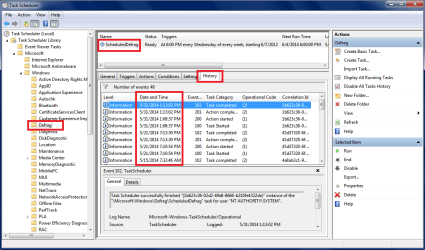
I see "Defrag" entries in Win 8 events, but the scheduled defrag did not run at that time.
SOMETHING else did run ...

Could booting in Win 7 add Event entries in Win 8?
I'll test it and let you know.

Thanks.
 

My Computer

Computer type
PC/Desktop
Computer Manufacturer/Model Number
home built
OS
Multi-Boot W7_Pro_x64 W8.1_Pro_x64 W10_Pro_x64 +Linux_VMs +Chromium_VM
CPU
AMD Athlon II x4 620
Motherboard
Gigabyte GA-MA785G-UD3H
Memory
6GB GSkill DDR2 800
Graphics Card(s)
AMD 4670 GPU + AMD 4200 IGP
Sound Card
on board Realtek ALC889A
Monitor(s) Displays
RCA 40" LCD TV, Insignia 32" LCD TV, HP 15" LCD monitor
Screen Resolution
1680 x 1050
Hard Drives
OCZ Vertex 3 120GB,
Samsung F3 1TB (3),
Several others - WD, Seagate, Hitachi, ...
PSU
Corsair 500 W
Case
Rosewill mid tower
Cooling
CM 90mm rifle
Keyboard
Gyration wireless, Logitech wireless, Dell USB wired
Mouse
Gyration wireless, Logitech wireless, V7 USB wired
Internet Speed
Spectrum - 100Mbps D / 10Mbps U
Antivirus
Avast, MBAM3, EMET, WinPatrol
Browser
Pale Moon, Firefox, IE
Other Info
2 multi-boot PC's
Mainly HTPC/Office/Gen purpose (no gaming).
Trendnet USB KVM.
LG DVD burner/Blue Ray Player.
Tray system for removable SATA backup drives.

Not currently OCd, under-volted.
I use Hybrid sleep, rarely re-boot or shutdown.

Hauppauge HD-PVR, Avermedia PCIe TV Tuner, Hauppauge PCI TV Tuner.
I re-booted to Win 7 64 and then Win 7 32.
Re-booted to Win 8, and the RP is gone and max usage is reset to 0.
So, that explains what I'm seeing with that. :o

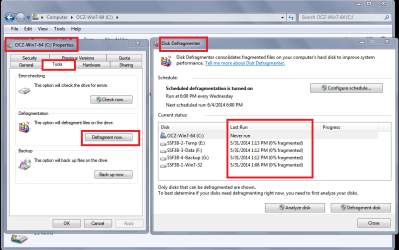
But, this still doesn't explain what is running to add DEFRAG entries to the Event log, when the scheduled defrag task did not run (as shown in Task History).
And, why are defrags run every few days when they should run once per week ...
But that's really a Win 8 question, not related to this thread topic.
Anyway, for this thread topic - my question is answered - solved.
 

My Computer

Computer type
PC/Desktop
Computer Manufacturer/Model Number
home built
OS
Multi-Boot W7_Pro_x64 W8.1_Pro_x64 W10_Pro_x64 +Linux_VMs +Chromium_VM
CPU
AMD Athlon II x4 620
Motherboard
Gigabyte GA-MA785G-UD3H
Memory
6GB GSkill DDR2 800
Graphics Card(s)
AMD 4670 GPU + AMD 4200 IGP
Sound Card
on board Realtek ALC889A
Monitor(s) Displays
RCA 40" LCD TV, Insignia 32" LCD TV, HP 15" LCD monitor
Screen Resolution
1680 x 1050
Hard Drives
OCZ Vertex 3 120GB,
Samsung F3 1TB (3),
Several others - WD, Seagate, Hitachi, ...
PSU
Corsair 500 W
Case
Rosewill mid tower
Cooling
CM 90mm rifle
Keyboard
Gyration wireless, Logitech wireless, Dell USB wired
Mouse
Gyration wireless, Logitech wireless, V7 USB wired
Internet Speed
Spectrum - 100Mbps D / 10Mbps U
Antivirus
Avast, MBAM3, EMET, WinPatrol
Browser
Pale Moon, Firefox, IE
Other Info
2 multi-boot PC's
Mainly HTPC/Office/Gen purpose (no gaming).
Trendnet USB KVM.
LG DVD burner/Blue Ray Player.
Tray system for removable SATA backup drives.

Not currently OCd, under-volted.
I use Hybrid sleep, rarely re-boot or shutdown.

Hauppauge HD-PVR, Avermedia PCIe TV Tuner, Hauppauge PCI TV Tuner.
But, this still doesn't explain what is running to add DEFRAG entries to the Event log, when the scheduled defrag task did not run (as shown in Task History).
And, why are defrags run every few days when they should run once per week ...
But that's really a Win 8 question, not related to this thread topic.
Anyway, for this thread topic - my question is answered - solved.
Various cleaners/utilities include tools, or access built-in Windows tools.
Glary Utilities has settings for boot defragging and auto-defragging.

Do you have any programs that might be in that category?
 

My Computer

Computer type
PC/Desktop
Computer Manufacturer/Model Number
n/a
OS
W7 Ultimate SP1, LM19.2 MATE, W10 Home 1703, W10 Pro 1703 VM, #All 64 bit
CPU
AMD Phenom II x6 1100T, 3.3 GHz
Motherboard
ASUS M4A88T-M/USB3 (AM3)
Memory
12GB DDR3 1333 G-Skill (4GB x 2), G-Skill (2GB x 2)
Graphics Card(s)
NVIDIA GeForce GTX 660
Sound Card
Realtek?
Monitor(s) Displays
Samsung S23B350
Screen Resolution
1920x1080
Hard Drives
WD Green 2TB (SATA), WD Green 3TB (SATA), WD Blue 4TB (SATA), WD Blue 6TB (SATA)
PSU
Cooler Master
Case
Antec GX300 Tower
Cooling
3x Antec TRICOOL 120mm Fans
Mouse
Wired Optical
Internet Speed
DSL
Antivirus
Avast
Browser
Pale Moon (64 bit)
Other Info
2018-12-27 Upgraded HDDs
2015-12-10 Upgraded case, graphics card, storage
2015-08-15 Upgraded motherboard & RAM
2015-07-15 Upgraded LM17.1 to LM17.2
No, I don't use those type of utilities.
The only cleaner I use is CCleaner.

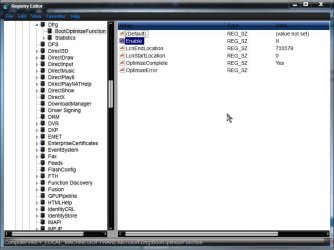
I did find a Registry key that might have something to do with this:
HKEY_LOCAL_MACHINE\SOFTWARE\Microsoft\Dfrg\BootOptimizeFunction
 

My Computer

Computer type
PC/Desktop
Computer Manufacturer/Model Number
home built
OS
Multi-Boot W7_Pro_x64 W8.1_Pro_x64 W10_Pro_x64 +Linux_VMs +Chromium_VM
CPU
AMD Athlon II x4 620
Motherboard
Gigabyte GA-MA785G-UD3H
Memory
6GB GSkill DDR2 800
Graphics Card(s)
AMD 4670 GPU + AMD 4200 IGP
Sound Card
on board Realtek ALC889A
Monitor(s) Displays
RCA 40" LCD TV, Insignia 32" LCD TV, HP 15" LCD monitor
Screen Resolution
1680 x 1050
Hard Drives
OCZ Vertex 3 120GB,
Samsung F3 1TB (3),
Several others - WD, Seagate, Hitachi, ...
PSU
Corsair 500 W
Case
Rosewill mid tower
Cooling
CM 90mm rifle
Keyboard
Gyration wireless, Logitech wireless, Dell USB wired
Mouse
Gyration wireless, Logitech wireless, V7 USB wired
Internet Speed
Spectrum - 100Mbps D / 10Mbps U
Antivirus
Avast, MBAM3, EMET, WinPatrol
Browser
Pale Moon, Firefox, IE
Other Info
2 multi-boot PC's
Mainly HTPC/Office/Gen purpose (no gaming).
Trendnet USB KVM.
LG DVD burner/Blue Ray Player.
Tray system for removable SATA backup drives.

Not currently OCd, under-volted.
I use Hybrid sleep, rarely re-boot or shutdown.

Hauppauge HD-PVR, Avermedia PCIe TV Tuner, Hauppauge PCI TV Tuner.
Windows 7 also has that key

BootOptimizeFunction

The following registry entries are located under HKEY_LOCAL_MACHINE\SOFTWARE\Microsoft\Dfrg\BootOptimizeFunction.
Enable
Registry path

HKEY_LOCAL_MACHINE\SOFTWARE\Microsoft\Dfrg\BootOptimizeFunction
Version

Windows Server 2003

Accepted values for this entry are Y or N. If the entry is set to Y, Windows automatically optimizes the file location for boot optimization. This optimization occurs automatically if the system is idle for 10 minutes. Boot optimization improves startup time by locating startup files in contiguous clusters on the volume, reducing the movement of the disk head when reading the volume.

I believe by default Enable is set to Y. I have the Task disabled, and mine is set to N

Clipboard01.jpg

A Guy
 

My Computer

Computer type
PC/Desktop
OS
Windows 10 Home x64
CPU
INTEL Core i5-750 Quad-Core 3.37GHz
Motherboard
ASUS P7P55D
Memory
HyperX Fury Black Series 8GB (2 x 4GB) 1866Mhz
Graphics Card(s)
EVGA GeForce GTX 750 Superclocked 1GB 128-Bit GDDR5
Monitor(s) Displays
LG 32MA68HY 32" IPS
Screen Resolution
1920 x 1080
Hard Drives
Samsung 840 Evo 120GB, SEAGATE 500GB Barracuda® 7200.12, SATA 3 Gb/s, 7200 RPM, 16MB cache
PSU
ANTEC TruePower New TP-550, 80 PLUS, 550W
Case
ANTEC Three Hundred Illusion
Cooling
COOLER MASTER Hyper 212 Plus, 4 x 120mm 1 x 140mm Noctua's
Internet Speed
85 + Mbps
Antivirus
Avast
Browser
Vivaldi
Used Puran Boot time on laptop and desktop PC's here with no loss of Restore Points on laptop, but the desktop had the "Missing" condition on C drive in System Protection which may have happened when it was Startup Repaired in the past without confirming that System Restore points lived on. This is the condition which requires Turning Off in System Protection the "Missing" C listing so that the real C shows up and can be turned On. I've only seen it happen after Startup Repairs recover an OS which then lists in WinRE as "C:\Windows 7 - Recovered."

Are others familar with this and agree it is a Startup Repair byproduct?
 
Great thread :D

I've never seen the need for a third party program to clean what for the most part windows creates as in restore points,
Or me loading and uninstalling programs/ files...

Disk cleanup and system cleanup and More options inside of system cleanup is good enough for me,
Windows defrag usually runs in the middle of the night so if my machine is always off as far as I know it never runs ?

Interesting about the dual boot thing which I've never thought about dual booting into another os before x-p bites and win-8 well I'm not quite ready for that jump :D

After two years of use I'm sure re-install is a better option than defrag compulsions every night or every week ... large hdd's the space usually isn't a big deal,
Besides re-install is the best way to clean a system after learning what programs you like and which ones were not so great
Cheers.
 

My Computer

Computer type
PC/Desktop
Computer Manufacturer/Model Number
Custom assembled by me :}
OS
Win-7-Pro64bit 7-H-Prem-64bit
CPU
i7-5930K 2nd i9-9940x both water blocked VRM's too
Motherboard
ASUS SABERTOOTH X99 2nd ASUS x299 Apex
Memory
Trident-z 3200C14 2nd Trident-z 3600C16
Graphics Card(s)
EVGA 1080ti ftw3 2nd Titan Xp both water blocked
Sound Card
Built-in Realtek
Monitor(s) Displays
1-AOC G2460PG 24"G-Sync 144Hz/ 2nd 1-ASUS VG248QE 24" 144Hz
Screen Resolution
1920 x 1080 144Hz
Hard Drives
2-Samsung M.2 Evo & Evo Plus
2-Samsung 850 EVO 500GB SSD's/ 3-2.5 W.D. Black 1tb-&3-1tb/3-3.5 WD Black 1tb hdd's
PSU
EVGA SuperNOVA 1000-P2 2nd 1200-P2
Case
2-Corsair Obsidian Series 450D Black ATX Mid Tower
Cooling
Custom water loops
Keyboard
Logitech G710+/ 2nd Logitech G910
Mouse
2-RedDragon M901 Perdition 16400 dpi Gaming mouse = wired
Internet Speed
Comcast Ping 19ms 89.31mbps download speed 6.12mbps upload
Antivirus
Malwarebytes Pro/ Superantispyware Pro
Browser
FireFox & Pale moon
Other Info
2nd ASUS X299 Apex/Intel i9-9940x with Custom water loop/7H-Prem-x64/Corsair 450D case/Ram Trident-z 3600C16 4x8gb / Samsung970Evo plus 500gb SSD/Dual ssd EZ swap evo/PSU EVGA SuperNova 1200w-P2 80+Platinum/GPU Titan Xp /8-ML-140 on push-pull on 2-280GTX rads
Reinstall is really very time consuming option if you have multiple paid programs and games. I was just forced to do fresh reinstall of Windows on my laptop due to HDD crash and just setting Windows the way I want it, took me whole afternoon and some, since everything is wrong on factory setup,(for example why is windows hiding system files from me??) took another 4 hours to reinstall 3.5 GB worth of Win updates and then fun began, looking for keys for all the games and paid programs to install and register them. Some older ones, I can't even find and lost it forever (partially due to moving). Some of my video files don't work due to video and audio codecs not installed, I still have to install printer and scanner drivers and then download another Gig of updates etc. etc. Long story, short it's been 4 weeks and I still don't have my PC 100% restored yet, so I would not do this again on my free will, ever. Granted, I work full time and have wife and 2 little kids so free time is hard to come by, but reinstalling fresh Windows every year or 2 is huge PITA. At least most of the programs I use are portable apps, thank you so much to whoever came out with the concept, otherwise I wouldn't even bother with fresh install, but just reimage old drive from backup. I don't know how other people do fresh reinstall every year, they must be much better organized than me and have plenty of free time on their hands.
 

My Computer

OS
win7hp64
Pete, what is this factory install you write about? I thought you said you were doing a clean or fresh install? If you spent all of that time doing the grossly inferior factory install then the time was wasted since it's the worst possible install of Win7 one can have, and one which no tech enthusiast would run.

Did you look at http://www.sevenforums.com/tutorials/219487-clean-reinstall-factory-oem-windows-7-a.html#post1839164 ?


You only need to do one perfect install then save a backup image which replaces future reinstalls with a 20 minute reimaging operation.
 
Windows defrag usually runs in the middle of the night so if my machine is always off as far as I know it never runs ?

Defrag should run later if the PC is off at the scheduled time.
You can check when it last ran in Windows Explorer Partition Properties.
If you have Task Scheduler History enabled you can see more info there.

DFGSP01.PNG

DFGSP02.PNG
 

My Computer

Computer type
PC/Desktop
Computer Manufacturer/Model Number
home built
OS
Multi-Boot W7_Pro_x64 W8.1_Pro_x64 W10_Pro_x64 +Linux_VMs +Chromium_VM
CPU
AMD Athlon II x4 620
Motherboard
Gigabyte GA-MA785G-UD3H
Memory
6GB GSkill DDR2 800
Graphics Card(s)
AMD 4670 GPU + AMD 4200 IGP
Sound Card
on board Realtek ALC889A
Monitor(s) Displays
RCA 40" LCD TV, Insignia 32" LCD TV, HP 15" LCD monitor
Screen Resolution
1680 x 1050
Hard Drives
OCZ Vertex 3 120GB,
Samsung F3 1TB (3),
Several others - WD, Seagate, Hitachi, ...
PSU
Corsair 500 W
Case
Rosewill mid tower
Cooling
CM 90mm rifle
Keyboard
Gyration wireless, Logitech wireless, Dell USB wired
Mouse
Gyration wireless, Logitech wireless, V7 USB wired
Internet Speed
Spectrum - 100Mbps D / 10Mbps U
Antivirus
Avast, MBAM3, EMET, WinPatrol
Browser
Pale Moon, Firefox, IE
Other Info
2 multi-boot PC's
Mainly HTPC/Office/Gen purpose (no gaming).
Trendnet USB KVM.
LG DVD burner/Blue Ray Player.
Tray system for removable SATA backup drives.

Not currently OCd, under-volted.
I use Hybrid sleep, rarely re-boot or shutdown.

Hauppauge HD-PVR, Avermedia PCIe TV Tuner, Hauppauge PCI TV Tuner.
Pete, what is this factory install you write about? I thought you said you were doing a clean or fresh install? If you spent all of that time doing the grossly inferior factory install then the time was wasted since it's the worst possible install of Win7 one can have, and one which no tech enthusiast would run.

Did you look at http://www.sevenforums.com/tutorials/219487-clean-reinstall-factory-oem-windows-7-a.html#post1839164 ?


You only need to do one perfect install then save a backup image which replaces future reinstalls with a 20 minute reimaging operation.

Sorry, I misspoke, it was fresh install and I should have said Windows default settings are wrong and I had to change many of them, like making all folders visible, show file extensions, disable remote desktop access for security or disable some services for better performance. I know about imaging properly set up system for future, but since the system is dynamic (adding new programs and updates, deleting old ones) it still requires considerable work and in my case I'm less organized, I only kept couple latest backups so it was all or nothing, so to speak and I choose nothing to have fresh start.
 

My Computer

OS
win7hp64
Thank you David,
That I saw it's never run/ Weekly/ Wednesday 4 a.m. I believe I may have set that ;)
After analyzing C-drive it only shows 2% fragmented this is after 18 months of use ?
Not bad I don't believe,
Most of it probably came from removing redundant windows updates in system cleanup ?
Cheers.
 

My Computer

Computer type
PC/Desktop
Computer Manufacturer/Model Number
Custom assembled by me :}
OS
Win-7-Pro64bit 7-H-Prem-64bit
CPU
i7-5930K 2nd i9-9940x both water blocked VRM's too
Motherboard
ASUS SABERTOOTH X99 2nd ASUS x299 Apex
Memory
Trident-z 3200C14 2nd Trident-z 3600C16
Graphics Card(s)
EVGA 1080ti ftw3 2nd Titan Xp both water blocked
Sound Card
Built-in Realtek
Monitor(s) Displays
1-AOC G2460PG 24"G-Sync 144Hz/ 2nd 1-ASUS VG248QE 24" 144Hz
Screen Resolution
1920 x 1080 144Hz
Hard Drives
2-Samsung M.2 Evo & Evo Plus
2-Samsung 850 EVO 500GB SSD's/ 3-2.5 W.D. Black 1tb-&3-1tb/3-3.5 WD Black 1tb hdd's
PSU
EVGA SuperNOVA 1000-P2 2nd 1200-P2
Case
2-Corsair Obsidian Series 450D Black ATX Mid Tower
Cooling
Custom water loops
Keyboard
Logitech G710+/ 2nd Logitech G910
Mouse
2-RedDragon M901 Perdition 16400 dpi Gaming mouse = wired
Internet Speed
Comcast Ping 19ms 89.31mbps download speed 6.12mbps upload
Antivirus
Malwarebytes Pro/ Superantispyware Pro
Browser
FireFox & Pale moon
Other Info
2nd ASUS X299 Apex/Intel i9-9940x with Custom water loop/7H-Prem-x64/Corsair 450D case/Ram Trident-z 3600C16 4x8gb / Samsung970Evo plus 500gb SSD/Dual ssd EZ swap evo/PSU EVGA SuperNova 1200w-P2 80+Platinum/GPU Titan Xp /8-ML-140 on push-pull on 2-280GTX rads
Back
Top