Solved Delete " All Programs " text in theme.

crookadile

New member
Member
Local time
10:48 AM
Messages
29
Location
Yorkshire
Hi, I have downloaded a theme and customized it to my liking using Anolis Resource Editor.

I have a problem however with the All programs tab I need to get rid of the text "ALL PROGRAMS"and also the "BACK" text.

Can anyone help me to do this.

I have been able to do this with Style Builder but when I use the theme and restart my pc, after the welcome screen it goes to the login screen and I have to try up to a dozen times to get to the desktop. I never have this problem with with Anolis.

Does anyone know how to delete these two pieces of text using a resource editor.

Thanks in advance for any help and a merry xmas to all.
 

My Computer

OS
Win 7 32 bit home premium
Welcome To the Seven Forums

Did the theme work before you try to edit it with Window Style Builder?

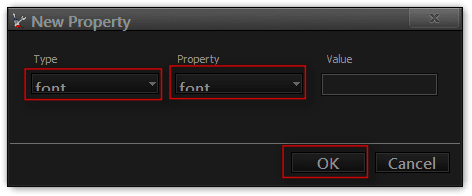
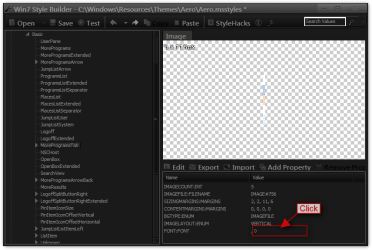
To remove that text you need to add a font properties to Start Menu > Panels > Basic > MoreProgramsTab and put a Blank font in it, the Blank font can be found on the net. Look at screenshots.

#1
1.png

#2
2.png

#3
3.png

#4
4.png

Jerry
 

My Computer

Computer type
Laptop
Computer Manufacturer/Model Number
Sager NP9170
OS
Win 7 Pro x64 / Win 10 Pro
CPU
Intel(R) Core(TM) i7-3630QM CPU @ 2.40GHz
Motherboard
CLEVO P170EM
Memory
12 GB
Graphics Card(s)
(1) Intel(R) HD Graphics 4000 (2) NVIDIA GeForce GTX 675M
Sound Card
(1) Realtek High Definition Audio (2) Intel(R) Display Aud
Monitor(s) Displays
17.3
Screen Resolution
1920x1080
Hard Drives
(1) Samsung 860 EVO 500GB(OS) (1) Samsung 860 EVO 500GB(Data)
Keyboard
Backlite
Antivirus
MSE, Malwarebytes Pro
Browser
Firefox
Other Info
DESKTOP: Custom-built.
OS: Win 10 Pro x64.
CASE: Rosewill R5.
CPU: Intel I5 4670K CPU @ 3.40GHz.
CPU COOLER: Cool Master Hyper 212 EVO.
MOTHERBOARD: Asus Z87-A.
MEMORY: Kingston HyperX 2x4 GB.
GPU: Nvidia Geforce 650 TI.
PSU: Corsair TX750.
DRIVES: (1) Samsung 840 120 GB SSD (2) Western Digital blue 500 GB 7200 RPM.
Hi Bongo,


Yes the theme did work before I edited with Style Builder.

I must have been doing something wrong because I have now followed your advice and my theme now works correctly. Thanks for your help.

Have a happy and prosperous new year.
 

My Computer

OS
Win 7 32 bit home premium
You're Welcome
 

My Computer

Computer type
Laptop
Computer Manufacturer/Model Number
Sager NP9170
OS
Win 7 Pro x64 / Win 10 Pro
CPU
Intel(R) Core(TM) i7-3630QM CPU @ 2.40GHz
Motherboard
CLEVO P170EM
Memory
12 GB
Graphics Card(s)
(1) Intel(R) HD Graphics 4000 (2) NVIDIA GeForce GTX 675M
Sound Card
(1) Realtek High Definition Audio (2) Intel(R) Display Aud
Monitor(s) Displays
17.3
Screen Resolution
1920x1080
Hard Drives
(1) Samsung 860 EVO 500GB(OS) (1) Samsung 860 EVO 500GB(Data)
Keyboard
Backlite
Antivirus
MSE, Malwarebytes Pro
Browser
Firefox
Other Info
DESKTOP: Custom-built.
OS: Win 10 Pro x64.
CASE: Rosewill R5.
CPU: Intel I5 4670K CPU @ 3.40GHz.
CPU COOLER: Cool Master Hyper 212 EVO.
MOTHERBOARD: Asus Z87-A.
MEMORY: Kingston HyperX 2x4 GB.
GPU: Nvidia Geforce 650 TI.
PSU: Corsair TX750.
DRIVES: (1) Samsung 840 120 GB SSD (2) Western Digital blue 500 GB 7200 RPM.
Back
Top