Solved Delete key non-responsive, doesn't delete

ChakLong

New member
Local time
4:05 AM
Messages
3
Hi, for some reason I can no longer use the Delete key to move files to the recycle bin, delete text, et cetera. I can still use Shift+Delete to permanently remove files et cetera, but using the Delete key by itself does not do anything whatsoever. This also doesn't appear to be a hardware issue, as using two different keyboards as well as the on-screen keyboard yields the same result. Using a program that checks for keyboard inputs, it also clearly shows the Delete key being pressed, but nothing happens.

Anyone know what is going on? I tried closing down any programs that could possibly interfere, for example programs that might use the Delete key for some shortcut or macro et cetera.
 

My Computer

OS
Windows 7 Ultimate x64
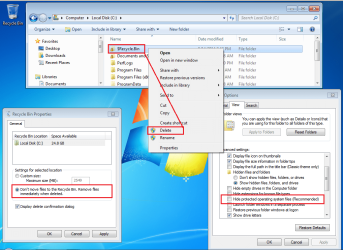
Right click on the Recycle shortcut on your desktop and select Properties from the context menu.

Once the properties window appears, select the option named:
Don't move files to the Recycle Bin. Remove files immediately when deleted.

"OK" your way our of that properties window.

Use Windows (file) Explorer to delete the folder* named $Recycle.Bin

*If need be, set Windows (file) Explorer to show protected operating system files.

Open the Recycle bin's properties window again and select:
Custom size

"OK" your way our of that properties window.

You should now have a new folder** named $RECYCLE.BIN

You might need to refresh Windows (file) Explorer.

Hopefully, this rebuilt recycle bin will work for you. If not, then we have some more hunting to do.


recycle.png
 

My Computer

Computer type
Laptop
Computer Manufacturer/Model Number
Employer provided Dell Latitude
OS
W7 Pro SP1 64bit
CPU
i7
Memory
8GB
Graphics Card(s)
Intel HD Graphics
Hard Drives
crappy SSD
Antivirus
Employer mandated Symantec Endpoint Protection
Browser
Pale Moon 64bit, IE11 64bit & Chrome 64bit

My Computer

Computer type
Laptop
Computer Manufacturer/Model Number
Employer provided Dell Latitude
OS
W7 Pro SP1 64bit
CPU
i7
Memory
8GB
Graphics Card(s)
Intel HD Graphics
Hard Drives
crappy SSD
Antivirus
Employer mandated Symantec Endpoint Protection
Browser
Pale Moon 64bit, IE11 64bit & Chrome 64bit
Thanks for the advice. I have had this issue for the past few days, and nothing I could do could resolve it. Just now, my computer wouldn't boot properly, and startup repair wouldn't work properly either. So I reseated my RAM and reconnected my drives, which made it boot up properly.

And now the delete button works properly. I have no idea what happened. Thanks anyways.
 

My Computer

OS
Windows 7 Ultimate x64
Back
Top