How to free up space on my windows and make it run faster.

Lance1982

New member
Local time
1:47 AM
Messages
2
Hi all,

I have a MacBook Pro with Bootcamp, on which I am running Windows 7. I've had it since 2011 and think the system has accumulated a lot of junk over the years. My question is this:

I have very little installed on my hard drive but the memory is nearly full and my laptop is being VERY slow. How can I free up the memory of all the junk and speed my system up? I've done all the normal things but the problem is still there and frustrating me. I've even tried 'pagefile.sys'. But don't really know what I'm doing with that. A friend suggested 'Treesize' too, but again not sure what I'm doing with it either. I've even tried reinstalling Windows but a it won't let me, an error message, I can't remember the error number, appears.

Please help!

Cheers,
Lance.
 

My Computer My Computer

At a glance

Windows 7 63 bit.
Computer type
Laptop
Computer Manufacturer/Model Number
MacBook Pro
OS
Windows 7 63 bit.
You should get your terminology straight. If you talk about "memory", does that refer to disk space or to RAM.
 

My Computer My Computer

At a glance

Vista, Windows7, Mint Mate, Zorin, Windows 8from 1.6GHz Duo to i7
Computer Manufacturer/Model Number
HP, Dell, Gateway, Toshiba - 4 laptops and 2 desktops
OS
Vista, Windows7, Mint Mate, Zorin, Windows 8
CPU
from 1.6GHz Duo to i7
Monitor(s) Displays
2x HP w2207
Hard Drives
5x HDD, 7x SSD, 12x Externals
Keyboard
with trackball - no mices
Mouse
Trackball mice
Internet Speed
DSL 6000
If I knew the correct "terminology" do you think I'd be using this forum!

All I know is it tells me the disk space is nearly full.
 

My Computer My Computer

At a glance

Windows 7 63 bit.
Computer type
Laptop
Computer Manufacturer/Model Number
MacBook Pro
OS
Windows 7 63 bit.
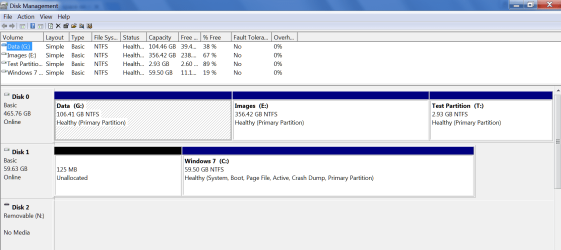
So it is disk space that we are talking about. Could you post a picture of your disk management. Something like this:
 

Attachments

  • 2016-01-13_1522.png
    2016-01-13_1522.png
    36.2 KB · Views: 2

My Computer My Computer

At a glance

Vista, Windows7, Mint Mate, Zorin, Windows 8from 1.6GHz Duo to i7
Computer Manufacturer/Model Number
HP, Dell, Gateway, Toshiba - 4 laptops and 2 desktops
OS
Vista, Windows7, Mint Mate, Zorin, Windows 8
CPU
from 1.6GHz Duo to i7
Monitor(s) Displays
2x HP w2207
Hard Drives
5x HDD, 7x SSD, 12x Externals
Keyboard
with trackball - no mices
Mouse
Trackball mice
Internet Speed
DSL 6000

My Computer My Computer

At a glance

Windows 10 Pro x64Intel Core i7 6700KGSkill TridentZ RGB 16GB 3600 16-16-16-36EVGA GTX 980 Ti SC x2
Computer type
PC/Desktop
Computer Manufacturer/Model Number
Skylake Special #666
OS
Windows 10 Pro x64
CPU
Intel Core i7 6700K
Motherboard
Asus Sabertooth Z170 Mark 1
Memory
GSkill TridentZ RGB 16GB 3600 16-16-16-36
Graphics Card(s)
EVGA GTX 980 Ti SC x2
Sound Card
Realtek High Definition
Monitor(s) Displays
AOC G2460PG
Screen Resolution
1920 x 1080 144Hz
Hard Drives
Samsung 860 Pro 256GB, Seagate Barracuda 4TB x2
PSU
EVGA 1000 P2, EVGA White Custom Braided Cables
Case
Corsair Vengeance C70 Gunmetal Black
Cooling
Corsair H100i v2, Corsair ML120 x2, Thermal Grizzly Kryonaut
Keyboard
Logitech G910 Orion Spectrum
Mouse
Logitech G700s
Internet Speed
Verizon Fios Quantum Gateway 75/75
Antivirus
Windows Defender, Malwarebytes Free 3.8.3
Browser
Chrome
Other Info
Corsair SP120 x4, LG Blu-ray Drive, Durabrand HT-395 100 Watt Dolby Digital Amp, Corsair H2100 Wireless 7.1 Headset
Hi and welcome to SevenForums,
Either get a larger hdd or clean up the existing one

Personally I would look into a larger ssd = (solid state drive) and still clean up what ever you don't need.
 

My Computer My Computer

At a glance

Win-7-Pro64bit 7-H-Prem-64biti7-5930K 2nd i9-9940x both water blocked VRM'...Trident-z 3200C14 2nd Trident-z 3600C16EVGA 1080ti ftw3 2nd Titan Xp both water blocked
Computer type
PC/Desktop
Computer Manufacturer/Model Number
Custom assembled by me :}
OS
Win-7-Pro64bit 7-H-Prem-64bit
CPU
i7-5930K 2nd i9-9940x both water blocked VRM's too
Motherboard
ASUS SABERTOOTH X99 2nd ASUS x299 Apex
Memory
Trident-z 3200C14 2nd Trident-z 3600C16
Graphics Card(s)
EVGA 1080ti ftw3 2nd Titan Xp both water blocked
Sound Card
Built-in Realtek
Monitor(s) Displays
1-AOC G2460PG 24"G-Sync 144Hz/ 2nd 1-ASUS VG248QE 24" 144Hz
Screen Resolution
1920 x 1080 144Hz
Hard Drives
2-Samsung M.2 Evo & Evo Plus
2-Samsung 850 EVO 500GB SSD's/ 3-2.5 W.D. Black 1tb-&3-1tb/3-3.5 WD Black 1tb hdd's
PSU
EVGA SuperNOVA 1000-P2 2nd 1200-P2
Case
2-Corsair Obsidian Series 450D Black ATX Mid Tower
Cooling
Custom water loops
Keyboard
Logitech G710+/ 2nd Logitech G910
Mouse
2-RedDragon M901 Perdition 16400 dpi Gaming mouse = wired
Internet Speed
Comcast Ping 19ms 89.31mbps download speed 6.12mbps upload
Antivirus
Malwarebytes Pro/ Superantispyware Pro
Browser
FireFox & Pale moon
Other Info
2nd ASUS X299 Apex/Intel i9-9940x with Custom water loop/7H-Prem-x64/Corsair 450D case/Ram Trident-z 3600C16 4x8gb / Samsung970Evo plus 500gb SSD/Dual ssd EZ swap evo/PSU EVGA SuperNova 1200w-P2 80+Platinum/GPU Titan Xp /8-ML-140 on push-pull on 2-280GTX rads
Hello there! You may wanna try these things:

1. Delete Temp files (Which should contain A LOT since you have had it for some time now)
Steps------> Windows + R Keys -> Type in "%temp%" (without the quotes) -> DELETE ALL FILES. [You don't even know these files are saved here]

2. Delete Windows Temporary Files
Steps-----> Windows + R Keys -> Type in "Temp" (without the quotes) -> DELETE ALL FILES

3. Delete Windows Prefetch junks
Steps-----> Windows + R Keys -> Type in "prefetch" (without the quotes) -> Delete all files EXCEPT from the ReadyBoot FOLDER

4. Delete Browser Cache files (I think you already know this one)

5. Disable unnecessary applications that are running together when you turn on your Bootcamp (Win7)
Steps -----> Open MSCONFIG -> Startup TAB -> Click on Disable ALL

6. You may also wanna try to adjust the display settings for your Windows 7 virtual machine by going into the Advanced System Settings and adjusting the display according to your preference


After you've done these steps, pretty sure you'll have your computer running at its optimum performance.


CHEEERIO~!
 

My Computer My Computer

At a glance

Windows 7 UltimateIntel Xeon16GBNVidia GTX 970
Computer type
PC/Desktop
Computer Manufacturer/Model Number
Razer
OS
Windows 7 Ultimate
CPU
Intel Xeon
Motherboard
Gigabyte
Memory
16GB
Graphics Card(s)
NVidia GTX 970
Hard Drives
SSD
PSU
900 Wath
Case
CM
Keyboard
Razer Gaming Keyboard
Mouse
Razer Gaming Mouse
Antivirus
Norton
Browser
Chrome
Back
Top