Delete Windows 7 Boot Partition

Marionumber1

New member
Local time
4:22 PM
Messages
9
Hello SevenForums! I'm new here, and this is my first post. Anyway, I discovered the boot partition in Disk Management. It is marked active, and has Bootmgr plus the Boot folder. Due to this, I presume it is some boot partition separate. However, my C: drive also has a valid Bootmgr and Boot folder. I was wondering if I could delete this, and mark the C: drive active.

Note 1: I'm using GRUB2 in the MBR, so it may not matter.
Note 2: It is called "Recovery", so it most likely has the WinRE on it. But I have a recovery disk, so it may not matter.
 

My Computer

Computer Manufacturer/Model Number
Dell
OS
Windows 7 Home Premium x64
CPU
Intel Pentium Dual-Core CPU T4500 @ 2.30GHz
Memory
4 GB
Hello Marionumber1, welcome to Seven Forums!


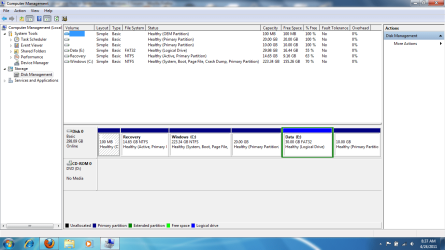
Before we make any specific recommendations will you please post a snip/screen-shot of the entire disk management drive map with a full description as to which drive/partition is which, so we can see what you have going on as there may be a fairly simple way to resolve the situation.

In the Windows start menu right click computer and click manage, in the left pane of the "Computer Management" window that opens click disk management and post a maximized snip of that.


How to Upload and Post a Screenshot and File in Seven Forums
 

My Computer

Computer Manufacturer/Model Number
* BFK Customs *
OS
W 7 64-bit Ultimate
CPU
Intel Q9550 Yorkfield
Motherboard
ASUS P5Q Pro
Memory
8GB Dominator 8500C5D
Graphics Card(s)
ATI : XFX 5870
Sound Card
Realtek HD Audio 7-1
Monitor(s) Displays
1x 47" LCD HDMI & 3x 26" LCD HDMI
Screen Resolution
1920x1080P & 1920x1200
Hard Drives
1x 80GB Intel X25-M G2 SSD : 1x 500GB & 1x 640GB WD Caviar Black(s)
PSU
Corsair 620HX
Case
Cooler Master RC-690
Cooling
Tuniq Tower 120, 2x 140mm and 3x 120mm case fans
Keyboard
Microsoft 500
Mouse
Razer Diamondback 3G
Internet Speed
14 Mb/s
Other Info
1x Koutech 3Gb/s SATA HDD Hot Swap Rack
Disk Management

diskmgmt.png
The first is an OEM partition. Then we have the partition I'm talking about, called "Recovery". Then we have my C: drive. After that is my Ubuntu partition. Then my E: drive, for shared data. Then my Ubuntu swap partition.

Also, I confirmed that Bootmgr can load from the C: drive.
 

My Computer

Computer Manufacturer/Model Number
Dell
OS
Windows 7 Home Premium x64
CPU
Intel Pentium Dual-Core CPU T4500 @ 2.30GHz
Memory
4 GB
I just want to make sure you to know that "Recovery" partition is the one used to recover the PC back to "Factory" specs, like it was when you purchased and set it up for the first time.

Before you change anything: have you created the set of recovery disks in case you ever want to take it back to "Factory" condition?


I can help you remove that partition and recover that space into the C: partition if you choose.
 

My Computer

Computer Manufacturer/Model Number
* BFK Customs *
OS
W 7 64-bit Ultimate
CPU
Intel Q9550 Yorkfield
Motherboard
ASUS P5Q Pro
Memory
8GB Dominator 8500C5D
Graphics Card(s)
ATI : XFX 5870
Sound Card
Realtek HD Audio 7-1
Monitor(s) Displays
1x 47" LCD HDMI & 3x 26" LCD HDMI
Screen Resolution
1920x1080P & 1920x1200
Hard Drives
1x 80GB Intel X25-M G2 SSD : 1x 500GB & 1x 640GB WD Caviar Black(s)
PSU
Corsair 620HX
Case
Cooler Master RC-690
Cooling
Tuniq Tower 120, 2x 140mm and 3x 120mm case fans
Keyboard
Microsoft 500
Mouse
Razer Diamondback 3G
Internet Speed
14 Mb/s
Other Info
1x Koutech 3Gb/s SATA HDD Hot Swap Rack
Yeah, I made a recovery disc. And I know how to partition hard drives, so if you think it's safe, I'll remove it and resize C: and mark C: as active. Don't even know if it matters with GRUB2 in the MBR anyway.
 

My Computer

Computer Manufacturer/Model Number
Dell
OS
Windows 7 Home Premium x64
CPU
Intel Pentium Dual-Core CPU T4500 @ 2.30GHz
Memory
4 GB
[Disclaimer]I don't know how this will affect Grub[/disclaimer]


You can use the outline in this tutorial at the link below to do as you like, be sure to mark the Windows 7 partition Active first to make sure there will be no issues with that side of it.

Do the wipes to the 2 partition to the left of C: don't just delete them, the recovery partition may cause errors if you just delete that one.

Partition : Recover Space Used by an Older OS


If you have any issues marking C: active, Option Two of this tutorial shows how to correct for that.

Startup Repair - Run 3 Separate Times


Be sure to post back with any further questions you may have and to keep me informed.
 

My Computer

Computer Manufacturer/Model Number
* BFK Customs *
OS
W 7 64-bit Ultimate
CPU
Intel Q9550 Yorkfield
Motherboard
ASUS P5Q Pro
Memory
8GB Dominator 8500C5D
Graphics Card(s)
ATI : XFX 5870
Sound Card
Realtek HD Audio 7-1
Monitor(s) Displays
1x 47" LCD HDMI & 3x 26" LCD HDMI
Screen Resolution
1920x1080P & 1920x1200
Hard Drives
1x 80GB Intel X25-M G2 SSD : 1x 500GB & 1x 640GB WD Caviar Black(s)
PSU
Corsair 620HX
Case
Cooler Master RC-690
Cooling
Tuniq Tower 120, 2x 140mm and 3x 120mm case fans
Keyboard
Microsoft 500
Mouse
Razer Diamondback 3G
Internet Speed
14 Mb/s
Other Info
1x Koutech 3Gb/s SATA HDD Hot Swap Rack
  • Like
Reactions: Arc
I am puzzled. In your disk management snip I see the Recovery Partition as active partition. So the bootmgr must have somehow ended up there. I do not understand the Grub deal. The MBR should be pointing to the recovery partition.
 

My Computer

Computer Manufacturer/Model Number
HP, Dell, Gateway, Toshiba - 4 laptops and 2 desktops
OS
Vista, Windows7, Mint Mate, Zorin, Windows 8
CPU
from 1.6GHz Duo to i7
Monitor(s) Displays
2x HP w2207
Hard Drives
5x HDD, 7x SSD, 12x Externals
Keyboard
with trackball - no mices
Mouse
Trackball mice
Internet Speed
DSL 6000
The Recovery partition has Bootmgr. But the C: drive does too. And I'm dual booting, so I have GRUB in the MBR.
 

My Computer

Computer Manufacturer/Model Number
Dell
OS
Windows 7 Home Premium x64
CPU
Intel Pentium Dual-Core CPU T4500 @ 2.30GHz
Memory
4 GB
View attachment 150959
The first is an OEM partition. Then we have the partition I'm talking about, called "Recovery". Then we have my C: drive. After that is my Ubuntu partition. Then my E: drive, for shared data. Then my Ubuntu swap partition.

Also, I confirmed that Bootmgr can load from the C: drive.

that first partition, the 100MB one, is supposed to be the active partition and hold the BASE boot files for Win 7.
Somehow those BASE boot files got put on the recovery partition, Maybe.

What I would suggest is getting a boot CD/USB utility program, something like Hirens boot CD, that has a file manager included and take a look at what is on both of those partitions. Until you know what is on them I would not delete/move/resize anything. you could end up with a non booting system.
Of course if you do delete that partition and then move the space into the C drive and the system doesn't boot you could always run a repair install to place the needed boot files back on that 100MB partition.
 

My Computer

Computer Manufacturer/Model Number
Built be Me
OS
Windows 7 Pro x64
CPU
i5 760
Motherboard
Asus P7P55D-E Pro
Memory
16GB
Graphics Card(s)
Nvidia GTS450
Sound Card
On board
Monitor(s) Displays
Dell 2007WFP Dell 1800FP
Screen Resolution
1680x1050 1280x1024
Hard Drives
Seagate 250GB & 750GB
WD 1TB
PSU
Antec 750
Case
In Win
Cooling
Cooler Master Hyper 212+
Keyboard
IBM
Mouse
MS
Well, if you are sure that C has a full bootmgr, I guess you can make it active. I have no idea though how the bootmgr would have gotten there. A bootmgr looks like in the picture below.

You then still have to make Grub point to C, but I have no idea how this is done.
 

Attachments

  • P2[1].png
    P2[1].png
    24.3 KB · Views: 121

My Computer

Computer Manufacturer/Model Number
HP, Dell, Gateway, Toshiba - 4 laptops and 2 desktops
OS
Vista, Windows7, Mint Mate, Zorin, Windows 8
CPU
from 1.6GHz Duo to i7
Monitor(s) Displays
2x HP w2207
Hard Drives
5x HDD, 7x SSD, 12x Externals
Keyboard
with trackball - no mices
Mouse
Trackball mice
Internet Speed
DSL 6000
Don't use grub myself - I believe it points to hd and partition number.

If you remove a partition - you would need to alter that to match
 

My Computers

System One System Two

  • Computer type
    PC/Desktop
    OS
    7 X64
    CPU
    i5 8400
    Motherboard
    gigabyte b365m ds3h
    Memory
    2x8gb 3200mhz
    Hard Drives
    various
    PSU
    pure power 11 400w cm
    Case
    Coolermaster
    Cooling
    cryorig m9i
  • Computer type
    PC/Desktop
    OS
    7x64
    CPU
    g5400
    Motherboard
    ga b365m ds3h
    Memory
    8gb ddr4 2400
    PSU
    xfx pro 450w
GRUB chainloads Windows bootsectors. In my case, that would be (hd0,3), or my C: drive. And the 100MB partition, called "DELLUTILITY", has no Windows boot files. It has some DOS ones, and what are (presumably) some Dell Utilities.
 

My Computer

Computer Manufacturer/Model Number
Dell
OS
Windows 7 Home Premium x64
CPU
Intel Pentium Dual-Core CPU T4500 @ 2.30GHz
Memory
4 GB
Yes, so if you get rid of the 100mb, you would need to change it to (hd0,2) I assume.
 

My Computers

System One System Two

  • Computer type
    PC/Desktop
    OS
    7 X64
    CPU
    i5 8400
    Motherboard
    gigabyte b365m ds3h
    Memory
    2x8gb 3200mhz
    Hard Drives
    various
    PSU
    pure power 11 400w cm
    Case
    Coolermaster
    Cooling
    cryorig m9i
  • Computer type
    PC/Desktop
    OS
    7x64
    CPU
    g5400
    Motherboard
    ga b365m ds3h
    Memory
    8gb ddr4 2400
    PSU
    xfx pro 450w
Yes, so if you get rid of the 100mb, you would need to change it to (hd0,2) I assume.


He's got 2 partitions to the left of C: that need removed, that will change this correct?
 

My Computer

Computer Manufacturer/Model Number
* BFK Customs *
OS
W 7 64-bit Ultimate
CPU
Intel Q9550 Yorkfield
Motherboard
ASUS P5Q Pro
Memory
8GB Dominator 8500C5D
Graphics Card(s)
ATI : XFX 5870
Sound Card
Realtek HD Audio 7-1
Monitor(s) Displays
1x 47" LCD HDMI & 3x 26" LCD HDMI
Screen Resolution
1920x1080P & 1920x1200
Hard Drives
1x 80GB Intel X25-M G2 SSD : 1x 500GB & 1x 640GB WD Caviar Black(s)
PSU
Corsair 620HX
Case
Cooler Master RC-690
Cooling
Tuniq Tower 120, 2x 140mm and 3x 120mm case fans
Keyboard
Microsoft 500
Mouse
Razer Diamondback 3G
Internet Speed
14 Mb/s
Other Info
1x Koutech 3Gb/s SATA HDD Hot Swap Rack
Does he want to get rid of both of them? - too lazy to look back- whatever, Marionumber knows what to do already. Looks like he's using grub2.
 

My Computers

System One System Two

  • Computer type
    PC/Desktop
    OS
    7 X64
    CPU
    i5 8400
    Motherboard
    gigabyte b365m ds3h
    Memory
    2x8gb 3200mhz
    Hard Drives
    various
    PSU
    pure power 11 400w cm
    Case
    Coolermaster
    Cooling
    cryorig m9i
  • Computer type
    PC/Desktop
    OS
    7x64
    CPU
    g5400
    Motherboard
    ga b365m ds3h
    Memory
    8gb ddr4 2400
    PSU
    xfx pro 450w
Does he want to get rid of both of them? - too lazy to look back- whatever, Marionumber knows what to do already. Looks like he's using grub2.


I think he does, it would serve him better if he wiped and recovered both partitions into C:
 

My Computer

Computer Manufacturer/Model Number
* BFK Customs *
OS
W 7 64-bit Ultimate
CPU
Intel Q9550 Yorkfield
Motherboard
ASUS P5Q Pro
Memory
8GB Dominator 8500C5D
Graphics Card(s)
ATI : XFX 5870
Sound Card
Realtek HD Audio 7-1
Monitor(s) Displays
1x 47" LCD HDMI & 3x 26" LCD HDMI
Screen Resolution
1920x1080P & 1920x1200
Hard Drives
1x 80GB Intel X25-M G2 SSD : 1x 500GB & 1x 640GB WD Caviar Black(s)
PSU
Corsair 620HX
Case
Cooler Master RC-690
Cooling
Tuniq Tower 120, 2x 140mm and 3x 120mm case fans
Keyboard
Microsoft 500
Mouse
Razer Diamondback 3G
Internet Speed
14 Mb/s
Other Info
1x Koutech 3Gb/s SATA HDD Hot Swap Rack
Okay, I'll wipe it. And in case of emergency, I got a Windows 7 repair disc and Ubuntu LiveCD.
 

My Computer

Computer Manufacturer/Model Number
Dell
OS
Windows 7 Home Premium x64
CPU
Intel Pentium Dual-Core CPU T4500 @ 2.30GHz
Memory
4 GB
I am puzzled. In your disk management snip I see the Recovery Partition as active partition. So the bootmgr must have somehow ended up there. I do not understand the Grub deal. The MBR should be pointing to the recovery partition.
It's the MBR boot code which determines what to do with the partition flagged active in the partition table.
I don't know much about Grub but I believe it can change the MBR code. So normal MBR booting may not apply.

Edit: I would not just delete the recovery partition without seeing what is inside it. Partition Wizard mini tool allows you to easily explore the recovery partition.
When you say "I'm using Grub2 in the MBR" what do you actually mean?

Dell routinely use the Recovery partition as active, system.
 
Last edited:

My Computer

Computer type
PC/Desktop
Computer Manufacturer/Model Number
Own build
OS
Windows 7x64 Home Premium SP1
CPU
Intel i7 2600k
Motherboard
ASUS P8Z68 Deluxe
Memory
G.Skill Ripjaws (DDR3-1600) 2x4GB
Graphics Card(s)
Nvidia GeForce GTS 450; Intel HD Graphics 3000(GT2+)
Monitor(s) Displays
Dell Ultrasharp IPS panel U2311H, Samsung SyncMaster P2350
Screen Resolution
1920x1080
Hard Drives
Samsung 850 Pro SSD 256GB, Samsung SSD 840 120GB, Seagates 1TB Barracuda ST31000528AS x2
PSU
Seasonic M12II 520W
Case
Lian Li Lancool PC-K60
Cooling
Case: 1x120mm, 3x140mm CPU: Hyper 212+
Keyboard
Logitech MK520 (wireless)
Mouse
Logitech MK520
Internet Speed
6-7 Mbps
Antivirus
Norton Security Premium, Malwarebytes on 2 (MSE on 3rd PC)
Browser
FireFox
Other Info
Audio: Logitech Z523 2.1
No need to wipe anything - just delete the partitions before incorporating the unallocated space into your windows partition.

You would need a 3rd party partitioner for that - one made for windows.
 

My Computers

System One System Two

  • Computer type
    PC/Desktop
    OS
    7 X64
    CPU
    i5 8400
    Motherboard
    gigabyte b365m ds3h
    Memory
    2x8gb 3200mhz
    Hard Drives
    various
    PSU
    pure power 11 400w cm
    Case
    Coolermaster
    Cooling
    cryorig m9i
  • Computer type
    PC/Desktop
    OS
    7x64
    CPU
    g5400
    Motherboard
    ga b365m ds3h
    Memory
    8gb ddr4 2400
    PSU
    xfx pro 450w
If he's going to recover 2 partitions to the left of C: into C: he's going to need a 3rd party SW, the best is the Partition Wizard boot disk and a wipe will only take a few minutes on factory recovery partitions and there's been instances of disk management not allowing a "Recovery" partition marked as active to be simply deleted, it had to be wiped first, he might as well save the trouble and just do the wipes.
 

My Computer

Computer Manufacturer/Model Number
* BFK Customs *
OS
W 7 64-bit Ultimate
CPU
Intel Q9550 Yorkfield
Motherboard
ASUS P5Q Pro
Memory
8GB Dominator 8500C5D
Graphics Card(s)
ATI : XFX 5870
Sound Card
Realtek HD Audio 7-1
Monitor(s) Displays
1x 47" LCD HDMI & 3x 26" LCD HDMI
Screen Resolution
1920x1080P & 1920x1200
Hard Drives
1x 80GB Intel X25-M G2 SSD : 1x 500GB & 1x 640GB WD Caviar Black(s)
PSU
Corsair 620HX
Case
Cooler Master RC-690
Cooling
Tuniq Tower 120, 2x 140mm and 3x 120mm case fans
Keyboard
Microsoft 500
Mouse
Razer Diamondback 3G
Internet Speed
14 Mb/s
Other Info
1x Koutech 3Gb/s SATA HDD Hot Swap Rack
Back
Top